
1. Уводзіны
Дзякуй за пакупкуasing the GTRACING DL004 L-Shaped Gaming Desk. This manual provides detailed instructions for assembly, operation, maintenance, and troubleshooting to ensure optimal use and longevity of your desk. Please read this manual thoroughly before assembly and retain it for future reference.
2. Інфармацыя па бяспецы
- Заўсёды збірайце стол на мяккай, чыстай паверхні, каб пазбегнуць драпін.
- Перад выкарыстаннем пераканайцеся, што ўсе шрубы і крапежныя элементы надзейна зацягнуты. Перыядычна правярайце і падцягвайце па меры неабходнасці.
- Do not overload the desk or shelves beyond the specified weight capacity (80 kg).
- Трымайце дробныя дэталі і ўпаковачныя матэрыялы далей ад дзяцей, каб прадухіліць небяспеку ўдушша.
- Avoid using power tools for assembly unless explicitly instructed, as they may overtighten screws and damage components. A manual wrench is recommended.
- The desk features rounded corners (fillet design) for safety, but exercise caution to prevent injury.
3. Змесціва ўпакоўкі
Перад пачаткам зборкі пераканайцеся, што ўсе кампаненты наяўныя:
- L-shaped Desktop Panels (A, B)
- Metal Frame Components (D, E, F, G, H)
- Паліцы для захоўвання
- Высоўныя скрыні
- Рэгуляваная падстаўка для манітора
- Cable Management Grommet
- Кручок для навушнікаў
- Stabilizer Rods (J)
- Assembly Hardware (Screws, Allen Wrench)
- Power Outlet Strip (if included with your model)
4. Інструкцыі па ўсталёўцы
4.1 Pre-Assembly Notes
For a smooth assembly process, please watch the following video for helpful tips. It is recommended to use a manual wrench instead of a power drill to avoid damaging the desk components.
Video: Assembly Tips. This video provides general advice for assembling furniture, including the recommendation to use a manual wrench instead of a power drill to prevent damage.
4.2 Этапы зборкі
- Attach Feet to Frame Components: Secure the feet to frame parts D, E, and F. Ensure they are firmly attached.
- Connect Desktop Panels: Join desktop panel A and side desktop panel B. Use the provided wooden dowels and ensure a tight fit to minimize gaps.
- Attach Frame G: Secure frame G to the underside of the connected desktop panels. Tighten screws to approximately 70% to allow for adjustments. Do not use a power drill.
- Attach Frame H: Secure frame H to the underside of the desktop panels. Ensure the four vertical screws and two horizontal screws are tightened to about 70%. The two outermost horizontal holes are not used.
- Assemble Side Shelves: Attach the side shelves to the frame. Ensure the holes on the surface of the shelf board are facing downwards. Tighten screws to approximately 70%.
- Install Stabilizer Rods (J): Attach the stabilizer rods (J) to the designated points on the frame to enhance stability.
- Усталюйце падстаўку для манітора: Attach the monitor stand to the desktop. Ensure the cylindrical posts are installed vertically and do not overtighten the screws (95% tightness is sufficient). If you prefer more desktop space, the monitor stand can be left unattached for easy movement.
- Install Cable Management Grommet: Insert the cable management grommet into the designated hole on the desktop.
- Усталюйце падоўжку разеткі: If your model includes a power outlet strip, attach it to the side of the monitor stand or desktop using the provided screws.
- Прымацуйце кручок для навушнікаў: Замацуйце кручок для навушнікаў збоку стала.
Video: L-shaped Desk Detailed Introduction. This video provides a detailed overview of the desk's features and assembly process.
Video: Assembly Skills. This video demonstrates various assembly techniques applicable to the desk.
5. Інструкцыя па эксплуатацыі
5.1 Adjustable Monitor Stand
The monitor stand is designed for ergonomic comfort. Its height can be adjusted to suit your preference, promoting a comfortable posture during use. For maximum desktop space, the monitor stand can be removed or repositioned as needed.
5.2 Storage Shelves and Drawers
The desk features a removable storage shelf on the right side, providing convenient access to essential items. Two fabric drawers offer additional storage for accessories, helping to keep your workspace tidy. The side panels of the desk include anti-drop panels and rounded corners for safety, preventing items from falling and reducing the risk of injury.
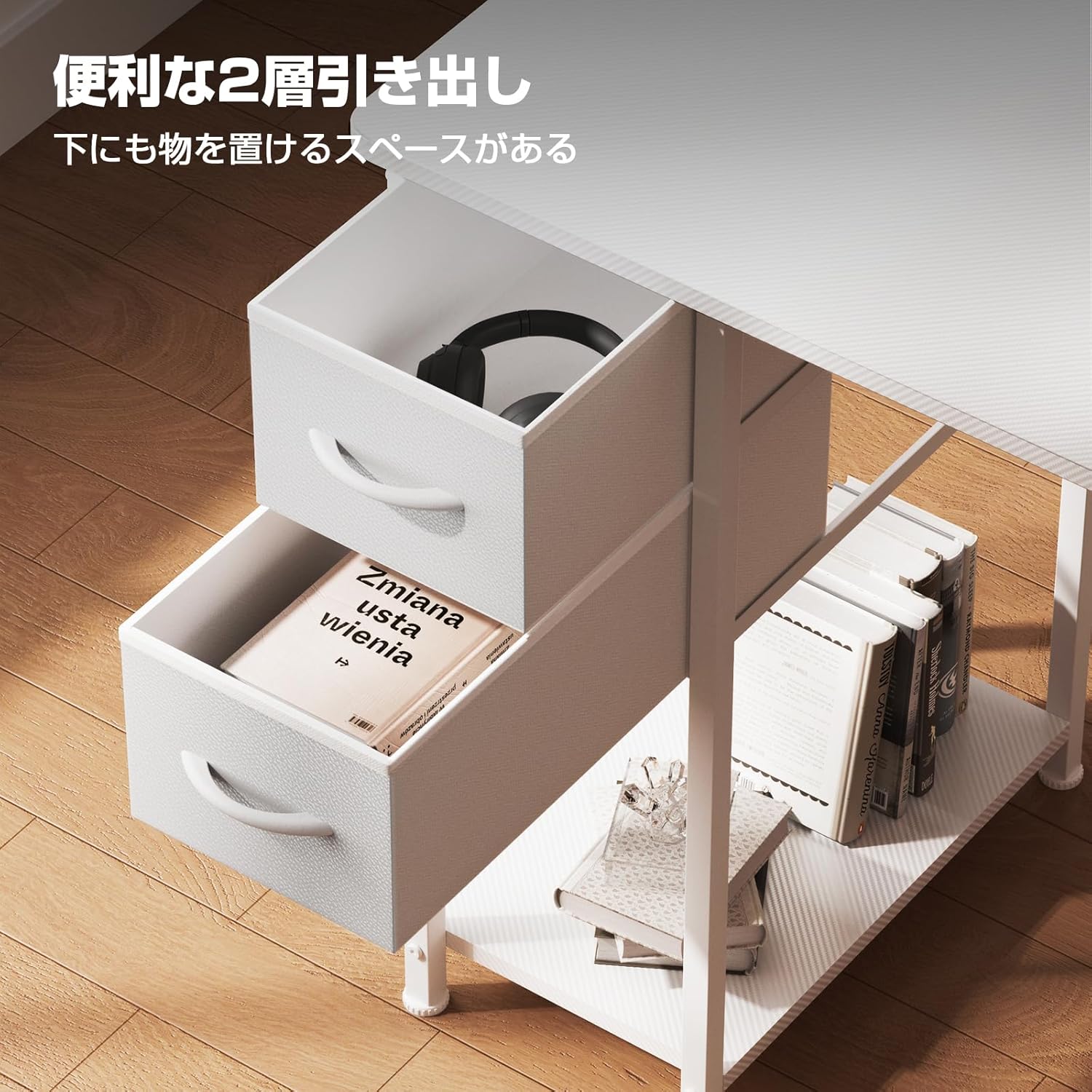
Image: Two convenient fabric drawers for storage, located on the left side of the desk.
5.3 Арганізацыя кабеляў
The integrated cable management grommet helps organize your wires, keeping your desktop neat and free from clutter. Utilize the included power outlet strip for easy access to charging ports for your devices.
Video: L-shaped Gaming Desk Detailed Video. This video highlights the various features and functionalities of the desk, including storage and cable management.
6. Тэхнічнае абслугоўванне
- Уборка: Працярыце паверхню стала мяккай, damp cloth. Avoid abrasive cleaners or harsh chemicals that may damage the carbon fiber finish.
- агляд: Перыядычна правярайце ўсе шрубы і злучэнні, каб пераканацца, што яны зацягнуты. Падцягніце іх, калі выявіць якія-небудзь няшчыльнасці.
- Абарона: Avoid placing extremely hot or cold items directly on the desk surface. Use coasters or protective pads as needed.
- Размеркаванне вагі: Distribute weight evenly across the desktop and shelves to prevent stress on any single point.
7. Выпраўленне непаладак
| праблема | Магчымая прычына | Рашэнне |
|---|---|---|
| Стол хістаецца | Аслабленыя шрубы або няроўная падлога. | Check and tighten all assembly screws. Adjust the leveling feet on the bottom of the desk to stabilize it on uneven surfaces. |
| Дэталі не сумяшчаюцца падчас зборкі | Incorrect orientation of parts or screws not fully loosened. | Review the assembly instructions carefully. Ensure all parts are oriented correctly. Loosen screws slightly to allow for adjustment, then re-tighten. |
| Шуфляды не слізгаюць плаўна | Obstruction or improper installation. | Check for any items obstructing the drawer's path. Ensure the drawers are inserted correctly into their slots. |
8. Тэхнічныя характарыстыкі
| Асаблівасць | Дэталь |
|---|---|
| Марка | GTRACING |
| мадэль | DL004 |
| Колер | Белы |
| Памеры (Д х Ш х У) | 130 х 48 х 74 см |
| Вага прадукту | 10 кг |
| Грузападымальнасць | 80 кг |
| Матэрыял | Metal (Base), Carbon Fiber Finish (Desktop) |
| Асаблівасці | Adjustable height monitor stand, Removable storage shelf, Cable management, Rounded corners |
| Патрабуецца зборка | так |
9. Гарантыя і падтрымка
The GTRACING DL004 L-Shaped Gaming Desk comes with a 12-month manufacturer's quality guarantee from the date of purchase. This warranty covers initial defects and any subsequent issues that may arise under normal use. Spare parts are stocked in warehouses in Tokyo and Osaka, Japan, and can be delivered as early as the next day for replacement.
For any questions, concerns, or warranty claims, please contact GTRACING customer support through the retailer where you purchased the product. Please have your purchase receipt and product model number ready when contacting support.