
Уводзіны
This manual provides essential information for setting up, operating, and maintaining your TCL 32S5K 32-inch QLED Smart TV. Please read these instructions carefully before using your television to ensure proper functionality and safety. Keep this manual for future reference.

Фронт view of the TCL 32S5K 32-inch QLED Smart TV. This image shows the television screen displaying vibrant colors, supported by two sleek stands.
Што ў скрынцы
Праверце наяўнасць усіх кампанентаў ва ўпакоўцы:
- TCL 32S5K Television
- Адаптар сілкавання
- Сілавы кабель
- Пульт дыстанцыйнага кіравання
- Тумба пад тэлевізар (2 штукі)
- Кіраўніцтва карыстальніка (гэты дакумент)
Настройка
1. Мацаванне падстаўкі для тэлевізара
- Асцярожна пакладзеце тэлевізар экранам уніз на мяккую, роўную паверхню, каб пазбегнуць пашкоджанняў.
- Сумясціце кожную падстаўку з адпаведнымі пазы ў ніжняй частцы тэлевізара.
- Замацуйце падстаўкі з дапамогай шруб, якія ўваходзяць у камплект. Пераканайцеся, што яны надзейна прымацаваныя.

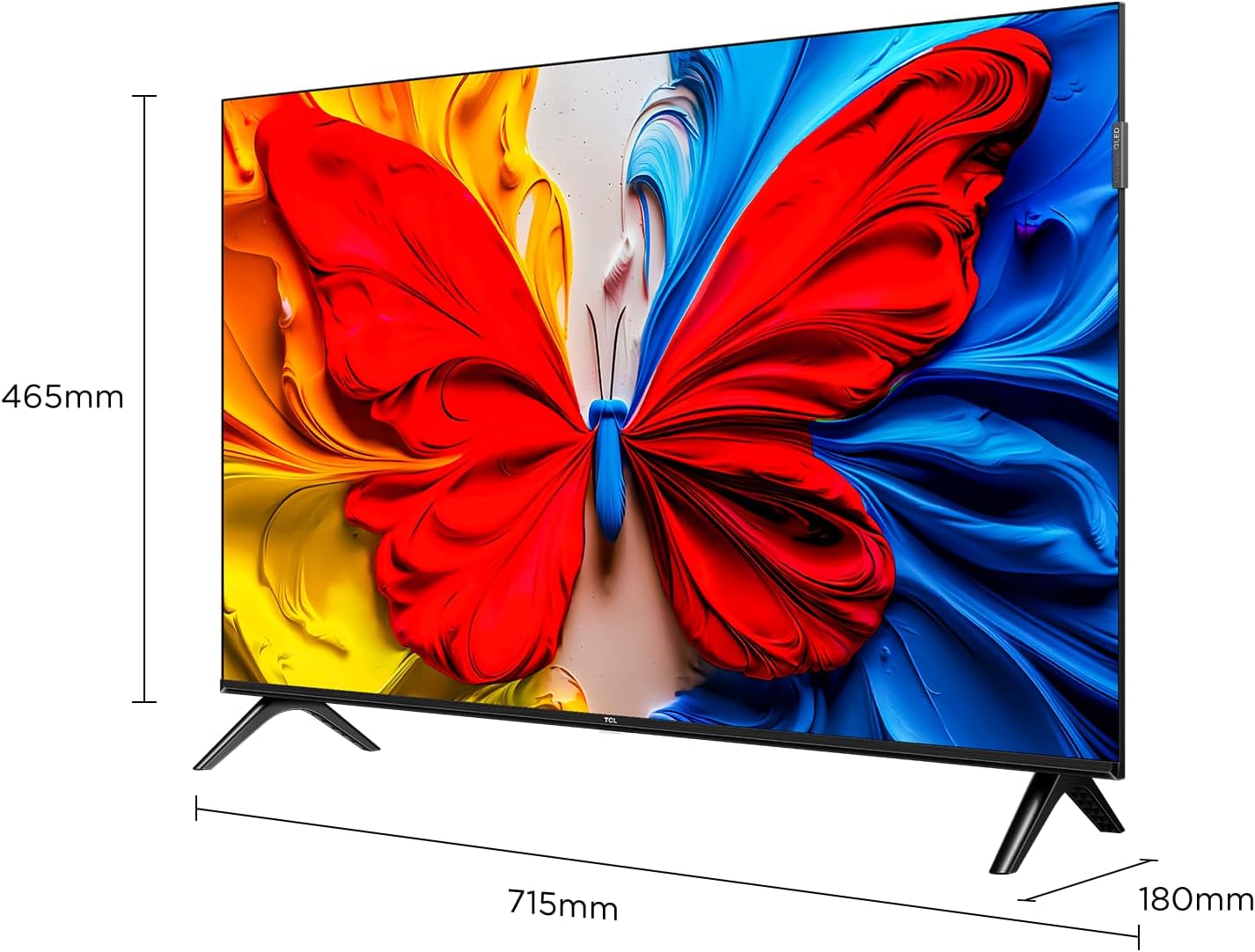
Image illustrating the dimensions of the TCL 32S5K TV and how the stands are attached to the bottom of the unit. The image shows measurements for width (715mm) and height (465mm).
2. Насценнае мацаванне (неабавязкова)
If you choose to wall mount your TV, refer to the instructions provided with your wall mount kit. Ensure the wall mount is compatible with the VESA mounting pattern of the TCL 32S5K TV. Professional installation is recommended for wall mounting.
Тыл view of the TCL 32S5K TV, showing the VESA mounting points and various input ports. This view is useful for understanding wall mount compatibility and cable management.
3. Падключэнне знешніх прылад
Тэлевізар мае некалькі партоў для падключэння знешніх прылад:
- Парты HDMI: Connect Blu-ray players, game consoles, cable/satellite boxes, etc. (Total 2 HDMI ports).
- Парты USB: Падключыце USB-назапашвальнікі для прайгравання медыяфайлаў.
- Wi-Fi: Падключыцеся да хатняй сеткі для доступу ў Інтэрнэт і струменевай перадачы.
- Bluetooth: Connect compatible wireless accessories.

Збоку view of the TCL 32S5K TV, highlighting the accessible input ports including HDMI and USB. This image helps users locate the connectivity options.
4. Падключэнне сілкавання
Connect the power cable to the TV's power input, then plug the other end into a suitable electrical outlet.
5. Пачатковая налада
Пры першым уключэнні тэлевізар правядзе вас праз працэс пачатковай налады, у тым ліку:
- Выбар мовы.
- Network connection (Wi-Fi).
- Google Account sign-in (for Google TV features).
- Channel scanning (if connecting an antenna).
Інструкцыя па эксплуатацыі
Пульт дыстанцыйнага кіравання
The included remote control allows you to navigate the TV's interface and control various functions. Insert two AAA batteries (not included) into the remote control, observing polarity.
- Кнопка харчавання: Уключае або выключае тэлевізар.
- Кнопка ўводу: Выбірае крыніцы ўваходнага сігналу (HDMI 1, HDMI 2, USB і г.д.).
- Кнопкі навігацыі: Up, Down, Left, Right arrows to move through menus.
- Кнопка ОК: Пацвярджае выбар.
- Кнопка "Назад": Вяртае да папярэдняга экрана.
- Кнопка дадому: Доступ да галоўнага экрана Google TV.
- Кнопкі гучнасці: Рэгулюе ўзровень гучнасці.
- Кнопкі канала: Змяняе тэлеканалы (калі ёсць).
- Кнопка Памочніка Google: Актывуе галасавое кіраванне.
Інтэрфейс Google TV
Your TCL 32S5K TV runs on the Google TV operating system, providing access to a wide range of streaming apps, movies, and shows. Navigate using the remote control to browse content, search, and manage settings.
- Галоўны экран: Displays personalized content recommendations, installed apps, and quick access to inputs.
- Праграмы: Спампоўвайце і кіруйце праграмамі з крамы Google Play.
- Налады: Access TV settings for picture, sound, network, system, and more.
Асноўныя характарыстыкі
QLED Display Technology
The TCL 32S5K features QLED (Quantum Dot LED) technology, which enhances color volume and accuracy, delivering a more vibrant and lifelike viewing experience compared to conventional LED TVs.

Diagram explaining the difference between Colorful Quantum Crystal (TCL QLED) and Conventional Quantum Crystal, highlighting the layers and efficiency.
HDR 10 Support
With HDR 10 support, the TV can display a wider range of brightness and contrast, revealing more detail in both the darkest and brightest areas of the picture. This results in a more dynamic and immersive visual experience.

Comparison image showing a scene with HDR (left) and without HDR (right), demonstrating the enhanced detail and dynamic range provided by HDR 10.
Dolby Audio
Experience rich, clear, and powerful sound with Dolby Audio. This technology optimizes the TV's audio output for an immersive listening experience, whether you're watching movies, sports, or playing games.

Image depicting a TV screen displaying a dynamic ocean wave, with visual elements suggesting enhanced audio quality, representing Dolby Audio.
Рэжым гульні
Game Mode automatically optimizes display settings for gaming, reducing input lag and improving responsiveness. This provides a smoother and more enjoyable gaming experience.

Split-screen image comparing "Game Mode Off" (left) and "Game Mode On" (right) during a video game scene, illustrating the visual improvements and reduced lag.
Тонкі дызайн
The TCL 32S5K features a modern, slim design with a metallic bezel-less display, allowing the screen to blend seamlessly into your living space and providing a more immersive viewвопыту.

Прэзентацыя малюнкаўasing тонкі прафесіяналfile and metallic bezel-less design of the TCL 32S5K TV, emphasizing its modern aesthetic.
Тэхнічнае абслугоўванне
- Ачыстка экрана: Акуратна працярыце экран мяккай тканінай без ворса. Для выдалення ўстойлівых плям выкарыстоўвайце сродак для чысткі экранаў, спецыяльна прызначаны для тэлевізараў, наносячы яго на тканіну, а не непасрэдна на экран.
- Уборка шафы: Выкарыстоўвайце мяккую сухую тканіну для працірання корпуса тэлевізара. Пазбягайце выкарыстання абразіўных ачышчальнікаў або растваральнікаў.
- Вентыляцыя: Пераканайцеся, што вентыляцыйныя адтуліны тэлевізара не заблакаваныя, каб пазбегнуць перагрэву.
- Шнур харчавання: Рэгулярна правярайце шнур харчавання на наяўнасць пашкоджанняў. У выпадку пашкоджання звярніцеся ў службу падтрымкі кліентаў для замены.
Ліквідацыю непаладак
Перш чым звяртацца ў службу падтрымкі кліентаў, паспрабуйце наступныя рашэнні для распаўсюджаных праблем:
| праблема | Магчымае рашэнне |
|---|---|
| Няма харчавання / тэлевізар не ўключаецца. |
|
| Няма выявы, але гук ёсць. |
|
| Гуку няма, але выява ёсць. |
|
| Не працуе пульт дыстанцыйнага кіравання. |
|
| TV turns on for a few seconds then shuts off. |
|
Тэхнічныя характарыстыкі
| Асаблівасць | Дэталь |
|---|---|
| Назва мадэлі | 32С5К |
| Памер экрана | 32 цалі |
| Тэхналогія адлюстравання | QLED |
| дазвол | 1920 x 1080 (FHD) |
| Частата абнаўлення | 60 Гц |
| Падтрымліваецца фармат HDR | HDR10 |
| Аўдыётэхналогія | Dolby Audio, DTS, Dolby Atmos |
| Аперацыйная сістэма | Google TV |
| Сувязь | Wi-Fi, Bluetooth, 2x HDMI, USB |
| Памеры прадукту (Д х Ш х У) | 2.95" Г x 28.15" Ш x 16.61" У |
| Вага прадмета | 4.42 кілаграма |
| Тып мацавання | Настольнае мацаванне, насценнае мацаванне |
| Уключаныя кампаненты | Power Adapter, Power Cable, Remote Control, Stand, User Manual |
Гарантыя і падтрымка
Каб атрымаць інфармацыю пра гарантыю, звярніцеся да гарантыйнага талона, які ўваходзіць у камплект прадукту, або наведайце афіцыйны сайт TCL. website. For technical support or service inquiries, please contact TCL customer service through their official channels. Keep your purchase receipt as proof of purchase for warranty claims.
Больш падрабязную інфармацыю і падтрымку вы можаце знайсці на Крама TCL на Amazon.