
1. Уводзіны
The Thermaltake AW420 Liquid Cooler is an all-in-one (AIO) liquid cooling solution engineered for high-performance workstation processors. It is compatible with Intel LGA 4677 and AMD sTR5/SP6 platforms, providing efficient thermal management for demanding tasks such as 3D rendering and AI computing. This cooler features a 420mm radiator, three 140mm TOUGHFAN PROs, and a nickel-plated copper water block for optimal heat dissipation.

Выява 1.1: Канецview of the Thermaltake AW420 AIO Liquid Cooler.
The AW420 is designed for reliability and quiet operation, integrating the pump into the radiator to minimize noise. Its all-black aesthetic ensures it blends seamlessly into various workstation and conventional chassis designs.
2. Інфармацыя па бяспецы
Please read and understand all safety instructions before installing or operating the Thermaltake AW420 Liquid Cooler. Failure to follow these instructions may result in product damage, personal injury, or voiding your warranty.
- Электрабяспека: Ensure your system is powered off and unplugged from the wall outlet before installation. Avoid contact with electrical components while the system is powered.
- Апрацоўка вадкасці: The cooler contains a sealed liquid loop. Do not attempt to open or modify the cooler, as this may cause leaks and damage to your system.
- Статычны разрад: Always ground yourself before handling internal PC components to prevent electrostatic discharge (ESD) damage.
- Вострыя краю: Be cautious of sharp edges on computer cases and cooler components during installation.
- Вентыляцыя: Забяспечце дастатковую цыркуляцыю паветра ўнутры корпуса ПК, каб пазбегнуць перагрэву.
- Дзеці і хатнія жывёлы: Keep packaging materials and small components away from children and pets.
3. Змесціва ўпакоўкі
Verify that all components are present in your package before beginning installation:
- Thermaltake AW420 AIO Liquid Cooler (Radiator with integrated pump, tubing, and water block)
- 3 x 140mm TOUGHFAN PRO PWM Fans
- Mounting hardware for Intel LGA 4677 sockets
- Mounting hardware for AMD sTR5/SP6 sockets
- Тэрмапаста (папярэдне нанесеная або ў цюбіку)
- Fan splitter cable (if applicable)
- Кіраўніцтва карыстальніка (гэты дакумент)

Image 3.1: The AW420 radiator with three 140mm TOUGHFAN PRO fans.
4. Настройка і ўстаноўка
This section outlines the general steps for installing your Thermaltake AW420 Liquid Cooler. Specific motherboard and case layouts may vary, so always refer to your motherboard and PC case manuals for detailed instructions.
4.1. Падрыхтуйце сваю сістэму
- Выключыце камп'ютар і адключыце яго ад разеткі.
- Open your PC case and remove any existing CPU cooler. Clean any old thermal paste from the CPU surface using isopropyl alcohol.
4.2. Усталюйце радыятар і вентылятары
- Attach the three 140mm TOUGHFAN PROs to the 420mm radiator using the provided screws. Ensure the fan airflow direction is appropriate for your case (typically exhausting air out of the case).
- Mount the assembled radiator and fans to an available 420mm mounting location in your PC case (e.g., top, front). Secure with the appropriate screws.

Image 4.1: AW420 Liquid Cooler installed in a typical PC case configuration.
4.3. Install Water Block
- Select the correct mounting brackets for your CPU socket (Intel LGA 4677 or AMD sTR5/SP6).
- Attach the chosen brackets to the water block.
- If thermal paste is not pre-applied, apply a small amount (pea-sized dot) to the center of your CPU's integrated heat spreader (IHS).
- Акуратна ўстаўце вадзяны блок на працэсар, сумясціўшы яго з мантажнымі адтулінамі.
- Secure the water block to the motherboard using the provided screws, tightening them in a diagonal pattern until snug. Do not overtighten.

Image 4.2: Mounting hardware for Intel LGA 4677 and AMD sTR5/SP6 sockets.

Image 4.3: Detail of the water block base and tubing connections.
4.4. Падключыце кабелі
- Connect the 4-pin PWM fan cables from the TOUGHFAN PROs to your motherboard's CPU_FAN or AIO_PUMP headers, or use the provided fan splitter cable if necessary.
- Connect the pump's power cable (typically a 4-pin connector) to a dedicated AIO_PUMP or CPU_OPT header on your motherboard. Ensure the pump receives full power for optimal performance.
4.5. Заключныя праверкі
- Double-check all connections and ensure no cables are interfering with fan blades or other components.
- Close your PC case.
- Reconnect power and boot your system. Monitor CPU temperatures during initial operation.
5. Інструкцыя па эксплуатацыі
The Thermaltake AW420 Liquid Cooler operates automatically once installed and connected correctly. The TOUGHFAN PROs utilize PWM (Pulse Width Modulation) control, allowing your motherboard to dynamically adjust fan speeds based on CPU temperature, optimizing for both cooling performance and noise levels.
- Кіраванне вентылятарам: Fan speeds range from 500 to 2000 RPM. You can typically adjust fan curves in your motherboard's BIOS/UEFI settings or through motherboard utility software to customize performance.
- Праца помпы: The integrated pump operates at up to 4000 RPM, ensuring consistent coolant circulation. It is recommended to set the pump header to run at 100% speed in your BIOS/UEFI for optimal cooling performance and longevity.

Image 5.1: TOUGHFAN PROs designed for high static pressure and airflow.
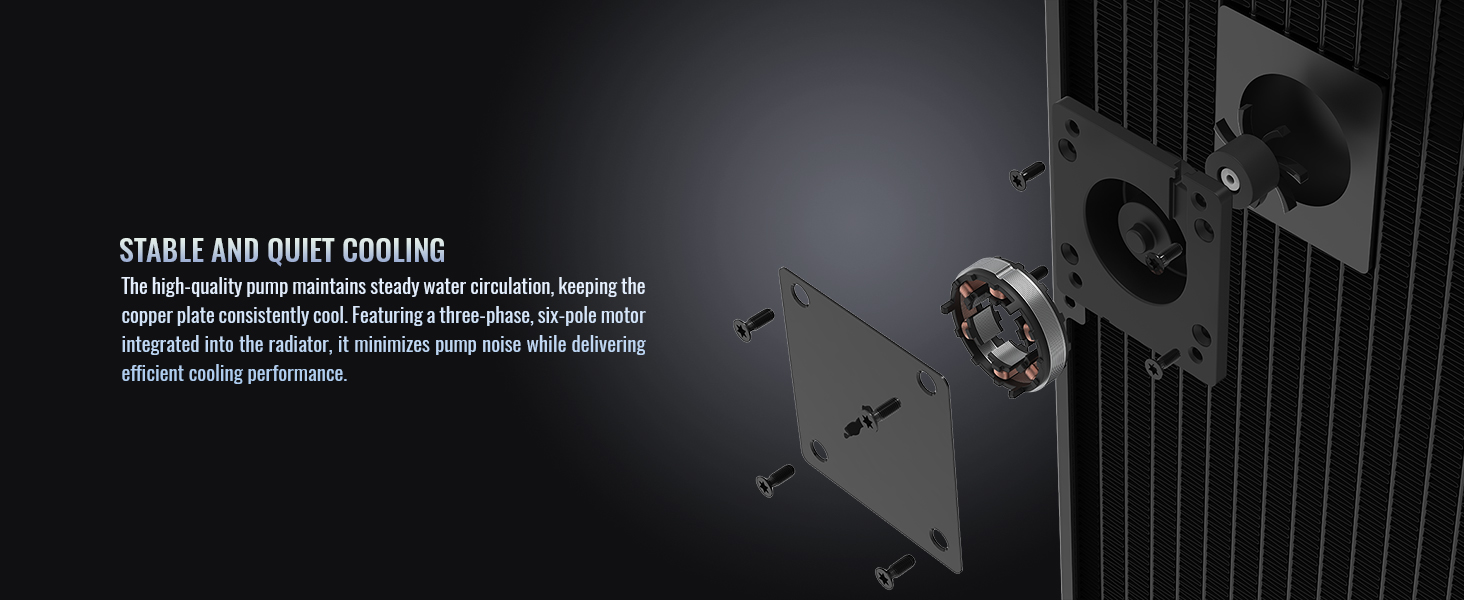
Малюнак 5.2: Унутраная частка view of the radiator-integrated pump for stable and quiet cooling.
6. Тэхнічнае абслугоўванне
The Thermaltake AW420 Liquid Cooler is a closed-loop system, requiring minimal maintenance. However, periodic cleaning can help maintain optimal performance.
- Выдаленне пылу: Every 3-6 months, or as needed, power off your system and use compressed air to clean dust from the radiator fins and fan blades. Ensure fans are held stationary while cleaning to prevent damage.
- Візуальны агляд: Periodically inspect the tubing and connections for any signs of wear, kinks, or leaks. While rare in AIOs, early detection can prevent potential issues.
- Тэрмапаста: The thermal paste applied between the water block and CPU typically lasts for several years. If you notice a significant increase in CPU temperatures over time, consider reapplying fresh thermal paste.
7. Выпраўленне непаладак
If you encounter issues with your Thermaltake AW420 Liquid Cooler, refer to the following common troubleshooting steps:
- Высокія тэмпературы працэсара:
- Ensure the water block is securely mounted and making good contact with the CPU.
- Verify that the pump is running (you may feel a slight vibration or hear a faint hum). Check its power connection.
- Confirm that all fans are spinning and connected correctly.
- Clean any dust buildup from the radiator fins.
- Check BIOS/UEFI settings to ensure fan and pump speeds are set appropriately.
- Празмерны шум:
- Вызначце, ці шум зыходзіць ад вентылятараў, ці ад помпы.
- For fan noise, adjust fan curves in BIOS/UEFI to lower RPMs at idle or low loads.
- Ensure no cables are hitting fan blades.
- If pump noise is excessive, ensure the pump is receiving stable power. Slight gurgling sounds upon initial startup are normal as air bubbles settle.
- Няма харчавання/Вентылятары не круцяцца:
- Check all power connections to the fans and pump.
- Ensure the motherboard headers are enabled and configured correctly in BIOS/UEFI.
If problems persist, please contact Thermaltake customer support.
8. Тэхнічныя характарыстыкі

Малюнак 8.1: Ніжні бок view of the AW420 radiator.
| Асаблівасць | Дэталь |
|---|---|
| Марка | Кампанія Thermaltake |
| Нумар мадэлі | CL-W445-PL14BL-A |
| Спосаб астуджэння | вадкасць |
| Памер радыятара | 420 мм |
| Тып вентылятара | 3 x 140mm TOUGHFAN PRO PWM |
| Хуткасць вентылятара | 500~2000 абаротаў у хвіліну |
| Ёмістасць паветранага патоку | 119.6 CFM |
| Статычны ціск | 3.57 мм-H2O |
| Узровень шуму | 31.6 дэцыбел (макс.) |
| Матэрыял вадзянога блока | Нікеляваная медзь |
| Хуткасць помпы | Да 4000 абаротаў у хвіліну |
| Тып раздыма харчавання | 4-кантактны |
| тtage | 12 вольт |
| Ватtage | 16.56 ват |
| Сумяшчальныя прылады | Працоўны стол |
| Сумяшчальнасць разеткі працэсара | Intel LGA 4677, AMD sTR5/SP6 |
9. Інфармацыя аб гарантыі
The Thermaltake AW420 Liquid Cooler comes with a 3-гадовая гарантыя ад вытворцы. This warranty covers defects in materials and workmanship under normal use. For specific terms and conditions, please refer to the warranty card included with your product or visit the official Thermaltake webсайт.
Пацвярджэнне пакупкі патрабуецца для ўсіх прэтэнзій па гарантыі.
10. Падтрымка
For technical assistance, warranty claims, or additional product information, please contact Thermaltake customer support through their official channels.
- Афіцыйны Webсайт: Наведайце ст Крама Thermaltake каб атрымаць рэсурсы падтрымкі, адказы на часта задаваныя пытанні і кантактную інфармацыю.
- Інтэрнэт-рэсурсы: Check the product page on the Thermaltake website for updated drivers, software, and additional guides.


