
1. Уводзіны
The ATTACK SHARK X11SE is a high-performance wireless gaming mouse designed for precision and comfort. It features a lightweight design, advanced sensor technology, and versatile connectivity options to enhance your gaming and productivity experience.

Выява: Зверхуview of the ATTACK SHARK X11SE's key features including PAW3311 sensor, 63g lightweight design, 22000 DPI, HUANO switches, tri-mode switch, BK52820 chip, TTC encoders, and 65 hours of battery life.
Асноўныя характарыстыкі:
- PAW3311 Gaming Sensor: Equipped with the flagship PixArt PAW3311 sensor, offering up to 22,000 DPI with 6 adjustable levels, 400 IPS tracking speed, 35G acceleration, and a 1000Hz/1ms polling rate.
- Ultralight 63g Design: Weighing only 63 ± 3g, this mouse features a minimalist, full-casing design optimized for reduced weight without compromising build quality.
- Трохрэжымнае падключэнне: Supports 2.4 GHz wireless, USB-C wired, and Bluetooth connections for versatile use across various devices.
- Durable Switches & Encoder: Features HUANO switches with a lifespan of 20 million clicks and an optimized TTC encoder for precise scroll wheel feedback.
- Эрганамічны дызайн: Dimensions (128 x 64 x 40 mm) suitable for medium to large hands, accommodating palm, claw, and fingertip grip styles for extended comfort.
- Dual Driver Support: Сумяшчальны з Web Driver and proprietary ATTACK SHARK driver for advanced customization of buttons, DPI, polling rate, and macros.
2. Настройка
Змест пакета:
- ATTACK SHARK X11SE Wireless Gaming Mouse
- USB-кабель C
- USB Receiver (2.4GHz)
- Захопная стужка
- Кіраўніцтва карыстальніка
Зарадка мышы:
Connect the mouse to your computer using the provided USB-C cable. The mouse has a 300mAh battery, providing up to 65 hours of uninterrupted use on a full charge (2-3 hours charging time).

Image: The ATTACK SHARK X11SE mouse illustrating its efficient battery management, offering up to 65 hours of use from a 300mAh battery, fully charged in 2-3 hours.
Рэжымы падлучэння:
The X11SE mouse supports three connection modes: 2.4GHz Wireless, Bluetooth, and USB-C Wired.

Image: The ATTACK SHARK X11SE mouse highlighting its lightning-fast 2.4G wireless connection, wired mode via USB-C, and Bluetooth 5.2 capabilities.
- Бесправадны рэжым 2.4 ГГц:
- Знайдзіце USB-прыёмнік, які звычайна захоўваецца ў адсеку на ніжняй частцы мышы.
- Падключыце USB-прыёмнік да вольнага порта USB на вашым кампутары.
- Turn on the mouse using the switch on the bottom. Select the 2.4G mode.
- Мышка павінна падключыцца аўтаматычна.
- Рэжым Bluetooth:
- Turn on the mouse and select the Bluetooth mode using the switch on the bottom.
- Press and hold the Bluetooth toggle button (often located near the mode switch) for 3 seconds to enter pairing mode. The indicator light will flash.
- На вашым камп'ютары або прыладзе перайдзіце ў налады Bluetooth і знайдзіце новыя прылады.
- Select "ATTACK SHARK X11SE" from the list to pair.
- Правадны рэжым USB-C:
- Connect the USB-C cable to the front port of the mouse and the other end to a USB port on your computer.
- Мыш аўтаматычна пераключыцца ў правадны рэжым і пачне зараджацца.
3. Аперацыя
Функцыі кнопак:
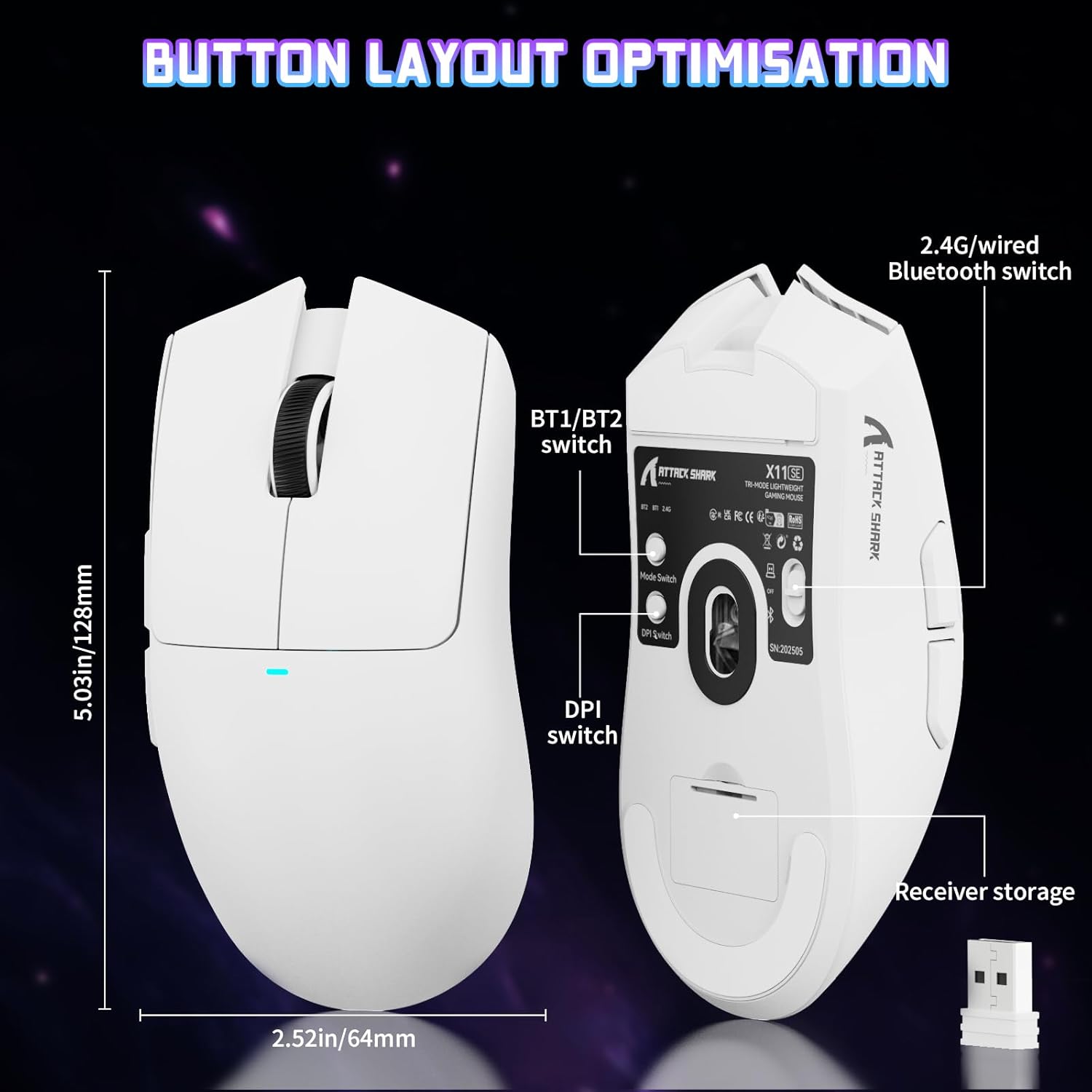
Image: The ATTACK SHARK X11SE mouse displaying its button layout, including the BT1/BT2 switch, DPI switch, and receiver storage, along with its dimensions (128mm length, 64mm width).
- Пстрычка левай кнопкай мышы: Кнопка асноўнага дзеяння.
- Пстрыкніце правай кнопкай мышы: Дадатковая кнопка дзеяння, звычайна для кантэкстных меню.
- Кола пракруткі: Scrolls up/down. Can also be pressed for a middle-click function.
- Бакавыя кнопкі (уперад/назад): Used for navigation in web браўзеры або дзеянні ў гульні.
- Пераключальнік DPI: Located on the underside of the mouse, this button cycles through preset DPI levels.
- Пераключальнік рэжымаў: Located on the underside, this switch allows you to select between 2.4G wireless, Bluetooth, and Off modes.
Рэгуляванне DPI:
The X11SE features a PixArt PAW3311 sensor with up to 22,000 DPI. You can adjust the DPI sensitivity using the dedicated DPI switch on the bottom of the mouse. For more precise control and custom DPI levels, use the official software.
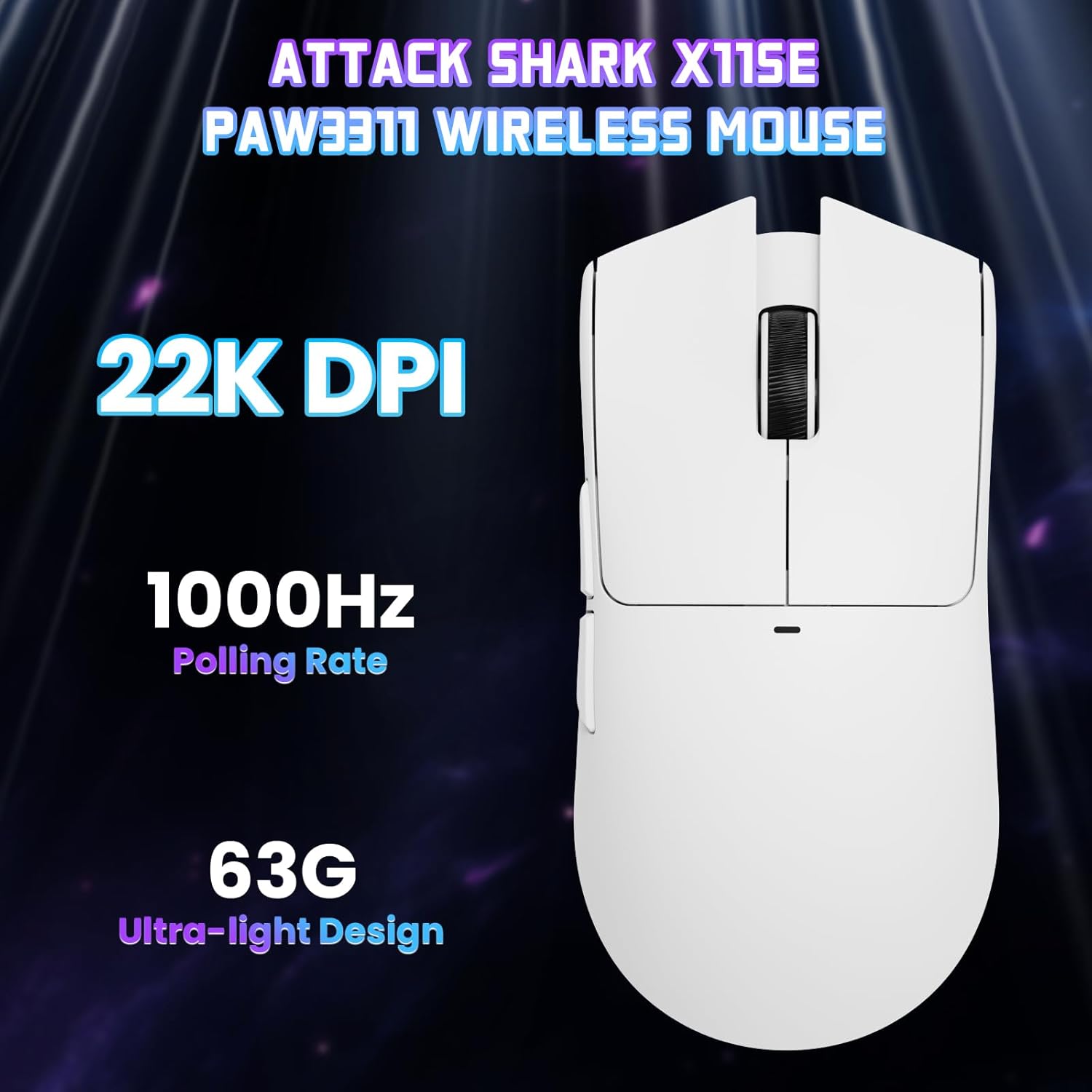
Выява: зверху ўніз view of the ATTACK SHARK X11SE mouse, emphasizing its 22,000 DPI capability and 1000Hz polling rate for high-performance gaming.
4. Налада
The ATTACK SHARK X11SE mouse offers extensive customization options through its dedicated software. This allows you to personalize button assignments, DPI settings, polling rate, and create macros.
Ўстаноўка драйвера:
The mouse supports two drivers:
- Web Кіроўца: Доступ праз http://szslxd-tech.com/#/
- ATTACK SHARK Proprietary Driver: Спампаваць з https://attackshark.com/pages/dirver-download
Download and install the preferred driver software on your Windows, macOS, or Linux system.
Асаблівасці праграмнага забеспячэння:

Image: The ATTACK SHARK X11SE software interface, demonstrating options for mouse settings, DPI adjustments, parameter settings, macro editing, and personal profiles.
- Праграмаванне кнопак: Перапрызначце функцыі любой з 5 кнопак.
- Налады DPI: Стварыце карыстальніцкі DPI profiles and adjust sensitivity levels.
- Хуткасць галасавання: Adjust the polling rate for optimal responsiveness.
- Рэдактар макрасаў: Record and assign complex sequences of commands to a single button.
- профіfile Кіраванне: Save and switch between different profiles for various games or applications.
5. Тэхнічнае абслугоўванне
Уборка:
- Выкарыстоўвайце мяккую, сухую тканіну, каб працерці паверхню мышы.
- Для ўстойлівага бруду злёгку ачысціцеampпрацярыце тканіну вадой або мяккім ачышчальным растворам. Пазбягайце агрэсіўных хімічных рэчываў.
- Ачысціце вобласць аптычнага датчыка ў ніжняй частцы мышы ватовым тампонам, каб забяспечыць дакладнае адсочванне.
Сыход за батарэяй:
- Пазбягайце частай поўнай разрадкі акумулятара, каб падоўжыць тэрмін яго службы.
- Захоўвайце мыш у прахалодным, сухім месцы, калі яна не выкарыстоўваецца працяглы час.
6. Выпраўленне непаладак
Агульныя праблемы і рашэнні:
- Мышка не рэагуе:
- Пераканайцеся, што мыш зараджана.
- Check the mode switch on the bottom of the mouse to ensure it's in the correct mode (2.4G, BT, or Wired).
- Для рэжыму 2.4 ГГц пераканайцеся, што USB-прыёмнік надзейна падключаны. Паспрабуйце іншы USB-порт.
- For Bluetooth mode, ensure Bluetooth is enabled on your device and the mouse is paired correctly. Try re-pairing.
- У правадным рэжыме пераканайцеся, што кабель USB-C падключаны правільна.
- DPI не змяняецца:
- Press the DPI switch on the bottom of the mouse.
- If using custom DPI settings, ensure the driver software is running and the correct profile з'яўляецца актыўным.
- Затрымка або перарывістае падключэнне:
- Ensure the mouse is close to the USB receiver (for 2.4GHz) or your device (for Bluetooth).
- Пазбягайце перашкод ад іншых бесправадных прылад.
- Пераканайцеся, што батарэя мышы дастаткова зараджана.
- Update mouse drivers if available.
7. Тэхнічныя характарыстыкі
| Асаблівасць | Спецыфікацыя |
|---|---|
| Марка | АТАКА АКУЛА |
| Назва мадэлі | X11SE |
| Колер | Белы |
| Тэхналогія падлучэння | 2.4 GHz Wireless/USB-C Wired/Bluetooth |
| Асаблівасці | 63g ultralight, BK52820 Chip, TTC Encoder, Dual Driver |
| Тэхналогія выяўлення руху | Optical (PixArt PAW3311) |
| Колькасць кнопак | 5 |
| Рука арыентацыі | Амбідэкстр |
| Рэкамендаванае выкарыстанне прадукту | Кампутарныя гульні |
| Сумяшчальныя прылады | Desktop Computer, MAC |
| Аперацыйная сістэма | Windows, macOS, Linux |
| Колькасць батарэек | 1 літый-палімерны (у камплекце) |
| Крыніца харчавання | Харчаванне ад батарэі |
| Maximum Mouse Sensitivity | 22000 DPI |
| Дыяпазон | 300 сантыметраў |
| стыль | Эрганамічны |
| Матэрыял | Пластыкавыя |
| Краіна паходжання | Кітай |
| Уключаныя кампаненты | USB-C Cable, Manual, Grip Tape |
| UPC | 752010613663 |
8. Гарантыя і падтрымка
Інфармацыя аб гарантыі:
The ATTACK SHARK X11SE Wireless Gaming Mouse comes with a six-month warranty from the date of purchase. Please retain your proof of purchase for warranty claims.
Спампаваць драйверы:
For the latest drivers and software updates, please visit:
- Web Кіроўца: http://szslxd-tech.com/#/
- ATTACK SHARK Driver: https://attackshark.com/pages/dirver-download
Related Product Video:
Відэа: Афіцыйнае відэа прадаўцаasing the ATTACK SHARK X11 Mouse, demonstrating its features and functionality. While specifically for the X11, it provides relevant insights into the X11SE's design and operation.