
1. Уводзіны
Thank you for choosing the DEPSTECH DS650-DL Dual-Lens Articulating Industrial Endoscope. This device is designed for detailed visual inspection in hard-to-reach areas, featuring a dual-lens system with 210° bidirectional rotation, a 4.5-inch IPS monitor, and 1080P high-definition imaging. It is an essential tool for home maintenance, vehicle inspection, and machinery checks.
Please read this manual thoroughly before use to ensure proper operation and to maximize the product's lifespan.
2. Інфармацыя па бяспецы
- Не выкарыстоўвайце эндаскоп у асяроддзях з лёгкаўзгаральнымі або выбуханебяспечнымі газамі.
- The probe is IP67 waterproof, but the main unit is not. Avoid exposing the main unit to water or excessive moisture.
- Не спрабуйце разбіраць або мадыфікаваць прыладу. Гэта прывядзе да анулявання гарантыі і можа прывесці да пашкоджанняў.
- Захоўвайце прыладу ў месцах, недаступных дзецям.
- Avoid direct eye exposure to the LED lights.
- The device features overheat protection. If the temperature exceeds 70°C, a warning will display. If it exceeds 80°C, the device will automatically shut down to prevent damage. Allow the device to cool down before resuming operation.
3. Змесціва ўпакоўкі
Пасля адкрыцця ўпакоўкі пераканайцеся, што ўсе прадметы ёсць у наяўнасці і ў добрым стане.
- DEPSTECH DS650-DL Endoscope Unit
- Чахол для захоўвання
- Кіраўніцтва карыстальніка
- Зарадны кабель Type-C
- Карта памяці на 32 ГБ (папярэдне ўсталяваная або ўваходзіць у камплект асобна)

Image: Contents of the DEPSTECH DS650-DL package.
4. Настройка
4.1 Зарадка прылады
Before first use, fully charge the endoscope unit. Connect the provided Type-C charging cable to the charging port on the device and to a suitable USB power adapter (not included).
4.2 Устаўка карты памяці
If the 32GB memory card is not pre-installed, locate the TF card slot on the side of the monitor unit. Insert the memory card with the contacts facing down until it clicks into place.
4.3 Уключэнне/выключэнне
Press and hold the power button (usually located near the monitor) for a few seconds to turn the device on or off. The IPS monitor will display the startup screen.
5. Аперацыя
5.1 Разуменне элементаў кіравання

Выява: Зверхуview of the endoscope controls and ports.
- Кнопка OK/Пацвердзіць: Пацвярджае выбар у меню.
- Up/Zoom In Button: Navigates up in menus or zooms in on the image.
- Down/Zoom Out Button: Navigates down in menus or zooms out on the image.
- Кнопка павароту на 180°: Rotates the real-time image on the screen by 180 degrees.
- Lens Switch Button: Toggles between front camera, side camera, and dual-view рэжым.
- Кнопка фота/відэа: Кароткае націсканне — зрабіць фота, доўгае націсканне — пачаць/спыніць відэазапіс.
- Power Button/LED Adjustment: Short press to adjust LED brightness (3 levels), long press to power on/off.
- Articulating Angle Dial: Controls the 210° bidirectional rotation of the probe tip.
- Слот TF карты: Для ўстаўкі карты памяці.
- Порт тыпу C: Для зарадкі і перадачы дадзеных.
- Кнопка скіду: Скідае налады прылады (націскайце шпількай).
5.2 Using the Dual-Lens and Articulation
The DS650-DL features both a front camera and a side camera, allowing for a wider inspection range. The probe tip can be articulated up to 210° in two directions for comprehensive viewінж.
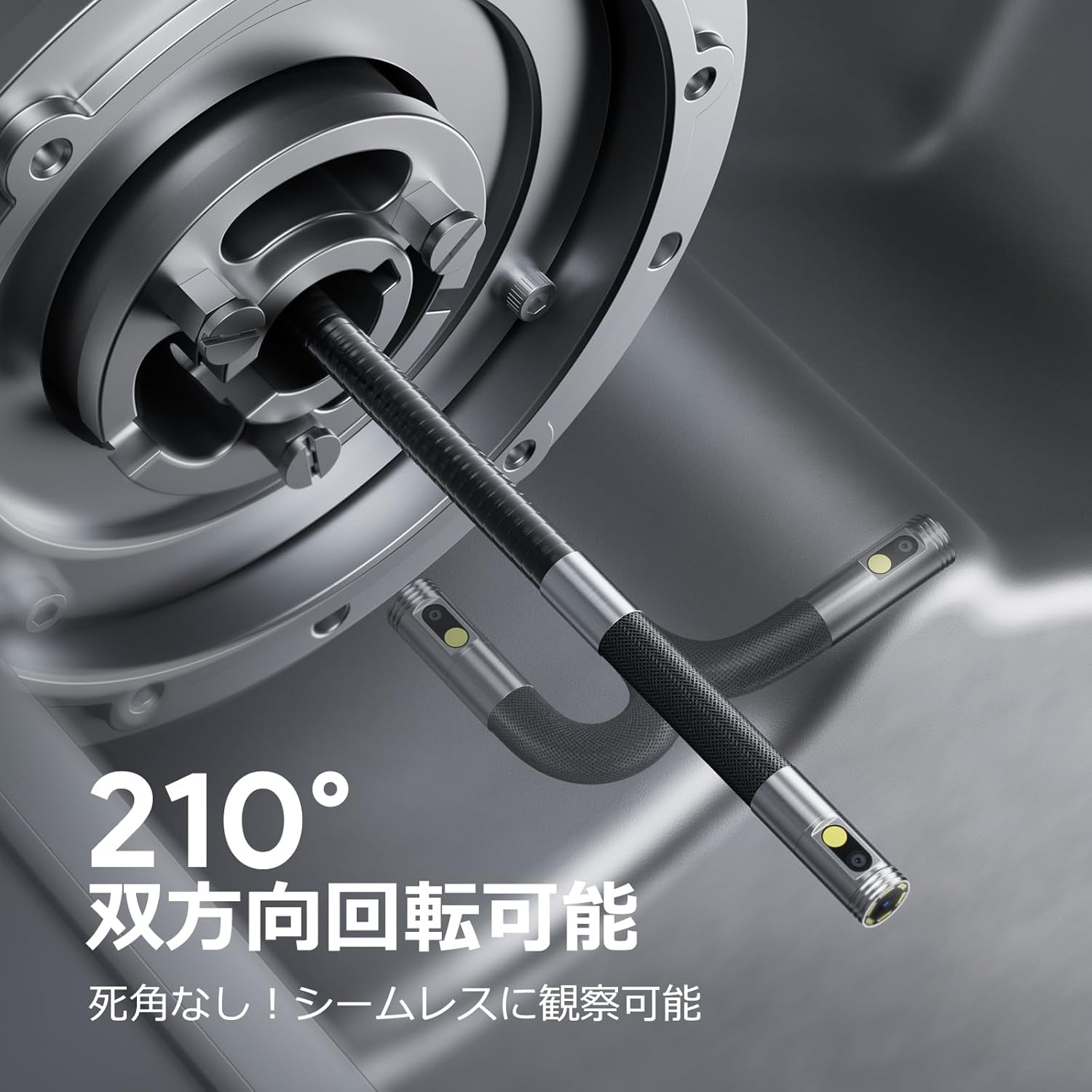
Image: Endoscope probe demonstrating 210° bidirectional articulation.
- Выкарыстоўвайце Кнопка пераключэння аб'ектыва to cycle between the front camera, side camera, or a split-screen dual-view рэжым.
- Павярнуць Articulating Angle Dial to precisely adjust the direction of the probe tip. This allows you to navigate around obstacles and view areas from multiple angles without repositioning the entire cable.
5.3 Захоп малюнкаў і відэа
The device supports capturing both still images and video recordings directly to the inserted 32GB memory card.

Image: Monitor display showing photo and video capture features.
- Каб зрабіць фота: Кароткае націсканне Кнопка фота/відэа.
- Каб запісаць відэа: Доўгі націск Кнопка фота/відэа to start recording. Long press again to stop recording.
- Захоплены files are saved to the 32GB memory card. You can store approximately 10,000 images or 50 videos.
5.4 Рэгуляванне яркасці святлодыёда
The probe is equipped with high-brightness LED lights to illuminate dark inspection areas. Short press the Power Button/LED Adjustment button to cycle through 3 levels of LED brightness.

Image: IP67 waterproof probe with adjustable LED illumination.
5.5 Перадача дадзеных
You can transfer captured images and videos to a computer via the Type-C cable or by directly accessing the memory card.

Image: High-speed data transfer from endoscope to PC.
6. Тэхнічнае абслугоўванне
- Ачыстка зонда: After use, especially in dirty or wet environments, gently wipe the probe with a soft, damp cloth. Ensure no debris remains on the camera lenses.
- Ачыстка манітора: Use a soft, dry cloth to clean the IPS monitor. Avoid abrasive cleaners or solvents.
- захоўванне: Store the endoscope in its provided storage case in a cool, dry place, away from direct sunlight and extreme temperatures. This prevents damage from improper storage and moisture.
- Сыход за батарэяй: Каб падоўжыць тэрмін службы батарэі, пазбягайце частай поўнай разрадкі прылады. Рэгулярна зараджайце яе, нават калі яна не выкарыстоўваецца працяглы час.
7. Выпраўленне непаладак
| праблема | Магчымая прычына | Рашэнне |
|---|---|---|
| Прылада не ўключаецца. | Нізкі зарад батарэі; няспраўнасць прылады. | Цалкам зарадзіце прыладу. Калі праблема не знікне, звярніцеся ў службу падтрымкі. |
| Няма выявы на экране. | Cable not connected properly; camera lens obstructed. | Ensure the probe cable is securely connected. Check for obstructions on the lens. |
| Выява размытая або невыразная. | Lens is dirty; focus distance incorrect. | Clean the camera lens. Ensure the object is within the optimal focal range (3-10cm). |
| Немагчыма запісваць фота/відэа. | Карта памяці запоўненая або няправільна ўстаўлена. | Check if the 32GB memory card is inserted correctly. Delete old fileабо заменіце карту, калі яна поўная. |
| Device shuts down automatically. | Уключана абарона ад перагрэву. | Allow the device to cool down. Avoid using in excessively hot environments. |
8. Тэхнічныя характарыстыкі
| Асаблівасць | Дэталь |
|---|---|
| Марка | ДЭПСТЭХ |
| Нумар мадэлі | DS650DJ |
| Дысплей | 4.5-inch IPS LCD Monitor |
| Дазвол камеры | 1080P |
| Дыяметр зонда | 8.5 мм |
| Кут артыкуляцыі | 210° Bidirectional |
| Тып кабеля | 1.5M Semi-rigid |
| Рэйтынг воданепранікальнасці | IP67 (толькі зонд) |
| Асвятленне | Рэгуляваныя святлодыёдныя лямпы |
| Захоўванне | Карта Micro SD на 32 ГБ (у камплекце) |
| Акумулятар у камплекце | так |
| Памеры ўпакоўкі | 43.1 х 21.4 х 7.4 см |
| Вага ўпакоўкі | 1.33 кг |
9. Гарантыя і падтрымка
9.1 Гарантыя вытворцы
This DEPSTECH product comes with a 24-месячная гарантыя вытворцы. Your order number serves as your proof of purchase for warranty claims. Please retain it.
9.2 Падтрымка кліентаў
For any questions, technical assistance, or warranty inquiries, please contact our professional support team:
электронная пошта: support.jp@depstech.com
We aim to respond to all inquiries within 24 hours (excluding weekends and public holidays, where responses will be provided on the next business day).

Image: DEPSTECH customer support and warranty information.