
Ledwood PLAYKARAOKE
Ledwood PLAYKARAOKE Portable Karaoke Speaker
Кіраўніцтва па эксплуатацыі
Уводзіны
Дзякуй за пакупкуasing the Ledwood PLAYKARAOKE Portable Karaoke Speaker. This manual provides essential information for the safe and efficient operation of your device. Please read it thoroughly before use and retain it for future reference.
Важная інфармацыя па бяспецы
- Не падвяргайце прыладу ўздзеянню вады або празмернай вільгаці.
- Пазбягайце экстрэмальных тэмператур.
- Не спрабуйце разбіраць або рамантаваць прыладу самастойна. Звяртайцеся да кваліфікаванага персаналу па любыя паслугі па абслугоўванні.
- Захоўваць у месцах, недаступных дзецям.
- Выкарыстоўвайце толькі зарадны кабель і адаптар, якія ўваходзяць у камплект.
- Забяспечце належную вентыляцыю падчас выкарыстання і зарадкі.
Змест пакета
Калі ласка, праверце наяўнасць усіх прадметаў:
- Ledwood PLAYKARAOKE Portable Karaoke Speaker
- 2 бесправадныя мікрафоны
- Зарадны кабель (USB-C)
- Кіраўніцтва карыстальніка
- 32GB USB Key
Прадукт скончаныview
The Ledwood PLAYKARAOKE is a compact and powerful portable karaoke speaker designed for entertainment. It features a 120W output, dynamic RGB LED lighting, and multiple connectivity options.
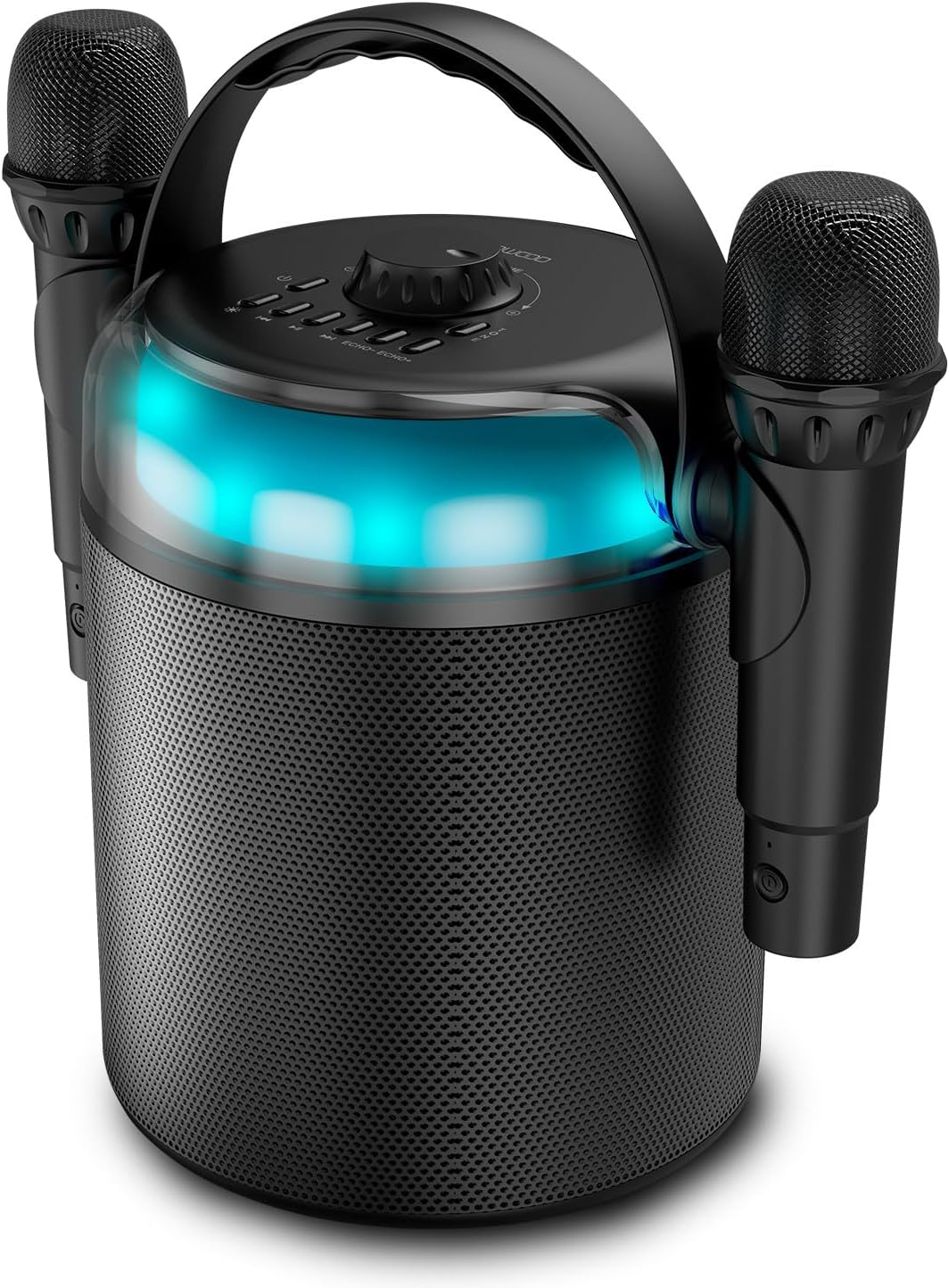
Figure 1: Ledwood PLAYKARAOKE Speaker with Microphones
This image shows the main unit of the Ledwood PLAYKARAOKE speaker, a cylindrical black device with a handle on top. Two wireless microphones are securely attached to the sides of the speaker. A blue LED light band is visible around the top section of the speaker.
Панэль кіравання

Малюнак 2: Верхняя панэль кіравання
Гэта выява паказвае зверху ўніз view of the speaker's control panel. It features a large central volume knob, a power button, buttons for LED light control, playback controls (play/pause, skip), and echo adjustment for the microphones.
Familiarize yourself with the buttons and ports on the device:
- Рэгулятар гучнасці: Рэгулюе агульны гук.
- Кнопка харчавання: Уключае або выключае дынамік.
- Кнопка святлодыёднага святла: Cycles through LED light effects or turns them off.
- Элементы кіравання прайграваннем: Прайграванне/Паўза, Папярэдні трэк, Наступны трэк.
- Echo Controls (Echo-, Echo+): Adjusts the echo effect on the microphones.
- Кнопка рэжыму: Switches between input sources (Bluetooth, USB, MicroSD, AUX, COAX).
- Vocal Effects Button: Cycles through different vocal effects (Man, Woman, Monster, Child, Reverb).
- Порт USB: Для прайгравання з USB-назапашвальніка.
- Слот для карты MicroSD: Для прайгравання з карты microSD.
- Уваход AUX: 3.5-мм аўдыёўваход для падлучэння знешніх прылад.
- COAX Input: Coaxial audio input.
- Порт для зарадкі: Порт USB-C для зарадкі дынаміка.
Настройка
1. Зарадка дынаміка
- Connect the provided USB-C charging cable to the charging port on the speaker.
- Падключыце другі канец кабеля да адпаведнага адаптара харчавання USB (не ўваходзіць у камплект) або да порта USB з харчаваннем.
- Індыкатар зарадкі загарыцца. Поўная зарадка займае прыблізна 4 гадзіны.
- Пасля поўнай зарадкі адключыце зарадны кабель.
2. Уключэнне / выключэнне харчавання
- Каб уключыць, націсніце і ўтрымлівайце Кнопка харчавання until the LED lights illuminate and you hear an audible prompt.
- Каб выключыць харчаванне, націсніце і ўтрымлівайце Кнопка харчавання again until the LED lights turn off.
3. Pairing Wireless Microphones
The two wireless microphones are typically pre-paired with the speaker. If they do not connect automatically:
- Пераканайцеся, што дынамік уключаны.
- Insert batteries into the microphones (if not already installed).
- Power on each microphone. They should automatically connect to the speaker.
- If connection issues persist, refer to the Troubleshooting section.
Інструкцыя па эксплуатацыі
1. Злучэнне Bluetooth
- Power on the speaker. It will automatically enter Bluetooth pairing mode (indicated by a flashing LED).
- На смартфоне, планшэце або іншай прыладзе з падтрымкай Bluetooth уключыце Bluetooth і знайдзіце даступныя прылады.
- Select "Ledwood PLAYKARAOKE" from the list.
- Once connected, the speaker will emit an audible confirmation, and the LED will stop flashing.
- You can now play audio from your connected device through the speaker.
2. Прайграванне з USB/MicroSD
- Insert a USB drive or microSD card (with audio files) into the corresponding port/slot on the speaker.
- The speaker should automatically switch to USB/MicroSD mode and begin playing audio. If not, press the Кнопка рэжыму каб выбраць правільны ўваход.
- Выкарыстоўвайце Элементы кіравання прайграваннем (Play/Pause, Previous Track, Next Track) to manage your music.
3. AUX/COAX Input
- Connect an external audio device (e.g., TV, PC) to the speaker using a 3.5mm AUX cable or a coaxial cable (not included).
- Націсніце Кнопка рэжыму repeatedly until the speaker switches to AUX or COAX input mode.
- Play audio from your external device. The speaker will output the sound.
4. Рэгуляванне гучнасці
Павярніце вялікі Ручка гучнасці on the top panel clockwise to increase volume and counter-clockwise to decrease volume.
5. Using Vocal Effects
While using the microphones:
- Націсніце Vocal Effects Button to cycle through the available vocal effects: Man, Woman, Monster, Child, and Reverb.
- Выкарыстоўвайце Рэха- і Рэха+ buttons to adjust the intensity of the echo effect on your voice.
6. Святлодыёдныя светлавыя эфекты
Націсніце Кнопка са святлодыёдным святлом to cycle through different dynamic RGB LED light patterns or to turn the lights off.
Тэхнічнае абслугоўванне
- Уборка: Працірайце дынамік мяккай сухой тканінай. Не выкарыстоўвайце абразіўныя ачышчальнікі або растваральнікі.
- захоўванне: Захоўвайце прыладу ў прахалодным, сухім месцы, удалечыні ад прамых сонечных прамянёў і экстрэмальных тэмператур.
- Сыход за батарэяй: For optimal battery life, charge the speaker fully before long periods of storage and recharge it every few months.
Ліквідацыю непаладак
| праблема | Магчымае рашэнне |
|---|---|
| Дынамік не ўключаецца. | Пераканайцеся, што акумулятар зараджаны. Падключыце зарадны кабель і паспрабуйце яшчэ раз. |
| Няма гуку з дынаміка. |
|
| Мікрафоны не працуюць. |
|
| Нестабільнае злучэнне Bluetooth. |
|
Тэхнічныя характарыстыкі
- мадэль: Ledwood PLAYKARAOKE
- Выходная магутнасць: 120 Вт
- Драйверы дынамікаў: 4" (10 cm) Woofer, 1.25" Tweeter
- Версія Bluetooth: 5.1
- Тэрмін службы батарэі: Да 3 гадзін (пры гучнасці 70%)
- Час зарадкі: Прыкладна 4 гадзіны
- Парты ўводу: USB, MicroSD, AUX (3.5mm), COAX
- Мікрафоны: 2 бесправадныя мікрафоны
- Вакальныя эфекты: Man, Woman, Monster, Child, Reverb (5 effects)
- Святлодыёдныя ліхтары: Дынамічны RGB
- Памеры дынаміка (В x Ш x Г): 215 х 168 х 168 мм
- Microphone Dimensions (H x Dia): 175 х 50 мм
- Аксэсуары ў камплекце: 32GB USB Key
Гарантыя і падтрымка
For warranty information and technical support, please refer to the warranty card included with your product or visit the official Ledwood webсайт. Захоўвайце пацвярджэнне пакупкі для любых гарантыйных прэтэнзій.
Ask a question about this manual
Ask about setup, troubleshooting, compatibility, parts, safety, or missing instructions. Manuals+ will review the question and use this page’s manual context to help answer it.