
Уводзіны
This manual provides detailed instructions for the installation, operation, and maintenance of your Ctronics 4K Hybrid Zoom WLAN Outdoor Security Camera, Model 930C-4K. Please read this manual thoroughly before using the product to ensure proper functionality and safety.
The Ctronics 4K Hybrid Zoom WLAN Outdoor Security Camera features a dual-lens system, 10x hybrid zoom (6x optical + 4x digital), automatic zoom tracking, human recognition, 4K full-color night vision, two-way audio, and IP66 weather resistance for reliable outdoor surveillance.

Figure 1: Ctronics 4K Hybrid Zoom WLAN Outdoor Security Camera (Model 930C-4K)
Змест пакета
Праверце наяўнасць усіх прадметаў у камплекце:
- Ctronics 4K Hybrid Zoom WLAN Outdoor Security Camera
- Адаптар сілкавання
- Мантажныя шрубы і дзюбелі
- Waterproof Kit for Network Cable
- Свердзел Шаблон
- Кіраўніцтва карыстальніка
Тэхніка бяспекі
- Ensure the power supply matches the camera's requirements (12V).
- Do not expose the camera to extreme temperatures or humidity beyond its operating range.
- Avoid direct exposure to strong light sources, which may affect image quality.
- Handle the camera with care to prevent physical damage.
- Consult a professional for installation if you are unsure about electrical wiring or mounting procedures.
Настройка
1. Фізічная ўстаноўка
The camera supports both wall and ceiling mounting. Choose a location that provides optimal coverage and a stable Wi-Fi signal.
- Выберыце месца ўстаноўкі: Identify a suitable outdoor location, ensuring it is within range of your Wi-Fi network and has access to a power outlet.
- Пазначце адтуліны для свідравання: Use the provided drill template to mark the positions for drilling on the wall or ceiling.
- Свідраваць адтуліны: Прасвідруйце адтуліны ў пазначаных месцах і ўстаўце дзюбелі ў сцяну.
- Мацаванне камеры: Secure the camera bracket to the wall or ceiling using the provided screws.
- Падключыце харчаванне: Connect the power adapter to the camera and plug it into a power outlet. Ensure the connection is waterproof using the provided kit if applicable.

Figure 2: Camera mounting options (wall-mounted and ceiling-mounted) demonstrating IP66 weather resistance.
2. Падключэнне да сеткі
The camera supports stable and fast dual-band Wi-Fi (2.4GHz and 5GHz).
- Спампаваць прыкладанне: Download the "Ctronics Pro" app from your smartphone's app store (iOS or Android).
- Зарэгістраваць уліковы запіс: Адкрыйце праграму і зарэгіструйце новы ўліковы запіс або ўвайдзіце ў сістэму, калі ў вас ужо ёсць уліковы запіс.
- Дадаць камеру: Выконвайце інструкцыі ў дадатку, каб дадаць камеру. Звычайна гэта патрабуе сканавання QR-кода на камеры або ўручную ўводу яе ідэнтыфікатара.
- Падключыцеся да Wi-Fi: Select your Wi-Fi network (2.4GHz or 5GHz) and enter the password. The camera will connect to your network.
- Першапачатковая ўстаноўка: Complete any initial setup steps prompted by the app, such as setting a device password and time zone.

Figure 3: Ctronics Pro app interface for camera management.

Figure 4: Illustration of the camera's stable dual-band Wi-Fi connectivity (2.4GHz and 5GHz).
Кіраванне камерай
1. Жыць View і кіраванне PTZ
- Адкрыйце праграму Ctronics Pro і абярыце камеру, каб атрымаць доступ да жывой трансляцыі view.
- Use the on-screen controls to pan (355°) and tilt (90°) the camera to adjust its viewкут нахілу.
- Utilize the 10x hybrid zoom feature (6x optical + 4x digital) to get a closer look at specific areas.

Figure 5: The camera's 10x hybrid zoom capability, showing a zoomed-in view of a child in a backyard.

Figure 6: Illustration of the dual-lens system providing both narrow (50° view, 8mm) and wide (90° view, 3.6mm) perspectives.
2. Motion Detection and Auto-Tracking
- Access the camera settings in the app to configure motion detection zones and sensitivity.
- Enable human recognition to filter out false alarms caused by animals or inanimate objects.
- Activate auto-tracking zoom, which allows the camera to automatically follow detected human movement and zoom in for clearer details.
- Set up preset points for quick navigation to frequently monitored areas.
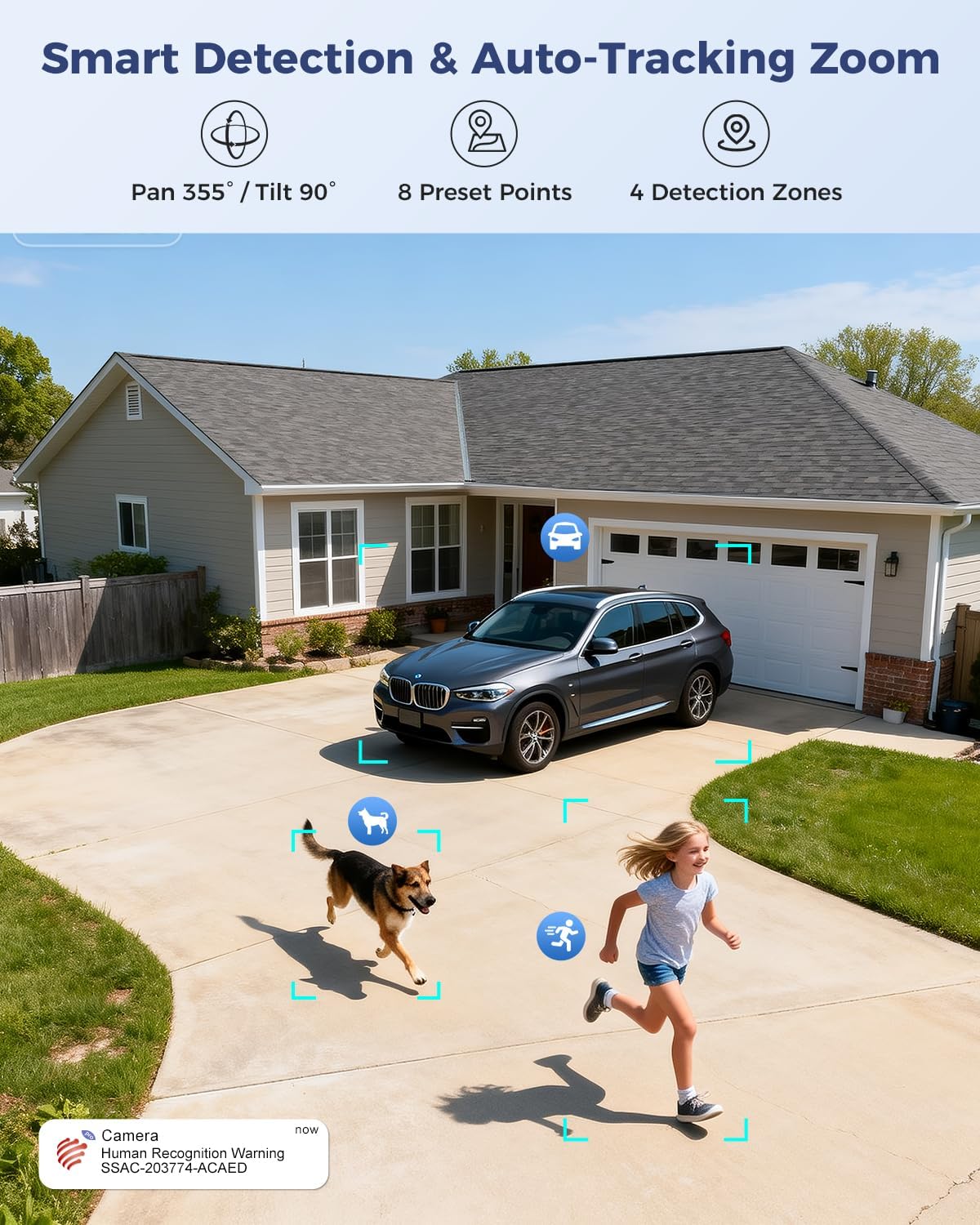
Figure 7: Visual representation of smart detection features including pan/tilt, preset points, detection zones, and human recognition with auto-tracking.
3. Начное бачанне
The camera features a starlight lens for 4K full-color night vision, providing clear images even in low-light conditions.
- The camera automatically switches to night vision mode when ambient light is insufficient.
- The starlight lens (F/1.6 aperture) enhances low-light performance, offering a night vision range of up to 30 meters.

Figure 8: Comparison of starlight lens night vision (top) providing full-color clarity versus a normal lens (bottom) in low light conditions.
4. Двухбаковая аўдыёсувязь
Use the two-way audio feature to communicate with visitors or deter intruders.
- У прамым эфіры view, націсніце значок мікрафона, каб гаварыць праз дынамік камеры.
- The camera's built-in microphone allows you to hear audio from the camera's vicinity.
5. Запіс і захоўванне
The camera offers multiple storage options for recorded footage:
- Карта MicroSD: Supports up to 256GB microSD card (not included) for local storage.
- Воблачнае сховішча: Optional 30-day cloud storage service (subscription may be required).
- NVR: Supports Network Video Recorder (NVR) for 24/7 continuous recording.
- FTP: Supports FTP for uploading recordings to an FTP server.

Малюнак 9: Закончанаview of the camera's four storage options: MicroSD card (up to 256GB), 30-day Cloud, NVR (7/24 Recording), and FTP support.
6. Сумяшчальнасць прылад
Access and manage your camera from various devices and platforms:
- Мабільнае прыкладанне: Ctronics Pro (iOS, Android)
- Кліент для ПК: HiP2P Client (Windows, Mac OS)
- Web Браўзэр: Доступ праз web browser for live view і налады.

Figure 10: The camera's broad device compatibility, showing access from smartphones, tablets, laptops, and desktop computers.
Тэхнічнае абслугоўванне
- Уборка: Рэгулярна працірайце аб'ектыў камеры мяккай сухой тканінай, каб забяспечыць выразную якасць выявы. Не выкарыстоўвайце агрэсіўныя хімічныя рэчывы.
- Абнаўленні прашыўкі: Check the Ctronics Pro app periodically for available firmware updates. Keeping the firmware updated ensures optimal performance and security.
- крыніца харчавання: Пераканайцеся, што адаптар харчавання і кабель не пашкоджаны.
Ліквідацыю непаладак
| праблема | Магчымая прычына | Рашэнне |
|---|---|---|
| Камера ў аўтаномным рэжыме | No power; Wi-Fi signal weak or disconnected; incorrect Wi-Fi password. | Check power connection; move camera closer to router or use a Wi-Fi extender; re-enter Wi-Fi password in app. |
| Дрэнная якасць выявы | Dirty lens; insufficient lighting; network bandwidth issues. | Clean the lens; ensure adequate lighting for optimal night vision; check network speed. |
| Выяўленне руху не працуе | Detection sensitivity too low; detection zones not configured; human recognition disabled. | Adjust sensitivity in app; configure detection zones; enable human recognition. |
| Праблемы з двухбаковым гукам | Мікрафон/дынамік адключаны ў дадатку; затрымка сеткі. | Ensure audio is enabled in app; check network connection. |
Тэхнічныя характарыстыкі
| Асаблівасць | Дэталь |
|---|---|
| Нумар мадэлі | 930C-4K |
| Дазвол відэа | 4K (3840 pixels) |
| маштабаванне | 10x Hybrid Zoom (6x Optical + 4x Digital) |
| Дыяпазон павароту/нахілу | Панарамаванне 355°, нахіл 90° |
| Тып аб'ектыва | Dual Lens (Narrow 50°/8mm, Wide 90°/3.6mm) |
| Начное бачанне | 4K Full-Color Starlight Night Vision (F/1.6), up to 30 meters |
| Аўдыё | Двухбаковае аўдыё |
| Сувязь | Dual-Band Wi-Fi (2.4GHz, 5GHz), Wired Ethernet |
| Параметры захоўвання | MicroSD (up to 256GB), Cloud, NVR, FTP |
| Ўстойлівасць да надвор'я | IP66 |
| Электразабеспячэнне | 12 Volt, 12 Watt |
| Памеры (Д х Ш х У) | 25 х 13 х 20 см |
| Матэрыял | Метал |
| Тып мацавання | Wall- and Ceiling-mount |
| Сумяшчальныя прылады | Настольны кампутар, ноўтбук, смартфон, планшэт |
Гарантыя і падтрымка
Інфармацыя аб гарантыі
This product typically comes with a standard manufacturer's warranty. For specific warranty terms and conditions, please refer to the documentation included with your purchase or contact Ctronics customer support. Amazon's return policy for this product is 30 days for refund/replacement.
Падтрымка кліентаў
If you encounter any issues or have questions regarding your Ctronics camera, please contact Ctronics customer support through their official website or the contact information provided in the product packaging. You can also refer to the FAQ section within the Ctronics Pro app for common solutions.