
1. Уводзіны
The Fuzion Milligram Scale TGD-50 is a high-precision digital scale designed for accurate weighing of small quantities. It offers a maximum capacity of 50 grams with a readability of 0.001g (1mg) and an accuracy within ±0.003g. This scale is suitable for measuring items such as powders, medicines, jewelry, gold, and gems. It features a large LCD display for clear readings and adjustable feet for stable operation.
2. Змесціва ўпакоўкі
Праверце наяўнасць усіх прадметаў у камплекце:
- Fuzion Milligram Scale TGD-50
- Калібравальны вага 50 г
- 2 Silicone Storage Boxes
- 1 сіліконавая чаша
- 1 лыжка
- 1 пінцэт
- 1 шчотка для чысткі
- Кабель USB
- 4 AAA Batteries (may be pre-installed)
- Кіраўніцтва карыстальніка
3. Настройка
3.1 Устаноўка батарэі
If batteries are not pre-installed, open the battery compartment cover on the underside of the scale. Insert 4 AAA batteries, ensuring correct polarity. Close the battery compartment. The scale can also be powered via the included USB cable.
3.2 Размяшчэнне і выраўноўванне
Place the scale on a flat, stable surface free from vibrations and drafts. Use the adjustable feet at the bottom of the scale to level it. Observe the bubble level indicator, typically located near the weighing platform, to ensure the scale is perfectly horizontal for accurate readings.

Image: Adjustable feet and bubble level for ensuring scale balance.
4. Інструкцыя па эксплуатацыі
4.1 Уключэнне/выключэнне сілкавання
- Press the "ON/OFF" button to turn the scale on.
- Press and hold the "ON/OFF" button to turn the scale off.
4.2 Пераўтварэнне адзінак
The scale supports 6 weighing units: grams (g), ounces (oz), troy ounces (ozt), pennyweights (dwt), carats (ct), and grains (gn).
- Press the "MODE" button to cycle through the available weighing units. The selected unit will be displayed on the LCD screen.
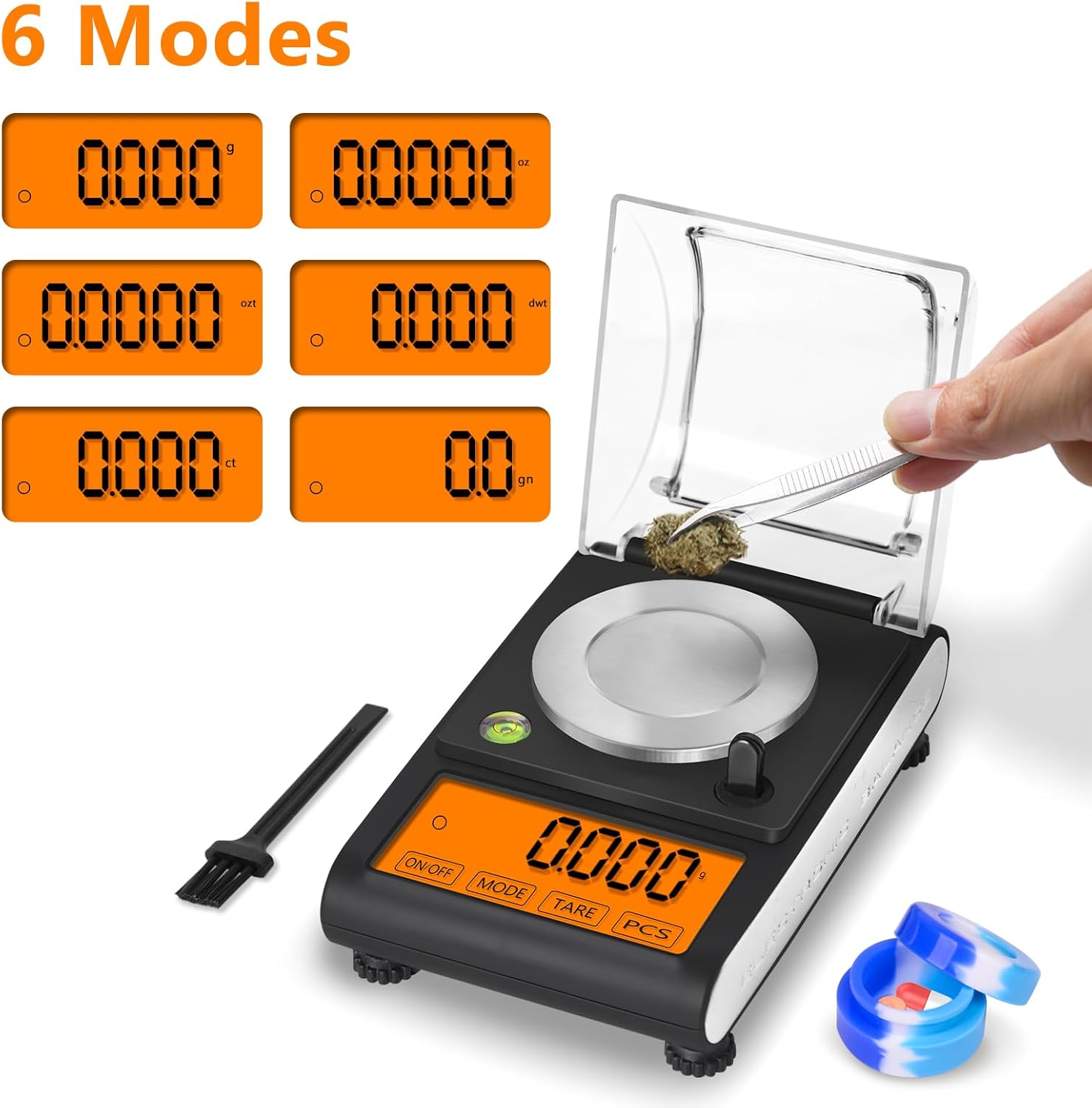
Image: Display showing the six available weighing modes.
4.3 Функцыя тары
The Tare function allows you to zero out the weight of a container or pan, so you only measure the contents.
- Пастаўце пусты кантэйнер на платформу для ўзважвання.
- Press the "TARE" button. The display will reset to zero.
- Add the items to be weighed into the container. The display will show the net weight of the items.
4.4 Counting Function (PCS)
The PCS function allows you to count the number of pieces of an item based on a sampвага.
- Размясціць якample quantity (e.g., 25, 50, 75, or 100 pieces) of the item on the platform.
- Press and hold the "PCS" button until the display shows a sample size (e.g., "25 PCS").
- Press the "MODE" button to select the correct sample size corresponding to the number of items on the platform.
- Press "PCS" again to confirm. The scale is now in counting mode.
- Add more items to the platform, and the display will show the total count.
4.5 Функцыя аўтаматычнага выключэння
To conserve battery life, the scale will automatically shut off after 180 seconds of inactivity. This duration is fixed and cannot be adjusted.

Image: Large, easy-to-read LCD display of the scale.
5. Каліброўка
Regular calibration ensures the accuracy of your scale. A 50g calibration weight is included for this purpose.
- Уключыце шалі.
- Press and hold the "MODE" button until the display shows "CAL".
- The display will then flash "50.000g". Place the 50g calibration weight precisely in the center of the weighing platform.
- Wait for the display to show "PASS" and then return to normal weighing mode. The scale is now calibrated.

Image: Step-by-step guide for easy calibration.
6. Тэхнічнае абслугоўванне
6.1 Ачыстка
Use the included small brush to gently clean any dust or residue from the weighing platform and surrounding areas. For stubborn dirt, wipe with a soft, damp тканінай. Не выкарыстоўвайце абразіўныя ачышчальныя сродкі і не апускайце шалі ў ваду.
6.2 Захоўванне
When not in use, store the scale in a dry, stable environment. The scale features a windshield design to protect the weighing mechanism from environmental factors. Keep the protective cover closed during storage.
7. Выпраўленне непаладак
If you encounter any issues with your Fuzion Milligram Scale, please try the following:
- Няправільныя паказанні: Ensure the scale is on a level, stable surface and recalibrate it using the 50g weight. Check for any obstructions under the weighing platform.
- Дысплей не ўключаецца: Verify that the batteries are correctly installed and have sufficient charge. If using USB power, ensure the cable is securely connected.
- Зменлівыя паказанні: Ensure there are no air currents (e.g., from fans, open windows) affecting the scale.
For further assistance, please contact Fuzion Support.
8. Тэхнічныя характарыстыкі
| Марка | Зрастанне |
| мадэль | TGD-50 |
| Максімальная грузападымальнасць | 50 грам |
| Minimum Readability | 0.001 г (1 мг) |
| Дакладнасць | ±0.003г |
| Адзінкі ўзважвання | g, oz, ozt, dwt, ct, gn |
| Тып дысплея | ВК |
| Матэрыял | Акрыланітрыл-бутадыен-стырол, нержавеючая сталь |
| Вага прадмета | 0.47 кілаграма |
| Памеры (прыбл.) | 5.90 цалі х 3.66 цалі х 1.38 цалі |
| Крыніца харчавання | 4 AAA Batteries or USB Cable |

Image: Approximate dimensions of the Fuzion Milligram Scale.
9. Гарантыя і падтрымка
Fuzion offers a 2-гадовая гарантыя і пажыццёвая падтрымка for this digital scale. Our dedicated Fuzion support team is available to assist with any questions or concerns you may have. Please refer to the warranty card included in your package for detailed terms and conditions, or contact Fuzion directly for support.