
1. Уводзіны
The FIREBAT X3 Wired RGB Gaming Mouse is designed for precision and comfort, suitable for various computing tasks including gaming, office work, and general use. This manual provides detailed instructions for setting up, operating, and maintaining your mouse.

Скончанаview of the FIREBAT X3 Wired RGB Gaming Mouse highlighting its main features.
2. Настройка
2.1 Падключэнне мышы
The FIREBAT X3 Gaming Mouse features a simple plug-and-play design for easy setup.
- Locate an available USB-A port on your computer or laptop.
- Insert the USB connector of the mouse into the USB-A port.
- Your operating system will automatically detect and install the necessary drivers. No additional software installation is required for basic functionality.

The FIREBAT X3 mouse connects via a standard USB-A port for immediate use.
3. Аперацыя
3.1 Функцыі кнопак
The FIREBAT X3 Gaming Mouse is equipped with 6 programmable buttons for enhanced control.
- Левая кнопка: Стандартная функцыя пстрычкі мышы.
- Правая кнопка: Стандартная функцыя правай кнопкі мышы.
- Кола пракруткі: Scrolls up and down. Can also be pressed for a middle-click function.
- DPI Adjustment Key: Змяняе адчувальнасць мышы (DPI).
- Кнопка "Наперад": Перамяшчаецца наперад web браўзэры або file даследчыкі.
- Кнопка "Назад": Пераходзіць назад у web браўзэры або file даследчыкі.

Illustration of the 6-button layout on the FIREBAT X3 Gaming Mouse.
3.2 Рэгуляванне DPI (адчувальнасці)
The mouse features 4 adjustable DPI levels to suit different tasks and preferences.
- Націсніце DPI Adjustment Key (located behind the scroll wheel) to cycle through the preset DPI settings.
- The default DPI levels are 1200, 1800, 2400, and 3600.
- Each press will switch to the next DPI level, allowing you to find the optimal sensitivity for your current activity.

The DPI adjustment key allows for quick changes in mouse sensitivity.
3.3 Рэжымы RGB-падсветкі
The FIREBAT X3 mouse features 7 dynamic RGB backlit modes to enhance your setup.
- The RGB lighting automatically cycles through its 7 distinct modes.
- There is no manual button to change the RGB mode; the mouse will continuously display various lighting effects.
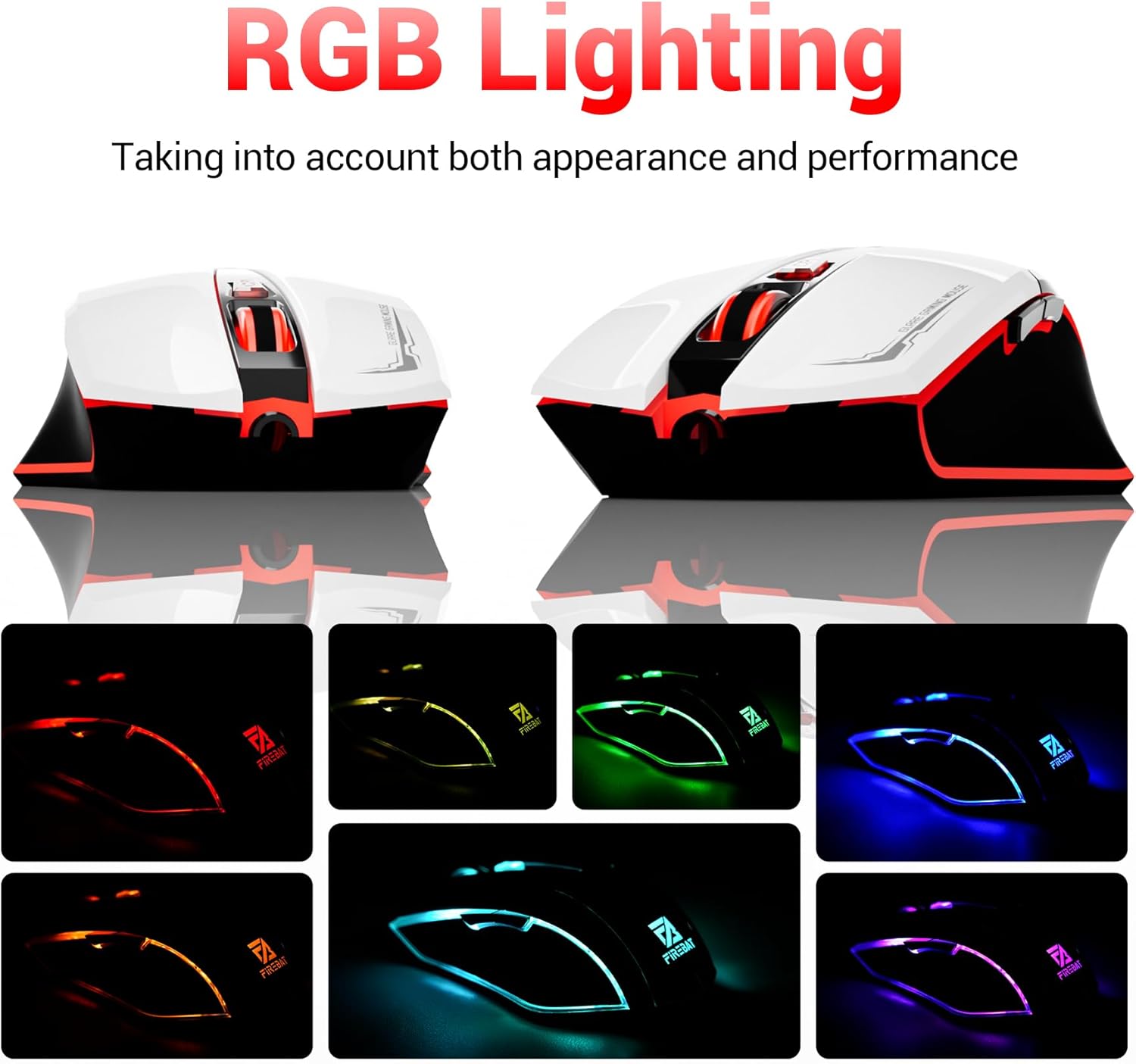
The mouse features vibrant RGB lighting with multiple dynamic modes.
3.4 Ergonomic Design and Comfort
The mouse is designed with an ergonomic shape to provide a comfortable grip and reduce hand fatigue during extended use, suitable for both right and left-hand users.

The ergonomic design ensures comfort during prolonged use.
3.5 Quiet Click Feature
The mouse incorporates a 'Heavy Bass Design' for its key sounds, ensuring soft clicks without excessive noise, which is beneficial in quiet environments.

The mouse features quiet clicks, minimizing noise during use.
4. Тэхнічнае абслугоўванне
4.1 Ачыстка
To ensure optimal performance and longevity, keep your mouse clean.
- Адключыце мыш ад кампутара перад чысткай.
- Выкарыстоўвайце мяккую тканіну без ворса. dampпрамыйце паверхню мышы вадой або мяккім ачышчальным растворам.
- Пазбягайце выкарыстання агрэсіўных хімікатаў, абразіўных ачышчальнікаў або празмернай вільгаці, бо яны могуць пашкодзіць мыш.
- For the optical sensor, use a cotton swab to gently remove any dust or debris.
4.2 Захоўванне
Калі мыш не выкарыстоўваецца, захоўвайце яе ў чыстым, сухім месцы, удалечыні ад экстрэмальных тэмператур і прамых сонечных прамянёў.
5. Выпраўленне непаладак
5.1 Мыш не рэагуе
- Праверце падключэнне USB: Пераканайцеся, што кабель USB надзейна падключаны да спраўнага порта USB на вашым камп'ютары. Паспрабуйце іншы порт USB.
- Перазагрузіце кампутар: Часам просты перазапуск можа вырашыць праблемы з падключэннем.
- Тэст на іншым кампутары: If possible, test the mouse on another computer to determine if the issue is with the mouse or your computer's setup.
5.2 Рух курсора няўстойлівы або скачковы
- Clean Optical Sensor: Dust or debris on the optical sensor can cause erratic movement. Refer to the cleaning instructions in the Maintenance section.
- Use a Mouse Pad: Ensure you are using the mouse on a suitable surface. Reflective, transparent, or uneven surfaces can interfere with the optical sensor.
5.3 RGB-падсветка не працуе
- Праверце харчаванне USB: Ensure the mouse is receiving sufficient power through the USB connection.
- Няма ручнога кіравання: Remember that the RGB lighting cycles automatically and does not have a manual control button. If the mouse is functioning otherwise, the lighting should be active.
6. Тэхнічныя характарыстыкі
| Асаблівасць | Дэталь |
|---|---|
| Нумар мадэлі | X3 Gaming Mouse |
| Марка | ВОГНЕНЫ БАТ |
| Тэхналогія падлучэння | Правадной USB |
| Выяўленне руху | Аптычны |
| Ўзроўні DPI | 1200/1800/2400/3600 |
| Колькасць кнопак | 6 (праграмуемых) |
| Падсвятленне | 7 рэжымаў RGB |
| Памеры прадукту | 5 х 3 х 0.1 цалі (12.7 х 7.6 х 0.25 см) |
| Вага прадмета | 5.1 унцыі (144.6 грам) |
| Эрганоміка | Right or Left Hand Use |
| Вытворца | ВОГНЕНЫ БАТ |
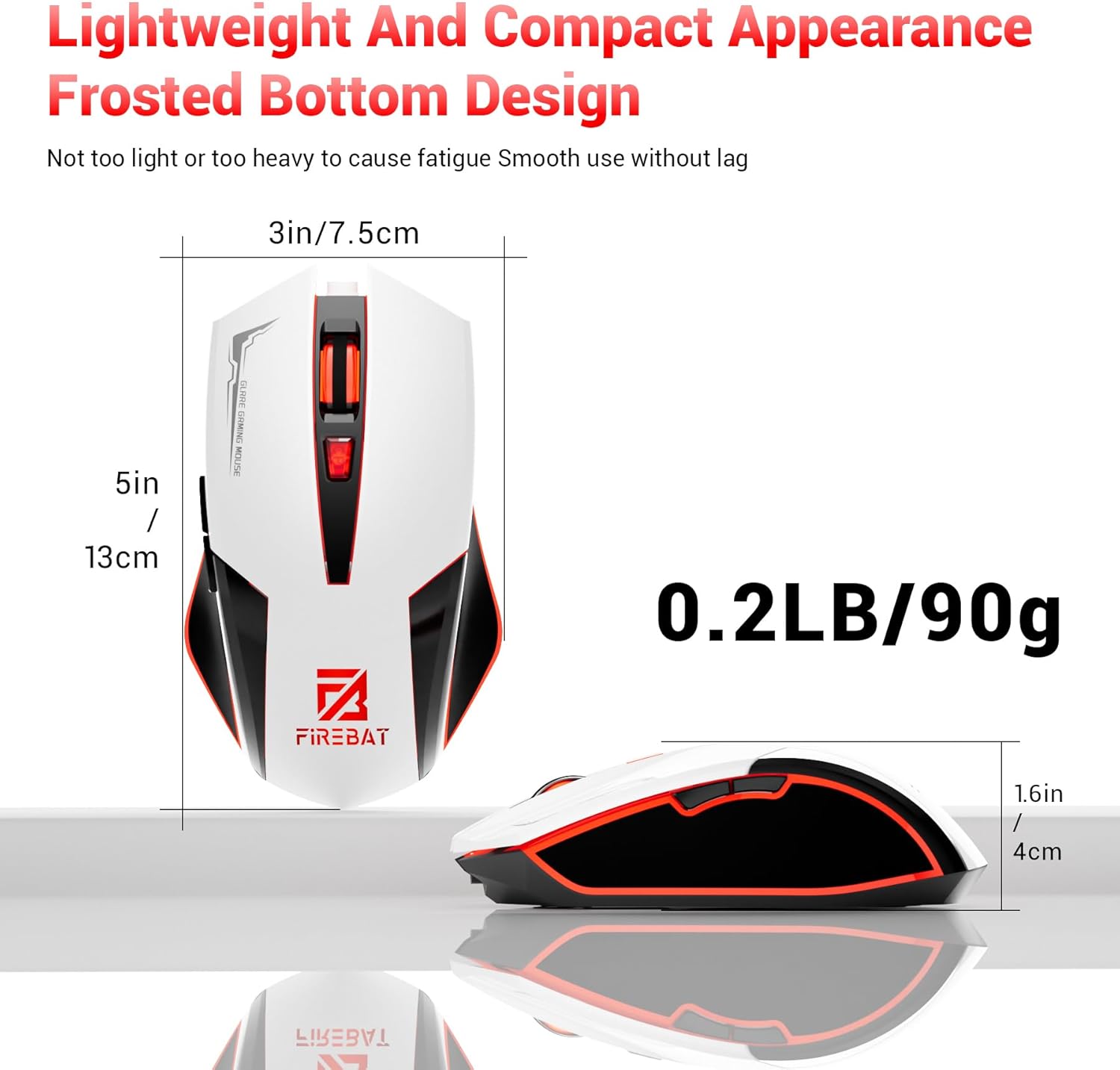
Physical dimensions and weight of the FIREBAT X3 Gaming Mouse.
7. Гарантыя і падтрымка
7.1 Інфармацыя аб гарантыі
FIREBAT products are manufactured to high-quality standards. For specific warranty details, please refer to the warranty card included with your product or visit the official FIREBAT website. Typically, products come with a limited warranty covering manufacturing defects.
7.2 Падтрымка кліентаў
If you encounter any issues or have questions regarding your FIREBAT X3 Gaming Mouse, please contact our customer support team:
- электронная пошта: support@firebatpc.com
- Webсайт: www.firebatpc.com
Please provide your product model number (X3 Gaming Mouse) and a detailed description of your issue when contacting support for faster assistance.