
Уводзіны
Thank you for choosing the Fisher SBX696 Portable Bluetooth Speaker. This manual provides essential information for setting up, operating, and maintaining your speaker to ensure optimal performance and longevity. Please read this manual thoroughly before using the product and retain it for future reference.
Інфармацыя па бяспецы
- Не падвяргайце дынамік уздзеянню экстрэмальных тэмператур, прамых сонечных прамянёў або высокай вільготнасці.
- Пазбягайце падзення дынаміка і не падвяргайце яго моцным ударам.
- Do not disassemble, repair, or modify the unit yourself. Contact qualified service personnel for any repairs.
- Трымайце дынамік далей ад вады і іншых вадкасцей. Гэты выраб не з'яўляецца воданепранікальным.
- Выкарыстоўвайце толькі зарадны кабель, які ўваходзіць у камплект, або яго сертыфікаваны эквівалент.
- Забяспечце належную вентыляцыю вакол дынаміка падчас выкарыстання.
Што ў скрынцы
- Fisher SBX696 Portable Bluetooth Speaker
- Зарадны кабель
- Кіраўніцтва карыстальніка
- Гарантыйны талон
Прадукт скончаныview
The Fisher SBX696 is a portable Bluetooth speaker designed for versatile audio playback. It features dual 6.5-inch drivers, RGB lighting, and multiple connectivity options.
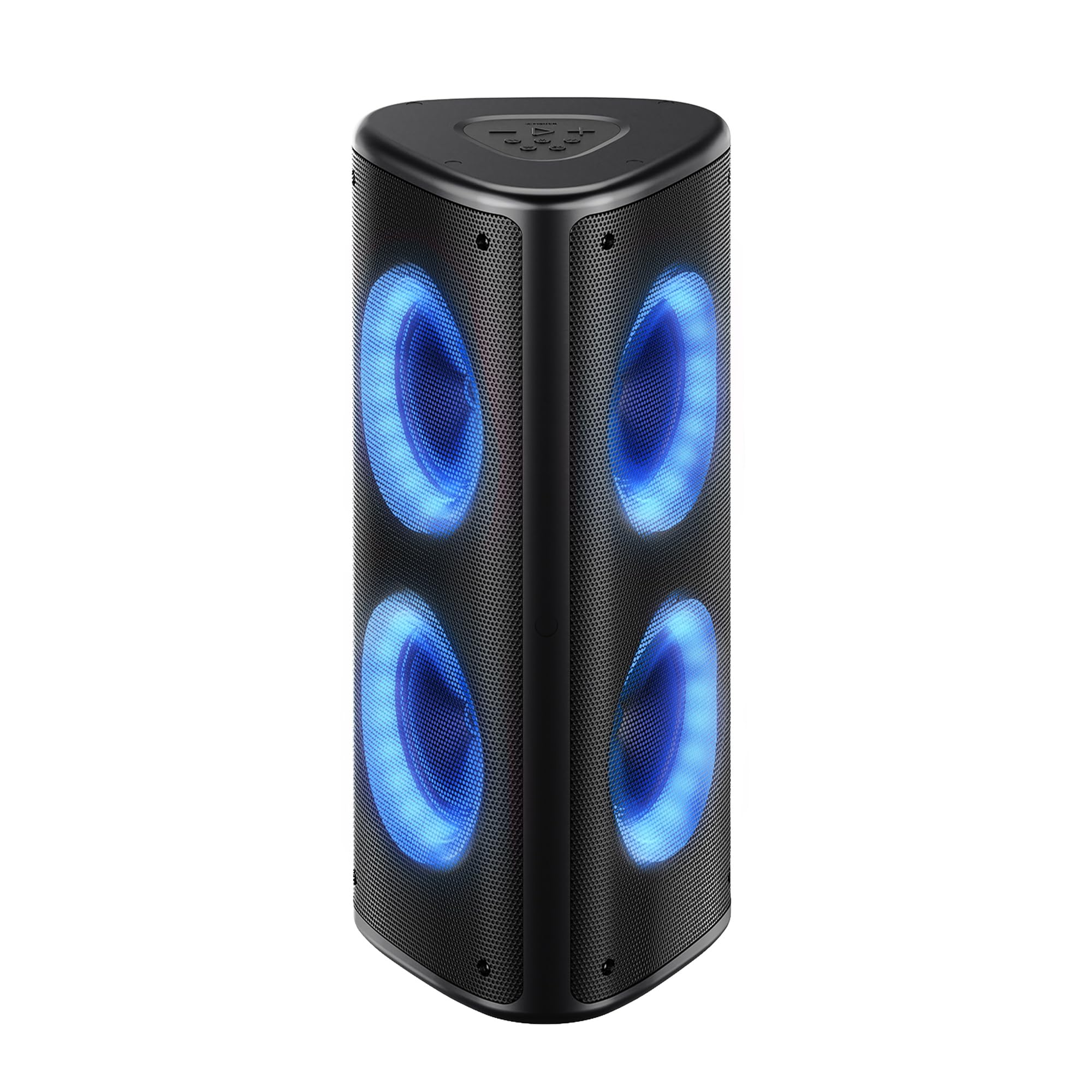
Малюнак 1: Спераду view of the Fisher SBX696 Portable Bluetooth Speaker, showcasing its triangular design and illuminated speaker cones.
Панэль кіравання
The main controls are located on the top panel of the speaker. The rear panel houses various input/output ports.

Малюнак 2: падрабязна view of the top control panel and rear input/output ports, including USB, TF Card, AUX, and Mic inputs.
- Кнопка прайгравання/паўзы: Кароткае націсканне для прайгравання або прыпынення аўдыё.
- Памяншэнне гучнасці (-): Кароткі націск, каб паменшыць гучнасць.
- Павялічыць гучнасць (+): Кароткае націск, каб павялічыць гучнасць.
- Папярэдні трэк: Доўгі націск, каб перайсці да папярэдняга трэка.
- Наступны трэк: Доўгі націск, каб перайсці да наступнага трэка.
- Кнопка рэжыму (M): Short press to switch between Bluetooth, USB, TF Card, AUX, and FM Radio modes.
- Кнопка рэжыму святла: Short press to cycle through 6 dynamic RGB light modes. Long press to turn lights off/on.
- Кнопка эквалайзера (EQ): Short press to switch between different equalizer presets (Bass, Treble, Normal).
- Выключальнік харчавання (УКЛ./ВЫКЛ.): Размешчаны на задняй панэлі.
- Порт USB: Для прайгравання з USB-флэшкі.
- Порт DC 5V: Для зарадкі калонкі.
- Слот TF карты: For TF (Micro SD) card playback.
- Уваход AUX: Для падлучэння знешніх аўдыёпрылад праз аўдыёкабель 3.5 мм.
- Мікрафонны ўваход: Для падлучэння мікрафона.
Настройка
Зарадка дынаміка
- Connect the provided USB-C charging cable to the DC 5V port on the speaker.
- Падключыце другі канец кабеля да адаптара харчавання USB (не ўваходзіць у камплект) або да USB-порта кампутара.
- The battery indicator will show charging status. A full charge typically takes 8-10 hours.
Note: For optimal battery life, fully charge the speaker before first use.
Уключэнне/выключэнне
- To power on, slide the ON/OFF switch on the rear panel to the "ON" position.
- To power off, slide the ON/OFF switch to the "OFF" position.
Інструкцыя па эксплуатацыі
рэжым Bluetooth
- Уключыце дынамік. Ён аўтаматычна пяройдзе ў рэжым спалучэння Bluetooth, пра што будзе сведчыць мігценне святлодыёда.
- Enable Bluetooth on your device (smartphone, tablet, etc.) and search for "SBX696".
- Select "SBX696" from the list of available devices to pair. A confirmation tone will sound upon successful connection.
- Цяпер вы можаце прайграваць аўдыё з прылады праз дынамік.
Note: The speaker has a wireless range of up to 33 feet (10 meters).
Функцыя True Wireless Stereo (TWS)
TWS allows you to pair two SBX696 speakers together for a wider, richer stereo sound experience.

Figure 3: Illustration of two SBX696 speakers connected wirelessly via True Wireless Stereo (TWS) to a single device for enhanced sound.
- Ensure both SBX696 speakers are powered on and in Bluetooth mode, but not yet paired with any device.
- На адным дынаміку (гэта будзе асноўны дынамік) доўга націсніце кнопку «M» (рэжым), пакуль не пачуеце гук спалучэння.
- Два дынамікі аўтаматычна падключацца адзін да аднаго. Пасля падключэння прагучыць гукавое пацверджанне.
- Цяпер падключыце прыладу да асноўнага дынаміка праз Bluetooth, як апісана ў раздзеле «Рэжым Bluetooth».
- To cancel TWS, long press the "M" button on either speaker.
Прайграванне карты USB/TF
- Устаўце флэш-назапашвальнік USB або карту TF (Micro SD), якая змяшчае аўдыё ў фармаце MP3 files into the corresponding port on the rear panel.
- The speaker will automatically switch to USB or TF Card mode and begin playback. If not, short press the "M" button to select the correct mode.
- Для кіравання прайграваннем выкарыстоўвайце кнопкі «Прайграць/Паўза», «Папярэдні» і «Наступны».
Рэжым уваходу AUX
- Connect an external audio device (e.g., MP3 player, TV) to the AUX input port on the rear panel using a 3.5mm audio cable (not included).
- Short press the "M" button to switch to AUX mode.
- Кіруйце прайграваннем з падлучанай прылады.
Рэжым FM-радыё
- Short press the "M" button to switch to FM Radio mode.
- Long press the Play/Pause button to automatically scan and save available FM stations.
- Для пераключэння паміж захаванымі станцыямі выкарыстоўвайце кнопкі «Папярэдняя» і «Наступная».
Мікрафонны ўваход
- Connect a microphone (not included) to the MIC input port on the rear panel.
- Адрэгулюйце гучнасць мікрафона з дапамогай элементаў кіравання падлучанага мікрафона або асноўнай гучнасці дынаміка.
RGB асвятленне

Figure 4: The Fisher SBX696 speaker showcasing its 6 dynamic RGB light modes, adding visual flair to the audio experience.
- Short press the Light Mode button to cycle through the 6 dynamic RGB light modes.
- Long press the Light Mode button to turn the lights off or on.
Тэхнічнае абслугоўванне
- Уборка: Выкарыстоўвайце мяккую сухую тканіну для чысткі вонкавага боку дынаміка. Не выкарыстоўвайце абразіўныя ачышчальнікі або растваральнікі.
- захоўванне: Калі дынамік не выкарыстоўваецца працяглы час, захоўвайце яго ў прахалодным, сухім месцы, удалечыні ад прамых сонечных прамянёў і экстрэмальных тэмператур.
- Сыход за батарэяй: Каб падоўжыць тэрмін службы батарэі, пазбягайце частай поўнай разрадкі батарэі. Рэгулярна зараджайце дынамік, нават калі ён не выкарыстоўваецца.
Ліквідацыю непаладак
| праблема | Магчымая прычына | Рашэнне |
|---|---|---|
| Дынамік не ўключаецца. | Low battery; Power switch is OFF. | Charge the speaker; Slide the power switch to "ON". |
| Немагчыма падключыцца праз Bluetooth. | Speaker is not in pairing mode; Device Bluetooth is off; Speaker is already connected to another device. | Ensure speaker is in Bluetooth mode (flashing LED); Turn on device Bluetooth; Disconnect from other devices. |
| Няма гуку з USB/TF-карты. | Incorrect mode selected; Corrupt files; Карта/дыск няправільна ўстаўлены. | Press "M" button to select correct mode; Ensure files are MP3 format; Reinsert card/drive. |
| Памылка спалучэння TWS. | Дынамікі занадта далёка адзін ад аднаго; адзін дынамік ужо падключаны да прылады. | Ensure speakers are close; Disconnect any Bluetooth devices from both speakers before TWS pairing. |
| Якасць гуку дрэнная. | Low battery; Device volume too low/high; EQ setting. | Charge speaker; Adjust device volume; Cycle through EQ settings. |
Тэхнічныя характарыстыкі
| Асаблівасць | Дэталь |
|---|---|
| Нумар мадэлі | SBX696 |
| Выходная магутнасць дынаміка | 80W Peak (Dual 40W drivers) |
| Памер дынаміка | 6.5 цалі (дыяметр нізкачастотнага дынаміка) |
| Тэхналогія падлучэння | Bluetooth 5.3, USB, AUX, TF Card, FM Radio, Mic Input |
| Дыяпазон Bluetooth | Да 33 футаў (10 метраў) |
| Ёмістасць батарэі | 6000 мАг |
| Сярэдні тэрмін службы батарэі | Up to 5-6 hours (at 50% volume) |
| Час зарадкі | 8-10 гадзін |
| АЧХ | 20 Гц - 20 кГц |
| Рэжым выхаду гуку | Стэрэа |
| Дадатковыя магчымасці | 6 RGB Light Modes, TWS Function, Built-in Carrying Handle |
| Памеры прадмета (Д х Ш х У) | 10.24" Г x 10.94" Ш x 24.25" У |
| Вага | Прыкладна 13.23 фунта |
| Колер | Чорны |
Гарантыя і падтрымка
The Fisher SBX696 Portable Bluetooth Speaker comes with a limited warranty. Please refer to the included Warranty Card for detailed terms and conditions. For technical support, troubleshooting assistance, or warranty claims, please contact Fisher customer service.
Contact information can typically be found on the product packaging, the official Fisher webсайт або гарантыйны талон.