
1. Уводзіны
This manual provides essential instructions for setting up, operating, maintaining, and troubleshooting your FUNYET 2-in-1 Laptop, Model FUN01-05. This device features a 14.1-inch Full HD touchscreen, an Intel Core i7-1265U processor, 16GB RAM, and a 512GB SSD, running Windows 11 Pro. Its 360-degree reversible screen allows for versatile usage modes.
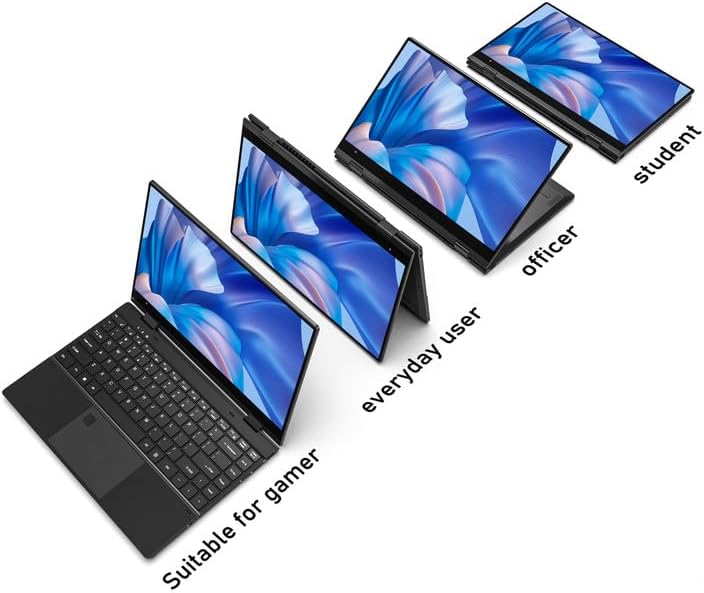
Figure 1: FUNYET 2-in-1 Laptop showcasing its versatile modes.
2. Змесціва ўпакоўкі
Праверце наяўнасць усіх прадметаў у камплекце:
- FUNYET 2-in-1 Touch Screen Laptop
- Адаптар пераменнага току
- Гарантыйны талон
- Інструкцыі (гэтае кіраўніцтва)
3. Настройка
3.1 Пачатковая зарадка і ўключэнне
- Connect the AC adapter to the DC-IN port on the laptop and plug it into a power outlet.
- Allow the laptop to charge for at least 30 minutes before initial use.
- Press and hold the Power Button (located on the side) until the screen illuminates.
3.2 Усталёўка Windows 11 Pro
Follow the on-screen prompts to complete the Windows 11 Pro initial setup. This includes selecting your region, language, connecting to a Wi-Fi network, and creating a user account.
3.3 Налада счытвальніка адбіткаў пальцаў
For enhanced security and quick access, set up the fingerprint reader:
- Перайдзіце ў раздзел «Налады Windows» > «Уліковыя запісы» > «Параметры ўваходу».
- Under "Windows Hello Fingerprint," click "Set up" and follow the instructions to register your fingerprint.

Figure 2: Backlit keyboard and integrated fingerprint reader.
4. Інструкцыя па эксплуатацыі
4.1 Кіраванне харчаваннем
- Уключэнне: Націсніце кнопку харчавання.
- Рэжым сну: Briefly press the Power Button or close the lid.
- Выключыць: Перайдзіце ў меню «Пуск» > «Харчаванне» > «Выключыць сістэму».
- Перазапуск: Перайдзіце ў меню «Пуск» > «Харчаванне» > «Перазагрузка».
4.2 Рэжымы 2 у 1
The laptop's 360-degree hinge allows for four primary modes:
- Рэжым наўтбука: Стандартная канфігурацыя ноўтбука для набору тэксту і прадукцыйнасці.
- Рэжым падстаўкі: Fold the keyboard back to prop up the screen for viewзмесціва.
- Рэжым намёта: Position the laptop in an inverted 'V' shape, ideal for touch interaction or presentations in confined spaces.
- Рэжым планшэта: Fold the screen completely back against the base for a tablet experience.

Figure 3: Different operational modes of the 2-in-1 laptop.
4.3 Touchscreen and Keyboard
- Сэнсарны экран: Use gestures similar to a smartphone or tablet for navigation and interaction.
- Клавіятура з падсветкай: The keyboard features a backlight for use in low-light conditions. The backlight can typically be toggled or adjusted using function keys (e.g., Fn + F5).
4.4 Падключэнне
Ваш ноўтбук падтрымлівае розныя варыянты падключэння:
- Wi-Fi 6: For high-speed wireless internet access. Connect via Windows Settings > Network & Internet > Wi-Fi.
- Bluetooth 5.2: For connecting wireless peripherals like headphones, mice, or keyboards. Pair devices via Windows Settings > Bluetooth & devices.
- парты: The laptop includes various ports for external devices.

Figure 4: Laptop ports and their functions.
Даступныя парты:
- DC-IN (уваходнае сілкаванне)
- USB 3.1 Type-C (Video Output, Data Transfer, Charging)
- Audio Port (Headphones/Microphone)
- Кнопка харчавання
- TF Card Slot (for storage expansion up to 1TB)
- USB 3.1 тыпу A
5. Тэхнічнае абслугоўванне
5.1 Ачыстка
- Выкарыстоўвайце мяккую тканіну без ворса для чысткі экрана і вонкавых паверхняў.
- Для ўстойлівых плям, dampзлёгку прамакніце тканіну вадой або сродкам для ачысткі экранаў.
- Avoid harsh chemicals, abrasives, or excessive moisture.
5.2 Сыход за акумулятарам
- Каб максімальна падоўжыць тэрмін службы акумулятара, пазбягайце частай поўнай разрадкі акумулятара.
- Захоўвайце ноўтбук у прахалодным, сухім месцы, калі ён не выкарыстоўваецца працяглы час.
- The laptop features a 38 Watt-hour Lithium-Ion battery, providing up to 8 hours of usage.
5.3 Тэрмічнае кіраванне
The laptop is designed with an improved thermal system to maintain optimal operating temperatures. Ensure proper airflow by not blocking the ventilation openings, especially during intensive tasks.

Figure 5: Laptop thermal design for efficient cooling.
6. Выпраўленне непаладак
Калі ў вас узніклі праблемы, паспрабуйце выканаць наступныя асноўныя дзеянні па ліквідацыі непаладак:
- Няма харчавання: Пераканайцеся, што адаптар пераменнага току надзейна падключаны як да ноўтбука, так і да спраўнай разеткі. Паспрабуйце іншую разетку.
- Экран не адлюстроўваецца: Connect an external monitor to check if the issue is with the laptop's display. Restart the laptop.
- Нізкая прадукцыйнасць: Закрыйце непатрэбныя праграмы. Праверце наяўнасць абнаўленняў Windows. Забяспечце дастаткова вольнага месца для захоўвання.
- Праблемы з Wi-Fi/Bluetooth: Toggle Wi-Fi/Bluetooth off and on in Windows Settings. Restart the laptop. Check router/device connections.
- Збоі ў дысплеі: Ensure your Windows operating system and graphics drivers are up to date. This can often resolve display anomalies.
- Сэнсарны экран не рэагуе: Перазагрузіце ноўтбук. Пераканайцеся, што экран чысты і без смецця.
Калі праблемы не знікнуць, звярніцеся ў раздзел падтрымкі або ў службу падтрымкі кліентаў.
7. Тэхнічныя характарыстыкі
| Асаблівасць | Дэталь |
|---|---|
| Марка | ФУНЬЕТ |
| Назва мадэлі | Magbook |
| Нумар мадэлі | FUN01-05 |
| Памер экрана | 14.1 цалі |
| Дазвол дысплея | 1920 x 1080 пікселяў (FHD) |
| Тып дысплея | LCD, Touchscreen, Glossy Finish |
| Працэсар | Intel Core i7-1265U (up to 4.8 GHz, 8 Cores, 12 Threads) |
| АЗП | 16 ГБ DDR4 (3733 МГц) |
| Захоўванне | 512 GB SSD (PCIE x 4), expandable up to 1TB with TF card |
| Аперацыйная сістэма | Windows 11 Pro |
| Графіка | Убудаваная графіка Intel Iris Xe |
| Бесправоднае падключэнне | Wi-Fi 6, Bluetooth 5.2 |
| Парты | USB 3.1 Type-A, USB 3.1 Type-C, DC-IN, Audio Jack, TF Card Slot |
| Камера | Front 2 MP |
| Бяспека | Распазнаванне адбіткаў пальцаў |
| акумулятар | 38 Watt Hours Lithium Ion (up to 8 hours) |
| Вага | 3 фунта |
| Памеры (Д х Ш х Г) | 12.7" x 8.6" x 0.6" |
8. Гарантыя і падтрымка
8.1 Інфармацыя аб гарантыі
Your FUNYET 2-in-1 Laptop comes with a 2-гадовая абмежаваная гарантыяГэтая гарантыя распаўсюджваецца на вытворчыя дэфекты і няспраўнасці абсталявання пры нармальным выкарыстанні. Калі ласка, захавайце пацвярджэнне пакупкі для прэтэнзій па гарантыі.
Акрамя таго, а 180-дзённая палітыка бясплатнага вяртання прапануецца з даты пакупкі.
8.2 Падтрымка кліентаў
For technical assistance, warranty claims, or any product-related inquiries, please contact FUNYET customer support:
- Падтрымка па тэлефоне: +1 800-986-9631 (English phone support available)
- Інтэрнэт-падтрымка: 24/7 instant online support is available. Please visit the official FUNYET webсайт для кантактных дадзеных.