
1. Прадукт скончыўсяview
This manual provides essential information for the safe and efficient operation of your Sunster 8KW Portable Diesel Heater. This 12V/24V diesel air heater features an upgraded design with AC 110-240V power adapter, turbo heat, ventilation mode, automatic start/stop, and APP control, suitable for various applications including vans, RVs, trucks, and campERS.

Figure 1: Sunster 8KW Portable Diesel Heater with accessories.
2. Інфармацыя па бяспецы
Read all safety warnings and instructions carefully before use. Failure to follow these instructions may result in fire, electric shock, or serious injury.
- Ensure proper ventilation when operating the heater to prevent carbon monoxide buildup.
- Не блакуйце паветразаборныя або вентыляцыйныя адтуліны.
- Трымайце лёгкаўзгаральныя матэрыялы на бяспечнай адлегласці ад абагравальніка.
- Always use the specified fuel type (diesel).
- Пераканайцеся, што ўсе злучэнні надзейныя і не маюць уцечак.
- Do not operate the heater in enclosed, unventilated spaces.
- This heater is equipped with multiple safety protection functions, including overheating, short circuit, reverse connection, and overvoltagэлектронная абарона.
3. Змесціва ўпакоўкі
Verify that all items are present after unpacking:
- Diesel heater (with LCD control panel)
- Дыстанцыйны выключальнік
- AC power supply (110-240V)
- Installation Accessories (including exhaust pipe, intake pipe, air filter, silencer, clamps, screws, battery power cord, foot stand, fixed plate)
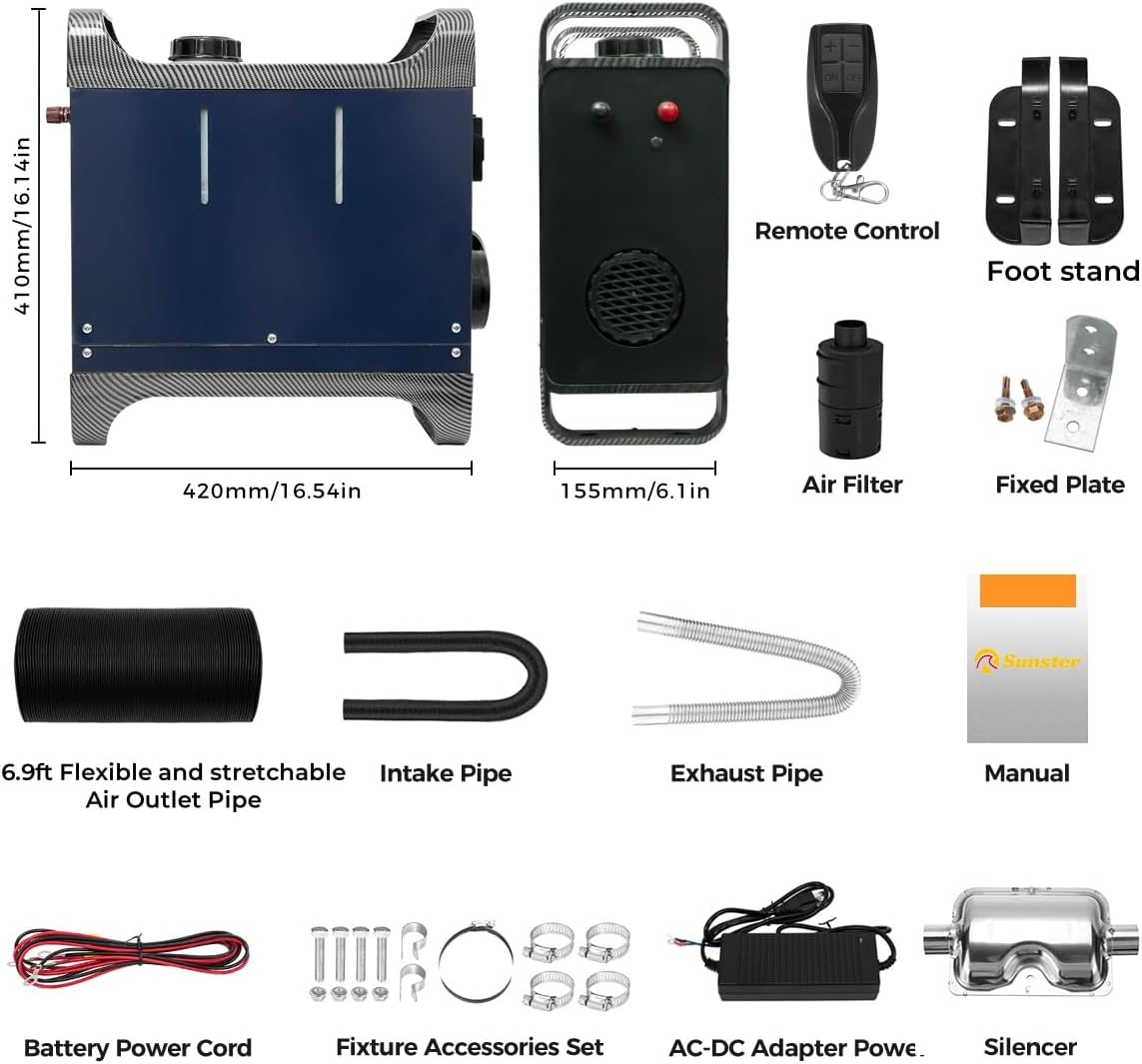
Figure 2: Included components and accessories.
4. Асаблівасці прадукту
- Upgraded Smart Panel: Provides constant temperature control (Automatic Start&Stop), timing function, ventilation mode, and turbo heat mode.
- Кіраванне праграмай Bluetooth: Adjust settings, create heating plans, and monitor performance via the 'Sunster' app.
- Двайны блок харчавання: Equipped with 12/24V DC and 110-240V AC wiring options for vehicle and household use.
- Функцыя вентыляцыі: Circulates air when not heating, useful in warmer conditions.
- Аўтаматычны запуск/прыпынак: Shuts off when the set temperature is reached and reactivates when the temperature drops, ensuring consistent heat and energy efficiency.
- Double Noise Reduction: Features a silent fan and upgraded silent oil pump for quiet operation.
- Абарона бяспекі: Includes overheating, short circuit, reverse connection, and overvoltagэлектронная абарона.

Figure 3: Intelligent LCD Panel and Remote Control.

Figure 4: Dual Power Supply Coverage for versatile use.
5. Тэхнічныя характарыстыкі
| Асаблівасць | Спецыфікацыя |
|---|---|
| Марка | Санстэр |
| мадэль | 8KW Portable Diesel Heater |
| Ватtage | 8 кВт |
| Тып паліва | Дызель |
| Электразабеспячэнне | 12 В/24 В пастаяннага току, 110–240 В пераменнага току |
| Налада мінімальнай тэмпературы | 8 градусы па Цэльсіі |
| Налада максімальнай тэмпературы | 36 градусы па Цэльсіі |
| Колькасць хуткасцяў | 10 |
| Вага прадмета | 21.4 фунта |
| Памеры ўпакоўкі | 20 х 19.5 х 9 цалі |
| Асаблівасці | Auto Climate Control, Automatic Start & Stop, Bluetooth APP Function, Turbo Heat Mode, Ventilation Function |
6. Настройка і ўстаноўка
Follow these steps for proper setup and installation of your diesel heater. Refer to the installation video for visual guidance.
- Распакаванне: Verify all accessories are complete as per the package contents list.
- Attach Bottom Supports: Align the bottom corner supports with the holes on both sides of the machine's base. Use a soft hammer to gently tap them into place.
- Падрыхтуйце мантажную паверхню: Measure the distance between the intake and exhaust pipe ports on the heater. Mark and drill corresponding holes on your mounting surface (e.g., floor of a vehicle, workbench).
- Connect Exhaust and Intake Pipes:
- Straighten the flexible exhaust pipe.
- Змесціце склamp on one end of the exhaust pipe and screw it into the bottom-left interface of the heater. Tighten the clamp надзейна.
- Take out the intake pipe, place a clamp on one end, and screw it into the bottom-right interface. Tighten the clamp.
- Insert both pipes through the drilled holes in your mounting surface.
- Бяспечны абагравальнік: Mark the positions for the bottom corner holes on the mounting surface. Drill pilot holes and secure the heater using the provided screws and nuts.
- Install Air Filter: Змесціце склamp on one end of the intake pipe. Screw the air filter onto the intake pipe and tighten the clamp. Use a fixing plate on the intake pipe sleeve and secure it with screws in the desired position.
- Install Silencer: Змесціце склamp on one end of the exhaust pipe. Screw the silencer onto the exhaust pipe and tighten the clamp. Attach the fixing screw and right-angle fixing plate to the silencer and secure it.
- Heating Duct Installation: Open the heating duct. Place a clamp at the duct interface and install it at the air outlet interface of the heater. Tighten the clamp to fix the heating duct.
- Падключэнне сілкавання:
- Remove the machine terminal position cover.
- For AC power: Connect the AC power adapter to the heater's power input and then to a 110-240V AC outlet.
- For DC power: Place the red (positive) and black (negative) copper rings of the battery power cord into the corresponding terminals on the heater and tighten them. Connect the other end to your 12V or 24V battery, ensuring correct polarity.
Video 1: Sunster Diesel Heater Installation Operation. This video demonstrates the step-by-step process of assembling and installing the diesel heater, including connecting pipes, mounting, and power connections.
Important: Flammable objects in contact with the exhaust pipe need to be filled with thermal insulation material. The exhaust pipe should be kept straight and not tilted upward to ensure smooth exhaust.
7. Кіраўніцтва па эксплуатацыі
Your Sunster diesel heater can be controlled via the LCD panel, remote control, or Bluetooth APP. This section details the functions of the LCD control panel.
Video 2: 2302B LCD Switch Operation. This video provides a detailed walkthrough of the LCD control panel's functions, including power, gear adjustment, numerical settings, and various modes.
7.1 Уключэнне/выключэнне сілкавання
- Каб уключыць: In shutdown state, press the [ON/OFF] button on the remote or the red button on the LCD panel.
- Каб выключыць: In power-on state, press the [ON/OFF] button on the remote or the red button on the LCD panel.
7.2 Gear Adjustment (Mode Switching)
In power-on state, press the [knob] on the LCD panel to switch between modes:
- Рэжым кантролю тэмпературы: Adjusts heating based on a set temperature.
- Рэжым пастаяннай тэмпературы: Maintains a consistent temperature.
- Рэжым перадач: Adjusts heating power by gear level.
7.3 Numerical Adjustment
In power-on state, rotate the [knob] to adjust values:
- Rotate clockwise to increase gear/temperature (+1), up to 10 gears / 36°C.
- Rotate counterclockwise to decrease gear/temperature (-1), minimum to 1 gear / 8°C.
7.4 Basic Settings (Base Model)
In power-on state, long press the [ON/OFF] button for 3 seconds to enter the basic settings interface. The upper left corner shows setting items (F0-FC). Rotate the [knob] to navigate and adjust settings. Press the [knob] again to confirm modification.
| Элемент налады | Апісанне | Adjustment Range/Options |
|---|---|---|
| F0 | Бягучы час | Рэгуляваны |
| F1 | Час запуску | 30 minutes is 1 unit, 0-10 hours |
| F2 | Running Time (After starting) | 30 minutes is 1 unit, 0-10 hours |
| F3 | Self-starting Switch Settings | ON (open) / OFF (closed) |
| F4 | Пераключальнік мовы | Chinese/English/Russian/Voice off |
| F5 | Тэмпературная кампенсацыя | -9 ~ 9 °C |
| F6 | Аб'ём паліўнага бака | 5L is 1 unit, 5-50L |
| F7 | Тып алейнага помпы | Adjustable (e.g., 16U, 22U, 32U) |
| F8 | Constant Temperature Heating | ON (open) / OFF (closed) |
| F9 | Temperature Switching Unit | ° F / ° C |
| FA | Яркасць экрана | 5-100 |
| FB | Full Tank (Reset) | Long press [knob] to reset after prompt tone. |
| FC | CO Numerical Detection | Press [knob] twice to check CO value. |
7.5 Engineering Mode
In power-on state, long press the [knob] for 5 seconds to enter the engineering mode. The upper right corner shows the current project (E0-E9). Rotate the [knob] to adjust the item to view дадзеныя.
- E0: Heater main board version number
- E1: Fault code
- E2: Shell temperature
- E3: Supply voltage
- E4: Heater running gear
- E5: Cab temperature
- E6: Altitude
- E8: Remote control matching
- E9: Bluetooth matching
7.6 Падбор пульта дыстанцыйнага кіравання
- In shutdown state, press the [knob] three times in a row. The screen will display 'P-1'.
- Press any button on the remote control. If the match is successful, the interface will automatically exit. The remote can now operate the heater.
- To clear matching data: Please press and hold the [ON/OFF] button when powered on. Wait for the interface to show that 'CLr' becomes 'SUC'.
7.7 Manual Fuel Pumping
Long press the [knob] for 5 seconds when powered on and turned off for the first time. The screen flashes and shows a 300-second countdown. Wait for the countdown to end or press [ON/OFF] to end pumping oil.
7.8 Злучэнне Bluetooth
- Open your mobile device's APP Store and search for 'Sunster' (or 'airHeaterByBLE' if 'Sunster' is not found). Download and install the app.
- In power-on state, long press the [knob] for 5 seconds to enter the engineering mode. Adjust to 'En09' to view the Bluetooth code.
- Open the mobile APP and turn on Bluetooth on your device.
- Пошук Bluetooth devices within the app and connect to your heater.
- Once connected, the heater can be operated through the mobile APP.
8. Тэхнічнае абслугоўванне
Regular maintenance ensures optimal performance and longevity of your diesel heater.
- Уборка: Перыядычна чысціце знешнія паверхні абагравальніка мяккай губкайamp тканінай. Сачыце за тым, каб вада не трапляла ўнутраныя кампаненты.
- Паветраны фільтр: Рэгулярна правярайце і чысціце паветраны фільтр. Замяняйце яго, калі ён моцна забруджаны або пашкоджаны.
- Паліўная сістэма: Use clean, high-quality diesel fuel. Avoid using contaminated fuel, which can lead to blockages and damage.
- Выхлапная сістэма: Inspect the exhaust pipe and silencer for any blockages, damage, or leaks. Ensure the exhaust path is clear.
- Электрычныя злучэнні: Перыядычна правярайце ўсе электрычныя злучэнні на наяўнасць герметычнасці і прыкмет карозіі.
9. Выпраўленне непаладак
Калі ў вас узніклі праблемы з абагравальнікам, звярніцеся да наступных распаўсюджаных крокаў па ліквідацыі непаладак:
| праблема | Магчымая прычына | Рашэнне |
|---|---|---|
| Абагравальнік не запускаецца | No power, low fuel, clogged fuel line, faulty glow plug | Check power connections, refill fuel, inspect/clean fuel line, consult service for glow plug replacement |
| Няма цеплааддачы | Incorrect mode, low fan speed, air intake/exhaust blocked | Verify operating mode, increase fan speed, clear blockages |
| Празмернае задымленне | Poor fuel quality, incorrect fuel/air mixture, carbon buildup | Use clean diesel, check air filter, perform maintenance to remove carbon |
| Незвычайны шум | Loose components, fan obstruction, worn bearings | Inspect for loose parts, clear fan area, consult service for worn parts |
| Адлюстроўваецца код памылкі | Канкрэтная памылка сістэмы | Refer to the Engineering Mode (E1) for fault code details and consult the manufacturer's support. |
10. Інфармацыя аб гарантыі
This product is covered by a manufacturer's warranty. Please retain your proof of purchase for any warranty claims. For specific warranty terms and conditions, or to inquire about extended protection plans, please contact Sunster customer support or refer to the product's official documentation at the time of purchase.