
1. Уводзіны
Thank you for choosing the Sunster TB10 8KW Portable Diesel Heater. This manual provides essential information for the safe and efficient operation of your device. Please read it thoroughly before use and retain it for future reference.
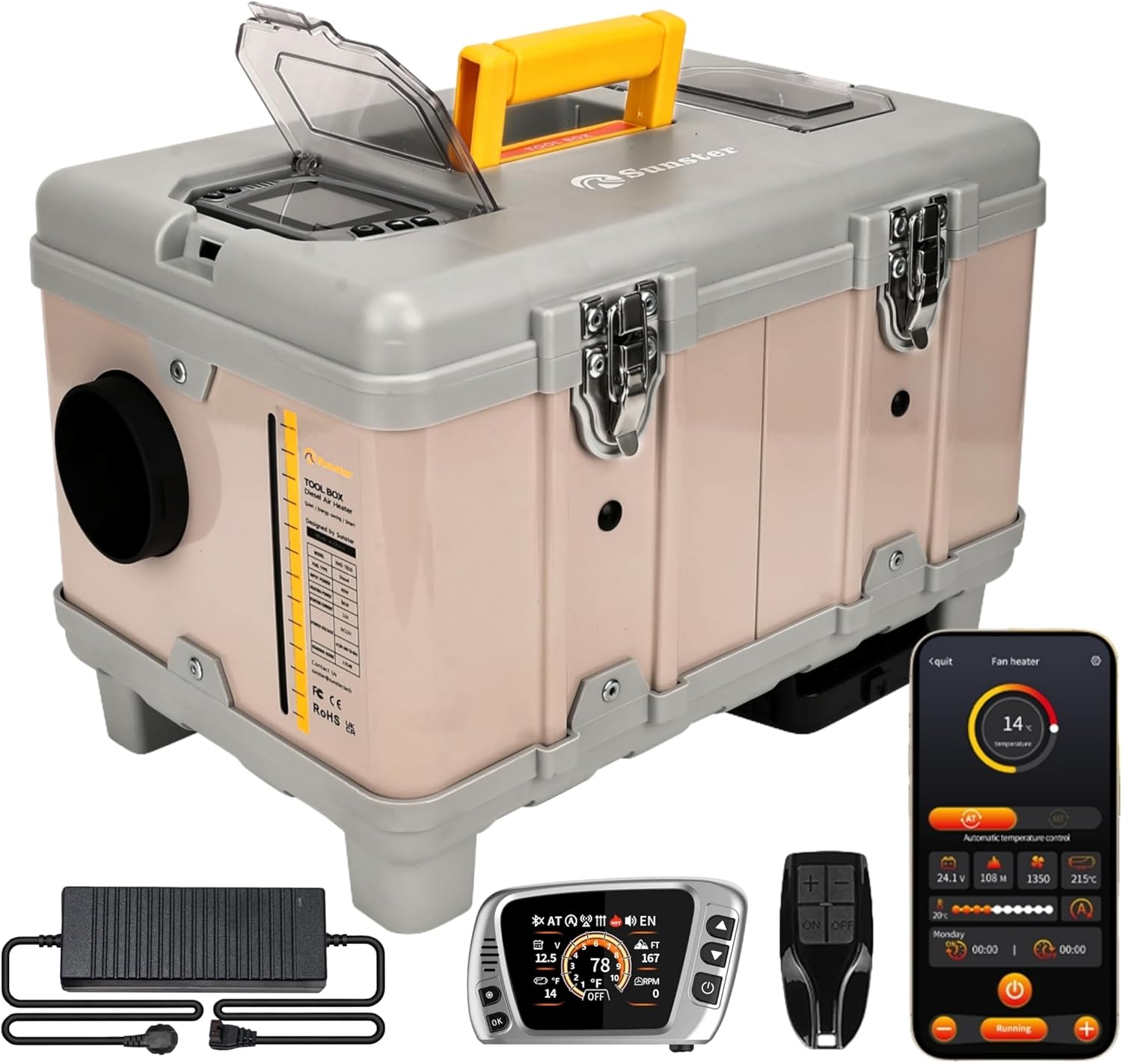
Figure 1: Sunster TB10 8KW Portable Diesel Heater and included accessories.
2. Інфармацыя па бяспецы
Your safety is paramount. Always adhere to the following precautions:
- Папярэджанне аб чадным газе: Diesel heaters produce carbon monoxide. Always ensure adequate ventilation when operating the heater. Never use in enclosed spaces without proper exhaust routing and ventilation. Consider using a CO alarm.
- Тып паліва: Use only diesel fuel. Never use gasoline or other flammable liquids.
- Размяшчэнне: Place the heater on a stable, non-flammable surface. Ensure sufficient clearance from combustible materials.
- выхлап: Ensure the exhaust pipe is properly installed and vented outdoors, away from any air intakes.
- Крыніца харчавання: Use only the specified DC 12V or AC 110-240V power sources. Ensure connections are secure.
- Дзеці і хатнія жывёлы: Трымайце дзяцей і хатніх жывёл далей ад абагравальніка падчас працы.
- Тэхнічнае абслугоўванне: Regularly inspect the heater for any damage or blockages. Do not operate if damaged.
3. Змесціва ўпакоўкі
Пасля распакавання пераканайцеся, што ўсе пералічаныя ніжэй прадметы наяўныя і не пашкоджаныя:

Figure 2: Complete package contents of the TB10 Diesel Heater.
- TB10 Portable Diesel Heater Unit
- Warm Air Outlet Pipe (Black, flexible)
- Exhaust Pipe (Stainless steel, flexible)
- Глушыцель
- Heat Insulation Cloth for Exhaust Pipe
- Clamps (various sizes for pipes)
- Адаптар сілкавання AC-DC
- Battery Power Cord (for 12V DC connection)
- LCD Switch with 4m/13.1ft Extension Cable
- Пульт дыстанцыйнага кіравання
- Кіраўніцтва карыстальніка
- Fixture Accessories Set (screws, brackets)
4. Прадукт скончыўсяview
The Sunster TB10 8KW Portable Diesel Heater is designed for versatile heating in various environments, including cars, trucks, RVs, garages, and outdoor camping. It features an integrated toolbox design for portability and ease of use.

Figure 3: Internal structure diagram of the TB10 Diesel Heater.
Асноўныя характарыстыкі:
- Smart APP Control: Full control over temperature, timers, power levels, altitude mode, constant temperature, and ventilation mode.
- Upgraded S-DZ06LCD Switch: Features Bluetooth function, Automatic Start & Stop, Turbo Heat Mode, Ventilation Function, and Cleaning mode.
- Integrated Toolbox Design: Portable with a built-in 6-liter fuel tank and handle.
- Падвойныя параметры харчавання: Supports 12V DC and 110-240V AC.
- Indoor Climate Control: Includes a 4-meter extension cable for the control panel.
- Функцыя вентыляцыі: Circulates air for cooling in warm weather.
- Adaptive Plateau Mode: Automatically adjusts fuel output for altitudes up to 4500 meters.
- Energy Saving & Silent: High heating efficiency with low fuel consumption (0.16-0.45L/h) and quiet operation (≤ 35 dB).
5. Настройка і ўстаноўка
Follow these steps for proper setup and installation:
5.1. Warm Air Duct Installation
- Open the warm air duct by extending it.
- Змесціце склamp at the pipe opening.
- Attach the duct to the air outlet on the heater unit.
- Зацягнуць клamp надзейна.
5.2. Exhaust Pipe and Muffler Installation
- Straighten the flexible exhaust pipe.
- Wrap the heat-insulating cloth around the exhaust pipe.
- Secure the heat-insulating cloth with clamps at both ends of the pipe.
- Screw the assembled exhaust pipe into the side interface of the heater unit.
- Зацягнуць клamp at the interface.
- Attach the muffler to the other end of the exhaust pipe using a clamp і зацягніце яго.
5.3. Падключэнне сілкавання
The heater supports both AC and DC power:
- Пераменны ток 110-240 В: Connect the provided AC-DC power adapter to a power strip or wall outlet. Insert the adapter's plug into the socket below the air outlet on the heater. Ensure the power adapter's indicator light is green.
- 12 В пастаяннага току: Use the provided battery power cord. Connect the positive (red) and negative (black) copper rings to the corresponding terminals of a 12V battery. Insert the plug into the socket below the air outlet on the heater.
Важна: Заўсёды пераканайцеся, што абtage used matches the product's specifications (12V DC or 110-240V AC).
Video 1: TB10 Installation Operation - This video demonstrates the step-by-step process of installing the air duct, exhaust pipe, and connecting power to the Sunster TB10 diesel heater.
6. Інструкцыя па эксплуатацыі
Your TB10 heater can be controlled via the integrated LCD switch, remote control, or Bluetooth APP.

Малюнак 4: Закончанаview of the LCD Monitor functions and settings.
6.1. Уключэнне/выключэнне харчавання
- Каб уключыць: In shutdown state, press the power button to wake up the screen. Then, press and hold the power button until 'ON' appears on the screen.
- Каб выключыць: Long press the power button until 'OFF' appears on the screen.
6.2. Пераключэнне мовы
- Press the 'Settings' key to enter the basic settings menu.
- Select 'Language selection' (usually the first item).
- Use the Up/Down buttons to select the desired language flag.
- Націсніце «ОК» для пацверджання.
6.3. Пераключэнне рэжымаў
- Press the 'Settings' key to enter the menu.
- Select 'Mode selection' (usually the second item).
- Use the Up/Down buttons to navigate through options:
- MT (Manual Mode) / AT (Automatic Mode): Press 'OK' to switch between manual and automatic heating modes.
- Altitude (M/FT): Press 'OK' to switch between meters and feet for altitude display.
- Temperature Units (°C/°F): Press 'OK' to switch between Celsius and Fahrenheit.
- Automatic Start/Stop (ON/OFF): Press 'OK' to enable or disable automatic start/stop based on set temperature.
- Instant Heating Mode (ON/OFF): Press 'OK' to enable or disable instant heating.
- Press the 'Settings' key to save and exit.
6.4. Remote Control Matching
- Press the 'Settings' key to enter the menu.
- Select 'Remote control pairing' (usually the third item).
- Press 'OK' to enter the matching interface.
- Use Up/Down buttons to select the corresponding remote control icon.
- Press 'OK'. The remote control icon will flash.
- Press any key on your physical remote control. The heater will automatically return to the main interface upon successful pairing.
6.5. Manual Fuel Pump
This function is used to prime the fuel system or manually pump fuel.
- Press the 'Settings' key to enter the menu.
- Select 'Manual oil pump' (usually the fourth item).
- Press 'OK'.
- Press the Up button to start pumping fuel.
- Press the Down button to stop pumping fuel.
- Press the 'Settings' key to exit.
6.6. Функцыя тэрмінаў
Set automatic power on/off times for specific days.
- Press the 'Settings' key to enter the menu.
- Select 'Timing setting up' (usually the fifth item).
- Press 'OK' to enter the timing function.
- First, select the alarm clock icon on the right (for time calibration).
- Press 'OK' to enter time calibration. Adjust the time using the Up/Down buttons and press 'OK' to confirm. Set the time to your local region.
- Press the 'Settings' key to return.
- Select the first alarm clock icon (for setting daily timers).
- Adjust to the current day (e.g., SUN for Sunday) and press 'OK'.
- Set the automatic start time and automatic shutdown time using the Up/Down buttons and 'OK' to confirm.
- Select 'ON' to activate the timer for that day.
- Press the 'Settings' key to return.
6.7. Злучэнне Bluetooth
Control your heater via a smartphone app.
- Press the 'Settings' key to enter the menu.
- Navigate to the Bluetooth connection option (often represented by a QR code icon).
- Press 'OK'. A QR code will appear on the screen.
- Use your smartphone to scan the QR code. This will direct you to download the 'AirHeater' app.
- Open the app after downloading and turn on Bluetooth on your phone.
- Connect to the device within the app.
- At this time, the Bluetooth icon will be displayed on the heater's switch.
- Press 'OK' on the heater's switch to confirm the connection. You can now operate the heater via your mobile phone.
6.8. Рэжым уборкі
The cleaning mode helps maintain the combustion chamber.
- In shutdown state, long press the Down button to turn on the cleaning mode.
- The heater will automatically shut down after cleaning the residual fuel from the combustion chamber.
Video 2: DZ06 Switch Operation - This video provides a detailed guide on operating the DZ06 Bluetooth LCD switch, including power, language, mode, remote pairing, manual pump, timing, Bluetooth, and cleaning functions.
Video 3: LCD Switch Operation - A comprehensive video demonstrating the various functions and settings of the LCD control switch.
7. Тэхнічнае абслугоўванне
Regular maintenance ensures optimal performance and longevity of your heater:
- Уборка: Regularly clean the exterior of the heater. Use the cleaning mode to clean the combustion chamber.
- Паветраны фільтр: Check and clean the integrated air filter periodically to ensure proper airflow.
- паліўны бак: Ensure the 6-liter fuel tank is free from contaminants.
- Сувязі: Periodically check all pipe and electrical connections for tightness and wear.
- захоўванне: When not in use for extended periods, drain the fuel tank and store the heater in a dry, safe place.
8. Выпраўленне непаладак
Калі ў вас узнікнуць праблемы, звярніцеся да наступных распаўсюджаных праблем і рашэнняў:
- Абагравальнік не ўключаецца: Check power connections (AC or DC), ensure sufficient fuel, and verify the power button is pressed correctly.
- Error Code E5 (Overheating): This indicates overheating. Check for blocked air intake or exhaust, ensure proper ventilation, and allow the unit to cool down before restarting.
- White Smoke from Intake: If the power source is interrupted during operation, partially combusted diesel may vent from the combustion air intake. Ensure a stable power supply and proper exhaust routing.
- Без цеплавой магутнасці: Check fuel level, ensure the heater is in 'ON' mode, and verify temperature settings.
- Remote/App Not Connecting: Ensure Bluetooth is enabled on your device, the app is installed, and follow the remote pairing instructions.
For persistent issues, please contact Sunster customer support.
9. Тэхнічныя характарыстыкі
| Асаблівасць | Спецыфікацыя |
|---|---|
| Марка | Санстэр |
| мадэль | TB10 8KW Portable Diesel Heater |
| Крыніца харчавання | DC 12V / AC 110-240V |
| Магутнасць ацяплення | 8 кВт |
| Эфектыўнасць ацяплення | ≥ 96% |
| Выдатак паліва | 0.16-0.45 л/г |
| Ёмістасць паліўнага бака | 6 л (1.58 галонаў) |
| Пакрыццё ацяплення | 215 футаў² / 20 м² |
| Аперацыйны шум | ≤ 35 дБ |
| Налада мінімальнай тэмпературы | 46°F (8°C) |
| Налада максімальнай тэмпературы | 95°F (35°C) |
| Altitude Adaptation | Да 4500 метраў |
| Вага прадмета | 21.7 фунта |
| Памеры ўпакоўкі | 18.25 х 15 х 12.5 цалі |
10. Гарантыя і падтрымка
Your Sunster TB10 Portable Diesel Heater comes with a standard manufacturer's warranty. Please refer to the warranty card included in your package for specific terms and conditions.
For technical support, troubleshooting assistance, or warranty claims, please contact Sunster customer service through the official webсайт або ваш прадавец.