
Уводзіны
Welcome to your new NIMO 15.6" FHD Laptop N151. This manual provides essential information to help you get started, operate, maintain, and troubleshoot your device. Please read through these instructions carefully to ensure optimal performance and longevity of your laptop.
Настройка
1. Распакаванне і першапачатковы агляд
Асцярожна выміце ўсе прадметы з упакоўкі. Пераканайцеся, што наступныя кампаненты наяўныя:
- 1 x Nimo N151 Laptop
- 1 x Type-C 65W PD Fast Charger
- 1 х Кіраўніцтва карыстальніка (гэты дакумент)
- Windows 11 Home (pre-installed)
Inspect the laptop for any physical damage. If any components are missing or damaged, contact customer support immediately.
2. Charging the Laptop
Before first use, fully charge your laptop. Connect the provided Type-C 65W PD Fast Charger to the Type-C charging port on your laptop and then to a power outlet. The charge LED indicator will illuminate.

Image: The NIMO laptop connected to its Type-C PD fast charger, illustrating the charging process.
3. Уключэнне і пачатковая налада
Press the power button located on the keyboard. The laptop will boot up and guide you through the initial Windows 11 Home setup process. Follow the on-screen instructions to configure your language, region, network, and user account.
Кіраванне ноўтбукам
Дысплей
Your NIMO laptop features a 15.6-inch Full HD (1920x1080) Anti-Glare IPS display. This display offers clear visuals and reduced eye strain, suitable for various tasks from work to entertainment.

Image: The NIMO laptop's 15.6-inch FHD IPS display, highlighting its narrow bezels and vibrant visual capabilities.
Keyboard and Fingerprint Sensor
The laptop is equipped with a backlit keyboard for comfortable typing in various lighting conditions and a numeric keypad for efficient data entry. A fingerprint sensor is integrated for secure and quick login.

Image: Close-up of the NIMO laptop's backlit keyboard, showcasing the fingerprint sensor and numeric keypad.
Webкамера
A 2MP webcam is integrated for video calls and online meetings.
Парты і падключэнне
The NIMO N151 offers a variety of ports for versatile connectivity:
- Порты USB 3.0: Для хуткаснай перадачы дадзеных.
- Порт USB 2.0: Для падключэння перыферыйных прылад.
- Порт HDMI: Для падлучэння да знешніх дысплеяў.
- Парты тыпу C: One for charging (PD Fast Charger) and one for multifunction use.
- Слот для карты Micro SD: Для пашырэння сховішча або пераносу files.
- Headphone Combo Jack: Для ўваходу/выхаду гуку.
- Слот замка Kensington: Для фізічнай бяспекі.
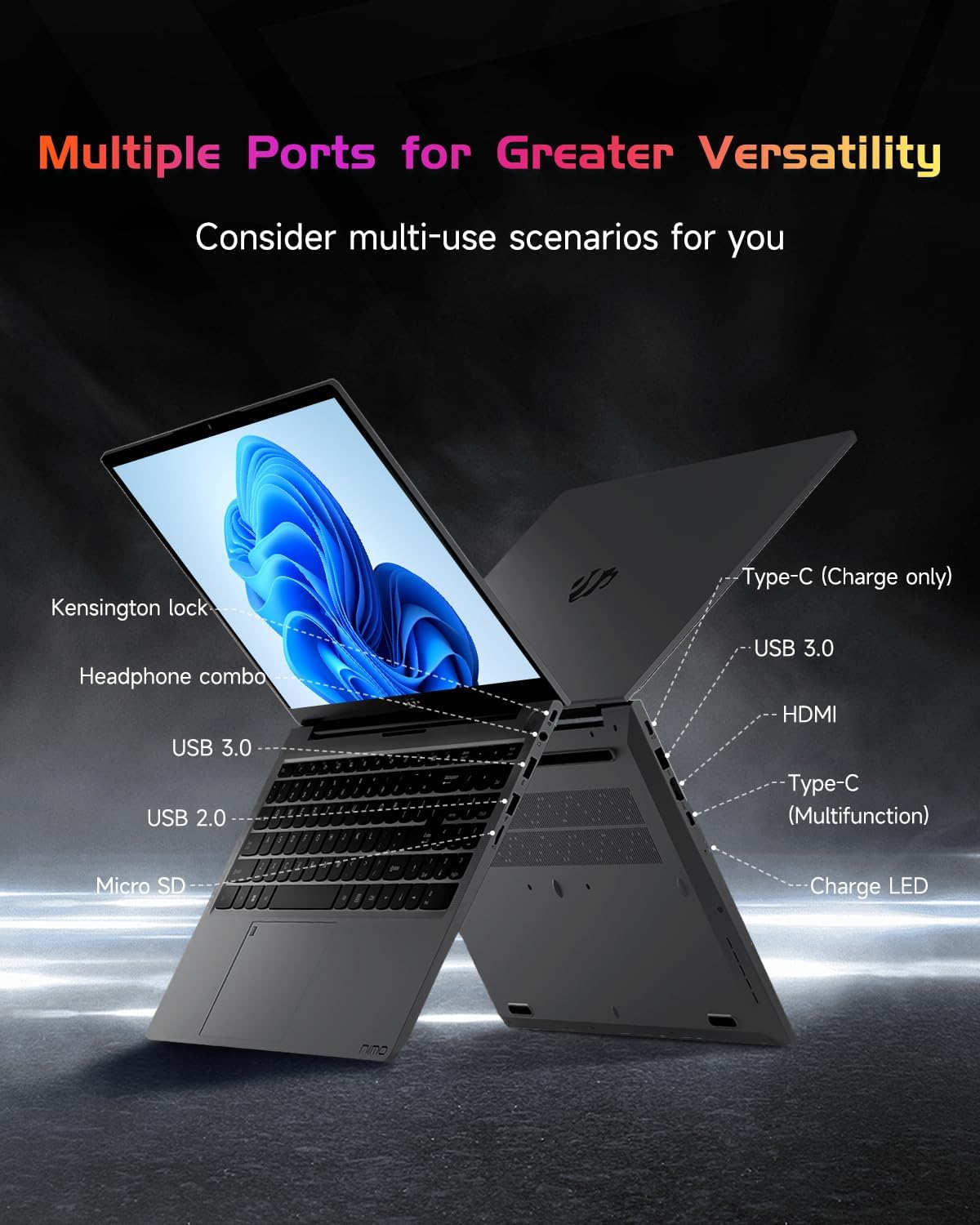
Выява: Бакавы прафесіяналfile of the NIMO laptop, displaying its array of ports for diverse connectivity needs.
Stay connected with integrated Wi-Fi 6 for fast wireless internet and Bluetooth 5.2 for connecting wireless accessories.
Працэсар і прадукцыйнасць
Powered by the Intel Alder Lake-N100 12th Gen processor, the NIMO N151 delivers reliable performance for multitasking, streaming, and everyday computing tasks. It comes with 16GB DDR4 RAM and a 256GB PCIe SSD for fast startups and seamless operation.

Image: A visual representation of the Intel Alder Lake-N100 12th Gen processor, highlighting its role in the laptop's performance.
Аперацыйная сістэма
The laptop comes pre-installed with Windows 11 Home, offering a modern and intuitive user experience.
Тэхнічнае абслугоўванне
Агульны догляд
- Захоўвайце ноўтбук у чыстым, сухім месцы, удалечыні ад экстрэмальных тэмператур.
- Avoid spilling liquids on the keyboard or screen.
- Выкарыстоўвайце мяккую тканіну без ворса для чысткі экрана і вонкавага выгляду. Не выкарыстоўвайце агрэсіўныя хімічныя рэчывы.
- Забяспечце належную вентыляцыю, не закрываючы вентыляцыйныя адтуліны.
Сыход за батарэяй
Каб падоўжыць тэрмін службы акумулятара, пазбягайце частай поўнай разрадкі. Рэкамендуецца падтрымліваць узровень зарада акумулятара ў межах ад 20% да 80%, калі гэта магчыма.
Ліквідацыю непаладак
Агульныя праблемы і рашэнні
- Ноўтбук не ўключаецца: Ensure the charger is properly connected and the battery has sufficient charge. Try holding the power button for 10-15 seconds to perform a hard reset.
- Экран пусты: Падключыце знешні манітор, каб праверыць, ці праблема ў дысплеі. Перазагрузіце ноўтбук.
- Праблемы з падключэннем Wi-Fi: Праверце, ці ўключаны Wi-Fi у наладах Windows. Перазагрузіце маршрутызатар і ноўтбук.
- Павольная прадукцыйнасць: Close unnecessary applications, check for malware, and ensure Windows is up to date.
For persistent issues, refer to the online support resources or contact NIMO customer service.
Тэхнічныя характарыстыкі
| Асаблівасць | Дэталь |
|---|---|
| Марка | NIMO |
| Назва мадэлі | Nimo N151 |
| Памер экрана | 15.6 цалі |
| Дазвол экрана | 1920 x 1080 пікселяў (FHD) |
| Працэсар | Intel Pentium Quad Core N100 (up to 3.4 GHz) |
| АЗП | 16 ГБ DDR4 |
| Хуткасць памяці | 3200 МГц |
| Жорсткі дыск | 256 GB SSD (PCIe) |
| Графічны супрацэсар | Інтэграваная графіка |
| Аперацыйная сістэма | Windows 11 хатняя |
| Бесправадны тып | 802.11a/b/g/n/ac (Wi-Fi 6) |
| Bluetooth | Bluetooth 5.2 |
| Парты USB 2.0 | 1 |
| Парты USB 3.0 | 3 |
| Сярэдні тэрмін службы батарэі | 5 гадзін |
| Вага прадмета | 3.8 фунта |
| Памеры прадукту | 14.07 х 8.98 х 0.76 цалі |
| Асаблівасці | Backlit Keyboard, Fingerprint Reader, HD Audio, Memory Card Slot, Numeric Keypad |
Гарантыя і падтрымка
Your NIMO laptop is covered by a 2-гадовая гарантыя ад вытворцы, ensuring peace of mind for your purchase. Additionally, NIMO offers a 90-Day Hassle-Free Return Policy.
For technical assistance, warranty claims, or returns, please contact NIMO customer support through their official channels. Refer to the contact information provided with your product or on the NIMO webсайт.
Відэа аб прадуктах
Watch these official videos for a comprehensive overview and demonstration of your NIMO laptop's features.
NIMO 15.6 Laptop Comprehensive Introduction
Video: A detailed introduction to the NIMO 15.6" FHD Laptop, showcasinяго дызайн і асноўныя функцыянальныя магчымасці.
NIMO Laptop: Perfect for Work and Study, Anytime, Anywhere
Video: This video highlights the NIMO laptop's versatility for both work and study environments, emphasizing its portability.
NIMO 15.6 FHD Laptop for Students Home Work
Video: A demonstration of the NIMO 15.6" FHD Laptop's suitability for students and home-based work tasks.
Efficiency Meets Convenience: Nimo Laptop
Video: This video showcases the NIMO laptop's efficiency and convenient features for daily use.
NIMO Laptop UGC
Video: User-generated content featuring the NIMO laptop, demonstrating real-world usage scenarios.
NIMO 15.6 FHD Laptop Promotion Video
Video: A promotional video for the NIMO 15.6" FHD Laptop, showcasinг яго асаблівасці і перавагі.