
1. Уводзіны
Thank you for choosing the eSynic Mini Portable Thermal Printer ESY337. This compact and inkless thermal printer is designed for convenience, allowing you to print photos, labels, notes, and more directly from your mobile device. This manual provides essential information for setup, operation, maintenance, and troubleshooting to ensure optimal performance.

Figure 1: The eSynic Mini Portable Thermal Printer in its compact pink design.
2. Што ў скрынцы
Пасля распакавання пераканайцеся, што ў камплекце ёсць усе наступныя прадметы:
- eSynic Mini Portable Thermal Printer (ESY337)
- 5 x Rolls of Standard Thermal Paper
- 5 x Rolls of Adhesive Thermal Paper
- USB-кабель для зарадкі
- Кіраўніцтва карыстальніка
- Дэкаратыўныя налепкі

Figure 2: The complete package includes the mini portable printer, 5 rolls of thermal paper, 5 rolls of adhesive thermal paper, a USB charging cable, and decorative stickers.
3. Кіраўніцтва па наладцы
3.1. Загрузка тэрмапаперы
Follow these steps to correctly load the thermal paper into your printer:
- Адкрыйце вечка прынтара: Gently slide or lift the cover of the printer to access the paper compartment.
- Устаўце рулон паперы: Place the thermal paper roll into the compartment. Ensure the smooth, printable side of the paper faces downwards.
- Падача паперы: Pull approximately 1 cm (0.4 inches) of paper out of the printer slot.
- Закрыць вокладку: Securely close the printer cover until it clicks into place.
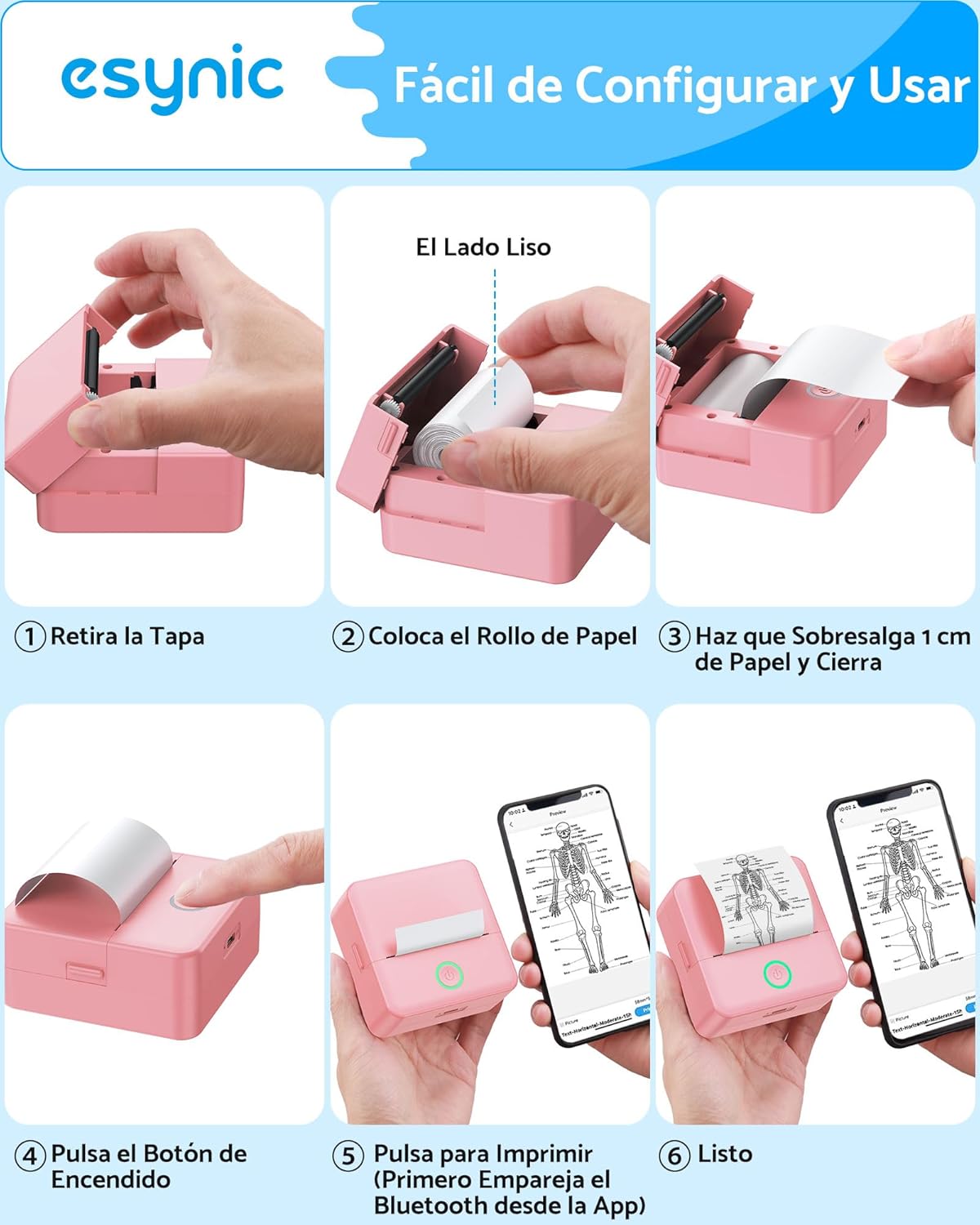
Figure 3: Visual instructions for loading paper: 1. Remove the cover. 2. Place the paper roll with the smooth side facing down. 3. Pull out about 1 cm of paper and close the cover. 4. Press the power button. 5. Connect via the "Tiny" app. 6. Ready to print.
3.2. Падключэнне праз Bluetooth
The printer connects wirelessly to your smartphone or tablet:
- Зарадзіць прынтар: Before first use, fully charge the printer using the provided USB cable.
- Уключэнне: Націсніце і ўтрымлівайце кнопку харчавання на прынтары, пакуль не загарыцца індыкатар.
- Спампаваць прыкладанне: Download the "Tiny" app from your device's app store (available for iOS and Android).
- Open App & Connect: Open the "Tiny" app, enable Bluetooth on your device, and follow the in-app instructions to connect to the printer. The connection typically takes about 2 seconds.

Figure 4: The printer connects quickly via Bluetooth 4.0 to both iOS and Android devices using the "Tiny" app, allowing instant printing of various documents like grocery lists.
4. Інструкцыя па эксплуатацыі
4.1. Асноўны друк
Once connected, you can print various content:
- Выберыце змест: Within the "Tiny" app, choose what you want to print (e.g., photo, text, label, note).
- Адрэгуляваць параметры: You can adjust print depth (intensity) and other settings as needed. The printer supports monochrome (black and white) output only.
- Друк: Tap the print button in the app. The printer will quickly produce your output.
4.2. Пашыраныя функцыі праграмы
The "Tiny" app offers a range of creative and functional features:
- Функцыі AI: Explore AI-powered tools for cartoonish portraits, line art, and various scene creations.
- Graphic Editing: Utilize graphic editing tools for artistic photos and creative painting.
- Шаблоны: Access free materials and templates for labels, notes, to-do lists, and more.
- Распазнаванне тэксту: Пераўтварыце друкаваны тэкст у рэдагуемы лічбавы тэкст.
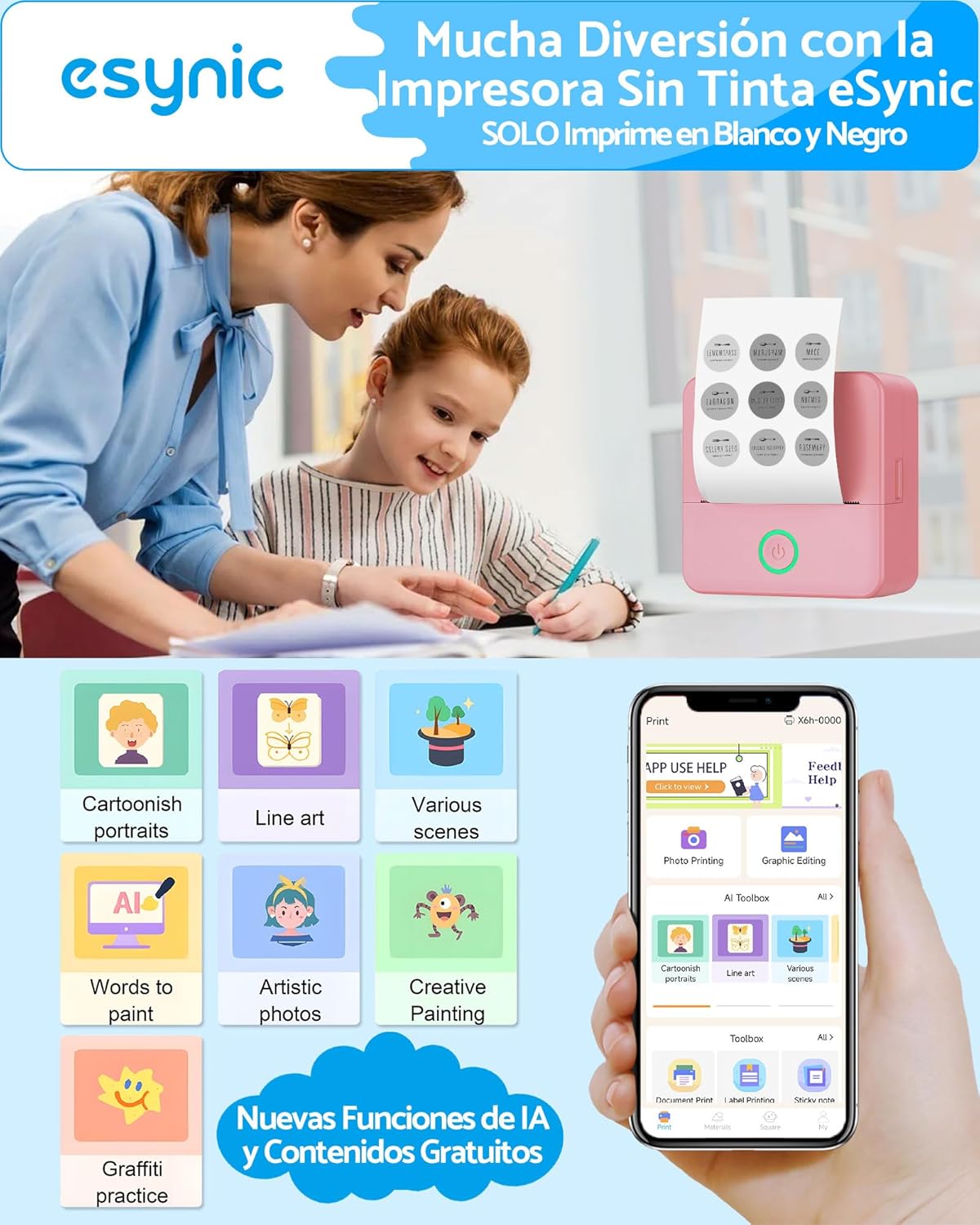
Figure 5: The "Tiny" app offers advanced features including AI functions for cartoonish portraits, line art, various scenes, text-to-paint, artistic photos, creative painting, and graffiti practice.
4.3. Creating Adhesive Labels
Use the included adhesive thermal paper to create custom stickers and labels:
- Load an adhesive paper roll as described in Section 3.1.
- Design your label in the "Tiny" app.
- Раздрукуйце этыкетку.
- Carefully peel off the backing and apply the sticker to your desired surface.
5. Тэхнічнае абслугоўванне
To ensure the longevity and optimal performance of your eSynic Mini Portable Thermal Printer, follow these maintenance guidelines:
- Ачыстка друкавальнай галоўкі: Перыядычна чысціце тэрмагалоўку друку мяккай тканінай без ворса, злёгку працёртайampened with isopropyl alcohol. Ensure the printer is off and completely dry before use.
- Знешняя ачыстка: Працірайце знешнія паверхні прынтара мяккай сухой тканінай. Пазбягайце выкарыстання агрэсіўных хімічных рэчываў або абразіўных матэрыялаў.
- Захоўванне паперы: Store thermal paper in a cool, dry place away from direct sunlight and heat to prevent premature fading or damage.
- Сыход за батарэяй: If the printer will not be used for an extended period, charge it periodically to maintain battery health.
6. Выпраўленне непаладак
Калі ў вас узніклі праблемы з прынтарам, звярніцеся да наступных распаўсюджаных праблем і рашэнняў:
| праблема | Магчымая прычына | Рашэнне |
|---|---|---|
| Прынтэр не ўключаецца | Нізкі зарад батарэі; кнопка харчавання націснута няправільна | Зарадзіце прынтар; націсніце і ўтрымлівайце кнопку харчавання некалькі секунд. |
| Немагчыма падключыцца праз Bluetooth | Bluetooth off; App not detecting printer; Printer too far | Ensure Bluetooth is enabled on your device; Restart the app and printer; Move printer closer to device (within 10m). |
| Нізкая якасць друку / цьмяныя адбіткі | Print head dirty; Paper loaded incorrectly; Low print depth setting | Clean the print head (see Maintenance); Ensure smooth side of paper faces down; Increase print depth in the app. |
| Замяцце паперы | Paper loaded incorrectly; Foreign object in paper path | Open cover, remove paper, re-load correctly; Carefully check for and remove any obstructions. |
| Прынтар не адказвае | System error; App crash | Restart the printer and the "Tiny" app. If issue persists, contact support. |
7. Тэхнічныя характарыстыкі
| Асаблівасць | Дэталь |
|---|---|
| Нумар мадэлі | ESY337 |
| Марка | eSynic |
| Памеры прадукту | 8.5 х 4.5 х 4.5 см |
| Вага прадукту | 485 грам |
| Тэхналогія падлучэння | Bluetooth |
| Тэхналогія друку | Цеплавы |
| Вывад на прынтэр | Манахромны (чорна-белы) |
| Max Print Resolution B/W | 200 dpi |
| Compatible Print Media | Этыкеткі, тэрмапапера |
| Максімальная шырыня паперы | 57 мм |
| Двухбаковая друк | Не (аднастайны) |
| Крыніца харчавання | 1 D battery (included) / USB-C Charging |
| Канкрэтнае выкарыстанне | School, Home, Office |

Figure 6: The printer's compact dimensions (8.5cm x 8.5cm x 4.0cm) highlight its portability, easily fitting into a backpack for on-the-go use.
8. Відэакіраўніцтва па прадукце
Watch this video for a visual demonstration of the eSynic Mini Portable Thermal Printer's features and operation:
Video 1: This video provides a visual guide on how to unbox the eSynic Mini Portable Thermal Printer, load the thermal paper, connect it to your smartphone via the "Tiny" app, print an image, and apply a printed sticker.
9. Гарантыя і падтрымка
The eSynic Mini Portable Thermal Printer ESY337 comes with an 18-месячная гарантыя на прадукцыю from the date of purchase. For technical support, warranty claims, or any inquiries, please refer to the contact information provided in the packaging or visit the official eSynic webсайт.