
Уводзіны
Thank you for choosing the COOAU Automatic Pet Feeder with Camera. This smart feeder is designed to provide convenient and reliable feeding for your pets, whether you are at home or away. Equipped with a high-resolution camera, two-way audio, and remote control capabilities, it helps you monitor your pet's health and ensure they are fed on schedule. Please read this manual thoroughly before use to ensure proper operation and maintenance.
Асноўныя характарыстыкі
- Wide-angle 3MP Camera & Clear Night Vision: Features a 110-degree wide-angle lens and a 2K (2560*1440) resolution camera. Clearly captures pet movements and expressions, allowing quick detection of changes in their physical condition. Infrared night vision enables clear monitoring even at night.
- Smartphone Compatible, Automatic Feeding, Two-Way Talk: Easy Wi-Fi setup via Bluetooth. Control the feeder remotely from your smartphone. Set up to 20 portions of 10g each per feeding, multiple times a day.
- 4.5L Large Capacity Tank: Stores up to 90 days of food for an adult cat, ideal for travel or business trips.
- Two-Way Audio & Voice Recording: Built-in speaker and microphone for remote communication. Record a 10-second voice message to call your pet at feeding times, reducing separation anxiety.
- Diverse Recording Functions & Detection Notifications: Supports up to 128GB memory card for 24-hour continuous recording and motion detection recording. Receive smartphone notifications when your pet is detected, allowing real-time monitoring of meal scenes.
- Кіраванне аховай здароўя: Combine feeding records and detection notifications to understand your pet's eating patterns and create appropriate feeding plans, ideal for managing pet weight.
- Двайны блок харчавання: Operates with AC power and backup D-cell batteries (3x D-cell batteries, sold separately) to ensure continuous feeding during power outagэс.
- Detachable and Washable Parts: All parts except the main unit are detachable and easily washable, maintaining a clean feeding environment and preventing bacterial growth.
- 2-Year Manufacturer's Warranty: Provides peace of mind with a comprehensive warranty.

Image: COOAU Automatic Pet Feeder with Camera.
Змест пакета
Калі ласка, праверце, ці ёсць у вашай упакоўцы ўсе наступныя прадметы:
- Automatic Feeder Main Unit
- Tray (Stainless Steel Bowl included)
- Сілавы кабель
- Адаптар пераменнага току
- Асушальнік
- Кранштэйны супраць наканечніка
- Набор шруб
- Кіраўніцтва па эксплуатацыі

Выява: Усе кампаненты ў камплекце.
Настройка
1. Электразабеспячэнне
The feeder supports dual power options: AC power and backup D-cell batteries. For continuous operation, it is recommended to use both. Batteries are not included and must be purchased separately.
- Connect the AC adapter to the feeder and plug it into a power outlet.
- For backup power, open the battery compartment at the bottom of the feeder and insert 3 D-cell batteries, ensuring correct polarity.

Image: The feeder can be powered by AC adapter or D-cell batteries for backup.
2. Устаноўка SD-карты
A new SD card is required. Please format an old SD card before use.
- Ensure the power is off before installing or removing the SD card.
- Remove the baffle to access the SD card slot.
- Insert the SD card into the slot, paying attention to its orientation.
- Press the SD card gently to secure it, then push again to release and remove.
- Reinsert the baffle at a slight angle and fix it in place until it clicks.
Video: Instructions for installing and removing the SD card.
3. зборка
Assemble the feeder components as follows:
- Align the food tank with the main unit and gently place it on top.
- Rotate the food tank clockwise until the marks align, securing it in place.
- Place the lid on the food tank and rotate it clockwise to fix it.
- Attach the food tray to the base of the main unit.
Video: Step-by-step guide to assembling the pet feeder.
4. Насценнае мацаванне (неабавязкова)
To prevent accidental tipping, you can mount the feeder to a wall using the provided bracket.
- Place the bracket on the desired wall location, confirm the position, and mark it with a pen.
- Drill holes in the wall according to the marks.
- Insert the expansion rubber plugs into the drilled holes.
- Замацуеце кранштэйн шрубамі.
- Align the grooves on the feeder body with the protrusions on the bracket.
- Slide the feeder downwards onto the bracket to secure it.
Video: Guide to installing the anti-tip bracket for wall mounting.
5. Падключэнне да праграмы
Connect your feeder to the smartphone app for remote control and monitoring.
- Ensure the feeder is powered on and the blue light is illuminated.
- Long-press the reset button on the feeder until you hear a sound effect, indicating a successful reset.
- Уключыце Bluetooth на смартфоне.
- Адкрыйце праграму Smart Life.
- Click the '+' icon in the top right corner to add a device.
- The app should automatically detect the feeder. If not, select 'Add Manually' and choose the pet feeder from the list.
- Follow the on-screen prompts to connect to your Wi-Fi network (2.4GHz or 5GHz).
- Once connected, the app will show 'Connection Successful'.
Video: How to connect the automatic feeder to the smartphone app.
Інструкцыя па эксплуатацыі
1. Устанаўленне графіка кармлення
Use the Smart Life app to set up automated feeding schedules for your pet.
- Open the app and select your pet feeder.
- Navigate to the 'Schedule' section.
- Add new feeding times and specify the number of portions (1 portion = 10g) for each meal.
- Save your settings. The feeder will dispense food automatically at the programmed times.
Image: The app allows you to customize feeding times and portion sizes.
2. Ручное кармленне
You can manually dispense food at any time using the 'Feed' button on the feeder or through the app.
- На кармушцы: Press the 'Feed' button once to dispense one portion of food.
- Праз прыкладанне: In the app, select the 'Feed' option and choose the desired number of portions.
3. Two-Way Audio & Voice Recording
Communicate with your pet remotely and record custom feeding calls.
- Двухбаковая размова: Use the microphone and speaker functions in the app to talk to your pet and hear their responses.
- Запіс голасу: Record a 10-second message that will play automatically during scheduled feeding times to attract your pet.

Image: The two-way audio feature allows you to interact with your pet remotely.
4. Camera and Recording Functions
Monitor your pet with the integrated 3MP camera and record their activities.
- жыць View: Access a real-time video feed of your pet through the app.
- Начное бачанне: The camera automatically switches to infrared night vision in low-light conditions for clear monitoring.
- Выяўленне руху: Receive push notifications on your smartphone when motion is detected, allowing you to check on your pet immediately.
- Рэжымы запісу: Supports 24-hour continuous recording and motion-activated recording to a micro SD card (up to 128GB).
- Meal Records: The app keeps a record of feeding times and detected activities, helping you track your pet's eating habits.
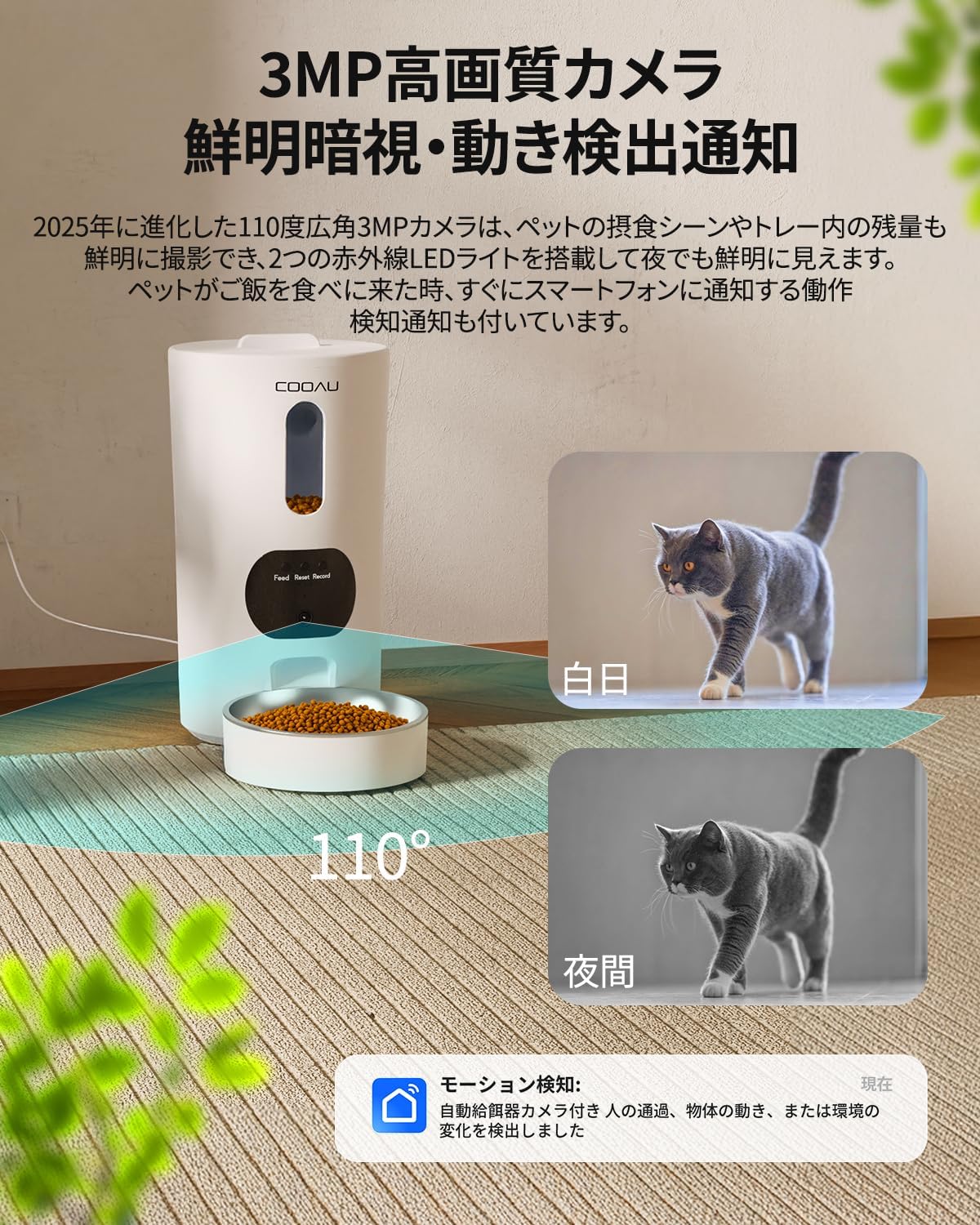
Image: The camera provides clear vision both during the day and at night.
5. Абарона прыватнасці
You can turn the camera on or off as needed for privacy.
- Camera ON/OFF: Use the app to physically close the camera lens when you don't need monitoring, ensuring your privacy.

Image: The camera can be turned off for privacy when not needed.
Тэхнічнае абслугоўванне
1. Ачыстка падачы
Regular cleaning is essential to maintain hygiene and your pet's health.
- Здымныя часткі: All parts except the main unit (food tank, lid, tray, stainless steel bowl, splitter) are detachable and can be hand-washed with water and mild detergent.
- Асноўны блок: The main unit, which contains electronic components, should not be submerged in water. Wipe it clean with a damp сурвэткай або вільготнай сурвэткай.
- Сушка: Ensure all parts are completely dry before reassembling and refilling with food to prevent mold or bacterial growth.

Image: The feeder's components are designed for easy disassembly and cleaning.
2. Замена асушальніка
The desiccant helps keep the food fresh and dry. Replace it periodically.
- The feeder has a desiccant slot in the top cover.
- Check the desiccant regularly and replace it when it changes color or appears saturated.

Image: The desiccant pocket helps maintain food freshness.
Ліквідацыю непаладак
If you encounter any issues with your COOAU Automatic Pet Feeder, please refer to the following common problems and solutions:
| праблема | Магчымая прычына | Рашэнне |
|---|---|---|
| Кармушка не выдае корм. | No food in tank, food jammed, power issue, incorrect schedule. | Check food level. Clear any food blockages. Ensure power supply is stable (AC or batteries). Verify feeding schedule in app. |
| Памылка падключэння да Wi-Fi. | Incorrect Wi-Fi password, 5GHz network selected (feeder supports 2.4GHz), router too far, Bluetooth off. | Double-check Wi-Fi password. Ensure you are connecting to a 2.4GHz network. Move feeder closer to router. Ensure Bluetooth is enabled on your phone during initial setup. Reset feeder and try again. |
| Камера не працуе або размытая. | Lens covered, poor lighting, app issue, network problem. | Ensure the camera lens is not physically covered. Check lighting conditions. Restart the app. Verify network connection. |
| Food portions are inconsistent. | Food type/size, feeder mechanism issue. | Ensure food kibble size is appropriate for the feeder. Clean the dispensing mechanism. If issues persist, contact customer support. |
| No sound from two-way audio. | Microphone/speaker muted, volume too low, app permissions. | Check volume settings in the app and on your phone. Ensure app has microphone permissions. Unmute microphone/speaker in the app. |
Тэхнічныя характарыстыкі
| Асаблівасць | Спецыфікацыя |
|---|---|
| Марка | COOAU |
| мадэль | ACF100W |
| Мэтавыя віды | Сабака, кот |
| Рэкамендуемае выкарыстанне | У памяшканні |
| Колер | Белы |
| Дазвол камеры | 3MP (2560*1440) |
| Ракурс камеры | 110 градусаў |
| Сувязь | Wi-Fi (2.4GHz/5GHz compatible), Bluetooth |
| Крыніца харчавання | Corded Electric, 3x D-cell batteries (backup, not included) |
| Ёмістасць | 4.5 літра |
| Памеры прадмета (Д х Ш х У) | 18 см х 18 см х 33 см |
| Інструкцыя па догляду | Hand Wash (detachable parts) |
| Падтрымка карты памяці | Карта памяці Micro SD да 128 ГБ |
| UPC | 790864718295 |
Гарантыя і падтрымка
Your COOAU Automatic Pet Feeder with Camera ACF100W comes with a 2-гадовая гарантыя вытворцы з дня пакупкі.
Гэтая гарантыя распаўсюджваецца на дэфекты матэрыялаў і вырабу пры нармальным выкарыстанні. Яна не распаўсюджваецца на пашкоджанні, выкліканыя няправільным выкарыстаннем, аварыямі, несанкцыянаванымі мадыфікацыямі або звычайным зносам.
For warranty claims, technical support, or any questions regarding your product, please contact COOAU customer service through the retailer where you purchased the product or visit the official COOAU webсайт для кантактнай інфармацыі.
Калі ласка, захавайце пацвярджэнне пакупкі для гарантыйных мэт.