
1. Уводзіны
This manual provides instructions for the setup, operation, and maintenance of your Retroid Pocket Classic handheld gaming console. The Retroid Pocket Classic is a portable Android-based gaming device featuring a 3.92-inch OLED touchscreen, designed for a versatile gaming experience.

Image 1.1: Retroid Pocket Classic consoles in white and yellow.
2. Што ў скрынцы
Праверце наяўнасць усіх прадметаў у камплекце:
- Retroid Pocket Classic Gaming Console
- Зарадны кабель (USB-C)
- Кіраўніцтва карыстальніка (гэты дакумент)
3. Прылада скончанаview
Familiarize yourself with the physical components and controls of your Retroid Pocket Classic.
3.1 фронт View

Выява 3.1: Спераду view of the Retroid Pocket Classic.
- 3.92-inch OLED Touchscreen: The primary display for all operations and gaming.
- D-Pad: Кірунак уводу для навігацыі і гульнявога працэсу.
- Кнопкі дзеянняў: (A, B, X, Y or similar layout) for in-game actions.
- Кнопкі «Пуск/Выбар»: For game and system functions.
- Рашоткі дынамікаў: Аўдыё выхад.
3.2 Top and Back View

Малюнак 3.2: Верх view showing shoulder buttons and ports.
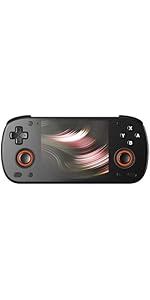
Image 3.3: Curved back design and trigger buttons.
- Плечавыя гузікі (L1, R1): Located on the top edge.
- Trigger Buttons (L2, R2): Located on the back, below the shoulder buttons.
- Порт USB-C: Для зарадкі і перадачы дадзеных.
- 3.5 мм аўдыяраз'ём: Для падлучэння навушнікаў.
- Слот для карты Micro SD: Для пашырэння сховішча.
- Кнопка харчавання: Каб уключыць/выключыць прыладу або перавесці яе ў спячы рэжым.
- Кнопкі гучнасці: To adjust audio output.
3.3 Internal Components (Cooling)

Image 3.4: Integrated active cooling system.
The Retroid Pocket Classic features an integrated active cooling system designed to maintain optimal performance and manage heat during extended use.
4. Настройка
4.1 Першапачатковая зарадка
Before first use, fully charge the device. Connect the provided USB-C charging cable to the console's USB-C port and the other end to a compatible USB power adapter (not included). The device has a 5000mAh battery.
4.2 Уключэнне/выключэнне
- Каб уключыць: Націсніце і ўтрымлівайце кнопку харчавання, пакуль не падсвяціцца экран.
- Каб выключыць: Націсніце і ўтрымлівайце кнопку харчавання, затым абярыце «Выключыць харчаванне» з опцый на экране.
- Каб заснуць/прачнуцца: Каротка націсніце кнопку харчавання.
4.3 Падключэнне Wi-Fi
To access online features and download applications, connect to a Wi-Fi network:
- Перайсці да Налады.
- Выберыце Сетка і інтэрнэт.
- Націсніце Wi-Fi і ўключыце яго.
- Выберыце патрэбную сетку са спісу і ўвядзіце пароль, калі будзе прапанавана.
4.4 Налада ўліковага запісу Google
The Retroid Pocket Classic runs Android 14 and supports the Google Play Store. To download apps and games, you will need to sign in with a Google account during the initial setup process or later via the Settings menu.
4.5 Усталёўка карты Micro SD
To expand the device's storage (128GB internal), insert a Micro SD card into the designated slot. Ensure the card is inserted correctly until it clicks into place. The device supports various Micro SD card capacities.
5. Інструкцыя па эксплуатацыі
5.1 Навігацыя па інтэрфейсе Android
The device operates on Android 14. Use the touchscreen for navigation, tapping icons to open applications, swiping to scroll, and using gestures for system controls. The D-pad and action buttons can also be used for navigation within compatible applications and games.
5.2 Downloading and Installing Applications
Applications and games can be downloaded from the Google Play Store. Open the Play Store app, search for your desired content, and follow the on-screen prompts to download and install.
Note: The Retroid Pocket Classic does not come with preloaded games. Users are responsible for acquiring and installing their own game content.
5.3 Кіраванне сховішчам
каб view and manage internal and external storage, go to Налады > Сховішча. Here you can see storage usage and manage files. For optimal performance, ensure sufficient free space is available.
5.4 Злучэнне Bluetooth
The device supports Bluetooth 5.1 for connecting wireless accessories such as headphones or external controllers.
- Перайсці да Налады.
- Выберыце Падключаныя прылады.
- Націсніце Спалучыце новую прыладу and select your accessory from the list.
6. Тэхнічнае абслугоўванне
6.1 Ачыстка прылады
Use a soft, dry, lint-free cloth to clean the device's exterior. For the screen, a screen cleaner specifically designed for electronics can be used. Avoid using harsh chemicals or abrasive materials.
6.2 Сыход за акумулятарам
Каб падоўжыць тэрмін службы батарэі:
- Пазбягайце экстрэмальных тэмператур.
- Не варта часта цалкам разраджаць акумулятар.
- Калі прылада не выкарыстоўваецца працяглы час, захоўвайце яе часткова зараджанай.
6.3 Абнаўленне праграмнага забеспячэння
Рэгулярна правярайце наяўнасць абнаўленняў сістэмы і ўсталёўвайце іх, каб забяспечыць аптымальную прадукцыйнасць і бяспеку. Перайдзіце па спасылцы Налады > Сістэма > Абнаўленне сістэмы каб праверыць наяўнасць даступных абнаўленняў.
7. Выпраўленне непаладак
7.1 Прылада не ўключаецца
- Ensure the device is sufficiently charged. Connect it to a power source for at least 30 minutes.
- Try holding the Power button for 10-15 seconds to force a restart.
7.2 Праблемы з падключэннем да Wi-Fi
- Праверце, ці ўключаны Wi-Fi у наладах.
- Перазапусціце свой Wi-Fi маршрутызатар.
- Forget the network and reconnect, ensuring the password is correct.
7.3 Збоі або завісанне праграм
- Зачыніце і зноў адкрыйце праграму.
- Ачысціце кэш і дадзеныя праграмы праз Налады > Праграмы > [Назва праграмы] > Сховішча і кэш.
- Пераканайцеся, што праграма абноўлена да апошняй версіі.
- Перазапусціце прыладу.
7.4 Экран не рэагуе
- Перазагрузіце прыладу, утрымліваючы кнопку харчавання.
- Пераканайцеся, што экран чысты і без смецця.
8. Тэхнічныя характарыстыкі

Image 8.1: Retroid Pocket Classic detailed specifications.
| Асаблівасць | Дэталь |
|---|---|
| Назва мадэлі | RP CLASSIC |
| Працэсар | G1 Gen2 (8-Core Kryo CPU, 2 Performance Cores, 6 Efficiency Cores) |
| графічны працэсар | Adreno A12 |
| АЗП | 6GB LPDDR4x @2133M |
| Захоўванне | 128GB EMMC 5.1 (expandable via Micro SD card) |
| Экран | 3.92-inch AMOLED, 1240x1080 @60fps |
| Аперацыйная сістэма | Android 14 |
| Wi-Fi | Wi-Fi 5 |
| Bluetooth | Bluetooth 5.1 |
| Інтэрфейс | USB-C / 3.5mm Audio Jack / TF Card Slot |
| Відэавыхад | Н/Д |
| акумулятар | 5000 мАг |
| Хуткасць зарадкі | 27 ват |
| Памеры | 138 х 89.8 х 26 мм (5.43 х 3.53 х 1 цалі) |
| Вага | 223 г (7.9 унцыі) |
9. Гарантыя і падтрымка
For warranty information and technical support, please refer to the official Retroid Pocket webсайт або звярніцеся ў службу падтрымкі кліентаў. Захоўвайце пацвярджэнне пакупкі для прэтэнзій па гарантыі.
Online resources and community forums may also provide helpful information and troubleshooting tips.