
Уводзіны
The Retroid Pocket Classic is a portable retro handheld game console designed for an immersive gaming experience. Featuring a 3.92-inch OLED touchscreen and running on Android 14, this device offers versatile connectivity and expansive storage options. This manual provides essential information for setting up, operating, maintaining, and troubleshooting your Retroid Pocket Classic.
Што ў скрынцы
- Гульнявая кансоль
- Зарадны кабель
- Кіраўніцтва карыстальніка
Асаблівасці прадукту

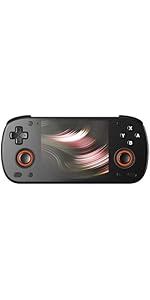
The Retroid Pocket Classic handheld game console, showcasing its design and available color options.

Падрабязны view of the 3.92-inch OLED touchscreen, highlighting its size and clarity.

This image illustrates the superior display characteristics of the OLED screen, including a 100,000:1 contrast ratio, 107% sRGB color gamut, low power consumption, and 500 Nits brightness.
The device features a curved and contoured back for enhanced grip and comfort, along with easily accessible R1, R2, L1, and L2 trigger buttons.

An illustration of the integrated active cooling system, designed for optimal performance and efficient heat management during gameplay.

The Retroid Pocket Classic offers different button configurations, including a 6-button layout (A, B, X, Y, C, Z) and a 4-button layout (A, B, X, Y) to suit various gaming preferences.
Кіраўніцтва па ўстаноўцы
1. Пачатковая зарадка
Before first use, fully charge your Retroid Pocket Classic using the provided charging cable. The device supports 27W charging.
2. Уключэнне
Націсніце і ўтрымлівайце кнопку харчавання, размешчаную на бакавой панэлі прылады, пакуль не падсвеціцца экран.
3. Android 14 Setup
Follow the on-screen prompts to complete the initial Android 14 setup. This includes connecting to a Wi-Fi network (Wi-Fi 5 supported) and logging into your Google account to access the Google Play Store.
4. Пашырэнне сховішча
The device comes with 128GB EMMC5.1 internal storage. To expand storage, insert a Micro SD card into the designated TF Card Slot.
5. Game Installation (Important Note)
Please note that the Retroid Pocket Classic does not come with preloaded games.
To play games, you will need to acquire game ROMs and BIOS files legally. The Android 14 operating system allows for the installation of various emulation applications from the Google Play Store. Online communities and resources can provide guidance on setting up emulation software and acquiring necessary files.
Інструкцыя па эксплуатацыі
Базавая навігацыя
- Сэнсарны экран: The 3.92-inch OLED touchscreen allows for intuitive navigation of the Android interface.
- D-Pad and Buttons: Use the D-pad for directional input and the face buttons (A, B, X, Y, and additional C/Z buttons on Classic 6 models) for in-game actions and menu selections.
- Shoulder/Trigger Buttons: L1, L2, R1, R2 buttons are located on the top rear of the device for additional control inputs.
Гульнявая
Launch your preferred emulation application or Android game from the home screen. Configure controls within each application as needed. The device is capable of running a wide range of retro games, including those from PS1 and below, and some GameCube titles.
Сувязь
- Wi-Fi 5: Connect to wireless networks for online gaming, app downloads, and system updates.
- Bluetooth 5.1: Pair with compatible Bluetooth accessories such as headphones or external controllers.
- Выхад USB-C: The USB-C port can be used for charging and data transfer. Note: This model does not support video output to a TV or monitor.
Кіраванне батарэяй
The 5000mAh battery provides extended gameplay. Monitor battery levels through the Android system interface. For optimal battery life, avoid extreme temperatures and use the provided charging cable.
Тэхнічнае абслугоўванне
Уборка
Use a soft, dry, lint-free cloth to clean the screen and exterior of the device. Avoid using harsh chemicals or abrasive materials.
Абнаўлення праграмнага забеспячэння
The Retroid Pocket Classic supports official Over-The-Air (OTA) updates. Regularly check for and install system updates to ensure optimal performance and access to new features. You can usually find this option in the device's settings menu under "System" or "About device".
Кіраванне сховішчам
Перыядычна пераview and manage your installed applications and game files to free up storage space. Uninstall unused apps and transfer large files to an external Micro SD card if necessary.
Ліквідацыю непаладак
Прылада не ўключаецца
- Пераканайцеся, што прылада цалкам зараджана. Падключыце яе да крыніцы харчавання і пачакайце некалькі хвілін, перш чым спрабаваць зноў уключыць.
- Калі акумулятар цалкам разраджаны, прылада можа адрэагаваць праз некалькі хвілін пасля зарадкі.
Application Compatibility Issues
- Some Android applications may experience display issues due to the device's unique screen aspect ratio. Check for app updates or alternative versions that may offer better compatibility.
- For emulation software, ensure you are using the latest version and that your ROMs and BIOS files настроены правільна.
Праблемы з прадукцыйнасцю
- If games or applications are running slowly, close any background applications.
- Ensure the device has sufficient free storage space.
- The active cooling system helps manage heat; ensure the vents are not obstructed.
Emulation Setup Difficulties
Setting up emulation can be complex. Numerous online guides and video tutorials are available from the community to assist with the initial setup of emulators and game files. Пошук "Retroid Pocket Classic emulation guide" for detailed instructions.
Тэхнічныя характарыстыкі
| Асаблівасць | Дэталь |
|---|---|
| Працэсар | G1 Gen2 CPU: 8-Core Kryo CPU (2 Performance Cores, 6 Efficiency Cores) |
| графічны працэсар | Adreno A12 |
| АЗП | 6GB LPDDR4x@2133MHz |
| Захоўванне | 128GB EMMC5.1 + TF Card Slot |
| Аперацыйная сістэма | Android 14 |
| Экран | 3.92 inch AMOLED, 1240*1080@60fps |
| Цеплааддача | Active-cooling |
| акумулятар | 5000 мАг |
| Хуткасць зарадкі | 27 Вт |
| Wi-Fi | Wi-Fi 5 |
| Bluetooth | БТ 5.1 |
| Інтэрфейс | USB-C / 3.5mm Audio Jack / TF Card |
| Памеры | 5.43 х 3.53 х 1 цалі (138 х 89.8 х 26 мм) |
| Вага | 7.9 унцыі (223 г) |
Гарантыя і падтрымка
Інфармацыя аб гарантыі
This product typically comes with a manufacturer's warranty. Please refer to the warranty card included in your product packaging for specific terms and conditions. Optional extended protection plans may be available for purchase separately.
Палітыка вяртання
Standard return policies apply, typically allowing returns within 30 days of purchase. Please consult your retailer's return policy for detailed information.
Падтрымка кліентаў
For technical assistance, troubleshooting beyond this manual, or warranty claims, please contact Retroid Pocket customer support through their official webсайт або прадаўца, дзе быў набыты тавар.