
Уводзіны
Thank you for choosing the GNCC 1080P Indoor Security Camera. This manual provides detailed instructions for setting up, operating, and maintaining your camera to ensure optimal performance and security for your home. This camera offers high-definition video, advanced detection features, and two-way audio communication.
Што ў скрынцы
Калі ласка, праверце змесціва вашай упакоўкі. Калі якія-небудзь прадметы адсутнічаюць або пашкоджаныя, звярніцеся ў службу падтрымкі кліентаў.
- Унутраная камера
- Адаптар сілкавання
- Кіраўніцтва па эксплуатацыі
- Мантажны шруба
- Шнур харчавання даўжынёй 2 м
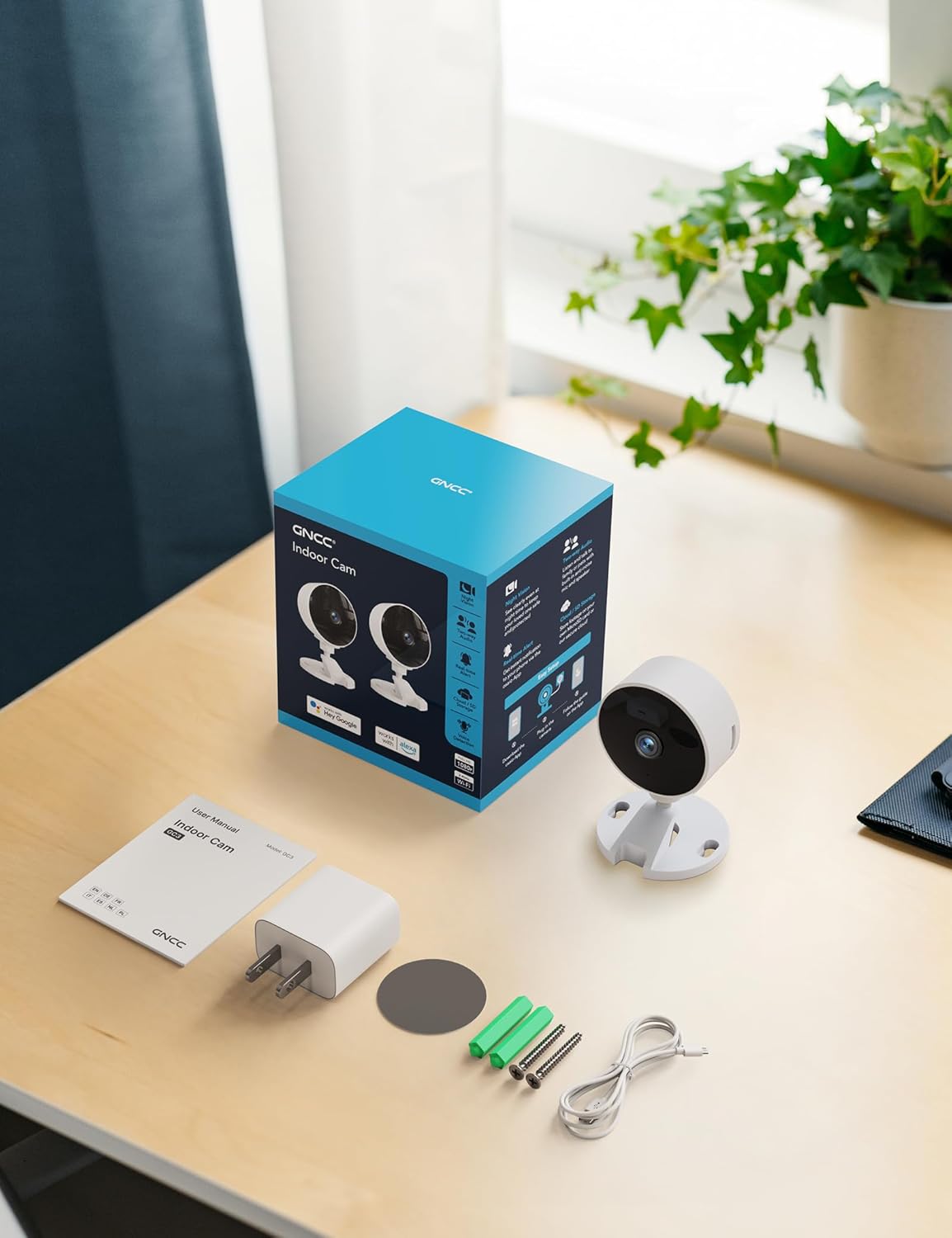
Image: All components included in the GNCC Indoor Camera package, neatly laid out on a wooden surface.
Асаблівасці прадукту
The GNCC Indoor Security Camera is equipped with several features designed to enhance your home security and monitoring experience:
- Раздзяленне 1080P Full HD: Provides clear and detailed video monitoring.
- 15m Night Vision: Built-in infrared LEDs enable clear vision up to 15 meters in low-light conditions.
- Smarter AI Detection: Advanced AI (subscription required) for identifying people, pets, vehicles, and packages, reducing false alerts.
- Гнуткія параметры захоўвання: Supports local recording with a 128GB Micro SD card (not included) and offers a 14-day free cloud storage trial.
- Лёгкая ўстаноўка: Can be installed quickly using 3M tape or included screws for wall mounting.
- Рэжым прыватнасці: One-tap privacy mode to disable the lens and LED for enhanced privacy.
- Двухбаковы аўдыё: Убудаваны мікрафон і дынамік для сувязі ў рэжыме рэальнага часу.
- Разумная інтэграцыя: Compatible with Alexa and Google Home for voice control.
- Сямейны доступ: Allows sharing access with up to 3 users.

Image: Visual representation of the camera's core functionalities, including HD resolution, night vision, and two-way audio.
Настройка
1. Уключэнне
- Падключыце прыкладзены адаптар сілкавання да ўваходнага порта сілкавання камеры.
- Падключыце адаптар сілкавання да стандартнай электрычнай разеткі.
- Камера ўключыцца, і індыкатар пакажа яе стан.
2. Усталёўка праграмы і стварэнне ўліковага запісу
- Download the official GNCC app from your smartphone's app store (iOS App Store or Google Play Store).
- Адкрыйце праграму і выконвайце інструкцыі на экране, каб стварыць новы ўліковы запіс, або ўвайдзіце ў сістэму, калі ў вас ужо ёсць уліковы запіс.
3. Даданне камеры ў праграму
- In the GNCC app, tap the "+" icon to add a new device.
- Select "Security Camera" or the specific model if prompted.
- Выконвайце інструкцыі праграмы, каб падключыць камеру да сеткі Wi-Fi 2.4 ГГц. Note: This camera is not compatible with 5GHz Wi-Fi networks.
- You may be required to scan a QR code displayed on your phone with the camera lens or enter a code manually.
- Once connected, name your camera and assign it to a specific room or location.

Image: The GNCC camera alongside a smartphone showing the camera's live feed and app interface, demonstrating connectivity.
4. Варыянты мантажу
Камера прапануе гнуткія варыянты мацавання:
- Размяшчэнне на стальніцы: Simply place the camera on a flat surface like a shelf, table, or desk.
- Насценны мантаж: Use the included 3M adhesive tape for a drill-free installation, or use the provided screws for a more permanent fixture. Ensure the mounting surface is clean and dry before applying adhesive.
Інструкцыя па эксплуатацыі
жыць View і дыстанцыйны маніторынг
Once connected, you can access the live video feed from your camera anytime, anywhere, through the GNCC app.

Image: A smartphone screen showing the live feed from the GNCC camera, illustrating remote monitoring capabilities.
Двухбаковае аўдыё
The camera features a built-in microphone and speaker, allowing for two-way communication. Tap the microphone icon in the app to speak, and release to listen. This is ideal for communicating with family members or pets.

Image: A visual representation of the two-way audio feature, showing a child and a pet, with text bubbles indicating conversation.
Начное бачанне
The camera automatically switches to night vision mode in low-light conditions, providing clear black and white images up to 15 meters. This ensures continuous monitoring even in complete darkness.

Image: A baby sleeping in a crib, demonstrating the camera's clear night vision capabilities in a dark environment.
Выяўленне руху і гуку
The camera can detect motion and sound, sending instant alerts to your smartphone. With an optional AI subscription, the camera can differentiate between people, pets, vehicles, and packages, reducing false alarms. You can customize motion detection zones within the app.

Image: Children and a dog triggering motion and sound detection, with example alert notifications shown.
Параметры захоўвання
Your GNCC camera supports two primary storage methods for recorded footage:
- Micro SD-карта: Insert a Micro SD card (up to 128GB, not included) into the camera's slot for continuous local recording.
- Воблачнае сховішча: A 14-day free trial of cloud storage is included. Cloud storage provides secure, off-site backup of your recordings, accessible from anywhere.

Image: The camera with visual cues for both SD card and cloud storage, highlighting flexible recording options.
Рэжым прыватнасці
To ensure privacy, the GNCC camera features a one-tap privacy mode within the app. Activating this mode will fully disable the camera lens and LED indicator, preventing any recording or live viewінж.
Тэхнічнае абслугоўванне
- Уборка: Выкарыстоўвайце мяккую сухую тканіну для чысткі аб'ектыва і корпуса камеры. Пазбягайце выкарыстання вадкіх ачышчальнікаў або абразіўных матэрыялаў.
- Абнаўленні прашыўкі: Regularly check the GNCC app for firmware updates. Keeping your camera's firmware up-to-date ensures optimal performance, security, and access to new features.
- Размяшчэнне: Пераканайцеся, што камера размешчана ў стабільным месцы, удалечыні ад прамых сонечных прамянёў, крыніц цяпла і празмернай вільгаці.
Ліквідацыю непаладак
| праблема | Магчымая прычына / рашэнне |
|---|---|
| Камера не падключаецца да Wi-Fi |
|
| No video feed / Offline status |
|
| Дрэнная якасць відэа |
|
| Папярэджанні аб руху/гуку не прымаюцца |
|
| Двухбаковы аўдыё не працуе |
|
Тэхнічныя характарыстыкі
| Асаблівасць | Дэталь |
|---|---|
| Назва мадэлі | GC3B-1P |
| Выкарыстанне ў памяшканні/на вуліцы | У памяшканні |
| Дазвол відэазахопу | 1080p Full HD |
| Дыяпазон начнога бачання | 15 метраў |
| Тэхналогія падлучэння | Бесправадная сувязь (Wi-Fi) |
| Частата Wi-Fi | 2.4 ГГц (не сумяшчальны з 5 ГГц) |
| Крыніца харчавання | Правадная электрычная |
| Тып кантролера | Amazon Alexa, Google Home |
| Тып мацавання | Настольнае мацаванне, насценнае мацаванне |
| Параметры захоўвання | Карта Micro SD (да 128 ГБ, не ўваходзіць у камплект), воблачнае сховішча |
| Двухбаковае аўдыё | так |
| Выяўленне штучнага інтэлекту | Motion, Sound (AI features require subscription) |
| Памеры прадукту | 2.56 х 2.76 х 3.54 цалі |
| Вага прадмета | 2.24 унцыі |
| Колер | Белы |
| Уключаныя кампаненты | Indoor camera, Power Adapter, Instruction Manual, Mounting Screw, 2m power cord |
Гарантыя і падтрымка
GNCC products are designed for reliability and performance. For specific warranty details, please refer to the warranty card included with your product or visit the official GNCC webсайт.
If you encounter any issues or have questions regarding your GNCC 1080P Indoor Security Camera, please contact GNCC Customer Support through the following channels:
- Official GNCC Webсайт: Look for the "Support" or "Contact Us" section.
- Падтрымка па электроннай пошце: Refer to the contact information provided in the GNCC app or on the product packaging.
- Падтрымка ў дадатку: Some issues can be resolved directly through the help section within the GNCC application.
Please have your product model (GC3B-1P) and purchase information ready when contacting support.