
KOFIRE UG-09
Бесправадная гульнявая гарнітура KOFIRE UG-09
Кіраўніцтва карыстальніка
Уводзіны
This manual provides detailed instructions for the setup, operation, maintenance, and troubleshooting of your KOFIRE UG-09 Wireless Gaming Headset. Please read this manual thoroughly before using the product to ensure optimal performance and longevity.

Image: The KOFIRE UG-09 Wireless Gaming Headset displayed with its charging cable, detachable microphone, and USB/Type-C 2-in-1 transmitter.
Змест пакета
Праверце, ці ёсць усе прадметы ў вашай упакоўцы:
- 1 x KOFIRE Wireless Gaming Headset (Model: UG-09)
- 1 x USB & Type-C 2-in-1 Transmitter
- 1 х зарадны кабель Type-C
- 1 х здымны мікрафон
- 1 х 3.5 мм аўдыякабель
- 1 х Кіраўніцтва карыстальніка (гэты дакумент)
Прадукт скончаныview
Азнаёмцеся з кампанентамі і элементамі кіравання вашай гарнітуры.
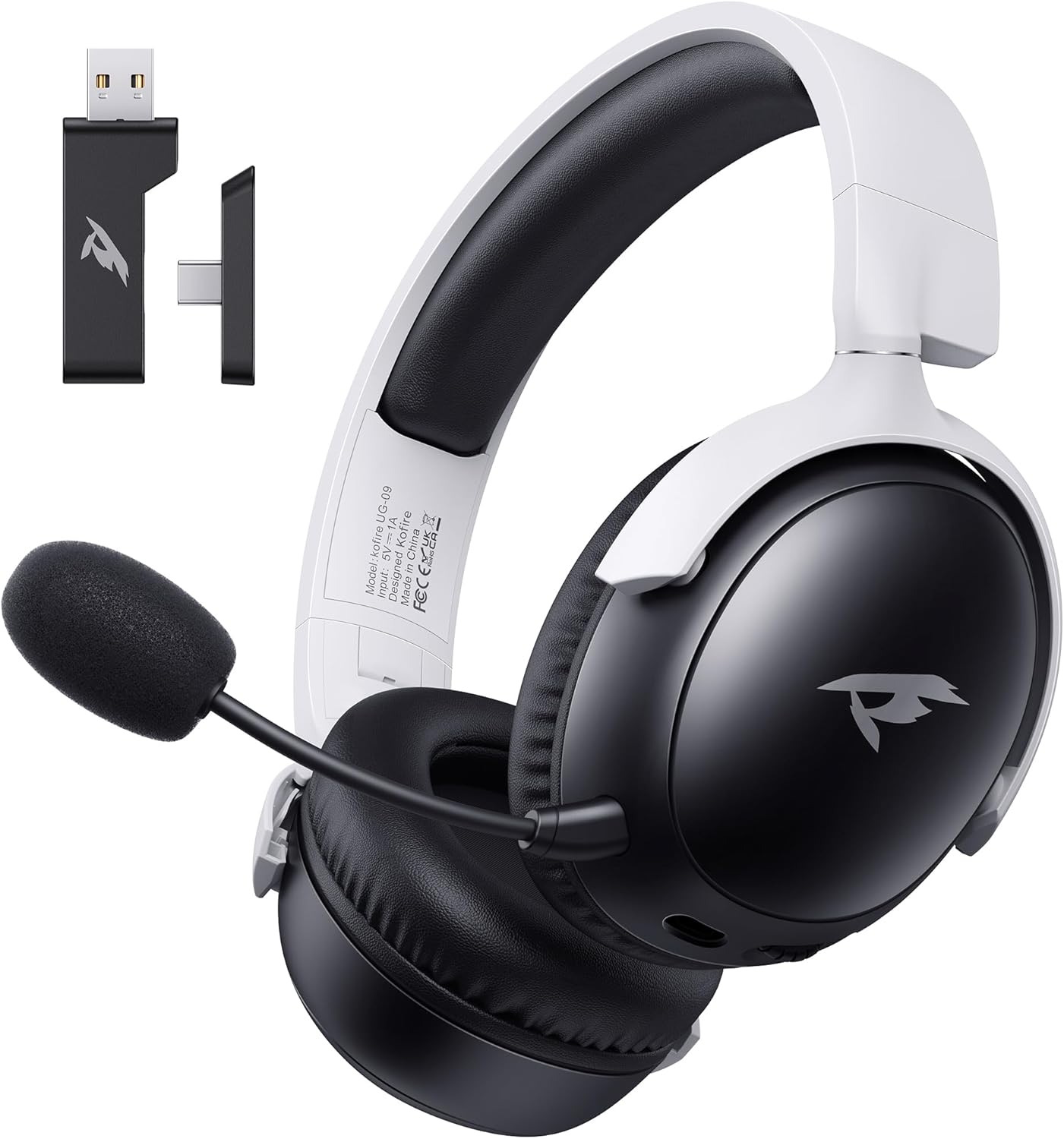
Выява: спераду view of the KOFIRE UG-09 Wireless Gaming Headset in black and white, showing the detachable microphone and the USB/Type-C 2-in-1 transmitter.
Асноўныя характарыстыкі:
- Шматрэжавае падключэнне: 2.4GHz Wireless, Bluetooth 5.4, and 3.5mm Wired options.
- Доўгі тэрмін службы батарэі: Да 65 гадзін прайгравання.
- Дынамічныя драйверы 53 мм: For immersive 3D stereo sound.
- ENC Noise-Canceling Microphone: Detachable and omnidirectional for clear communication.
- Эрганамічны дызайн: Lightweight with rotatable ear cups, adjustable headband, and soft memory foam cushions for comfort.
Інструкцыя па наладзе
1. Зарадка гарнітуры
Before first use, fully charge the headset. Connect the supplied Type-C charging cable to the headset's charging port and the other end to a USB power source (e.g., computer USB port, USB wall adapter). The LED indicator will show charging status. A full charge takes approximately 2-2.5 hours. The headset supports simultaneous charging and use.
2. Connecting via 2.4GHz Wireless (USB Dongle)
This mode offers ultra-low latency (≤20ms) for gaming on compatible devices like PC, Mac, PS4, PS5, and Nintendo Switch (audio only).
- Insert the USB & Type-C 2-in-1 transmitter into an available USB-A or USB-C port on your device.
- Уключыце гарнітуру.
- Press and hold the microphone button on the headset to switch to 2.4G mode. You will hear an audio prompt "dongle mode."
- On your connected device, navigate to sound settings and select "Kofire UG-09" as the audio output/input device to complete pairing.

Image: Illustration of the 2.4GHz wireless connection, showing the USB dongle plugged into a gaming handheld device, emphasizing stable and low-latency performance.
3. Connecting via Bluetooth 5.4
Use Bluetooth for mobile devices such as phones, tablets, and Nintendo Switch (audio only).
- Уключыце гарнітуру.
- Press and hold the microphone button for 3 seconds to switch to Bluetooth mode. You will hear an audio prompt "Bluetooth mode." The LED indicator will flash, indicating pairing mode.
- On your mobile device, go to Bluetooth settings and search for "Kofire UG-09." Select it to complete the pairing process.

Image: Depicts the versatility of the headset, showing one user connected via Bluetooth to a phone and another connected wirelessly to a PC, highlighting dual connectivity options.
4. Connecting via 3.5mm Wired
For universal compatibility or when the battery is depleted, use the 3.5mm audio cable.
- Падключыце адзін канец аўдыёкабеля 3.5 мм да раздыма 3.5 мм на гарнітуры.
- Connect the other end to the 3.5mm audio port on your gaming device or console.
- Гарнітура аўтаматычна пераключыцца ў правадны рэжым.
Заўвага: The microphone function is not supported on Nintendo Switch when using any wireless mode. For Xbox, only wired mode is supported.
Інструкцыя па эксплуатацыі
Уключэнне/выключэнне харчавання
- Уключэнне: Націсніце і ўтрымлівайце кнопку харчавання, пакуль не загарыцца святлодыёдны індыкатар.
- Выключэнне: Націсніце і ўтрымлівайце кнопку харчавання, пакуль не пагасне святлодыёдны індыкатар.
Рэгулятар гучнасці
- Павялічыць гучнасць: Rotate the volume wheel upwards.
- Паменшыць гучнасць: Rotate the volume wheel downwards.
Выкарыстанне мікрафона
The headset features a detachable ENC (Environmental Noise Canceling) omnidirectional microphone.
- Далучыць/Адлучыць: Insert the microphone into the dedicated port on the left earcup or remove it when not needed.
- Выключыць/уключыць гук: Press the dedicated microphone mute button for one-touch muting. The LED indicator on the microphone will show its status.

Выява: Падрабязная view of the ENC noise reduction microphone, highlighting its internal components and detachable design for clear voice transmission.
Пераключэнне рэжымаў
To switch between 2.4GHz wireless and Bluetooth modes, press and hold the microphone button for approximately 3 seconds until you hear the corresponding audio prompt ("dongle mode" or "Bluetooth mode").
Тэрмін службы батарэі і абвесткі
The headset provides up to 65 hours of playtime in Bluetooth mode (microphone off) and 50 hours in 2.4GHz dongle mode (microphone on). A low battery alert will notify you when recharging is needed.
Тэхнічнае абслугоўванне
Уборка
- Працярыце гарнітуру мяккай сухой тканінай.
- Не выкарыстоўвайце агрэсіўныя хімічныя рэчывы, ачышчальныя растваральнікі або моцныя мыйныя сродкі.
- Ensure no moisture enters the earcups or control buttons.
Захоўванне
- Захоўвайце гарнітуру ў прахалодным, сухім месцы, удалечыні ад прамых сонечных прамянёў і экстрэмальных тэмператур.
- When storing for extended periods, ensure the headset is partially charged (around 50%) to preserve battery health.
- The rotatable and foldable ear cups allow for compact storage.

Image: Illustrates the ergonomic design elements of the headset, including rotatable earcups, soft sponge cushioning, adjustable angle, and a retractable headband for comfortable wear and storage.
Сыход за батарэяй
- Пазбягайце частай поўнай разрадкі акумулятара.
- Не падвяргайце акумулятар уздзеянню высокіх тэмператур.
- Выкарыстоўвайце толькі зарадны кабель, які ўваходзіць у камплект, або яго сертыфікаваны эквівалент.
Ліквідацыю непаладак
| праблема | Магчымая прычына | Рашэнне |
|---|---|---|
| Няма гуку з гарнітуры. |
|
|
| Не працуе мікрафон. |
|
|
| Немагчыма падключыцца бесправадным шляхам. |
|
|
| Headset not charging. |
|
|

Image: Illustrates the universal compatibility of the headset with a range of gaming and mobile devices, including PlayStation consoles, PC, Mac, Nintendo Switch, and smartphones.
Тэхнічныя характарыстыкі
| Асаблівасць | Дэталь |
|---|---|
| Назва мадэлі | УГ-09 |
| Тэхналогія падлучэння | Бесправадная сувязь 2.4 ГГц, Bluetooth 5.4, правадны раз'ём 3.5 мм |
| Тэхналогія бесправадной сувязі | 2.4GHz USB-A & Type-C 2-in-1 Dongle, Bluetooth 5.4 |
| Тып аўдыё драйвера | Дынамічны драйвер 53 мм |
| АЧХ | 20 кГц (макс.) |
| Імпеданс | 32 Ом |
| Дыяпазон Bluetooth | 10 метраў |
| Затрымка гуку (2.4 ГГц) | ≤20 Milliseconds |
| Тэрмін службы батарэі | Up to 65 hours (Bluetooth, mic off); 50 hours (2.4GHz, mic on) |
| Час зарадкі | 2-2.5 гадзін |
| Мікрафон | Detachable ENC Noise-Canceling Omnidirectional |
| Вага | 14.4 унцыі (0.41 кілаграма) |
| Матэрыял | ABS, Faux Leather, PC, Soft Memory Sponge Cushions |
| Сумяшчальныя прылады | PC, Mac, Laptop, Desktop, Phone, Pad, Tablet, PlayStation 5/4/Pro/Slim, Gaming Consoles, Switch (audio only), Xbox (wired only) |
Гарантыя і падтрымка
KOFIRE is committed to providing professional service and expert support for your wireless gaming headset. If you encounter any issues or have questions regarding your product, please do not hesitate to contact us.
- Абслугоўванне кліентаў: Our team of experienced engineers and support staff are available to assist you.
- Час водгуку: We aim to respond to all inquiries within 0-24 hours.
- Кантактная інфармацыя: Please refer to the contact details provided on the product packaging or the official KOFIRE webсайт для дапамогі.