
Уводзіны
Thank you for choosing the Amazon Basics Single Outlet Hose Watering Timer. This device is designed to simplify your garden irrigation by providing flexible and automated watering schedules. Please read this manual carefully before installation and use to ensure proper operation and longevity of your product.
Асаблівасці прадукту
- Smart Watering Timer: Program flexible watering schedules from 1 minute to 3 hours 59 minutes for hassle-free garden irrigation.
- Інтуітыўнае кіраванне: Activate manual watering with customizable duration when needed. The program can be paused for 24, 48, or 72 hours.
- Angled Screen Design: The 45% adjustable tilted screen ensures optimal visibility from any angle, displaying time, program, and battery status.
- Leak-Free Connection: Rubber gaskets ensure a tight seal and prevent water waste. Standard 1.9cm BSP thread. Operates on 2 AA alkaline batteries (not included).

Малюнак 1: Спераду view of the Amazon Basics Single Outlet Hose Watering Timer, showing the digital display and control buttons.
Змест пакета
Ваш пакет павінен змяшчаць наступныя рэчы:
- 1 x Amazon Basics Single Outlet Hose Watering Timer
- 1 х Кіраўніцтва карыстальніка
- Rubber gaskets (pre-installed or included for leak-free connection)
Note: 2 AA alkaline batteries are required and are NOT included in the package.
Настройка
1. Устаноўка батарэі
- Знайдзіце батарэйны адсек на задняй панэлі таймера.
- Адкрыйце крышку батарэйнага адсека.
- Устаўце 2 новыя шчолачныя батарэйкі тыпу АА, сачыце за правільнай палярнасцю (+/-).
- Close the battery compartment cover securely to maintain water resistance.

Figure 2: Top connection of the timer, showing the filter and threaded inlet. Ensure rubber gaskets are in place for a leak-free seal.
2. Connecting to the Faucet
- Ensure the faucet is clean and free of debris.
- Check that the rubber gasket is properly seated inside the timer's inlet connector.
- Screw the timer onto your standard 1.9cm (3/4 inch) outdoor faucet by hand until it is snug. Do not overtighten.
- Connect your garden hose to the outlet of the timer.
- Slowly turn on the faucet. Check for any leaks. If leaks occur, tighten the connections slightly or adjust the rubber gaskets.
Інструкцыя па эксплуатацыі
1. Устаноўка бягучага часу
Refer to the angled screen for clear visibility of settings.
- Press the "SET" button to enter time setting mode.
- Use the "+" and "-" buttons to adjust the hour. Press "SET" to confirm.
- Use the "+" and "-" buttons to adjust the minute. Press "SET" to confirm.
2. Programming a Watering Schedule
The timer allows flexible schedules from 1 minute to 3 hours 59 minutes.
- Press the "PROG" button to enter program setting mode.
- Set the START TIME: Use "+" and "-" to adjust the hour and minute, pressing "PROG" to confirm each.
- Set the WATERING DURATION: Use "+" and "-" to adjust the duration (minutes/hours), pressing "PROG" to confirm.
- Set the WATERING FREQUENCY: Use "+" and "-" to select how often the timer should water (e.g., every 12 hours, every 24 hours, specific days). Press "PROG" to confirm.
- Once all settings are confirmed, the timer will display the next scheduled watering time.
3. Ручны паліў
To water manually outside of the programmed schedule:
- Press the "MANUAL" button.
- Use "+" and "-" buttons to set the desired manual watering duration.
- Press "MANUAL" again to start manual watering. The timer will automatically stop after the set duration.
4. Pause Function (Rain Delay)
If it rains or you don't need to water for a few days, you can pause the program:
- Press the "DELAY" button.
- Use "+" and "-" buttons to select the pause duration (24, 48, or 72 hours).
- Press "DELAY" again to confirm. The timer will resume its programmed schedule after the delay period.

Figure 3: Visual representation of the timer's main features, including flexible schedules, manual watering, and secure sealing.
Тэхнічнае абслугоўванне
- Замена батарэі: Replace batteries when the low battery indicator appears on the screen to ensure continuous operation.
- Ачыстка фільтра: Periodically check and clean the filter located in the inlet connector to prevent blockages and maintain water flow.
- Зімовае захоўванне: During freezing temperatures, remove the timer from the faucet, drain any remaining water, and store it indoors to prevent damage.
- Генеральная ўборка: Працярыце таймер мяккай, damp тканіна. Не выкарыстоўвайце абразіўныя ачышчальнікі або растваральнікі.
Ліквідацыю непаладак
| праблема | Магчымая прычына | Рашэнне |
|---|---|---|
| Таймер не палівае. | Low batteries, incorrect program, faucet off, water pressure too low. | Check battery status and replace if needed. Verify program settings. Ensure faucet is fully open. Check water supply. |
| Працякае вада з злучэнняў. | Loose connection, damaged gasket, missing gasket. | Tighten connections. Check and replace rubber gaskets if damaged or missing. |
| Дысплей пусты або цьмяны. | Батарэі разрадзіліся або разрадзіліся. | Replace batteries with new AA alkaline batteries. |
Тэхнічныя характарыстыкі
- Нумар мадэлі: AMZ622617EU
- Памеры: 8.2 см х 13.7 см х 18.5 см (даўжыня х шырыня х вышыня)
- Вага: 383.4 г
- Тып ніткі: Standard 1.9cm (3/4 inch) BSP
- Крыніца харчавання: 2 шчолачныя батарэйкі тыпу АА (не ўключаны)
- Працягласць паліву: 1 хвілін да 3 гадзін 59 хвілін
- Функцыя паўзы: 24, 48 або 72 гадзін
- колер: Grey, Black, Blue
- Краіна паходжання: Кітай
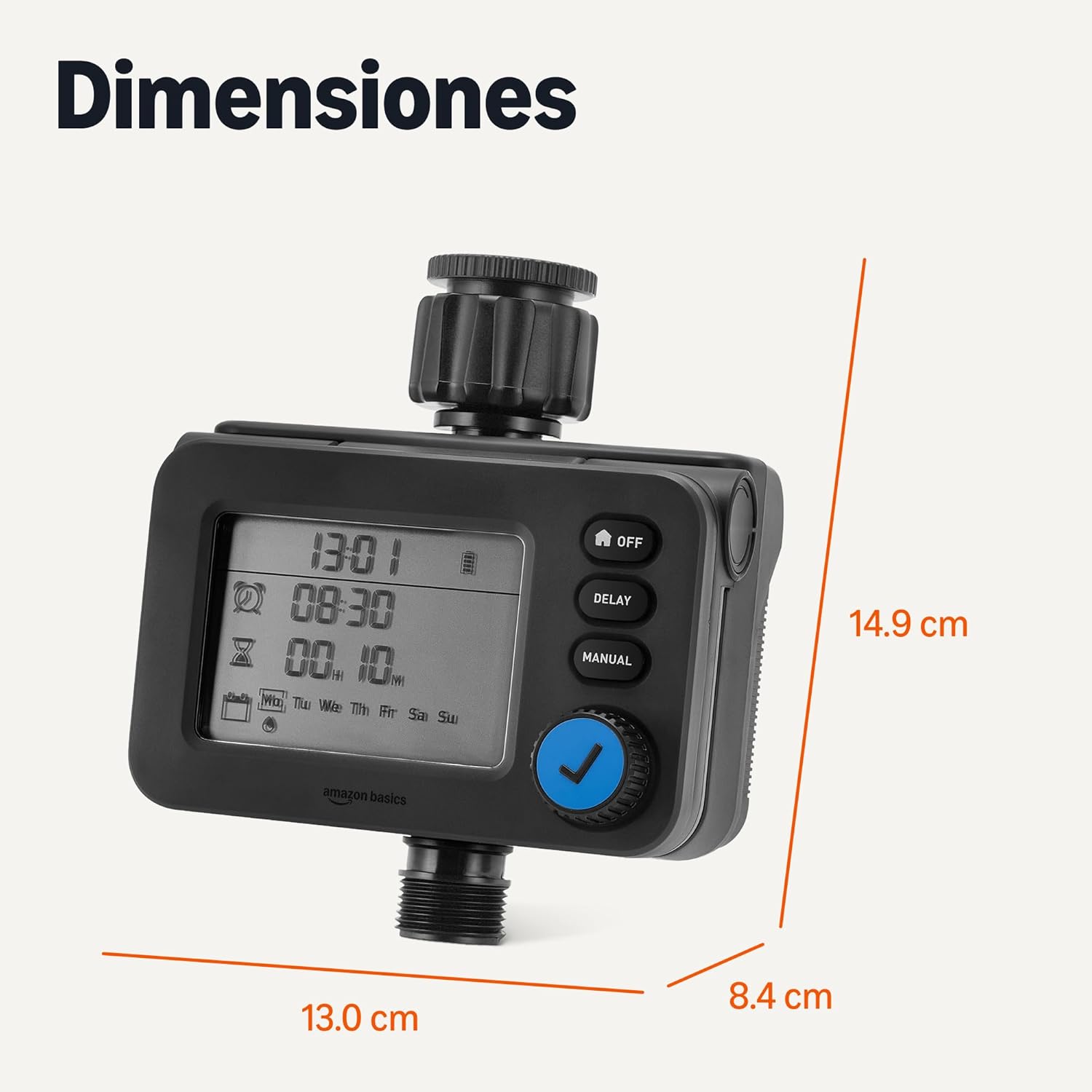
Малюнак 4: Памеры вырабу для планавання ўстаноўкі.
Гарантыя і падтрымка
Каб атрымаць інфармацыю аб гарантыі і падтрымцы кліентаў, звярніцеся да дакументацыі, якая прыкладаецца да вашай пакупкі, або наведайце афіцыйны сайт Amazon Basics. webсайт.