
1. Уводзіны
Thank you for choosing the Mistral MTF1697DR 16-inch DC Table Fan. This manual provides essential information for the safe and efficient operation, maintenance, and troubleshooting of your new fan. Please read these instructions thoroughly before use and retain them for future reference.
2. Прадукт скончыўсяview
The Mistral MTF1697DR is a 16-inch DC table fan designed for optimal air circulation. It features a durable construction and advanced functionalities for enhanced user comfort.
Асноўныя характарыстыкі:
- 9 Speed Settings with 3 Mode Selection
- Energy-efficient BLDC Motor
- Up to 9 Hours Timer Function
- Магутная падача паветра
- Front & Rear Durable Plastic Fan Guard
- Праца дыстанцыйнага кіравання
Кампаненты:
Familiarize yourself with the main components of your fan:
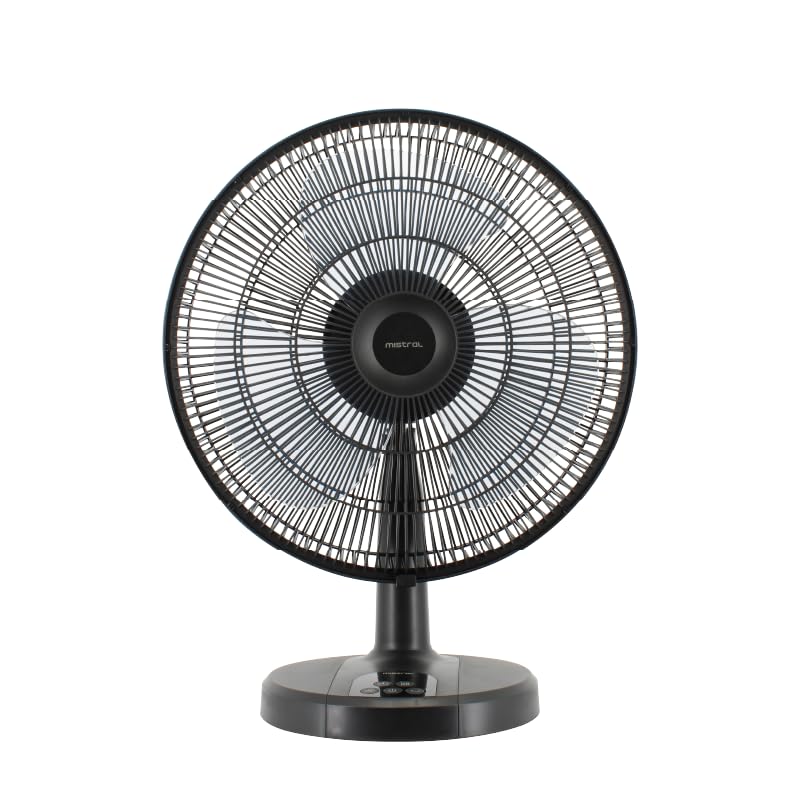
Малюнак 1: Спераду view of the Mistral MTF1697DR fan, showing the fan head, guard, stand, and base with control panel.

Малюнак 2: бок view of the Mistral MTF1697DR fan, illustrating the fan head's tilt mechanism and the fan's profile.
3. Настройка
Follow these steps to set up your fan:
- Распакаванне: Carefully remove all packaging materials. Ensure all components are present and undamaged.
- зборка: The fan typically comes partially assembled. If the fan guard or base requires attachment, follow the diagrams provided in the separate assembly guide (if applicable) or ensure the fan head is securely fastened to the stand and the stand to the base. Ensure the front and rear fan guards are properly aligned and secured.
- Размяшчэнне: Place the fan on a stable, flat surface. Ensure there is adequate space around the fan for proper air circulation and to prevent obstruction of the air intake/outlet. Keep the fan away from curtains, drapes, or any objects that could be drawn into the fan blades.
- Падключэнне сілкавання: Plug the power cord into a standard electrical outlet (220-240V ~ 50/60Hz).
4. Інструкцыя па эксплуатацыі
Your Mistral MTF1697DR fan can be operated using the control panel on the base or the included remote control.
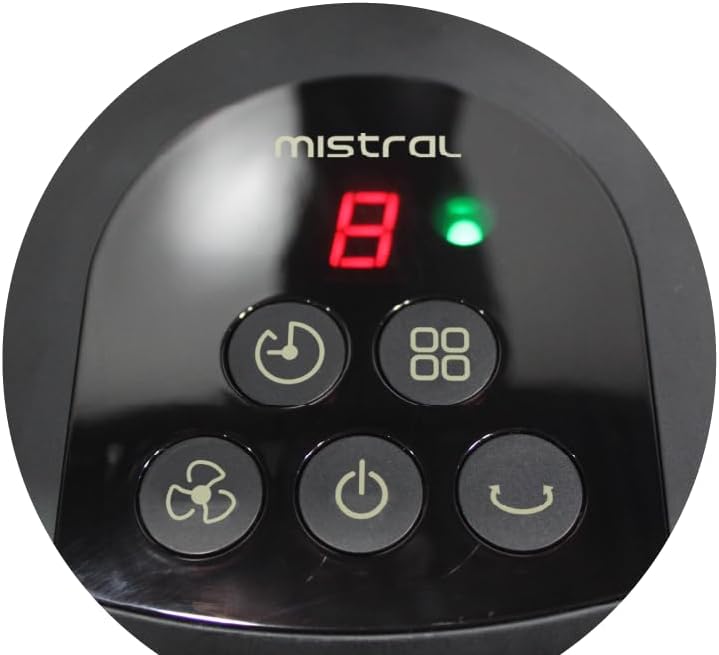
Figure 3: Close-up of the fan's control panel on the base, showing buttons for power, speed, mode, timer, and oscillation.
Функцыі панэлі кіравання:
- Кнопка харчавання (U): Націсніце, каб уключыць або выключыць вентылятар.
- Кнопка хуткасці (Значок вентылятара): Press repeatedly to cycle through 9 speed settings. The current speed will be displayed on the LED screen.
- Кнопка рэжыму (Squares Icon): Press to select from 3 operating modes (e.g., Normal, Natural, Sleep). Each press changes the mode.
- Кнопка таймера (Абразок гадзінніка): Press to set the fan to turn off automatically after a set period, up to 9 hours. Each press increases the timer duration.
- Кнопка ваганняў (Curved Arrow Icon): Press to start or stop the fan's oscillation function, which sweeps the airflow from side to side.
Пульт дыстанцыйнага кіравання:
The remote control duplicates all functions available on the fan's control panel, allowing for convenient operation from a distance. Ensure the remote control has working batteries and is pointed towards the fan's receiver.
5. Тэхнічнае абслугоўванне
Рэгулярная чыстка і належны догляд забяспечаць даўгавечнасць і аптымальную працу вашага вентылятара.
Уборка:
- Заўсёды адключайце вентылятар ад сеткі з разеткі перад чысткай.
- Знешні выгляд: Працірайце вонкавыя паверхні вентылятара мяккай губкайamp cloth. Do not use abrasive cleaners, solvents, or harsh chemicals, as these may damage the finish.
- Fan Guards and Blades: To clean the fan blades, you may need to carefully remove the front fan guard. Refer to the assembly instructions for guard removal. Use a soft cloth or a vacuum cleaner with a brush attachment to remove dust from the blades and guards. Ensure all parts are completely dry before reassembling and operating the fan.
- Do not immerse the fan in water or allow water to drip into the motor housing.
захоўванне:
Калі вентылятар не выкарыстоўваецца працяглы час, захоўвайце яго ў прахалодным, сухім месцы, пажадана ў арыгінальнай упакоўцы, каб абараніць ад пылу і пашкоджанняў.
6. Выпраўленне непаладак
Калі ў вас узніклі праблемы з вентылятарам, звярніцеся да наступных распаўсюджаных праблем і іх рашэнняў:
- Вентылятар не ўключаецца:
- Пераканайцеся, што шнур харчавання надзейна падключаны да спраўнай электрычнай разеткі.
- Check if the power button has been pressed.
- Verify that the household circuit breaker has not tripped.
- Weak or no airflow:
- Check for obstructions around the fan guards.
- Clean any dust or debris from the fan blades and guards (refer to Maintenance section).
- Павялічце хуткасць вентылятара.
- Пульт дыстанцыйнага кіравання не працуе:
- Пераканайцеся, што паміж пультам дыстанцыйнага кіравання і прымачом вентылятара няма перашкод.
- Замяніце батарэйкі ў пульце дыстанцыйнага кіравання.
- Пераканайцеся, што вы знаходзіцеся ў зоне дзеяння пульта дыстанцыйнага кіравання.
Калі праблема не знікне пасля спробы гэтых рашэнняў, звярніцеся ў службу падтрымкі кліентаў.
7. Тэхнічныя характарыстыкі
| Спецыфікацыя | Дэталь |
|---|---|
| мадэль | MTF1697DR |
| тtage | 220-240 В ~ 50/60 Гц |
| Ватtage | 36 Вт |
| Аб'ём паветра | 3600 м³/гадз |
| Максімальны расход паветра | 4.73 м/с |
| Памеры прадукту (Д*Ш*У) | 455 * 280 * 600 mm (45.5D x 28W x 60H cm) |
| Вага нета | 2.6 сома |
| Вага брута | 3.8 сома |
| Знак бяспекі | 250177-11 |
| Колер | Чорны |
| Дызайн электрычнага вентылятара | Настольны вентылятар |
| Крыніца харчавання | Правадная электрычная |
| Колькасць хуткасцяў | 9 |
| Метад кантролю | Дыстанцыйнае |
| Тып рухавіка | Brushless (BLDC) |
| Матэрыял | Пластыкавыя |
| Уключаныя кампаненты | Дыстанцыйнае |
8. Гарантыя і падтрымка
Інфармацыя аб гарантыі:
This Mistral MTF1697DR fan comes with a Гарантыя 2 год on the product, and an extended Гарантыя 8 год specifically for the motor. Please retain your proof of purchase for warranty claims.
Падтрымка кліентаў:
For technical assistance, warranty claims, or any questions not covered in this manual, please contact your retailer or the Mistral customer service department. Contact details can typically be found on the product packaging or the official Mistral webсайт.