
NIMO Nimo N157L
NIMO 15.6" FHD IPS Student Laptop Computer User Manual
Model: Nimo N157L
Уводзіны
Thank you for choosing the NIMO 15.6" FHD IPS Student Laptop Computer. This manual provides essential information for setting up, operating, maintaining, and troubleshooting your new device. Please read this manual thoroughly to ensure optimal performance and longevity of your laptop.
Што ў скрынцы
Калі ласка, пераканайцеся, што ўсе пералічаныя ніжэй прадметы ўваходзяць у ваш пакет:
- 1 x Nimo N157 Laptop
- 1 x Type-C 65W PD Fast Charger
- 1 х Кіраўніцтва карыстальніка (гэты дакумент)
- Windows 11 Home Operating System (pre-installed)
- Warranty Information (2 Years Warranty, 90 Days Return)
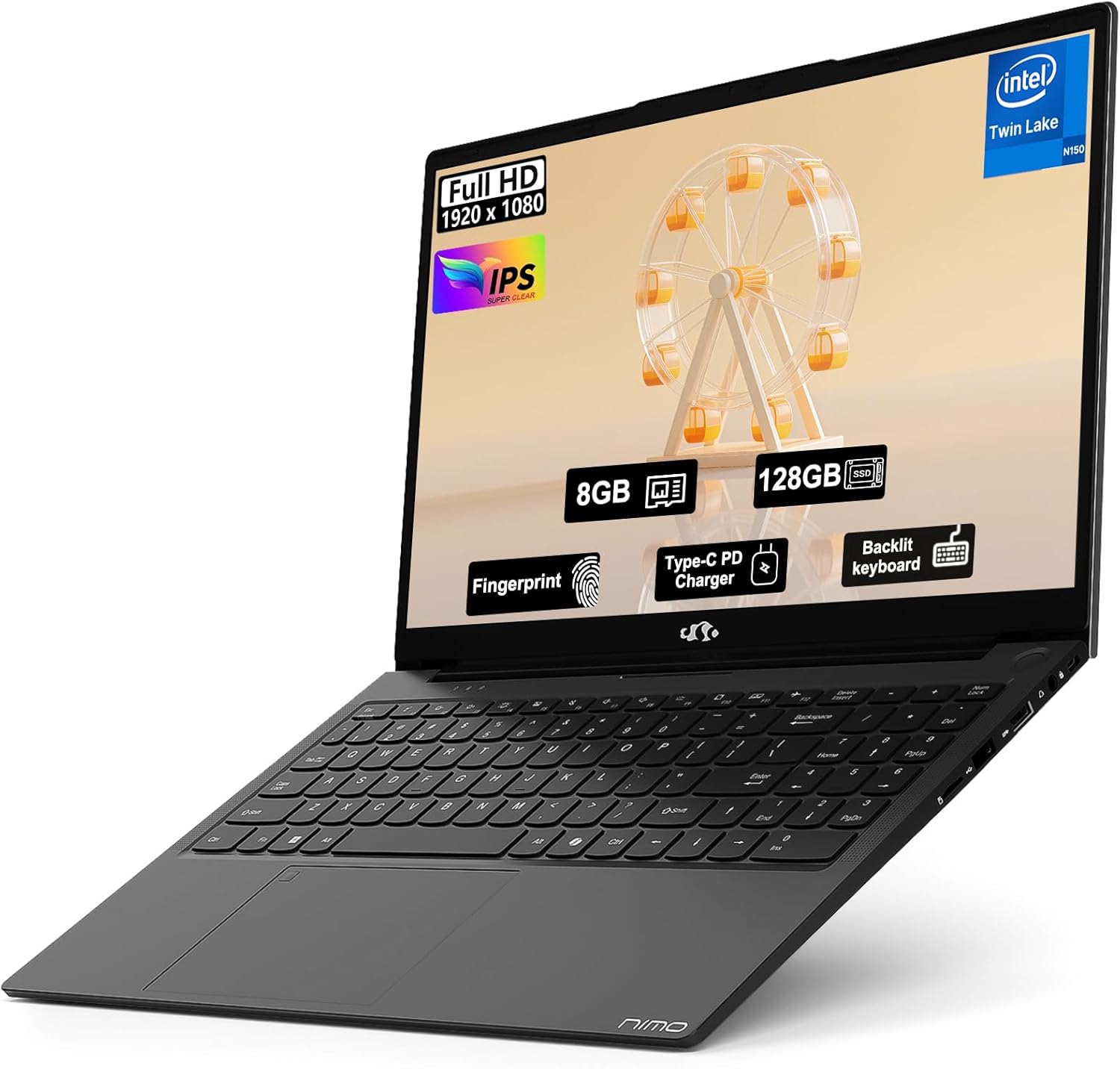
Image: The NIMO 15.6" FHD IPS Student Laptop Computer. The screen highlights key features such as Full HD 1920x1080 resolution, IPS display, 8GB RAM, 128GB SSD, Fingerprint reader, Type-C PD Charger, and Backlit keyboard. The laptop is shown in a sleek black finish.
Кіраўніцтва па ўстаноўцы
1. Пачатковае ўключэнне і зарадка
Before first use, it is recommended to fully charge your NIMO laptop. Connect the included Type-C 65W PD Fast Charger to the laptop's Type-C port and a power outlet. The charging indicator light will illuminate. A 15-minute charge can provide approximately 2 hours of standby time.
2. Налада аперацыйнай сістэмы
Your NIMO laptop comes with Windows 11 Home pre-installed. Upon first boot, follow the on-screen instructions to complete the initial Windows setup, including language selection, network connection, and user account creation.
3. Налада счытвальніка адбіткаў пальцаў
For enhanced security and convenient login, set up the fingerprint reader. Navigate to Settings > Accounts > Sign-in options > Fingerprint recognition (Windows Hello) and follow the prompts to register your fingerprints. The fingerprint sensor is integrated into the touchpad.
4. Backlit Keyboard Adjustment
The backlit keyboard allows for comfortable typing in low-light environments. Use the dedicated function keys (usually Fn + a specific F-key, refer to keyboard legends) to turn the backlight on/off and adjust its brightness levels.
Інструкцыя па эксплуатацыі
1. Асаблівасці дысплея
Your laptop features a 15.6-inch Full HD (1920x1080) IPS Anti-Glare Display. This provides wide viewing angles, accurate colors, and reduces reflections for a comfortable viewing experience. The 85% screen-to-body ratio and 16:9 aspect ratio optimize screen real estate.
2. Выкарыстанне сэнсарнай панэлі
The integrated touchpad supports multi-touch gestures for intuitive navigation. Common gestures include:
- Націск адным пальцам: Пстрыкніце левай кнопкай мышы
- Націсканне двума пальцамі: Пстрыкніце правай кнопкай мышы
- Пракрутка двума пальцамі: Пракрутка ўверх/уніз або ўлева/ўправа
- Звядзенне пальцамі для павелічэння: Павелічэнне/памяншэнне
3. Сувязь
The NIMO laptop supports various connectivity options:
- Wi-Fi 6: Для хуткаснага бесправаднога падключэння да Інтэрнэту.
- Bluetooth 5.2: For connecting wireless peripherals such as headphones, mice, and keyboards.
- Парты USB: Includes 1 x USB 2.0 port and 3 x USB 3.0 ports for connecting external devices.
- Порт тыпу C: Выкарыстоўваецца для зарадкі і перадачы дадзеных.
4. Кіраванне батарэяй
The laptop is equipped with a Lithium Polymer battery providing an average battery life of approximately 5 hours. To maximize battery life, adjust screen brightness, close unused applications, and utilize power-saving modes in Windows settings.
Тэхнічнае абслугоўванне
1. RAM and SSD Upgrade
The NIMO laptop supports user-detachable RAM and SSD, allowing for future upgrades. If you plan to upgrade, ensure you use compatible components (DDR4 RAM, PCIe SSD) and follow proper electrostatic discharge (ESD) precautions. Consult a professional if you are unsure.
2. Чыстка ноўтбука
Каб захаваць знешні выгляд і функцыянальнасць вашага ноўтбука:
- Выкарыстоўвайце мяккую тканіну без ворса для чысткі экрана і вонкавых паверхняў.
- Для ўстойлівых плям злёгкуampпрацярыце тканіну вадой або растворам для ачысткі экрана.
- Avoid using harsh chemicals, abrasive cleaners, or direct spraying of liquids onto the laptop.
- Рэгулярна чысціце клавіятуру і сэнсарную панэль, каб выдаліць пыл і смецце.
Ліквідацыю непаладак
У гэтым раздзеле прадстаўлены рашэнні распаўсюджаных праблем, з якімі вы можаце сутыкнуцца.
| праблема | Магчымае рашэнне |
|---|---|
| Ноўтбук не ўключаецца. | Ensure the charger is properly connected and the power outlet is functional. Allow the battery to charge for at least 30 minutes before attempting to power on again. |
| Экран пусты або мігціць. | Check display cable connections (if external monitor is used). Restart the laptop. Update graphics drivers. |
| Праблемы з падключэннем да Wi-Fi. | Ensure Wi-Fi is enabled in Windows settings. Restart your router/modem. Update Wi-Fi drivers. |
| Клавіятура або сэнсарная панэль не рэагуюць. | Restart the laptop. Check for driver updates. Ensure no external devices are interfering. |
If you encounter issues not covered here or require further assistance, please contact NIMO customer support.
Тэхнічныя характарыстыкі
Detailed technical specifications for your NIMO N157L laptop:
| Асаблівасць | Дэталь |
|---|---|
| Назва мадэлі | Nimo N157L |
| Памер экрана | 15.6 цалі |
| Дазвол экрана | 1920 x 1080 pixels (FHD IPS Anti-Glare) |
| Працэсар | Intel 4 Core N150 (up to 3.6 GHz) |
| АЗП | 8 GB DDR4 (3200 MHz, detachable) |
| Жорсткі дыск | 128 GB PCIe SSD (detachable) |
| Графічны супрацэсар | Інтэграваная графіка |
| Аперацыйная сістэма | Windows 11 хатняя |
| Бесправадны тып | 802.11a/b/g/n/ac (Wi-Fi 6), Bluetooth 5.2 |
| Парты USB | 1 х USB 2.0, 3 х USB 3.0 |
| Іншыя парты | Type-C (65W PD Fast Charging), Memory Card Slot |
| Асаблівасці | Падсветленая клавіятура, счытвальнік адбіткаў пальцаў, HD-аўдыё, лічбавая клавіятура |
| Тэрмін службы батарэі | Approx. 5 Hours (Lithium Polymer) |
| Вага прадмета | 3.8 фунта |
| Памеры прадукту | 14.07 х 8.98 х 0.76 цалі |
| Колер | Чорны |
| Тыл WebДазвол камеры | 2 МП |
Гарантыя і падтрымка
NIMO Direct Inc. offers a comprehensive 2-гадовая гарантыя вытворцы for your laptop. This warranty covers defects in materials and workmanship under normal use. Additionally, a 90-Day Hassle-Free Return and Exchange Service is provided from the date of purchase.
For warranty claims, technical support, or any concerns regarding your NIMO laptop, please contact the manufacturer's dedicated support team. Refer to the contact information provided on the product packaging or the official NIMO webсайт.
Заўвага: The laptop is partially assembled in the USA. Please retain your proof of purchase for warranty purposes.