
Ctronics 870C-5MP
Кіраўніцтва карыстальніка для вулічнай камеры бяспекі Ctronics 5MP (мадэль 870C-5MP)
Падрабязныя інструкцыі па ўсталёўцы, эксплуатацыі і абслугоўванні.
1. Уводзіны
This manual provides detailed instructions for the Ctronics 5MP Outdoor Security Camera, Model 870C-5MP. This device is designed for outdoor surveillance, offering high-resolution video, advanced night vision capabilities, and intelligent tracking features. Please read this manual thoroughly before installation and operation to ensure proper use and optimal performance.

Выява 1.1: Спераду view of the Ctronics 5MP Outdoor Security Camera (Model 870C-5MP).
2. Змесціва ўпакоўкі
Verify that all items listed below are included in your package. If any items are missing or damaged, please contact Ctronics customer support.
- Ctronics 5MP Security Camera (Model 870C-5MP)
- Power Adapter (12V – 2.5A with 3m cable)
- Ethernet Cable (CAT 5E, 1m length)
- Насценны кранштэйн
- Мантажныя шрубы і дзюбелі
- Камплект воданепранікальнага раздыма
- Адвёртка
- Антэна
- Кіраўніцтва карыстальніка (гэты дакумент)
- Кіраўніцтва па хуткай ўстаноўцы
3. Настройка
3.1 Фізічная ўстаноўка
The camera is designed for wall mounting. Ensure the chosen location provides a clear view of the area to be monitored and is within reach of a power outlet. The adjustable top bracket allows for optimal angle positioning.
- Адзначыць кропкі свідравання: Use the provided drilling template to mark the screw holes on the wall.
- Свідраваць адтуліны: Прасвідруйце адтуліны ў пазначаных месцах і ўстаўце дзюбелі ў сцяну.
- Прымацуйце мантажны кранштэйн: Secure the metal mounting bracket to the wall using the screws.
- Hang Camera: Carefully hang the camera onto the fixed metal plate of the bracket.
- Бяспечная камера: Fasten the camera to the bracket using the connecting screw.
- Падключэнне антэны: Screw the antenna onto the designated port on the camera.
- Падключэнне сілкавання: Connect the power adapter to the camera's power input and plug it into an electrical outlet.
- Waterproof Connections: Use the provided waterproof caps for all cable connections to protect against outdoor elements.

Image 3.1: Illustration of camera connectivity options including dual-band WiFi and storage.
3.2 Сеткавае падключэнне
The camera supports dual-band Wi-Fi (2.4GHz and 5GHz) and wired Ethernet connections.
- Спампаваць прыкладанне: Download the "Ctronics Pro" app from your smartphone's app store (iOS/Android).
- Bluetooth Quick Setup:
- Пераканайцеся, што Bluetooth уключаны на вашым смартфоне.
- Адкрыйце праграму Ctronics Pro і выконвайце інструкцыі на экране, каб дадаць новую прыладу.
- The app will detect the camera via Bluetooth for a quick setup process (1-2 minutes).
- Select your Wi-Fi network (2.4GHz or 5GHz) and enter the password.
- Правадное падключэнне (неабавязкова):
- Connect one end of the Ethernet cable to the camera's LAN port and the other end to your router.
- Follow the app instructions to add the camera. The app should detect the camera automatically via the wired connection.
- Кнопка скіду: If you encounter connection issues, locate the small reset button on the camera's integrated cable. Press and hold it for approximately 5-10 seconds until you hear a prompt, then release. The camera will reset to factory defaults.

Image 3.2: Fast Bluetooth networking for quick setup.
4. Інструкцыя па эксплуатацыі
Control and monitor your camera using the Ctronics Pro smartphone app or PC client.

Выява 4.0: Канецview of key camera features including 3D Zoom, Starlight, and Auto-Zoom.
4.1 У прамым эфіры View і кіраванне PTZ
- Open the Ctronics Pro app and select your camera to view жывы канал.
- Use the on-screen controls to pan (horizontal movement), tilt (vertical movement), and zoom (PTZ) the camera.
- Функцыі камеры а 30-кратны аптычны зум for clear magnification of distant objects without loss of image quality.

Image 4.1.1: Demonstrates the clarity of 5MP (2560x1920P) resolution.

Image 4.1.2: The camera's 30X optical zoom allows for detailed viewing of distant subjects.
4.2 Рэжымы начнога бачання
The camera offers advanced night vision capabilities:
- Інфрачырвонае (ІЧ) начное бачанне: Забяспечвае выразную чорна-белую выявуtagда 180 метраў у поўнай цемры.
- Каляровы начны бачанне: Utilizes integrated white lights to deliver full-color video up to 80 meters in low-light conditions.
- You can configure the night vision mode settings within the app.

Image 4.2.1: Demonstrates the range of IR and color night vision.
4.3 Smart Human Detection & Auto Tracking
- The camera can detect human shapes and automatically track their movement within its field of view.
- Auto-Zoom: When tracking, the camera will automatically zoom to keep the human subject in focus.
- After tracking, the camera will return to its preset guard position.
- Configure detection zones and sensitivity settings in the app.

Image 4.3.1: Auto-tracking with auto-zoom feature in action.
4.4 Preset Positions & Patrol Routes
- Зададзеныя пазіцыі: Set up to 60 specific camera positions for quick access and monitoring of critical areas.
- Patrol Routes: Configure two distinct patrol routes, allowing the camera to automatically cycle through a series of preset positions for comprehensive area monitoring.
- These settings are managed through the Ctronics Pro app.

Image 4.4.1: Visual representation of preset positions and patrol routes for 360-degree coverage.
Сігнальная сістэма 4.5
Upon human detection, the camera can trigger various warning actions:
- White Light Activation: The integrated white lights will turn on to deter intruders and enable color night vision.
- Галасавы сігнал: A customizable voice alarm can be triggered. You can set different sounds for day and night.
- Абвесткі праграмы: Real-time notifications will be sent to your smartphone via the Ctronics Pro app.

Image 4.5.1: Illustration of the camera's warning system in an industrial setting.
4.6 Video Storage Options
The camera offers multiple storage solutions for recorded footage:
- TF Card (MicroSD): Supports up to 128GB MicroSD cards (not included). Insert the card into the designated slot on the camera.
- Воблачнае сховішча: A 30-day free trial is typically offered. Cloud storage provides remote access and backup of your recordings.
- FTP: Фуtage can be uploaded to an FTP server.
- NVR/NAS: Compatible with Network Video Recorders (NVR) and Network Attached Storage (NAS) systems for continuous recording and centralized management.

Image 4.6.1: Various storage options including MicroSD, Cloud, and FTP.
4.7 Маскіроўка прыватнасці
To protect privacy in sensitive areas, you can define custom video masking zones. These areas will be blacked out in the live view and recordings, ensuring that private spaces are not monitored.

Image 4.7.1: Illustration of user-defined video masking for privacy.
4.8 Remote Control and Multi-Camera Management
The Ctronics Pro app and PC client allow for comprehensive remote control of your camera. You can view live streams, manage settings, and even control multiple Ctronics cameras simultaneously, supporting up to 36+ cameras for effortless group management. You can also share camera access with family members.
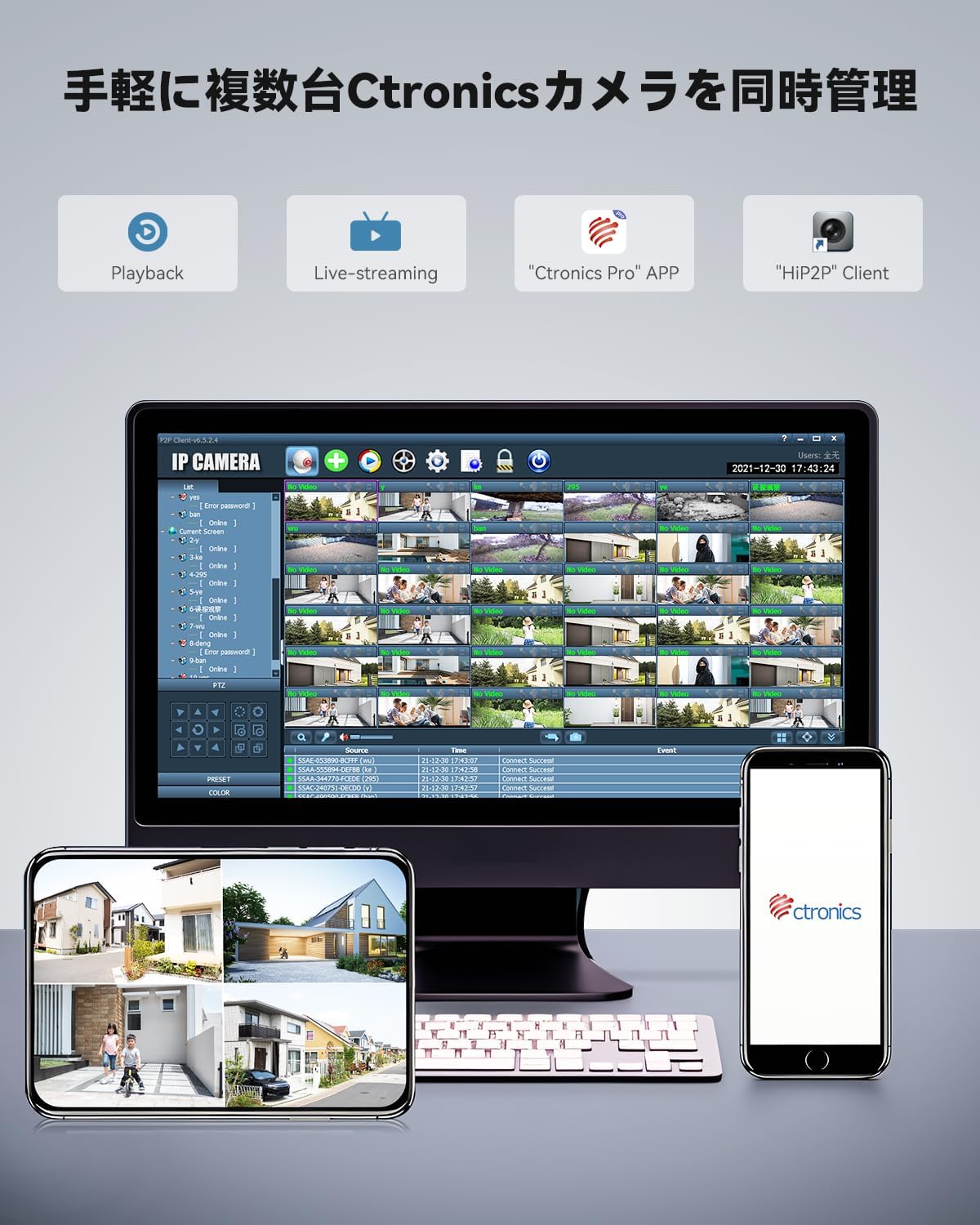
Image 4.8.1: Managing multiple Ctronics cameras via smartphone app and PC client.
5. Тэхнічнае абслугоўванне
5.1 Ачыстка
- Рэгулярна чысціце аб'ектыў і корпус камеры, каб забяспечыць выразную якасць выявы.
- Выкарыстоўвайце мяккі, damp cloth for cleaning. Avoid abrasive cleaners or solvents that could damage the camera's finish or lens.
- Перад чысткай пераканайцеся, што камера выключана.
5.2 Абнаўленне прашыўкі
Ctronics may release firmware updates to improve performance, add features, or address security vulnerabilities. Check the Ctronics Pro app periodically for available updates and follow the in-app instructions to install them.
5.3 Трываласць на адкрытым паветры
The camera features a rugged metal housing and is rated IP66 for weather resistance, meaning it is protected against dust ingress and powerful water jets. While designed for outdoor conditions, ensure all cable connections are properly sealed with the provided waterproof accessories during installation to prevent water damage.
6. Выпраўленне непаладак
| праблема | Магчымая прычына | Рашэнне |
|---|---|---|
| Камера не ўключаецца | Блок харчавання не падключаны або няспраўны; праблема з разеткай. | Check power connections. Try a different power outlet. Ensure the adapter is working. |
| Немагчыма падключыцца да Wi-Fi | Incorrect Wi-Fi password; camera too far from router; router firewall settings. | Verify Wi-Fi password. Move camera closer to router or use a Wi-Fi extender. Check router settings. Try wired connection first. Reset camera. |
| Няма ў прамым эфіры view у дадатку | Network connection issue; app not updated; camera offline. | Check internet connection. Restart camera and router. Update Ctronics Pro app. Ensure camera is online. |
| Дрэнная якасць выявы | Dirty lens; low network bandwidth; insufficient lighting. | Clean the camera lens. Ensure stable and sufficient Wi-Fi bandwidth. Adjust lighting or enable appropriate night vision mode. |
| Auto-tracking not working | Detection sensitivity too low; detection zone not configured; obstructions. | Adjust detection sensitivity in the app. Define or review detection zones. Ensure no physical obstructions. |
7. Тэхнічныя характарыстыкі
| Асаблівасць | Дэталь |
|---|---|
| Назва мадэлі | CTIPC-870C-5MP |
| Выкарыстанне ў памяшканні/на вуліцы | На адкрытым паветры |
| Дазвол відэазахопу | 5 МП (2560x1920) |
| Аптычны зум | 30X |
| Night Vision Range (IR) | Да 180 метраў |
| Color Night Vision Range | Да 80 метраў |
| Тэхналогія падлучэння | Wireless (Dual-Band Wi-Fi 2.4/5GHz), Wired Ethernet |
| Тэхналогія бесправадной сувязі | Bluetooth, WiFi |
| Тып кантролера | Ctronics APP |
| Параметры захоўвання | TF Card (up to 128GB), Cloud, FTP, NVR, NAS |
| Матэрыял | Метал |
| Міжнародны рэйтынг абароны | IP66 |
| Крыніца харчавання | Электрычны шнур (12 В) |
| Тып мацавання | Насценнае мацаванне |
| Памеры прадмета (Д х Ш х У) | 5.91 х 5.91 х 5.91 цалі |
| Вага прадмета | 5.39 фунта |
| Частата кадраў | 15 кадраў у секунду |
| Viewing кут | 90 Degrees (Optical) |
| Асаблівасць | Суцэльнаметалічная канструкцыя |
8. Гарантыя і падтрымка
For warranty information, technical support, or any inquiries regarding your Ctronics 5MP Outdoor Security Camera, please refer to the official Ctronics website or contact their customer service directly. Contact details are typically available on the product packaging or the manufacturer's official support page.
Калі ласка, захавайце чэк аб куплі ў якасці пацверджання пакупкі для прэтэнзій па гарантыі.