
Уводзіны
Thank you for choosing the Activa Digital ACW2100-003 Digital Quartz Watch. This manual provides essential information for the proper setup, operation, and maintenance of your new timepiece. Please read it thoroughly to ensure optimal performance and longevity of your watch.
Інфармацыя па бяспецы
- Пазбягайце працяглага ўздзеяння экстрэмальных тэмператур (высокіх або нізкіх).
- Не спрабуйце самастойна адкрываць корпус гадзінніка або замяняць батарэйку, бо гэта можа ануляваць гарантыю і пашкодзіць гадзіннік.
- Трымайце гадзіннік далей ад моцных магнітных палёў, якія могуць паўплываць на дакладнасць кварцавага механізму.
- Clean the watch with a soft, dry cloth. Avoid using chemical cleaners.
Прадукт скончаныview
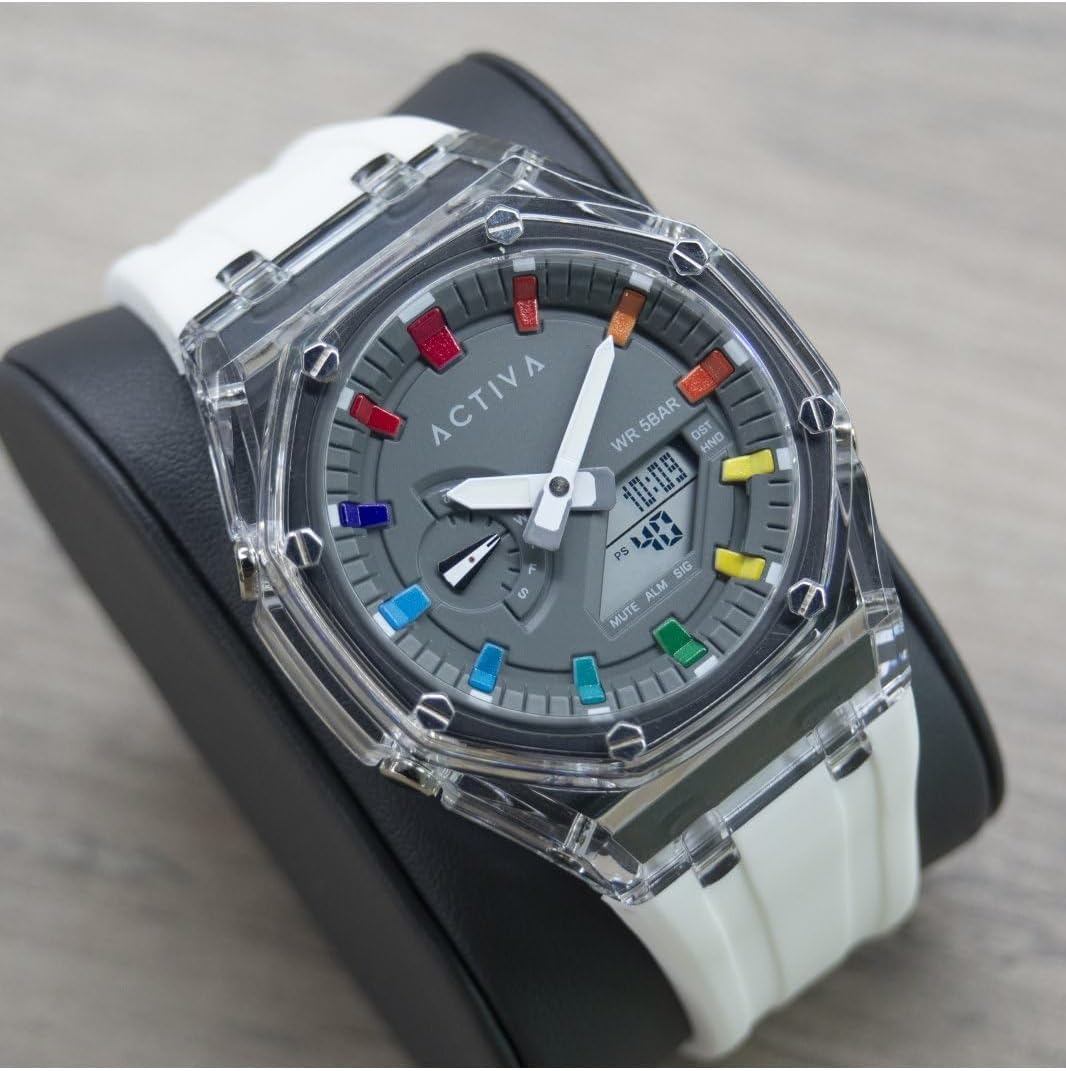
The Activa Digital ACW2100-003 is a robust digital quartz watch designed for daily wear. It features a durable plastic case, a clear digital display, and a comfortable silicone band. The watch is water-resistant up to 5 bars (50 meters), making it suitable for showering and swimming in shallow water, but not for diving.

Ключавыя кампаненты:
- Лічбавай дысплей: Паказвае час, дату і іншыя функцыі.
- Функцыянальныя кнопкі: Typically located on the sides of the watch for setting and mode changes. (Specific button functions will be detailed in the 'Operating' section).
- Чахол для гадзінніка: Выраблены з трывалага пластыка.
- Раменьчык для гадзінніка: Made of comfortable silicone.
Настройка
Ўстаноўка часу і даты:
The exact procedure for setting the time and date may vary slightly depending on the specific button configuration. Generally, digital watches follow these steps:
- Увайдзіце ў рэжым налад: Press and hold the 'MODE' or 'SET' button (usually on the bottom left or top left) until a digit on the display starts flashing.
- Змяніць значэнні: Use the 'ADJUST' or 'START/STOP' button (usually on the top right or bottom right) to increase or decrease the flashing digit (e.g., hours, minutes, year, month, day).
- Navigate Between Settings: Press the 'MODE' or 'SET' button again to move to the next setting (e.g., from hours to minutes, then to date).
- Выхад з рэжыму налад: Once all settings are adjusted, press the 'MODE' or 'SET' button one last time, or wait for a few seconds for the watch to automatically exit the setting mode.
Аперацыйная
Асноўныя функцыі:
- Дысплей часу: The primary mode shows the current time (hours, minutes, seconds) and often the day of the week and date.
- Функцыя сігналізацыі: To set an alarm, navigate to the alarm mode (often indicated by 'ALM'). Use the setting buttons to set the desired alarm time. An alarm icon will typically appear when activated.
- Функцыя секундамера: To use the stopwatch, navigate to the stopwatch mode (often indicated by 'STW' or 'CHR'). Press a designated button (e.g., 'START/STOP') to begin and end timing, and another (e.g., 'RESET') to clear the time.
- Падсвятленне: Many digital watches include a backlight for visibility in low-light conditions. Press a specific button (often labeled 'LIGHT' or a dedicated button on the top left) to activate it.
Воданепранікальнасць:
Your Activa Digital ACW2100-003 watch has a water resistance rating of 5 bars (50 meters). This means it is suitable for:
- Daily use and accidental splashes.
- Showering.
- Плаванне на плыткаводдзі.
Гэта так не падыходзіць для:
- Snorkeling or diving.
- Operating buttons while submerged in water.
- Exposure to hot water or steam (e.g., hot tubs, saunas), as this can compromise the seals.
Тэхнічнае абслугоўванне
Уборка:
Каб захаваць знешні выгляд гадзінніка:
- Wipe the watch case and band regularly with a soft, slightly damp тканіна.
- For the silicone band, mild soap and water can be used, then rinse thoroughly and dry completely.
- Avoid harsh chemicals, solvents, or abrasive cleaners, as these can damage the watch materials.
Замена батарэі:
The watch is powered by a long-lasting quartz battery. When the display becomes dim or the watch stops functioning, it's time for a battery replacement. It is highly recommended to have the battery replaced by a qualified watch technician to ensure the water resistance seal is properly maintained.
захоўванне:
Калі гадзіннік не выкарыстоўваецца, захоўвайце яго ў прахалодным, сухім месцы, удалечыні ад прамых сонечных прамянёў і экстрэмальных тэмператур.
Ліквідацыю непаладак
| праблема | Магчымая прычына | Рашэнне |
|---|---|---|
| Дысплей гадзінніка пусты або цьмяны. | Нізкі або разраджаны акумулятар. | Заменіце батарэйку (рэкамендавана спецыялістам). |
| Час недакладны. | Няправільная ўстаноўка часу; уздзеянне моцных магнітных палёў. | Скіньце час; трымайцеся далей ад магнітаў. |
| Вада ўнутры гадзінніка. | Парушэнне воданепранікальнасці (напрыклад, націсканне кнопак пад вадой, уздзеянне гарачай вады/пары, пашкоджанне ўшчыльняльніка). | Неадкладна аднясіце гадзіннік да спецыяліста для праверкі і рамонту. Не спрабуйце сушыць яго самастойна. |
| Кнопкі не рэагуюць. | Dirt or debris under buttons; internal malfunction. | Clean around buttons; if issue persists, contact support. |
Тэхнічныя характарыстыкі
| Асаблівасць | Дэталь |
|---|---|
| Нумар мадэлі | ACW2100-003 |
| Марка | Invicta (Activa Digital Collection) |
| Тып руху | Electronic Quartz |
| Тып дысплея | Лічбавы |
| Матэрыял корпуса | ПК (пластык) |
| Дыяметр корпуса | 44.2 міліметра |
| Таўшчыня корпуса | 14.1 міліметра |
| Тып матэрыялу раменьчыка | Сілікон |
| Шырыня паласы | 20 міліметра |
| Глыбіня воданепранікальнасці | 50 Meters (5 Bar) |
| Вага прадмета | 353.8 Grams (packaged) |
Гарантыя
Your Activa Digital ACW2100-003 watch comes with a 2-year Activa warranty. This warranty covers manufacturing defects under normal use. It does not cover damage resulting from improper handling, accidents, unauthorized repairs, or normal wear and tear. Please retain your proof of purchase for warranty claims.
Падтрымка
For further assistance, technical support, or warranty claims, please refer to the contact information provided with your purchase or visit the official Invicta/Activa website. When contacting support, please have your watch model number (ACW2100-003) and proof of purchase readily available.
Ўпакоўка
