
1. Уводзіны
The VSTARCAM VS-CS663DR is a 2MP dual-lens outdoor security camera designed for comprehensive surveillance. It features dual lenses for wide-angle and telephoto views, 2.4GHz WiFi connectivity, motion detection with auto-tracking, two-way audio communication, and both full-color and infrared night vision capabilities. This manual provides detailed instructions for the setup, operation, and maintenance of your security camera.
2. Змесціва ўпакоўкі
Перад тым, як працягнуць усталёўку, пераканайцеся, што ў камплекце ёсць усе пералічаныя ніжэй элементы:
- VSTARCAM VS-CS663DR Dual Lens Security Camera
- Кіраўніцтва па эксплуатацыі
- Адаптар сілкавання
- Крапежныя шрубы
- Зарадны кабель
- Stand (for mounting)

выява: Contents of the VSTARCAM VS-CS663DR package, including the camera, user manual, mounting screws, and power adapter.
3. Прадукт скончыўсяview
The VS-CS663DR camera features a robust design with dual antennas for stable connectivity and dual lenses for comprehensive coverage. It is equipped with infrared and white light dual core lamp beads for enhanced night vision.
выява: Падрабязны view of the VSTARCAM VS-CS663DR camera, highlighting its dimensions (approximately 18cm/7.08in width, 23cm/9.06in height, 14cm/5.51in depth) and components such as dual antennas, HD lenses, and microphone.
Dual Lens Functionality
This camera integrates two lenses: a 2.8mm wide-angle lens for a broad panoramic view and a 6.0mm telephoto lens for capturing detailed close-ups. Both views can be displayed simultaneously on one screen within the application.
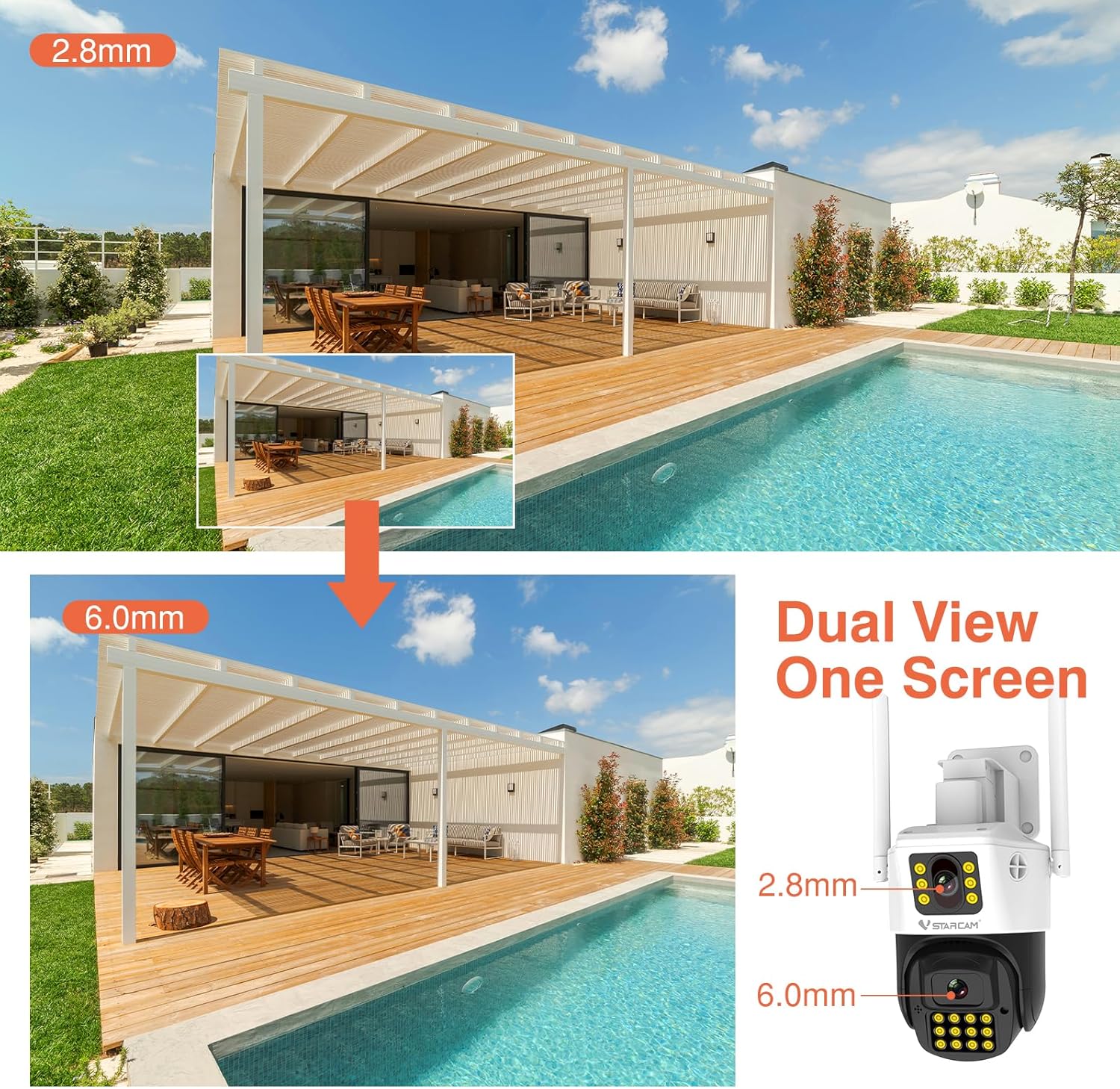
выява: Demonstrates the dual-view capability of the camera, showing a wide-angle perspective from the 2.8mm lens and a magnified view from the 6.0mm lens simultaneously.
Pan and Tilt Movement
The camera offers a horizontal rotation of 350° (Pan) and a vertical tilt of 90°, allowing for extensive coverage of your surveillance area. This movement can be controlled remotely via the mobile application.

выява: The VSTARCAM outdoor camera illustrating its pan (360°) and tilt (90°) rotation angles, providing flexible monitoring.
4. Настройка
4.1 Фізічная ўстаноўка
The camera can be mounted on a wall or placed on a desktop using the included bracket. Ensure the mounting location provides a clear view of the desired surveillance area and is within range of your 2.4GHz WiFi network.
- Выберыце месцазнаходжанне: Select a suitable outdoor location for optimal coverage.
- Мантаж: Use the provided screws and stand to securely attach the camera to a wall or place it on a stable surface for desktop mounting.
- Падключэнне сілкавання: Падключыце адаптар сілкавання да камеры і ўстаўце яе ў разетку.

выява: The camera's versatile mounting options, illustrating how it can be installed on a wall or placed on a desktop using its integrated rotating bracket.
4.2 Усталёўка праграмы і падключэнне да сеткі
To operate the camera, you need to download and install the O-KAM mobile application on your smartphone.
- Спампаваць прыкладанне: Пошук "O-KAM" in your smartphone's app store (iOS or Android) and install it.
- Рэгістрацыя/Уваход: Open the O-KAM app and create a new account or log in if you already have one.
- Дадаць прыладу: Follow the in-app instructions to add your VS-CS663DR camera. Ensure your smartphone is connected to a 2.4GHz WiFi network during this process, as the camera does not support 5GHz WiFi.
- Спалучэнне: The app will guide you through the pairing process, which typically involves scanning a QR code on the camera or listening for an audio prompt.
5. Інструкцыя па эксплуатацыі
5.1 Выяўленне руху і аўтаматычнае адсочванне
The camera is equipped with advanced motion detection and humanoid detection capabilities. When motion or a human figure is detected, the camera can automatically track the subject and send alerts to your O-KAM app.
- Актывацыя: Enable motion detection and humanoid tracking in the O-KAM app settings for your camera.
- Абвесткі: Upon detection, the camera can emit a white light alarm deterrent and send push notifications to your phone.
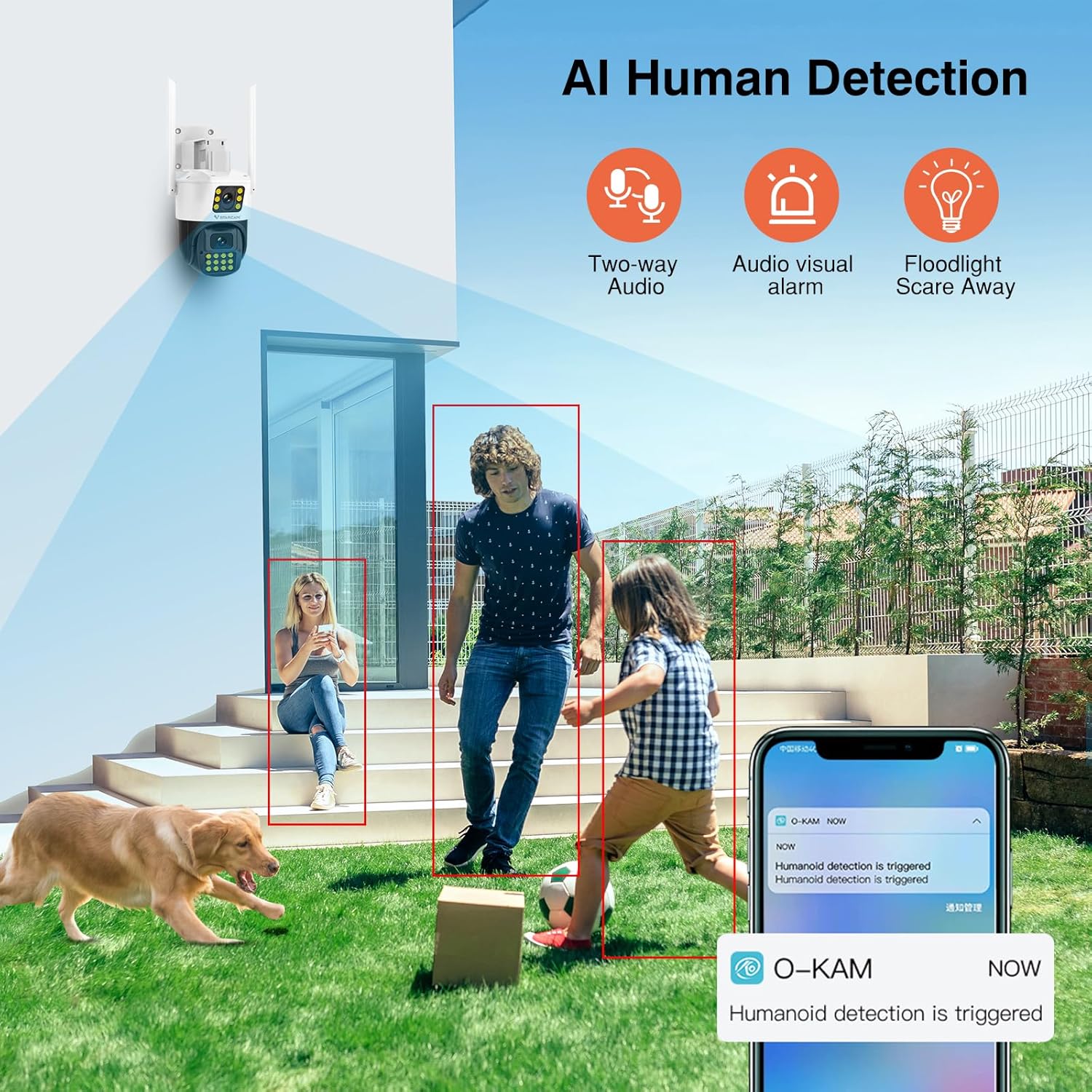
выява: The camera's AI Human Detection feature in action, showing how it identifies individuals and triggers alerts, two-way audio, and floodlight deterrence.
5.2 Двухбаковая размова
Utilize the built-in microphone and speaker for two-way audio communication. This allows you to speak to individuals near the camera and hear their responses through the O-KAM app.
- Initiate Talk: Доступ у прамым эфіры view in the O-KAM app and tap the microphone icon to begin two-way communication.
5.3 Начное бачанне
The camera provides both full-color and infrared night vision, ensuring clear monitoring in low-light or complete darkness up to 30 meters.
- Рэжымы: The camera can automatically switch between infrared (black and white) and full-color night vision depending on ambient light conditions or user settings.
5.4 Remote Monitoring and Multi-User Sharing
Доступ да live footage and recorded videos from anywhere using the O-KAM app, provided your camera is connected to the internet. You can also share camera access with family members.
- жыць View: Open the O-KAM app to view у рэжыме рэальнага часу footage.
- Абмен: Use the sharing function within the app to grant access to other users.
5.5 Варыянты захоўвання
The camera supports local storage via a T-Flash (microSD) card (up to 256GB, not included) for 24/7 continuous recording, as well as cloud storage services (subscription may be required).
- Ўстаноўка SD-карты: Insert a compatible microSD card into the designated slot on the camera. Format the card via the app if prompted.
- Воблачнае сховішча: Explore cloud storage options and subscription details within the O-KAM app.
6. Тэхнічнае абслугоўванне
Рэгулярнае тэхнічнае абслугоўванне забяспечвае аптымальную прадукцыйнасць і даўгавечнасць вашай камеры.
- Уборка: Перыядычна чысціце аб'ектывы і корпус камеры мяккай губкайamp тканіна. Пазбягайце абразіўных ачышчальнікаў.
- Абнаўленні прашыўкі: Check the O-KAM app regularly for firmware updates. Keeping the firmware updated ensures access to the latest features and security enhancements.
- Абарона ад надвор'я: The camera has an IP66 waterproof rating, making it suitable for outdoor use in various weather conditions. However, avoid direct high-pressure water jets.

выява: The camera's IP66 waterproof rating, demonstrating its resilience against various environmental factors like fog, sun, rain, and snow.
7. Выпраўленне непаладак
Калі ў вас узніклі праблемы з камерай, звярніцеся да наступных распаўсюджаных рашэнняў:
| праблема | Магчымае рашэнне |
|---|---|
| Camera is offline/cannot connect to WiFi |
|
| Няма запісу на SD-карту |
|
| Выяўленне руху не працуе |
|
| Дрэнная якасць выявы ўначы |
|
8. Тэхнічныя характарыстыкі
Detailed technical specifications for the VSTARCAM VS-CS663DR camera:
- Назва мадэлі: VS-CS663DR
- Эфектыўнае дазвол фота: 2 МП
- Дазвол фотадатчыка: 4 МП
- Дазвол відэазахопу: 1080p
- Частата кадраў: 25 кадраў у секунду
- Тэхналогія падключэння: Wired, Wi-Fi (2.4GHz only)
- Бесправадная тэхналогія: Wi-Fi
- асаблівасць: 2-Way Audio, Motion Detection, Auto Tracking, Night Color
- Выкарыстанне ў памяшканні/на вуліцы: На адкрытым паветры
- Viewкут нахілу: 360 Degrees (Pan 350°, Tilt 90°)
- Дыяпазон начнога бачання: 30 метраў
- Рэйтынг воданепранікальнасці: IP66
- захоўванне: Supports T-Flash card (max 256GB), Cloud Storage
- Метад кантролю: App (O-KAM)
- Крыніца харчавання: Правадная электрычная
- Operating Condition Temperature: -10℃ да 50℃
- Operating Condition Humidity: <90%
- Памеры прадмета: 6.08 х 5.5 х 8.06 цалі
- Матэрыял корпуса: Пластыкавыя
9. Гарантыя і падтрымка
VSTARCAM products are covered by a manufacturer's warranty. For specific warranty terms and conditions, please refer to the warranty card included in your package or visit the official VSTARCAM website. For technical support, troubleshooting assistance, or service inquiries, please contact VSTARCAM customer support through their official channels.
- вытворца: VSTARCAM
- Інтэрнэт-падтрымка: Refer to the VSTARCAM official webсайт з часта задаванымі пытаннямі, рэсурсамі падтрымкі і кантактнай інфармацыяй.