
1. Уводзіны
This manual provides comprehensive instructions for the installation, operation, maintenance, and troubleshooting of your NEWFAST 1200Mbps Dual Band WiFi Extender, model RE523. Please read this manual carefully before using the device to ensure proper setup and optimal performance.
2. Прадукт скончыўсяview
The NEWFAST RE523 WiFi Extender is designed to expand your existing wireless network coverage and eliminate Wi-Fi dead zones. It supports dual-band operation, offering speeds up to 1200Mbps (300Mbps on 2.4GHz and 867Mbps on 5.8GHz) for a stable and fast internet connection.
2.1 Асноўныя магчымасці
- Высокахуткасны двухдыяпазонны Wi-Fi: Up to 1200Mbps (300Mbps 2.4GHz + 867Mbps 5.8GHz).
- Пашыраны ахоп: Equipped with 4 external 3dBi high-gain antennas, rotatable 180° for optimal signal reception and coverage.
- Разумны ВК-дысплей: Provides real-time status information for easy monitoring.
- Некалькі рэжымаў працы: Supports Repeater, Bridge, AP, Router, and Client modes.
- Лёгкая ўстаноўка: One-click WPS setup or webканфігурацыя на аснове.
- Шырокая сумяшчальнасць: Compatible with 802.11 ac/a/b/g/n routers.
- Высокая ёмістасць прылады: Can connect up to 35 wireless devices simultaneously.
2.2 Змест пакета
- NEWFAST 1200Mbps WiFi Extender (RE523)
- Кіраўніцтва карыстальніка (гэты дакумент)
- Кабель Ethernet (можа адрознівацца ў залежнасці ад рэгіёна)
2.3 Фізічныя кампаненты
Below is an image of the NEWFAST RE523 WiFi Extender, highlighting its main components.
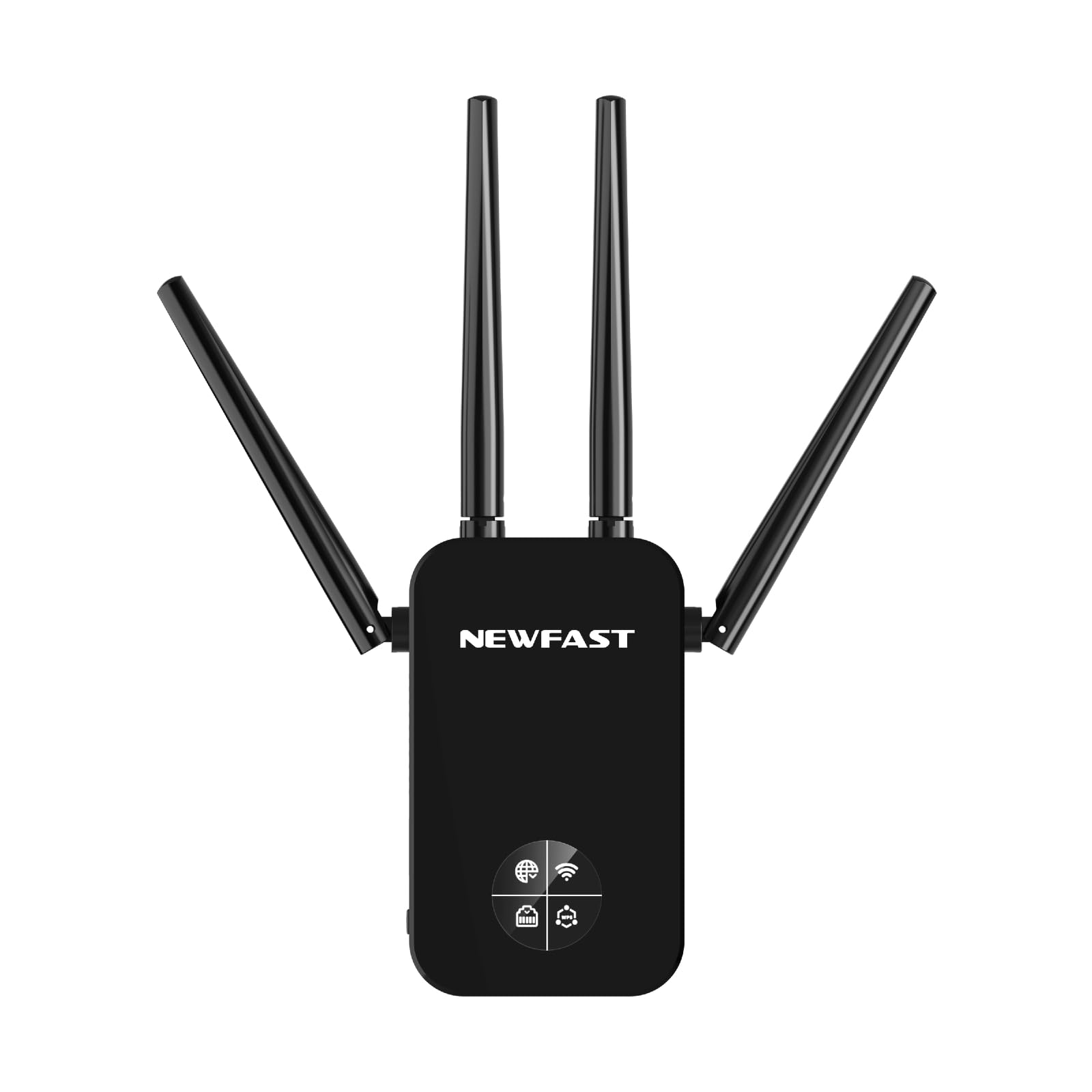
Figure 1: NEWFAST RE523 WiFi Extender. The device features four adjustable external antennas, an LCD screen on the front, and an Ethernet port on the side.
- Антэны: Four external antennas for signal transmission and reception.
- ВК-дысплей: Shows connection status, signal strength, and operating mode.
- Кнопка WPS: For quick and secure connection to a router.
- Ethernet порт: For wired connections in various operating modes.
- Святлодыёд харчавання: Паказвае стан харчавання.
3. Інструкцыі па ўсталёўцы
The NEWFAST RE523 offers two primary methods for setup: WPS (Wi-Fi Protected Setup) and Web карыстацкі інтэрфейс (Web Карыстальніцкі інтэрфейс).
3.1 WPS Setup (Recommended for quick setup)
- Уключэнне: Plug the RE523 extender into an electrical outlet near your main router. Wait for the Power LED to turn solid.
- Актывуйце WPS на маршрутызатары: Press the WPS button on your main Wi-Fi router. Refer to your router's manual for the exact location and timing.
- Актывуйце WPS на пашыральніку: Within 2 minutes of pressing the WPS button on your router, press the WPS button on the NEWFAST RE523 extender. The WPS LED on the extender will blink.
- Чакайце падключэння: The extender will automatically connect to your router. Once connected, the Signal LED on the extender will turn solid, indicating a successful connection.
- Перамясціць пашыральнік: Unplug the extender and move it to a location halfway between your router and the Wi-Fi dead zone. Ensure the Signal LED indicates a good signal strength from your router.
3.2 Web Налада карыстацкага інтэрфейсу
- Уключэнне: Plug the RE523 extender into an electrical outlet near your main router. Wait for the Power LED to turn solid.
- Падключэнне да сеткі пашыральніка: On your computer or mobile device, connect to the Wi-Fi network broadcast by the extender (e.g., "NEWFAST_EXT_2.4G" or "NEWFAST_EXT_5G"). No password is required initially.
- Доступ Web інтэрфейс: Адкрыйце a web browser and enter the default IP address or domain name (usually found on a sticker on the device or in a quick start guide, e.g.,
http://192.168.1.254orhttp://newfastwifi.net). - Лагін: Enter the default username and password (e.g., admin/admin).
- Выконвайце інструкцыі на экране: The setup wizard will guide you through selecting your main Wi-Fi network, entering its password, and configuring the extender's network name (SSID) and password.
- Поўная ўстаноўка: After configuration, the extender will restart. Once the Signal LED turns solid, the setup is complete.
- Перамясціць пашыральнік: Unplug the extender and move it to a location halfway between your router and the Wi-Fi dead zone. Ensure the Signal LED indicates a good signal strength from your router.
4. Рэжымы працы
The NEWFAST RE523 supports five operating modes to suit various network requirements.
- Рэжым рэтранслятара: Extends the existing Wi-Fi coverage of your main router. This is the most common mode for eliminating dead zones.
- Рэжым кропкі доступу (AP): Converts a wired network connection into a wireless one. Connect the extender to your router via an Ethernet cable, and it will broadcast a new Wi-Fi network.
- Рэжым маршрутызатара: Functions as a primary router, creating a new private network. This mode is typically used when you have a modem but no router.
- Рэжым моста: Connects two separate networks, allowing devices on one network to communicate with devices on another.
- Рэжым кліента: Allows wired-only devices (e.g., smart TVs, gaming consoles) to connect to a wireless network. The extender receives Wi-Fi and provides an Ethernet connection to the device.
You can switch between these modes via the web management interface after initial setup.
5. Тэхнічнае абслугоўванне
- Уборка: Для чысткі прылады выкарыстоўвайце мяккую сухую тканіну. Не выкарыстоўвайце вадкія або аэразольныя ачышчальнікі.
- Размяшчэнне: Place the extender in a well-ventilated area, away from direct sunlight, heat sources, and moisture. Avoid placing it near large metal objects or electrical appliances that may cause interference.
- Абнаўленні прашыўкі: Periodically check the NEWFAST official webсайт для абнаўленняў прашыўкі, каб забяспечыць аптымальную прадукцыйнасць і бяспеку.
- Скінуць: If the device malfunctions or you forget the login credentials, you can perform a factory reset by pressing and holding the reset button (usually a small pinhole button) for about 5-10 seconds while the device is powered on.
6. Выпраўленне непаладак
- Няма доступу да Інтэрнэту пасля ўстаноўкі:
- Ensure the extender is receiving a strong signal from your main router (check the Signal LED).
- Пераканайцеся, што ваш асноўны маршрутызатар мае доступ да Інтэрнэту.
- Re-run the setup process, ensuring you enter the correct Wi-Fi password for your main router.
- Try relocating the extender closer to your main router.
- Slow Speed or Frequent Disconnections:
- Relocate the extender to an optimal position, ideally halfway between your router and the desired coverage area, where it receives a good signal.
- Minimize physical obstructions (walls, large appliances) between the extender, router, and client devices.
- Праверце наяўнасць перашкод ад іншых электронных прылад.
- Пераканайцеся, што прашыўка вашага маршрутызатара абноўлена.
- Немагчыма атрымаць доступ Web Старонка кіравання:
- Пераканайцеся, што ваша прылада падключана да сеткі Wi-Fi пашыральніка.
- Verify the IP address or domain name entered in the browser is correct.
- Паспрабуйце ачысціць кэш браўзера або скарыстацца іншым браўзерам.
- If you've changed the extender's IP address, use the new one. If forgotten, perform a factory reset.
7. Тэхнічныя характарыстыкі
| Марка | NEWFAST |
| мадэль | RE523 |
| Стандарт бесправадной сувязі | 802.11a/b/g/n/ac |
| Хуткасць перадачы даных | 1200 Megabits per second (Mbps) |
| Клас дыяпазону частот | Двухдыяпазонны (2.4 ГГц і 5.8 ГГц) |
| Антэны | 4 External 3dBi Antennas |
| Порт Ethernet | 1x LAN/WAN Port |
| Колер | Чорны |
8. Гарантыя і падтрымка
NEWFAST products come with a standard manufacturer's warranty. For specific warranty terms and conditions, please refer to the warranty card included with your product or visit the official NEWFAST website. For technical support, troubleshooting assistance, or to download the latest drivers and firmware, please visit the NEWFAST support page or contact their customer service directly.
Official NEWFAST Webсайт: NEWFAST Store on Amazon (Please check the product packaging or official documentation for the direct manufacturer webсайт.)