
1. Уводзіны
This manual provides detailed instructions for the Loutoc SRC4526 Universal Remote Control, designed for seamless compatibility with Philips Ambilight Smart TVs. Please read this guide thoroughly to ensure optimal use and longevity of your remote control.
1.1 Прадукт скончыўсяview
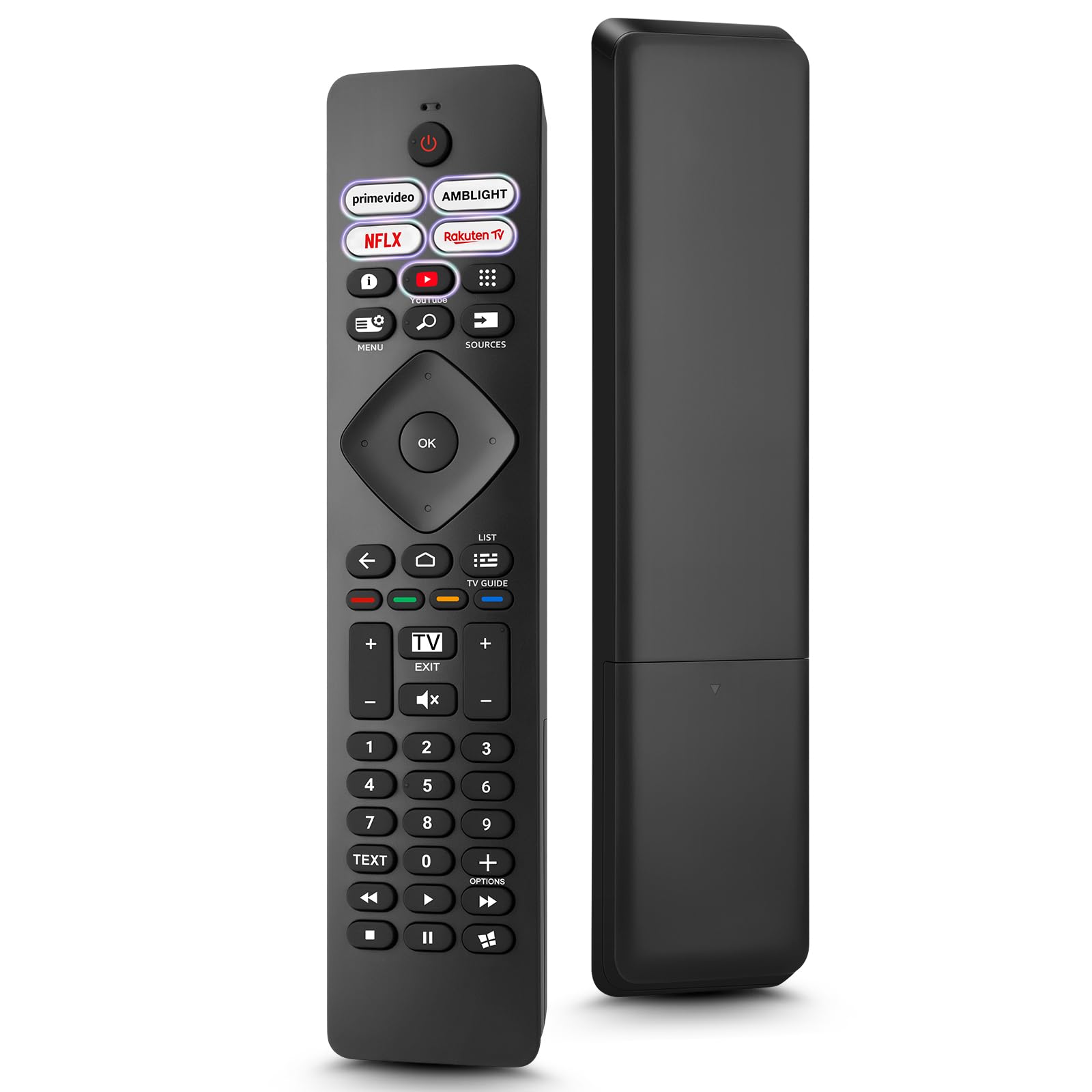
Image: The Loutoc SRC4526 Universal Remote Control, showcasinяго эрганамічны дызайн і размяшчэнне кнопак.
1.2 Асноўныя магчымасці
- Convenient Plug-and-Play: No complex setup or programming required. Simply insert batteries and the remote is ready for use.
- Шырокая сумяшчальнасць з тэлевізарамі: Fully compatible with Philips Ambilight TVs, including 4K Ambilight LED, OLED, FHD, and Full Ultra HD models.
- Спецыяльныя кнопкі хуткага доступу: Features 5 direct access buttons for popular streaming platforms: Ambilight, Video, NFLX (Netflix), Rakuten TV, and YouTube.
- Надзейная прадукцыйнасць: Offers an effective operating range of 8 meters (26 feet) and an ultra-fast response time of 0.2 seconds.
2. Настройка
2.1 Устаноўка батарэі
The Loutoc SRC4526 remote control requires two AAA batteries (not included) for operation.
- Знайдзіце батарэйны адсек на задняй частцы пульта дыстанцыйнага кіравання.
- Адкрыйце крышку адсека для батарэй.
- Устаўце дзве батарэйкі тыпу AAA, пераканаўшыся, што станоўчая (+) і адмоўная (-) клемы правільна сумяшчаюцца з індыкатарамі ўнутры адсека.
- Надзейна зачыніце крышку батарэйнага адсека.
2.2 Першапачатковае выкарыстанне
This remote control is designed for immediate use with compatible Philips Ambilight TVs. No programming or pairing is required. Once batteries are installed, point the remote at your TV and begin operation.
3. Інструкцыя па эксплуатацыі
3.1 Функцыі кнопакview
Refer to the image below for a visual guide to the remote control's buttons and their corresponding functions.

Image: Detailed diagram of the Loutoc SRC4526 remote control, illustrating each button and its primary function.
| Кнопка | Функцыя |
|---|---|
| Магутнасць | Switches the TV on or off (Standby mode). |
| Prime Video, Ambilight, Netflix, Rakuten TV | Quickly launches the corresponding application. |
| Меню | Opens the Quick Menu with typical TV functions. Hold to show Gaming control bar. |
| пошук | Opens the Search tab on the Home screen. |
| Крыніцы | Opens or closes the TV's input sources menu. |
| OK | Confirms a selection or setting. |
| Arrow/Navigation Keys | Navigates up, down, left, or right through menus and options. |
| Назад | Вяртанне да папярэдняга экрана або канала. |
| дадому | Opens the TV's Home menu. |
| Тэлегід | Opens or closes the TV Guide. Long press to open the channel list. |
| Color Keys (Red, Green, Yellow, Blue) | Provides direct selection of on-screen options. The blue key typically opens Help. |
| Гучнасць (+/-) | Рэгулюе ўзровень гучнасці тэлевізара. |
| Канал (+/-) | Switches to the next or previous channel. |
| Выхад | Exits current menu/application or returns to live TV. From standby, goes to last viewed source. |
| Адключыць гук | Уключае або выключае гук тэлевізара. |
| Лічбавыя клавішы (0-9) | Непасрэдны выбар тэлеканалаў. |
| ТЭКСТ | Opens or closes Text/Teletext. |
| Элементы кіравання прайграваннем | Controls media playback: Play, Pause, Stop, Rewind, Fast Forward. |
| Праграмы | Opens the Apps tab on the Home screen. |
3.2 Ambilight Functionality
For Philips TVs equipped with Ambilight functionality, the dedicated Ambilight button on your remote allows you to control the lighting effects.
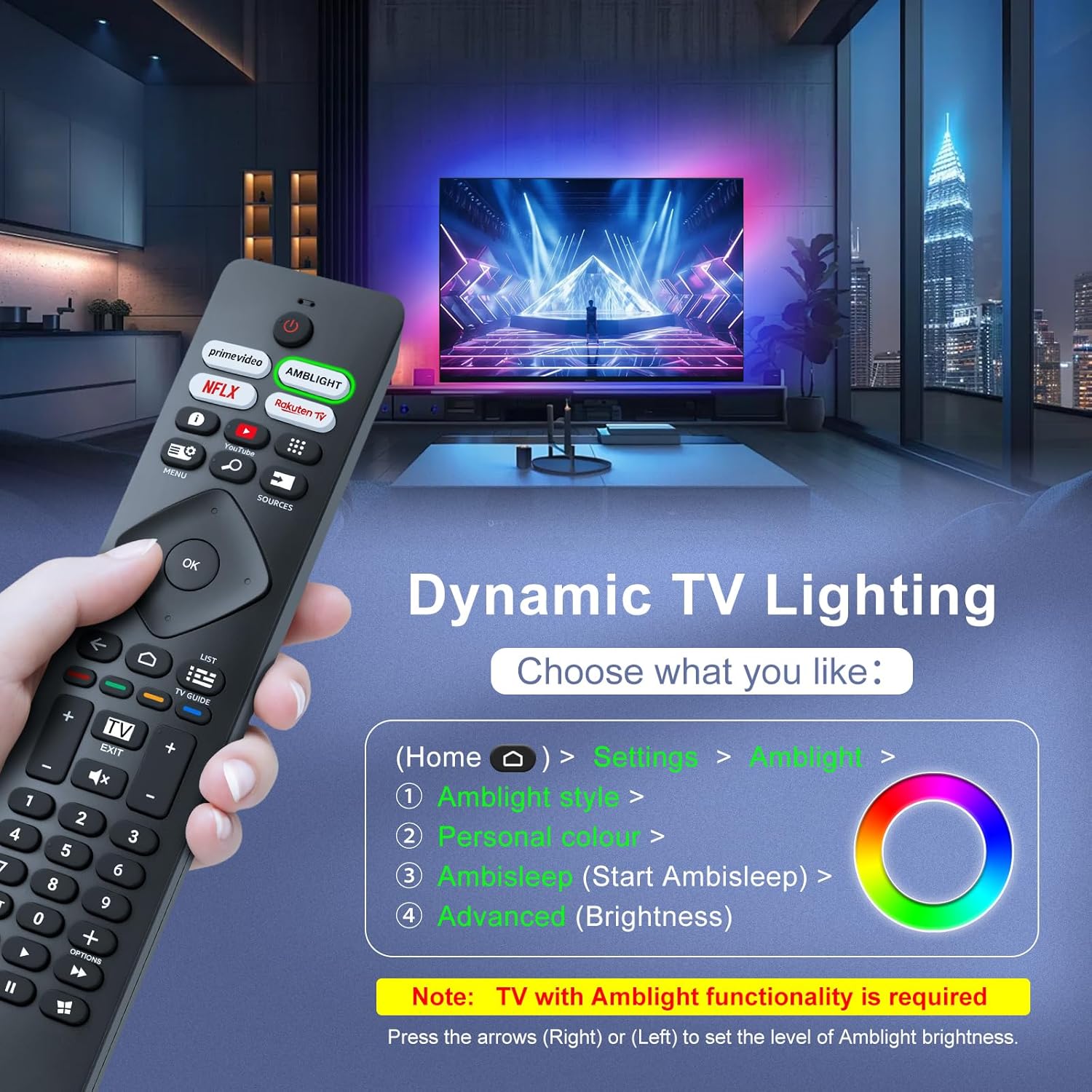
Image: A hand holding the remote control, with an overlay showing Ambilight settings on a TV screen.
After pressing the Ambilight button, you can navigate through the TV's menu to:
- Select different Ambilight display styles.
- Adjust personal color preferences.
- Initiate AmbiSleep mode.
- Adjust Ambilight brightness levels (using the right or left arrow keys).
Note: This feature requires a Philips TV with built-in Ambilight functionality.
4. Тэхнічнае абслугоўванне
4.1 Ачыстка
To clean your remote control, gently wipe it with a soft, dry cloth. Avoid using liquid cleaners, aerosols, or harsh chemicals, as these can damage the remote's surface or internal components.
4.2 Захоўванне
Захоўвайце пульт дыстанцыйнага кіравання ў прахалодным, сухім месцы, удалечыні ад прамых сонечных прамянёў і экстрэмальных тэмператур. Калі пульт не будзе выкарыстоўвацца працяглы час, рэкамендуецца выняць батарэйкі, каб прадухіліць іх уцечку.
4.3 Сыход за акумулятарам
- Замяніце ўсе батарэі адначасова; не змешвайце старыя і новыя батарэі.
- Не змешвайце розныя тыпы батарэек (напрыклад, шчолачныя і акумулятарныя).
- Утылізуйце выкарыстаныя батарэі адказна ў адпаведнасці з мясцовымі правіламі.
5. Выпраўленне непаладак
5.1 Агульныя праблемы і рашэнні
- Пульт не адказвае:
- Праверце, ці правільна ўстаўлены батарэйкі з захаваннем палярнасці.
- Заменіце батарэйкі новымі батарэйкамі тыпу AAA.
- Пераканайцеся, што паміж пультам дыстанцыйнага кіравання і інфрачырвоным прымачом тэлевізара няма перашкод.
- Make sure you are within the effective operating range (up to 8 meters).
- Не працуюць пэўныя кнопкі:
- Clean the remote control, especially around the non-functioning buttons, to remove any dirt or debris.
- If only Ambilight functions are not working, ensure your Philips TV model supports Ambilight.
5.2 Звярнуцца ў службу падтрымкі
If you encounter persistent issues that cannot be resolved with the troubleshooting steps above, please contact Loutoc customer support directly. We aim to respond to all inquiries within 12 working hours.
6. Тэхнічныя характарыстыкі
| Асаблівасць | Дэталь |
|---|---|
| Марка | Loutoc |
| Назва мадэлі | SRC4526-FBA |
| Нумар мадэлі тавару | SRC4526 |
| Колер | Чорны |
| Тэхналогія падлучэння | Інфрачырвоны |
| Асаблівасці | No programming required, Ergonomic, Lightweight |
| Сумяшчальныя прылады | Television (Philips Ambilight TVs) |
| Максімальная колькасць падтрымоўваных прылад | 1 |
| Тып кантролера | Кіраванне кнопкамі |
| Максімальны дыяпазон | 8 метраў (26 фута) |
| Апісанне батарэі | AAA (2 required, not included) |
| Вытворца | Loutoc |
| Краіна паходжання | Кітай |
| Дата першай даступнасці на Amazon.com.be | 31 жніўня 2025 г |
7. Гарантыя і падтрымка
7.1 Інфармацыя аб гарантыі
This Loutoc remote control comes with a manufacturer's warranty of 30 days from the date of purchase. Please retain your proof of purchase for any warranty claims.
7.2 Падтрымка кліентаў
For any questions, technical assistance, or warranty inquiries, please contact Loutoc customer support. We are committed to providing timely assistance and will respond to your queries within 12 working hours.