
Comfort Direct CD7030T4DS-2
Merwry DL-4112T-02 Fan Remote Control Replacement
Кіраўніцтва карыстальніка
Уводзіны
This manual provides detailed instructions for the setup, operation, and maintenance of your new Merwry DL-4112T-02 Fan Remote Control Replacement. This remote is designed to be a direct replacement for Home Decorators Ceiling Fans, offering enhanced functionality and ease of use.
It features an all-in-one control design, allowing you to manage fan speeds, light functions, and reverse mode directly from the front of the remote, eliminating the need to access internal switches for reverse function.

Image: Comparison of the original remote (left) and the Merwry DL-4112T-02 replacement remote (right).
Настройка
1. Устаноўка батарэі
Для пульта дыстанцыйнага кіравання патрабуецца адна батарэйка 9 В (не ўваходзіць у камплект). Каб усталяваць батарэйку:
- Знайдзіце вечка батарэйнага адсека на задняй панэлі пульта дыстанцыйнага кіравання.
- Зрушыце вечка ўніз, каб адкрыць.
- Устаўце новую батарэйку 9 В, пераканаўшыся, што палярнасць (+/-) адпавядае схеме ўнутры адсека.
- Ссуньце крышку на месца, пакуль яна не зашчоўкнецца.
2. Устаноўка насценнага мацавання
The remote comes with a convenient wall mount and screws for secure storage.
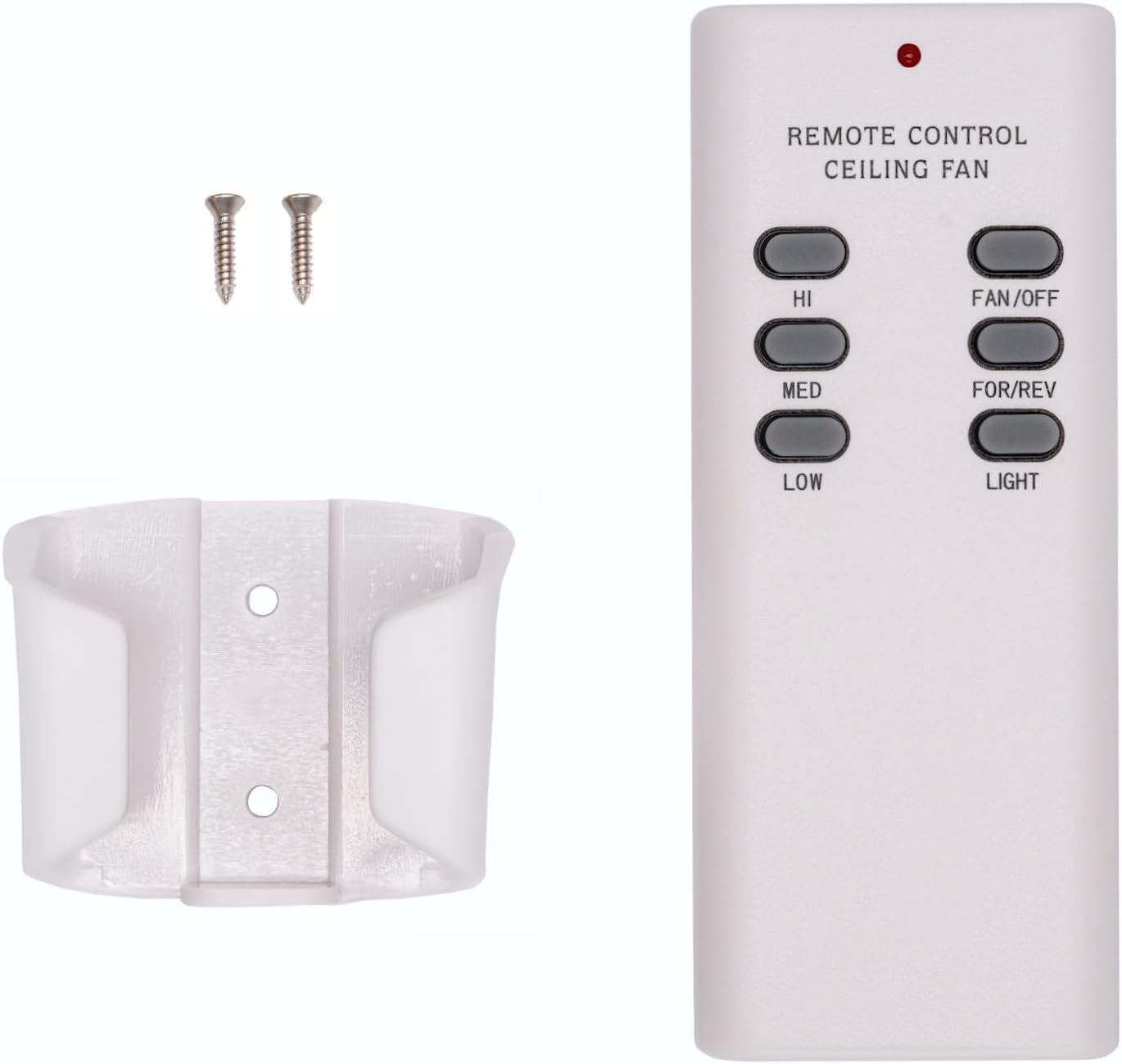
Image: The Merwry DL-4112T-02 remote control, its wall mount cradle, and two mounting screws.
Каб усталяваць насценнае мацаванне:
- Choose a suitable location on a wall, away from direct heat or moisture.
- Выкарыстоўвайце насценнае мацаванне ў якасці шаблону, каб адзначыць месцы для двух шруб.
- Пры неабходнасці прасвідруйце пілотныя адтуліны.
- Secure the wall mount to the wall using the provided screws.
- Place the remote control into the mounted cradle for easy access.
3. Pairing Process (Syncing the Remote)
Follow these steps to pair your new remote control with your ceiling fan:
- Turn off power to the fan: Locate the circuit breaker or wall switch that controls power to your ceiling fan and turn it OFF. Ensure the fan is completely powered down.

Image: A hand turning off a wall light switch, illustrating the first step of power cycling.
- Аднавіць харчаванне: After a few seconds, turn the power back ON at the circuit breaker or wall switch.
- Press and hold the "FAN/OFF" button: Within 30 seconds of restoring power, press and hold the "FAN/OFF" button on your remote control for 10 seconds. The fan light (if applicable) should blink, indicating successful pairing.

Выява: буйны план view of the Merwry DL-4112T-02 remote control, with the 'FAN/OFF' button highlighted by a green rectangle.
If pairing is unsuccessful, repeat the steps. Ensure the remote is within range of the fan's receiver during the pairing process.
Інструкцыя па эксплуатацыі
The Merwry DL-4112T-02 remote control provides comprehensive control over your ceiling fan's functions. Familiarize yourself with the buttons:

Выява: спераду view of the Merwry DL-4112T-02 replacement remote control, showing all control buttons.
- Прывітанне: Усталёўвае высокую хуткасць вентылятара.
- МЕД: Усталёўвае хуткасць вентылятара на сярэднюю.
- НІЗКІ: Усталёўвае хуткасць вентылятара на нізкую.
- ВЕНТЫЛЯТАР/ВЫКЛ.: Turns the fan off. Also used for pairing (see Setup section).
- FOR/REV: Toggles the fan's direction between forward (downward airflow for cooling) and reverse (upward airflow for heat distribution). This button is conveniently located on the front, unlike some original remotes.
- СВЯТЛО: Toggles the fan light On or Off.
Тэхнічнае абслугоўванне
Замена батарэі
Replace the 9V battery when the remote's indicator light dims or if the remote becomes unresponsive. Refer to the "Battery Installation" section under Setup for instructions.
Уборка
To clean the remote control, wipe it gently with a soft, dry cloth. Do not use abrasive cleaners, solvents, or expose the remote to excessive moisture, as this can damage the electronics.
Ліквідацыю непаладак
| праблема | Магчымая прычына | Рашэнне |
|---|---|---|
| Пульт не адказвае. | Нізкі або разраджаны акумулятар. | Заменіце батарэю 9 В. |
| Пульт не адказвае. | Remote is not paired with the fan. | Perform the pairing process again (see Setup section). |
| Fan or light not responding after pairing. | Power interruption to the fan. | Ensure the fan's power supply (wall switch/breaker) is ON. |
| Вентылятар працуе, але святло не гарыць. | Light bulb issue. | Check if the light bulb is properly installed and not burnt out. |
| Fan direction (FOR/REV) does not change. | Fan motor issue or internal switch. | Ensure the fan is running at a low speed before attempting to change direction. If issues persist, consult your fan's manual or a qualified electrician. |
Тэхнічныя характарыстыкі
- Нумар мадэлі: CD7030T4DS-2 (DL-4112T-02 Replacement)
- Марка: Comfort Direct
- Сумяшчальныя прылады: Home Decorators Ceiling Fans (Merwry series, 2A767-DL-4112T-01, 28865-DL4112T)
- Крыніца харчавання: 1 батарэйка 9 В (не ўваходзіць у камплект)
- асаблівасць: Radiofrequency (RF) control, All-in-One Control (Fan Speed, Light, Reverse)
- колер: Белы
- Памеры прадукту: 2.76 х 1.8 х 4.57 цалі
- Вага прадмета: 4 унцыі
- Краіна паходжання: Тайвань
Інфармацыя аб гарантыі
This Merwry DL-4112T-02 Fan Remote Control Replacement is backed by a 1-гадовая гарантыя ад вытворцыГэтая гарантыя распаўсюджваецца на дэфекты матэрыялаў і вырабу пры нармальным выкарыстанні. Калі ласка, захавайце пацвярджэнне пакупкі для прэтэнзій па гарантыі.
For specific warranty terms and conditions, or to initiate a warranty claim, please contact the manufacturer directly.
Падтрымка кліентаў
If you encounter any issues not covered in this manual or require further assistance, please contact Comfort Direct customer support. Refer to the product packaging or the retailer's webсайт для кантактнай інфармацыі.
When contacting support, please have your product model number (CD7030T4DS-2) and purchase details ready.
Ask a question about this manual
Ask about setup, troubleshooting, compatibility, parts, safety, or missing instructions. Manuals+ will review the question and use this page’s manual context to help answer it.