
Уводзіны
This user manual provides comprehensive instructions for the Chieftec AS-02B-TG-OP Midi Tower PC Case. It covers essential information regarding product features, installation procedures, operational guidelines, maintenance tips, and technical specifications. Please read this manual thoroughly before installing or operating your PC case to ensure proper functionality and longevity.
Прадукт скончаныview
The Chieftec AS-02B-TG-OP is a Midi Tower PC case designed for optimal cooling and a modern aesthetic. It features a sleek brushed front panel, a tempered glass side panel, and a pre-installed 120mm PWM fan for efficient heat dissipation.
Асноўныя характарыстыкі:
- Sleek brushed front panel design.
- Tempered glass side panel for component visibility.
- Optimized interior layout for efficient cooling.
- Pre-installed 120mm PWM fan at the rear.
- Support for various motherboard form factors (ATX, micro ATX, Mini-ITX).
- Multiple expansion bays for storage devices.
- Front I/O panel with USB 2.0, USB Type-C, and audio ports.
Ідэнтыфікацыя кампанента:

Малюнак 1: Пярэдняя-левая view of the Chieftec AS-02B-TG-OP PC case, showcasing the brushed front panel and the tempered glass side panel.

Малюнак 2: Прамая пярэдняя частка view of the Chieftec AS-02B-TG-OP PC case, highlighting the brushed finish of the front panel.

Малюнак 3: Front-right angle view of the Chieftec AS-02B-TG-OP PC case, showing the subtle design elements.
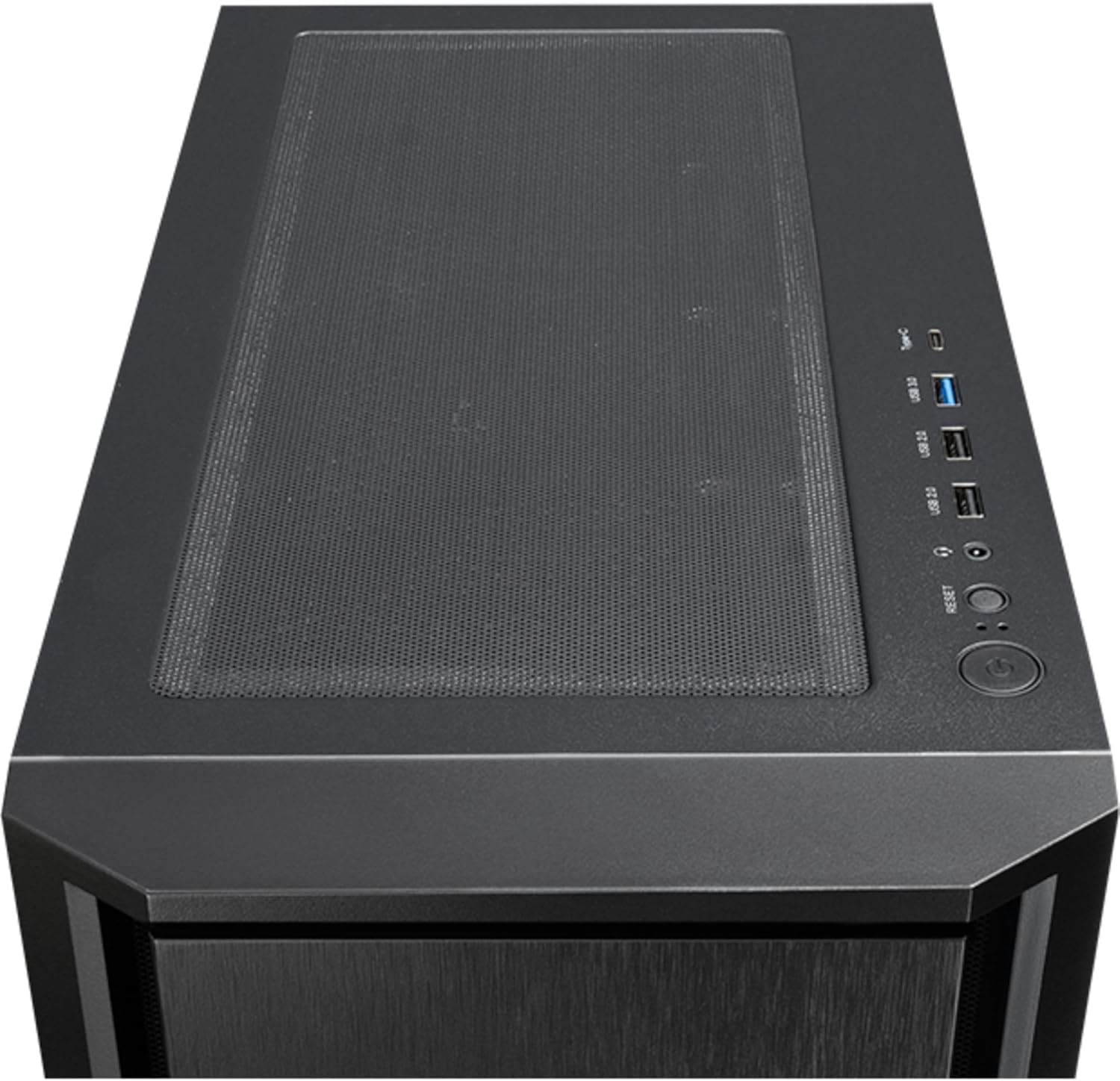
Малюнак 4: Топ view of the Chieftec AS-02B-TG-OP PC case, showing the top ventilation and the front I/O panel with USB ports and audio jacks.

Малюнак 5: Тыл view of the Chieftec AS-02B-TG-OP PC case, detailing the expansion slots, rear fan mount, and PSU opening.

Малюнак 6: Знізу view of the Chieftec AS-02B-TG-OP PC case, showing the case feet and bottom dust filter area.
Настройка і ўстаноўка
This section guides you through the process of installing components into your Chieftec AS-02B-TG-OP PC case.
1. Preparing the Case:
- Пастаўце корпус на ўстойлівую, роўную паверхню.
- Carefully remove the tempered glass side panel by unscrewing the thumb screws at the rear.
- Зніміце процілеглую бакавую панэль, каб атрымаць доступ да зоны кіравання кабелямі.
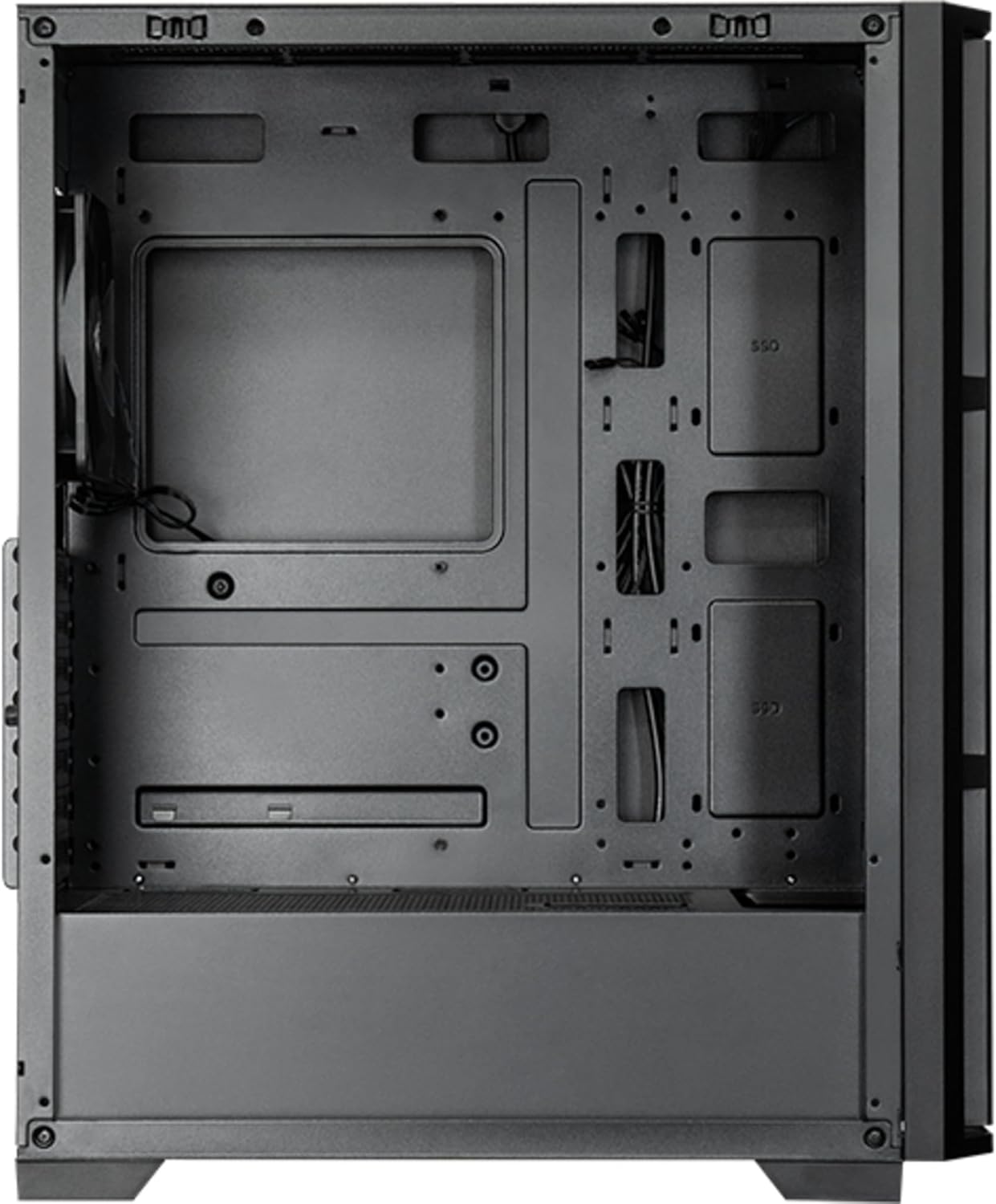
Малюнак 7: Інтэр'ер view of the main compartment, showing the motherboard tray and fan mounting points.
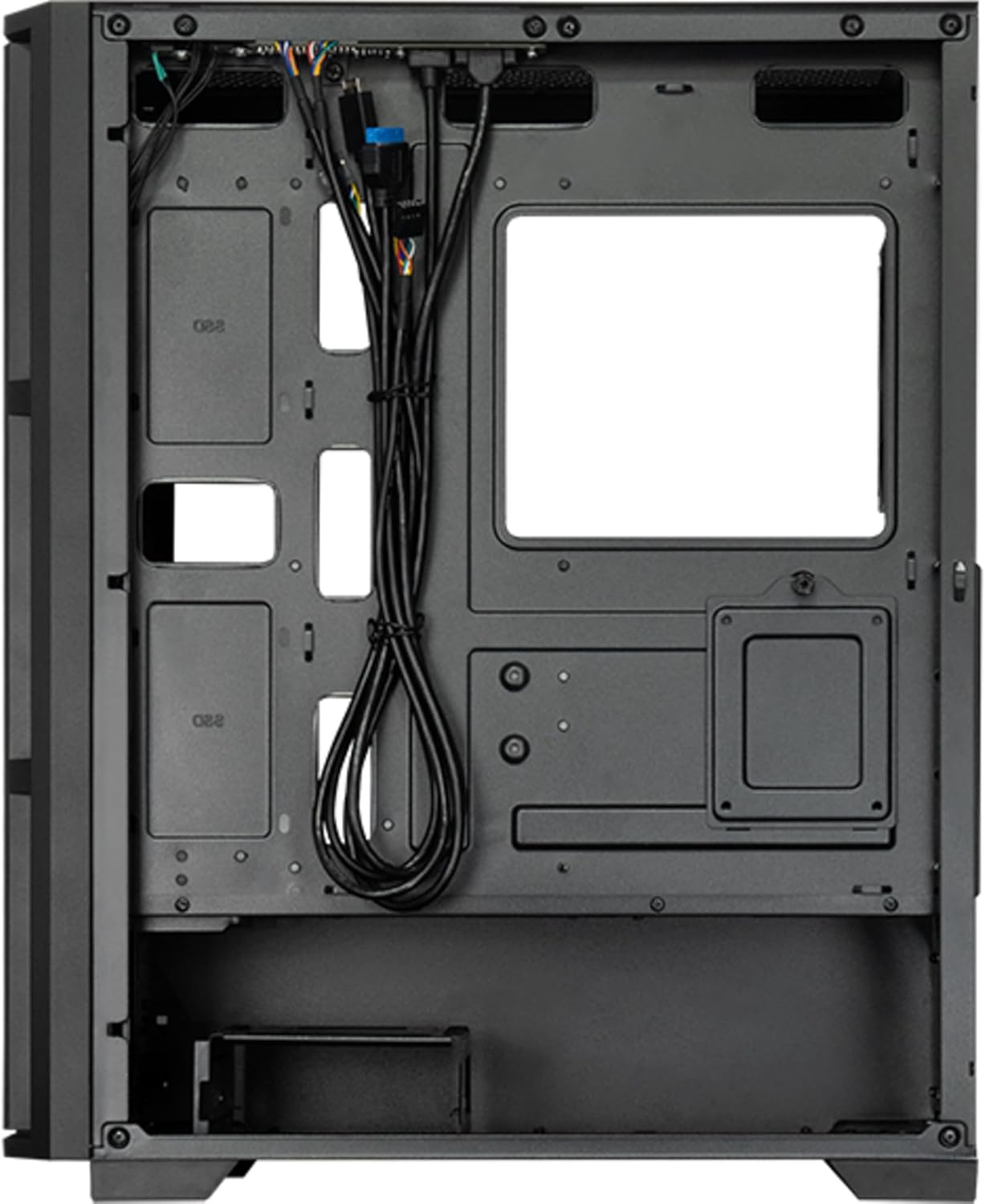
Малюнак 8: Інтэр'ер view from the backside, illustrating the cable management routes and drive mounting locations.
2. Устаноўка мацярынскай платы:
- Усталюйце экран уводу/вываду ў заднюю адтуліну корпуса.
- Align your ATX, micro ATX, or Mini-ITX motherboard with the standoffs inside the case.
- Замацуйце матчыну плату з дапамогай прадугледжаных шруб.
3. Power Supply Unit (PSU) Installation:
- The PSU is not included. Install your ATX power supply into the dedicated compartment at the bottom rear of the case.
- Замацуеце блок харчавання шрубамі з задняй часткі корпуса.
4. Storage Drive Installation:
- Install 3.5" HDDs into the drive cages located at the bottom.
- Install 2.5" SSDs/HDDs into the dedicated mounting points behind the motherboard tray.
- Secure all drives with appropriate screws.
5. Graphics Card and Expansion Cards:
- Зніміце неабходныя вечкі слотаў пашырэння на задняй панэлі корпуса.
- Insert your graphics card or other expansion cards into the PCIe slots on the motherboard.
- Замацуеце карты шрубамі.
6. Кіраванне кабелем:
- Правядзіце ўсе кабелі харчавання і перадачы дадзеных праз адтуліны і кропкі мацавання за паддонам матчынай платы.
- Connect the front panel I/O cables (USB, audio, power switch, reset switch, LED indicators) to the corresponding headers on your motherboard.
- Ensure cables do not obstruct airflow.
7. Усталёўка вентылятара і сістэмы астуджэння:
- The case includes one pre-installed 120mm PWM fan at the rear.
- Additional fans can be installed at the front (up to 3x 120mm/140mm) and top (up to 2x 120mm/140mm).
- Radiators up to 360mm can be installed at the front and up to 280mm at the top.
- Connect fan power cables to the motherboard fan headers.
Інструкцыя па эксплуатацыі
Once all components are installed and secured, and the side panels are reattached, your PC is ready for operation.
Уключэнне:
- Connect the power cable from your power supply to a wall outlet.
- Press the power button located on the top I/O panel of the case.
- The system should boot up, and any installed lighting will illuminate.
Front I/O Panel Usage:
- Парты USB 2.0 (x2): For connecting peripherals such as keyboards, mice, and USB drives.
- Порт USB тыпу C (x1): Для падлучэння сучасных прылад USB-C.
- Аўдыёраздымы (навушнікі/мікрафон): Для падключэння навушнікаў, дынамікаў або мікрафонаў.
- Кнопка скіду: To restart the computer.
Тэхнічнае абслугоўванне
Regular maintenance helps ensure optimal performance and extends the lifespan of your PC components.
Уборка:
- Знешні выгляд: Выкарыстоўвайце мяккі, damp cloth to wipe down the exterior surfaces. Avoid abrasive cleaners.
- Пылавыя фільтры: The case features dust filters (e.g., on the top and bottom). Regularly remove and clean these filters with compressed air or by rinsing with water (ensure they are completely dry before reinstallation).
- Інтэр'ер: Periodically use compressed air to remove dust buildup from fans, heatsinks, and other internal components. Ensure the system is powered off and unplugged before cleaning the interior.
Паток паветра:
- Ensure adequate space around the case for proper airflow.
- Пазбягайце блакавання вентыляцыйных адтулін.
Ліквідацыю непаладак
У гэтым раздзеле разглядаюцца распаўсюджаныя праблемы, з якімі вы можаце сутыкнуцца.
Няма харчавання:
- Праверце, ці надзейна падключаны кабель харчавання да блока харчавання і разеткі.
- Ensure the power switch on the PSU itself is in the "ON" position.
- Праверце, ці правільна падключаны кабель выключальніка харчавання на пярэдняй панэлі да раздыма матчынай платы.
Вентылятары не круцяцца:
- Check if fan power cables are securely connected to the motherboard fan headers or a fan controller.
- Ensure fan speed settings in BIOS/UEFI or operating system are not set to zero RPM.
Не працуе USB/аўдыё на пярэдняй панэлі:
- Verify that the USB and audio cables from the front panel are correctly connected to the corresponding headers on the motherboard.
- Check motherboard drivers for USB and audio functionality.
Тэхнічныя характарыстыкі
| Асаблівасць | Дэталь |
|---|---|
| Назва мадэлі | AS-02B-TG-OP |
| Марка | Шэфтэк |
| Формаў-фактар | Мідзі вежа |
| Колер прадукту | Чорны |
| Supported Motherboard Form Factors | ATX, micro ATX, Mini-ITX |
| Памеры (Ш х Г х У) | 215 мм х 390 мм х 485 мм (8.46" х 15.35" х 19.09") |
| Вага прадмета | 5.3 кг (прыбл. 11.68 фунта) |
| 3.5" Expansion Bays | 2 |
| 2.5" Expansion Bays | 2 |
| 5.25" Expansion Bays | 0 |
| Слоты пашырэння | 7 |
| Бакавое акно | Yes (Tempered Glass) |
| Асвятленне | Yes (Multi-color) |
| Максімальная вышыня працэсарнага кулера | 16.5 см |
| Пярэднія парты I / O | 2x USB 2.0, 1x USB Type-C, Audio In/Out |
| Папярэдне ўсталяваныя вентылятары | 1x 120mm PWM (Rear) |
| Supported Front Fans (Max) | 3x 120mm or 3x 140mm |
| Supported Top Fans (Max) | 2x 120mm or 2x 140mm |
| Supported Front Radiators | 120 мм, 140 мм, 240 мм, 280 мм, 360 мм |
| Supported Top Radiators | 120 мм, 140 мм, 240 мм, 280 мм |
| Блок сілкавання ўключаны | няма |
Інфармацыя аб гарантыі
The Chieftec AS-02B-TG-OP PC case comes with a 2-гадовая гарантыя вытворцы from the date of purchase. This warranty covers defects in materials and workmanship under normal use. It does not cover damage caused by misuse, accident, modification, unauthorized repair, or improper installation.
Калі ласка, захавайце доказы пакупкі для прэтэнзій па гарантыі.
Падтрымка
For technical assistance, troubleshooting beyond this manual, or warranty inquiries, please contact Chieftec customer support.
- Webсайт: Refer to the official Chieftec webсайт з рэсурсамі падтрымкі і кантактнай інфармацыяй.
- Электронная пошта/тэлефон: Specific contact details can typically be found on the product packaging or the official Chieftec support page.
When contacting support, please have your product model (AS-02B-TG-OP) and proof of purchase readily available.