
1. Уводзіны
Thank you for choosing the roborock Q10 S5 Robot Vacuum and Mop Cleaner. This manual provides essential information for setting up, operating, and maintaining your device to ensure optimal performance and longevity. Please read this manual thoroughly before using the product and keep it for future reference.
2. Інфармацыя па бяспецы
To reduce the risk of injury, electric shock, fire, or damage, please observe the following safety precautions:
- Гэтым прыборам могуць карыстацца дзеці ва ўзросце ад 8 гадоў і асобы з паніжанымі фізічнымі, сэнсарнымі або разумовымі здольнасцямі або з адсутнасцю вопыту і ведаў, калі яны знаходзяцца пад наглядам або атрымалі інструкцыі адносна бяспечнага выкарыстання прыбора і разумеюць звязаныя з гэтым небяспекі .
- За дзецьмі трэба сачыць, каб яны не гулялі з прыборам.
- Чыстка і абслугоўванне карыстальнікам не павінны праводзіцца дзецьмі без нагляду.
- Do not use the robot in areas with open flames or fragile objects.
- Пераканайцеся, што зарадная док-станцыя размешчана на роўнай паверхні каля сцяны.
- Only use the original power adapter provided with the device.
- Do not expose the robot to direct sunlight or moisture.
- Before cleaning, remove power cords, small objects, and fragile items from the floor.
3. Прадукт скончыўсяview
Familiarize yourself with the components of your roborock Q10 S5 robot vacuum.
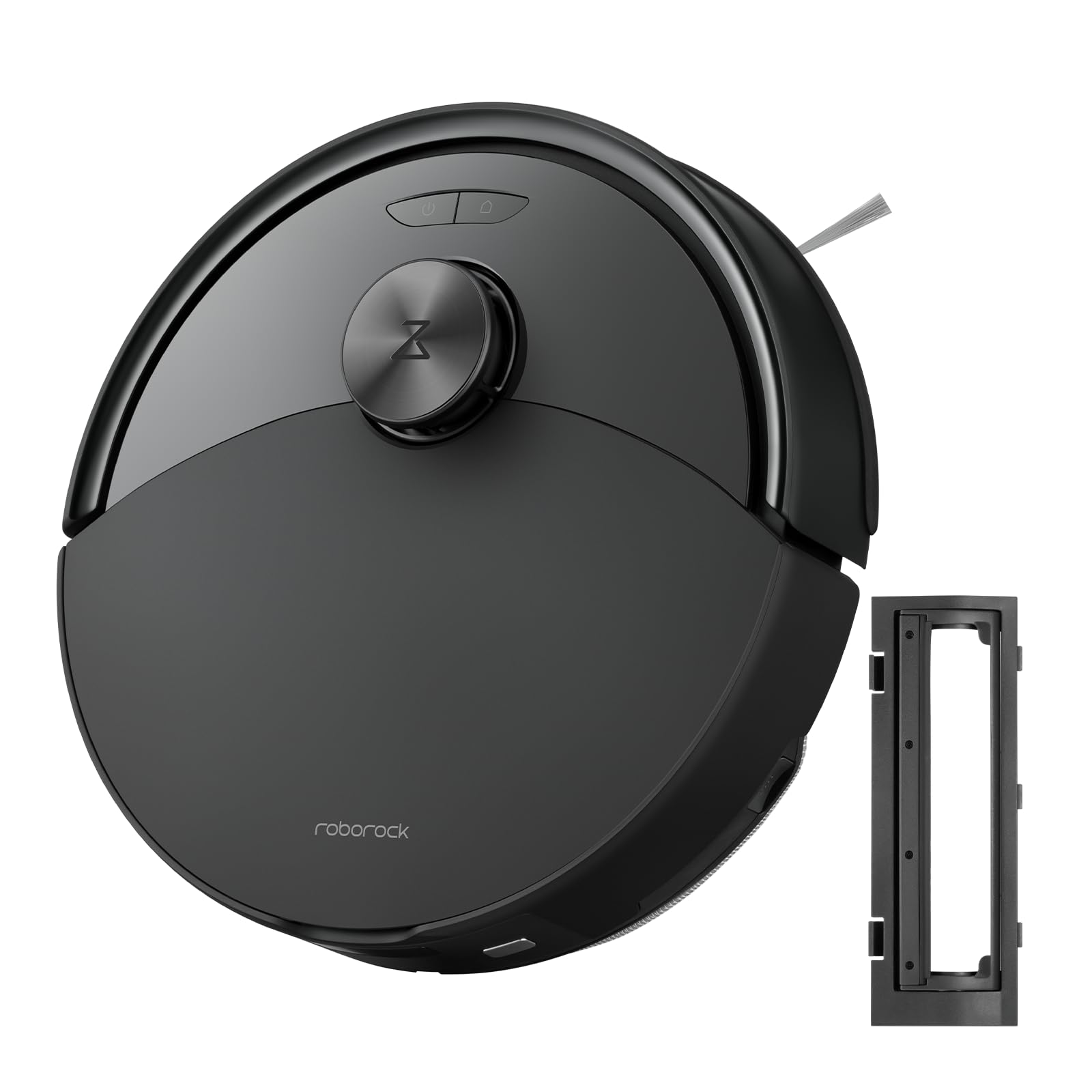
Малюнак 1: The roborock Q10 S5 Robot Vacuum and Mop Cleaner. This image shows the top view of the robot, highlighting its sleek black design and main control buttons.
Кампаненты робата:
- Верхняя вокладка: Lifts to reveal the dustbin and Wi-Fi indicator.
- Кнопка харчавання/ачысткі: Press to start/pause cleaning, hold to turn on/off.
- Dock/Spot Clean Button: Press to send the robot back to the dock, hold for spot cleaning.
- Датчык LDS: For navigation and mapping.
- Бампер: Выяўляе перашкоды.
- Бакавая шчотка: Sweeps debris from edges and corners.
- Асноўная шчотка: Collects dirt and debris from floors. Features a floating design for better contact.
- Omnidirectional Wheel: Для руху.
- Кантакты для зарадкі: Падключаецца да зараднай док-станцыі.
- Датчыкі абрыву: Prevents the robot from falling down stairs.
- Рэзервуар для вады і падкладка для швабры: For mopping functionality.
Док-станцыя для зарадкі:
- Dock Location Beacon: Helps the robot locate the dock.
- Кантакты для зарадкі: Transfers power to the robot.
- Power Cable Port: Падключае адаптар харчавання.
4. Настройка
- Распакуйце робата: Carefully remove the robot and all accessories from the packaging. Remove any protective films or shipping materials.
- Install the Side Brush: Press the side brush onto its post until it clicks into place.
- Place the Charging Dock:
- Place the charging dock on a hard, level surface against a wall.
- Ensure there is at least 0.5 meters (1.6 feet) of clear space on both sides and 1.5 meters (4.9 feet) in front of the dock.
- Connect the power cable to the charging dock and plug it into a wall outlet.
- Першапачатковая плата: Place the robot on the charging dock. The robot will automatically turn on and begin charging. For first-time use, fully charge the robot before operation (approximately 4-6 hours). The power indicator light will breathe white during charging and turn solid white when fully charged.
- Спампаваць прыкладанне: Пошук "Roborock" in the App Store or Google Play Store, or scan the QR code on the packaging to download and install the app.
- Падключыцеся да Wi-Fi:
- Open the Roborock app and follow the on-screen instructions to add your device.
- Пераканайцеся, што ваш тэлефон падключаны да сеткі Wi-Fi 2.4 Ггц.
- Націсніце і ўтрымлівайце Док і Магутнасць buttons simultaneously for 3 seconds until you hear the "Resetting Wi-Fi" voice alert.
- Follow the app's instructions to complete the connection.
5. Інструкцыя па эксплуатацыі
Пачатак уборкі:
- Ад робата: Націсніце Магутнасць button once. The robot will start cleaning.
- З праграмы: Open the Roborock app and tap the "Clean" button.
Pausing/Resuming/Stopping:
- Паўза: Націсніце любую кнопку на робаце або націсніце «Паўза» ў дадатку.
- Рэзюмэ: Націсніце Магутнасць button or tap "Resume" in the app.
- Stop: To stop a cleaning cycle, press the Док button to send the robot back to the charging dock, or tap "Stop" in the app.
Функцыя мыцця:
- Запоўніце бак для вады: Open the water tank cover, fill with clean water, and close securely.
- Прымацуйце падкладку для швабры: Wet the mop pad and wring it out. Slide it into the mop pad slot until it is securely attached.
- Пачаць мыццё падлогі: The robot will automatically detect the mop module and switch to mopping mode. You can adjust water flow levels in the app.
Асаблівасці прыкладання:
- Кіраванне картай: Create and save maps, set no-go zones, virtual walls, and invisible barriers.
- Выбарчая ўборка нумароў: Choose specific rooms to clean.
- Планавая ўборка: Усталюйце графікі ўборкі на розны час і дні.
- Custom Cleaning Modes: Адрэгулюйце магутнасць ўсмоктвання і ўзровень патоку вады.
- Пульт дыстанцыйнага кіравання: Кіруйце рухам робата ўручную.
6. Тэхнічнае абслугоўванне
Regular maintenance ensures your roborock Q10 S5 operates efficiently. Always turn off the robot and unplug the charging dock before performing any maintenance.
Dustbin and Filter (Weekly):
- Lift the top cover of the robot.
- Прыбярыце смеццевае вядро.
- Адкрыйце вечка пылазборніка і высыпце яго змесціва ў смеццевае вядро.
- Remove the filter. Tap it gently to remove dust. The filter can be rinsed with water; ensure it is completely dry before reinstallation (allow 24 hours).
- Rinse the dustbin with water if necessary and allow it to dry completely.
- Reinstall the dry filter and dustbin.
Main Brush (Weekly):
- Перавярніце робата.
- Press the tabs to remove the main brush cover.
- Выміце асноўную шчотку.
- Выкарыстоўвайце інструмент для чысткі (калі ён ёсць у камплекце) або нажніцы, каб абрэзаць і выдаліць валасы або смецце, якія заблыталіся вакол шчоткі.
- Reinstall the main brush and cover, ensuring it clicks into place.
Side Brush (Monthly):
- Адкруціце бакавую шчотку.
- Выдаліце любыя валасы або смецце.
- Reattach and tighten the screw.
Sensors and Charging Contacts (Monthly):
- Працярыце ўсе датчыкі (датчыкі абрыву, датчык сцены, акно датчыка LDS) і зарадныя кантакты як на робаце, так і на док-станцыі мяккай сухой тканінай.
Mop Pad (After Each Use):
- Зніміце швабру з ёмістасці для вады.
- Rinse thoroughly with water and allow it to air dry completely before next use.
7. Выпраўленне непаладак
If you encounter issues with your robot, please refer to the following table before contacting support.
| праблема | Магчымая прычына | Рашэнне |
|---|---|---|
| Робат не ўключаецца. | Нізкі ўзровень зарада батарэі або яна не зараджана. | Пастаўце робата на зарадную док-станцыю і пераканайцеся, што ён зараджаецца. |
| Робат не можа падключыцца да Wi-Fi. | Incorrect Wi-Fi password, 5GHz network, or poor signal. | Ensure correct 2.4GHz Wi-Fi, reset Wi-Fi on robot, move closer to router. |
| Робат часта захрасае. | Obstacles, tangled cables, or dirty sensors. | Clear floor, clean sensors, use no-go zones in app. |
| Слабая эфектыўнасць уборкі. | Full dustbin, dirty filter, tangled brushes. | Empty dustbin, clean/replace filter, clean main/side brushes. |
| Робат выдае незвычайныя гукі. | Debris in main brush, side brush, or wheels. | Inspect and clean all brushes and wheels for obstructions. |
If the problem persists, please refer to the Roborock app for more detailed error messages or contact customer support.
8. Тэхнічныя характарыстыкі
| Асаблівасць | Дэталь |
|---|---|
| мадэль | Q10 S5 |
| Памеры | Прыблізна 353 x 350 x 96.5 мм (13.9 x 13.8 x 3.8 цалі) |
| Вага | Прыбл. 3.7 кг (8.16 фунта) |
| акумулятар | Lithium-Ion (Capacity not specified, typical for robot vacuums) |
| Намінальная магутнасць | Approx. 60W (Typical for robot vacuums) |
| Ёмістасць сметніцы | Approx. 470 ml (Typical for robot vacuums) |
| Ёмістасць бака для вады | Approx. 300 ml (Typical for robot vacuums) |
| Магутнасць ўсмоктвання | Up to 10,000 Pa (HyperForce Suction Power from feature bullets) |
| Падключэнне да Wi-Fi | 2.4 ГГц |
Заўвага: Тэхнічныя характарыстыкі могуць быць зменены без папярэдняга паведамлення.
9. Гарантыя і падтрымка
roborock products are manufactured to the highest quality standards. For detailed warranty information, please refer to the warranty card included in your product packaging or visit the official roborock website. For technical support, troubleshooting assistance, or to purchase replacement parts, please contact roborock customer service through the app or their official webсайт.
Афіцыйны Webсайт: www.roborock.com