
Уводзіны
This manual provides detailed instructions for the setup, operation, and maintenance of your SPYPOINT FORCE-PRO 30 Megapixel 4K Trail Camera. Designed for outdoor monitoring, this camera captures high-resolution photos and videos, making it ideal for wildlife observation and security. Please read this manual thoroughly to ensure proper use and optimal performance of your device.
Змест пакета
Verify that all items listed below are present in your package. If any items are missing or damaged, please contact SPYPOINT customer support.
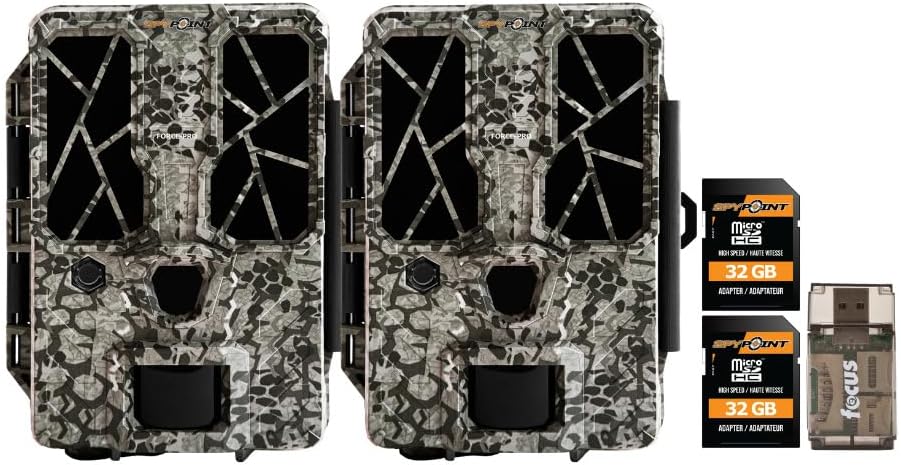
- 2 x SPYPOINT FORCE-PRO 30 Megapixel Trail Camera
- 2 x SPYPOINT MicroSD 32GB Ultra High Speed Class 10 Memory Card
- 1 x Focus All-In-One High Speed Card Reader

Прадукт скончаныview
The SPYPOINT FORCE-PRO is a robust trail camera designed for reliable performance in outdoor environments. It features advanced imaging capabilities and user-friendly controls.
Асноўныя характарыстыкі
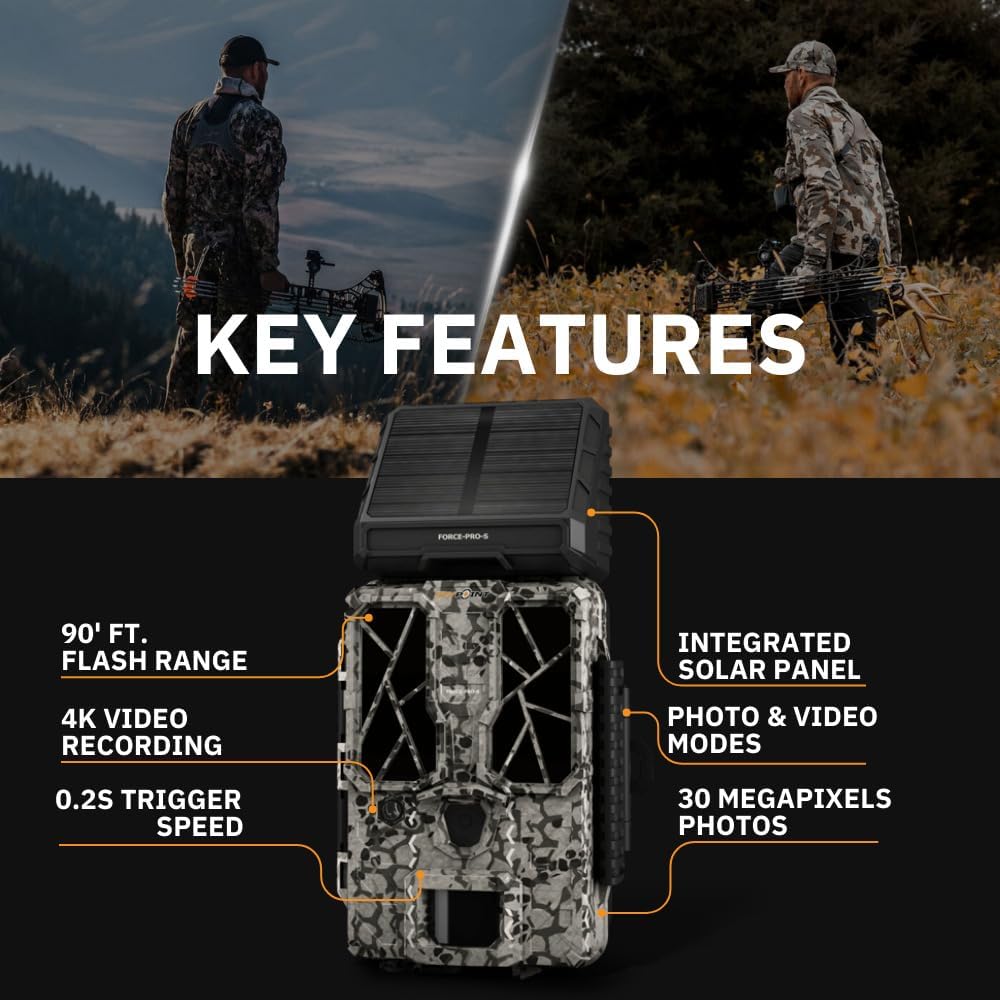
- Высокая раздзяляльнасць: 30 Megapixel photos and 4K video recording with sound.
- Хуткая хуткасць запуску: Ultra-fast 0.2-second trigger speed to capture quick movements.
- Шырокі дыяпазон выяўлення: 110-foot detection range.
- Powerful Flash: 90-foot flash range with 54 LEDs for clear night images.
- Інтэграваная сонечная панэль: For extended battery life and reduced maintenance.
- Dual-SIM Cellular: Automatically connects to the best available network for reliable transmission (if cellular model).



Настройка
1. Устаноўка крыніцы харчавання
The FORCE-PRO camera is equipped with an integrated solar panel for charging its internal battery. For initial setup or extended use without sufficient sunlight, an external power source can be used.
- Унутраны акумулятар: Ensure the camera's internal battery is charged. The integrated solar panel will charge it during daylight hours.
- Знешняе сілкаванне (дадаткова): If using an external 12V power source (not included), connect it to the camera's 12V jack.
2. Устаўка карты MicroSD
A MicroSD card is required to store photos and videos. Two 32GB MicroSD cards are included in this bundle.
- Знайдзіце слот для карты MicroSD на камеры.
- Устаўце карту MicroSD залацістымі кантактамі да задняй панэлі камеры, пакуль яна не зафіксуецца на месцы.
- Каб выняць карту, акуратна націсніце на яе, пакуль яна не выскочыць.
3. Пачатковае ўключэнне і базавая канфігурацыя
- Turn the camera ON using the power switch.
- Follow the on-screen prompts (if available) or refer to the camera's menu for initial settings such as date, time, and language.
- Format the MicroSD card through the camera's menu for optimal performance.
4. Мантаж камеры
The camera can be mounted using a strap, tripod, or other compatible mounting accessories. While specifications mention 'Tabletop Mount', for outdoor use, secure mounting is crucial.
- Выберыце месца, якое забяспечвае выразны view жаданай зоны маніторынгу.
- Ensure the camera is securely fastened to prevent movement from wind or animals.
- Position the camera to avoid direct sunlight into the lens, which can cause overexposure.
Інструкцыя па эксплуатацыі
Рэжымы камеры
- Рэжым фота: Захоплівае нерухомыя выявы пры спрацоўванні.
- Рэжым відэа: Запісвае відэакліпы пры спрацоўванні.
- Фота + відэа рэжым: Captures a photo followed by a video clip.
Рэгуляванне налад
Access the camera's menu using the built-in screen and navigation buttons to customize settings:
- дазвол: Select desired photo (up to 30MP) and video (up to 4K) resolution. Higher resolutions consume more storage.
- Затрымка запуску: Усталюйце затрымку паміж паслядоўнымі трыгерамі.
- Адчувальнасць: Adjust the motion sensor sensitivity to suit the environment and avoid false triggers.
- Гадзіны працы: Define specific times the camera should be active.
- Дата/час свamp: Enable or disable the date and time overlay on images/videos.
Выманне даных
- Карта MicroSD: Remove the MicroSD card from the camera and insert it into the included Focus All-In-One High Speed Card Reader. Connect the card reader to a computer to access files.
- Праграма SPYPOINT: For cellular models, use the SPYPOINT mobile application to view and manage captured media remotely. The app also allows for camera settings adjustments and firmware updates.
Тэхнічнае абслугоўванне
- Уборка: Regularly clean the camera lens and housing with a soft, dry cloth. Avoid abrasive materials or harsh chemicals.
- Праверка батарэі: Monitor battery levels, especially during periods of low sunlight. The integrated solar panel helps maintain charge, but supplemental charging may be needed.
- Абнаўленні прашыўкі: Periodically check for and install firmware updates via the SPYPOINT app or webсайт, каб забяспечыць аптымальную прадукцыйнасць і доступ да новых функцый.
- захоўванне: When not in use, store the camera in a cool, dry place away from direct sunlight.
Ліквідацыю непаладак
- Камера не спрацоўвае: Check motion sensor sensitivity, ensure no obstructions, and verify battery level.
- Нізкая якасць выявы/відэа: Clean the lens, check resolution settings, and ensure proper lighting conditions.
- Праблемы з харчаваннем: Ensure the internal battery is charged or an external power source is properly connected. Check for any damage to power cables.
- Памылкі карты MicroSD: Reformat the MicroSD card (backing up data first) or try a different card. Ensure the card is properly inserted.
- Connectivity Problems (Cellular Models): Verify cellular signal strength in the camera's location. Check your SPYPOINT app for data plan status.
Тэхнічныя характарыстыкі
| Асаблівасць | Спецыфікацыя |
|---|---|
| мадэль | FORCE-PRO |
| Дазвол фота | 30 мегапікселяў |
| Дазвол відэа | 4K |
| Спускавая хуткасць | 0.2 секунд |
| Далёкасць выяўлення | 110 футы |
| Далёкасць ўспышкі | 90 футы |
| святлодыёды | 54 |
| Крыніца харчавання | Integrated Solar Panel, Corded Electric (external 12V option) |
| Сувязь | USB, Wired (for data transfer), Cellular (for remote management) |
| Матэрыял | Пластыкавыя |
| Воданепранікальнасць | Водатрывалы |
| Тып фокусу | Аўтафокус |
| UPC | 196271434986 |
Гарантыя і падтрымка
For warranty information, technical support, or service inquiries, please refer to the official SPYPOINT webсайт або звярніцеся непасрэдна ў службу падтрымкі кліентаў. Захоўвайце пацвярджэнне пакупкі для прэтэнзій па гарантыі.
СПІПАНТ Webсайт: www.spypoint.com