
Skyworth H30P
Skyworth H30P Smart 360° Pan & Tilt Indoor Wi-Fi Security Camera User Manual
Мадэль: H30P
1. Уводзіны
Thank you for choosing the Skyworth H30P Smart 360° Pan & Tilt Indoor Wi-Fi Security Camera. This camera is designed to provide comprehensive surveillance for your indoor spaces, offering advanced features like 360° pan and tilt, two-way audio, and remote viewing via a mobile app. Please read this manual carefully before use to ensure proper installation and operation.
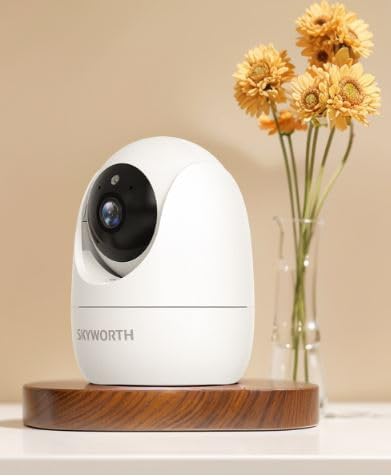
Figure 1: Skyworth H30P Smart Wi-Fi Camera
2. Інфармацыя па бяспецы
- Ensure the camera is used indoors only. It is not water-resistant (IP20 rating).
- Выкарыстоўвайце толькі адаптар сілкавання, які пастаўляецца з прыладай.
- Keep the camera away from direct sunlight, heat sources, and moisture.
- Не спрабуйце разбіраць або мадыфікаваць камеру. Гэта прывядзе да анулявання гарантыі.
- Захоўваць у месцах, недаступных дзецям і хатнім жывёлам.
- Ensure stable Wi-Fi connectivity for optimal performance.
3. Змесціва ўпакоўкі
Калі ласка, праверце змесціва ўпакоўкі пасля адкрыцця. Калі якія-небудзь прадметы адсутнічаюць або пашкоджаныя, звярніцеся ў службу падтрымкі кліентаў.
- Skyworth H30P Smart Wi-Fi Camera (1 unit)
- Блок харчавання (1 адзінка)
- Мантажныя аксэсуары (шрубы, дзюбелі)
- Кіраўніцтва карыстальніка (гэты дакумент)
4. Прадукт скончыўсяview
The Skyworth H30P camera features a compact dome shape with pan and tilt functionality, allowing for a 360-degree viewing angle. It includes a high-quality CMOS image sensor, infrared LEDs for night vision, and a built-in microphone and speaker for two-way audio communication.
Асноўныя характарыстыкі:
- Панарамаванне і нахіл на 360°: Full room coverage with no blind spots.
- Разрозненне 2K: Забяспечвае выразнае і падрабязнае відэа footage.
- Падключэнне Wi-Fi: Easy remote access and control via smartphone app.
- Поўнакаляровы начны бачанне: Палепшаная бачнасць у цёмных умовах асвятлення да 10 метраў.
- Двухбаковы аўдыё: Communicate with people or pets through the camera.
- Выяўленне руху: Receive alerts for detected movement.
- Падтрымка карт Micro SD: Up to 128GB for local storage (Micro SD card not included).
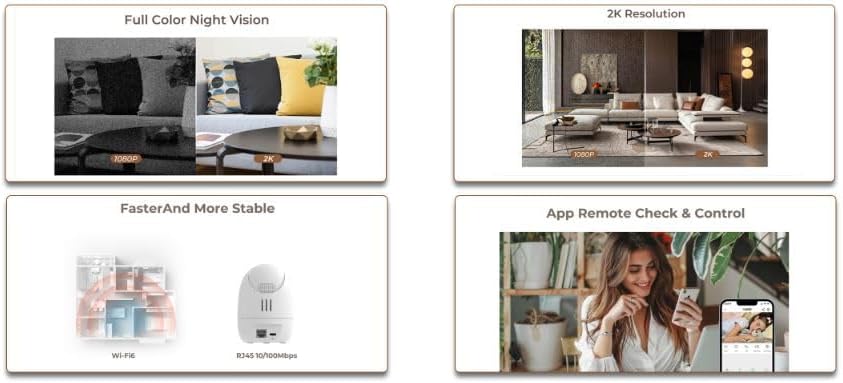
Figure 2: Demonstrates 2K resolution and full color night vision capabilities.
This image illustrates the camera's ability to capture clear images with 2K resolution and its full color night vision feature, which provides visibility even in dark environments.
5. Настройка
5.1 Уключэнне
- Падключыце адаптар сілкавання да ўваходнага порта сілкавання камеры.
- Plug the power adapter into a standard AC power outlet.
- The camera will power on, and its indicator light will begin to flash, indicating it is ready for setup.
5.2 Усталёўка праграмы і стварэнне ўліковага запісу
- Download the dedicated mobile application from your smartphone's app store (e.g., App Store for iOS, Google Play Store for Android). Пошук "Skyworth Smart Home" or refer to the QR code on the packaging.
- Адкрыйце праграму і выконвайце інструкцыі на экране, каб стварыць новы ўліковы запіс, або ўвайдзіце ў сістэму, калі ў вас ужо ёсць уліковы запіс.
5.3 Падключэнне да Wi-Fi
- In the app, tap on "Add Device" or the "+" icon.
- Select "Security Camera" or the specific model (H30P) from the list of devices.
- Follow the in-app prompts to connect the camera to your 2.4GHz Wi-Fi network. Ensure your Wi-Fi password is correct.
- The app may ask you to scan a QR code displayed on your phone screen with the camera lens, or to listen for an audible pairing tone.
- Пасля падключэння індыкатар камеры загарыцца пастаянна, і вы атрымаеце пацверджанне ў дадатку.

Figure 3: Illustrates Wi-Fi connectivity and remote control via mobile app.
This image shows the camera's wireless connectivity and how it can be controlled and monitored remotely using a smartphone application.
5.4 Мантаж камеры
The H30P camera can be placed on a flat surface like a shelf or table, or mounted on a wall.
Размяшчэнне стальніцы/паліцы:
- Place the camera on a stable, flat surface within Wi-Fi range.
- Пераканайцеся, што камера мае прамую бачнасць на вобласць, якую вы хочаце кантраляваць.
Насценны мантаж:
- Choose a suitable location on the wall, ensuring it is within Wi-Fi range and has a power outlet nearby.
- Use the provided mounting template (if available) or mark the screw positions on the wall.
- Drill pilot holes and insert wall plugs if necessary.
- Secure the mounting bracket (if included) to the wall using the screws.
- Прымацуеце камеру да мантажнага кранштэйна.
6. Кіраванне камерай
6.1 У прамым эфіры View
- Open the mobile app and select your H30P camera from the device list.
- You will see the live video feed from the camera.
6.2 Кіраванне паваротам і нахілам
- У прамым эфіры view screen in the app, use the directional controls (usually a joystick or arrows) to remotely adjust the camera's viewкут нахілу.
- The camera supports 360° horizontal rotation and vertical tilt.
6.3 Двухбаковае аўдыё
- To speak through the camera, tap the microphone icon in the app and hold it while speaking. Release to listen.
- To listen to audio from the camera's environment, ensure the speaker icon in the app is enabled.
6.4 Выяўленне руху і абвесткі
- Access the camera settings in the app to configure motion detection sensitivity and alert preferences.
- You can set up push notifications to your smartphone when motion is detected.
6.5 Запіс і захоўванне
- Камера падтрымлівае бесперапынны запіс або запіс па падзеях (напрыклад, пры выяўленні руху).
- Insert a Micro SD card (up to 128GB, not included) into the camera's Micro SD card slot for local storage.
- Запісана footagда яго можна атрымаць доступ і зноўviewed through the mobile app.
7. Тэхнічнае абслугоўванне
- Уборка: Акуратна працярыце аб'ектыў і корпус камеры мяккай сухой тканінай. Не выкарыстоўвайце вадкія ачышчальнікі або абразіўныя матэрыялы.
- Абнаўленні прашыўкі: Regularly check the mobile app for available firmware updates to ensure optimal performance and security.
- Кіраванне сховішчам: Пры выкарыстанні карты Micro SD перыядычна папаўняйцеview and delete old footage to free up space, or enable loop recording if supported.
8. Выпраўленне непаладак
| праблема | Магчымая прычына | Рашэнне |
|---|---|---|
| Камера не ўключаецца | Блок харчавання не падключаны або няспраўны; праблема з разеткай. | Check power connections. Try a different power outlet. Ensure the power adapter is working. |
| Немагчыма падключыцца да Wi-Fi | Няправільны пароль Wi-Fi; камера занадта далёка ад маршрутызатара; выкарыстоўваецца сетка Wi-Fi 5 ГГц. | Verify Wi-Fi password. Move camera closer to router. Ensure you are connecting to a 2.4GHz Wi-Fi network. Reset camera and try again. |
| Няма жывой відэатрансляцыі | Poor Wi-Fi signal; camera offline; app issue. | Check Wi-Fi signal strength. Restart the camera and router. Close and reopen the app. |
| Двухбаковы аўдыё не працуе | Мікрафон/дынамік адключаны ў дадатку; занадта нізкая гучнасць; затрымка сеткі. | Check app settings for audio controls. Adjust volume. Ensure stable network connection. |
| Папярэджанні аб руху не атрыманы | Motion detection disabled; incorrect sensitivity settings; app notifications blocked. | Enable motion detection in app settings. Adjust sensitivity. Check phone notification settings for the app. |
9. Тэхнічныя характарыстыкі
| Асаблівасць | Дэталь |
|---|---|
| Нумар мадэлі | H30P |
| Памеры | 8.5 х 8.5 х 12 см |
| Вага | 164 грамаў |
| Колер | Белы |
| Сувязь | Wi-Fi (2.4 ГГц) |
| дазвол | 2 Megapixels (2K effective video resolution) |
| Частата кадраў | 30 кадраў у секунду |
| Viewing кут | 360 degrees (Pan & Tilt) |
| Дыяпазон начнога бачання | Up to 10 meters (Full Color Night Vision with Infrared LEDs) |
| Захоўванне | Карта памяці Micro SD (да 128 ГБ, не ўваходзіць у камплект) |
| Крыніца харчавання | AC (5 Watts) |
| Асаблівасці | Pan/Tilt, Full Color Night Vision, Two-Way Audio, Remote ViewДатчык руху |
| Выкарыстанне ў памяшканні/на вуліцы | Indoor only (IP20) |
| Сумяшчальныя прылады | Smartphone, Tablet, Smart Displays |
10. Гарантыя і падтрымка
For warranty information and customer support, please refer to the warranty card included in your product packaging or visit the official Skyworth website. You can also contact your retailer for assistance.
вытворца: Скайворт
Краіна паходжання: Кітай