
1. Уводзіны
The Jacchozhi Face-HM01 Smart Lock is an advanced keyless entry system designed for enhanced home security and convenience. It integrates multiple unlocking methods including face recognition, palm vein scanning, fingerprint, keypad code, fob card, app remote control, and traditional mechanical key access. This manual provides detailed instructions for installation, operation, maintenance, and troubleshooting to ensure optimal performance of your smart lock.
Video 1: Jacchozhi Face-HM-01 Appearance and Features Overview. This video demonstrates the various features and the overall design of the smart lock, highlighting its multiple access methods and integrated components.
2. Інфармацыя па бяспецы
- Перад устаноўкай і выкарыстаннем уважліва прачытайце ўсе інструкцыі.
- Do not attempt to disassemble or repair the lock yourself. Contact customer support for assistance.
- Keep the mechanical keys in a safe place outside your home.
- Ensure the battery is charged regularly to avoid power loss.
- Protect the lock from extreme temperatures and direct water exposure, although it is designed with some water resistance (IP65).
- Пазбягайце выкарыстання абразіўных ачышчальнікаў або растваральнікаў на паверхні замка.
3. Змесціва ўпакоўкі
Перад пачаткам усталёўкі пераканайцеся, што ўсе кампаненты наяўныя:
- Jacchozhi Face-HM01 Smart Lock (Front and Rear Panels)
- Корпус ўразнога замка
- Запорная пласціна і запорная скрынка
- Мантажныя шрубы і фурнітура
- Акумулятарная батарэя
- Механічныя ключы (2)
- Fob Cards (2)
- Шаблон ўстаноўкі
- Кіраўніцтва карыстальніка
4. Настройка
4.1. Ўстаноўка
The Jacchozhi Face-HM01 Smart Lock is designed for standard residential doors, fitting 2-3/8" or 2-3/4" backsets and door thicknesses from 1-3/8" to 2-1/8". Follow these general steps for installation. For a detailed visual guide, please refer to the installation video below.
Video 2: Jacchozhi Face-HM-01 Installation Guide. This video provides a step-by-step visual guide for installing the smart lock on your door, including preparing the door, mounting the components, and connecting the wiring.
- Падрыхтуйце дзверы: Ensure your door meets the specified dimensions. Use the provided template to mark and drill any necessary holes.
- Install Mortise Lock Body: Insert the mortise lock body into the door edge and secure it with screws. Ensure the square hole is horizontal.
- Прымацаванне пярэдняй панэлі: Route the cables through the door and attach the front panel, aligning the spindle with the mortise.
- Прымацаваць мантажную пласціну: Secure the mounting plate to the door, ensuring the cables are not pinched.
- Падключыце кабелі: Connect the cables from the front panel to the rear panel.
- Прымацаваць заднюю панэль: Secure the rear panel to the mounting plate.
- Усталяваць батарэю: Устаўце акумулятарную батарэю ў батарэйны адсек.
- Праверка функцыянальнасці: Test all unlocking methods and ensure the lock operates smoothly.
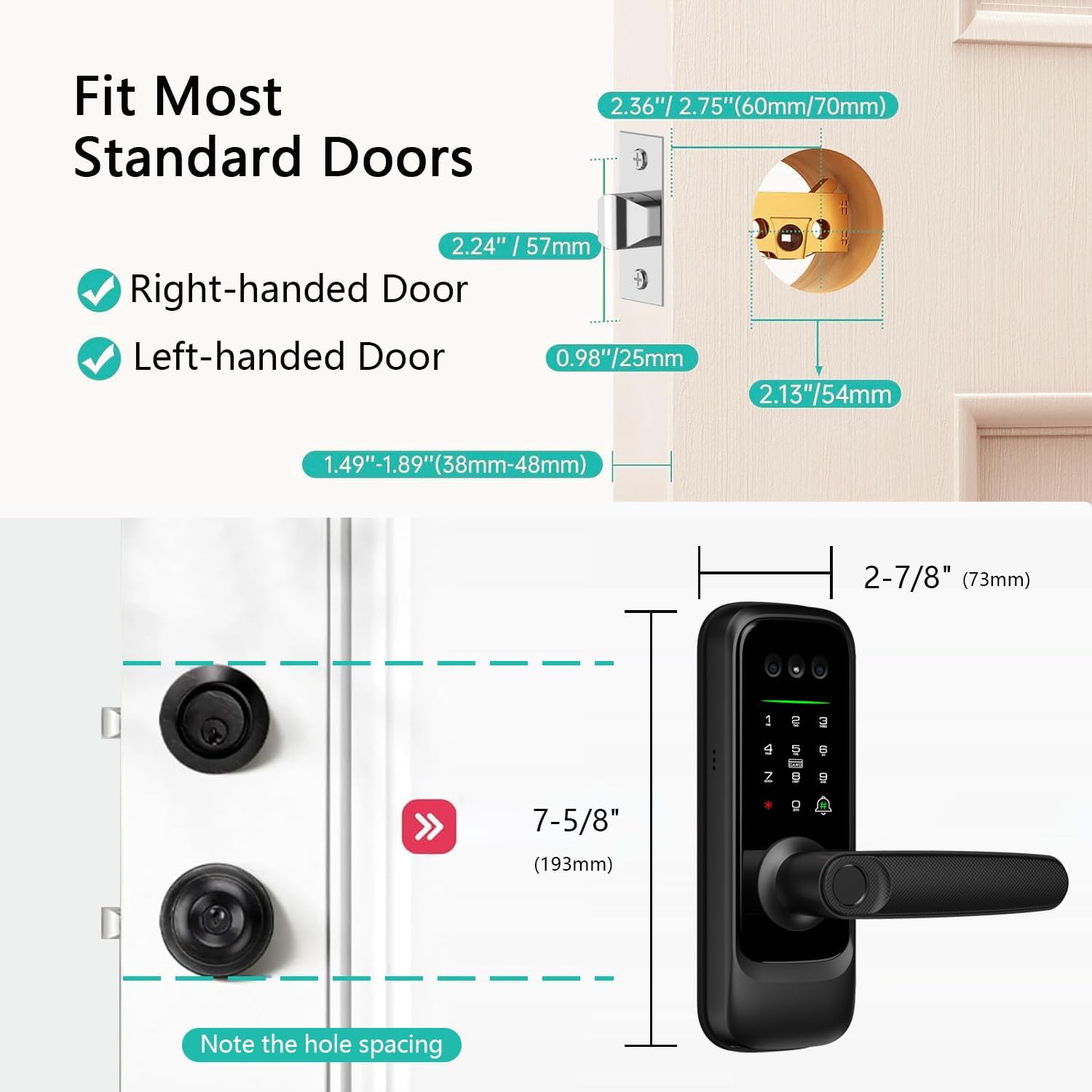
Image 1: Door Compatibility Diagram. This image illustrates the standard door dimensions and backset requirements for proper installation of the Jacchozhi Face-HM01 Smart Lock, including measurements for right-handed and left-handed doors.

Image 2: Installation Step. This image shows a person using a screwdriver to secure the mortise lock body into the door frame, an essential step in the smart lock installation process.
4.2. Initial Configuration (Tuya App)
Download the Tuya Smart app from your device's app store. Follow the in-app instructions to pair your smart lock and register initial users. This typically involves creating an account, adding the device, and then enrolling administrators for face, palm vein, and fingerprint access.
5. Аперацыя
5.1. Метады разблакоўкі

Image 3: Multiple Access Methods. This infographic visually represents the eight distinct methods available for unlocking the Jacchozhi Face-HM01 Smart Lock, offering versatile entry options.
- Распазнаванне асобы: Stand in front of the lock, and it will automatically scan your face for recognition. Once recognized, the lock will unlock.
- Распазнаванне вен на далоні: Place your palm over the designated sensor. The lock will scan your palm vein pattern for secure access.
- Разблакіроўка адбіткам пальца: Place your registered finger on the fingerprint sensor located on the handle. The lock will verify your fingerprint and unlock.
- Код клавіятуры: Enter your programmed numerical code on the touchscreen keypad. The lock supports anti-peep codes for added security.
- Fob Card: Present a registered fob card to the card reader area on the lock.
- Прыкладанне дыстанцыйнага кіравання: Use the Tuya Smart app on your smartphone to remotely unlock the door from anywhere with an internet connection.
- Галасавое кіраванне: Integrate with Amazon Alexa or Google Assistant for voice-activated unlocking (requires proper setup and security protocols).
- Механічны ключ: In case of power failure or electronic malfunction, use the provided mechanical key for emergency access.

Image 4: Face Recognition Unlock. This image depicts a user unlocking the door using face recognition technology, where the smart lock scans the user's face for secure access.

Image 5: Palm Vein Unlock. This image shows a user gaining entry by placing their hand over the smart lock's sensor for palm vein recognition, a contactless and secure method.

Image 6: Fingerprint Sensor Versatility. This image highlights the advanced fingerprint sensor's ability to recognize fingerprints even under challenging conditions such as dirty, peeling, sweaty, or faint prints, ensuring reliable access for all users.

Image 7: Fingerprint Unlock in Use. This image shows a user's finger activating the fingerprint sensor on the smart lock's handle, demonstrating the quick and secure fingerprint unlocking process.

Image 8: Anti-Peep Code Entry. This image demonstrates the use of an anti-peep code on the smart lock's keypad, where extra digits can be entered before or after the actual code to prevent others from guessing it.

Image 9: App Remote Unlock. This image illustrates the convenience of unlocking the smart lock remotely using the Tuya Smart app on a smartphone, showing the app interface and the lock on the door.

Image 10: Voice Control Integration. This image demonstrates the smart lock's compatibility with voice assistants like Amazon Alexa, allowing users to unlock their door using voice commands for hands-free convenience.
5.2. Video Doorbell & Two-Way Audio
The integrated camera and doorbell allow you to see and communicate with visitors at your door. When the doorbell is pressed, you receive an instant video call on your smartphone via the Tuya app.

Image 11: Video Doorbell Functionality. This image shows a smartphone receiving a video call from the smart lock's integrated doorbell, allowing the user to see and interact with a visitor remotely.

Image 12: Two-Way Audio. This image illustrates the two-way audio feature of the video doorbell, enabling users to communicate with visitors through their smartphone when the doorbell is pressed.
5.3. Камера начнога бачання
The smart lock features an infrared camera that automatically switches to night vision mode, providing clear visibility up to 3 meters in low-light conditions. A 160° wide-angle lens ensures comprehensive coverage of your doorstep.

Image 13: Night Vision Capability. This image demonstrates the smart lock's night vision feature, showing clear visibility of a person at the door in both day and night conditions.
5.4. Remote Control & Monitoring (Tuya App)
The Tuya Smart app provides extensive remote control and monitoring capabilities:
- Кіраванне карыстальнікамі: Add or remove users, assign different access methods.
- Часовыя паролі: Generate one-time or time-limited access codes for guests or service providers.
- Абвесткі аб актыўнасці: Receive instant notifications for door activity, such as unlocking events or doorbell presses.
- Video Surveillance: Access live video feed from the camera anytime, anywhere.
- Журнал доступу: Review гісторыя ўсіх падзей блакавання і разблакавання.

Image 14: Temporary Password Generation. This image shows how to generate and share temporary access codes for guests via the app, providing flexible access control.

Image 15: Real-time Notifications. This image demonstrates the app's ability to send real-time notifications to your smartphone, alerting you to visitors or door unlock events, even when you are away.

Image 16: Surveillance Camera. This image shows the live video surveillance feature accessible through the app, allowing users to monitor their doorstep remotely.

Image 17: Video Log. This image displays the video log feature within the app, which records and stores video clips of door activity for review.
5.5. Human Detection
The built-in sensor detects approaching individuals, automatically waking the lock and illuminating the keypad. This feature can be disabled in high-traffic areas to conserve battery life.

Image 18: 24H Human Detection. This image illustrates the smart lock's 24-hour infrared human detection feature, which automatically senses and activates the lock when someone approaches the door.
5.6. Кіраванне батарэяй
The smart lock is powered by a rechargeable battery. The Tuya app will provide low battery warnings. If the battery fully drains, a Type-C emergency port allows for a quick power boost, and the mechanical key can always be used as a failsafe.

Image 19: Low Battery Alert and Emergency Power. This image shows a low battery alert on the smartphone app and the smart lock being charged via its Type-C emergency port, ensuring continuous functionality.
6. Тэхнічнае абслугоўванне
- Уборка: Працярыце паверхню замка мяккай губкайamp тканіна. Не выкарыстоўвайце агрэсіўныя хімікаты або абразіўныя матэрыялы.
- Сыход за батарэяй: Recharge the battery when low battery alerts are received. Avoid fully draining the battery frequently to prolong its lifespan.
- Абнаўленні прашыўкі: Regularly check the Tuya app for available firmware updates to ensure optimal performance and security.
7. Выпраўленне непаладак
If you encounter issues with your Jacchozhi Face-HM01 Smart Lock, consider the following common solutions:
- Замак не адказвае: Check the battery level. If low, recharge using the Type-C port or replace the battery.
- Unlocking Failure: Ensure your biometric data (face, palm, fingerprint) is correctly enrolled and positioned. For keypad codes, verify the correct sequence.
- Праблемы з падключэннем праграмы: Ensure your Wi-Fi network is stable and the lock is within range. Restart the app and the lock if necessary.
- Doorbell Not Alerting: Check app notification settings and ensure the lock is connected to the internet.
- Фізічная перашкода: Ensure there are no physical obstructions preventing the latch from extending or retracting fully.
For more complex issues or persistent problems, please refer to the detailed troubleshooting section within the Tuya Smart app or contact Jacchozhi customer support.
8. Тэхнічныя характарыстыкі
| Марка | Жачожы |
| Нумар мадэлі | Face-HM01 |
| Тып замка | Біяметрычны |
| Асаблівасці | Alarm, Face Recognition, Fingerprint, Palm Vein, Camera, Doorbell, Motion Sensor |
| Памеры прадмета (Д х Ш х У) | 7.5 х 3.5 х 11 цалі |
| Вага прадмета | 3.3 фунта |
| Матэрыял | Алюміній |
| Колер | Чорны |
| Пратакол злучэння | Bluetooth, WiFi |
| Метад кантролю | Праграма, пульт дыстанцыйнага кіравання, сэнсарны, голас |
| Тып кантролера | Amazon Alexa, Android, iOS |
| Рэкамендуемае выкарыстанне | Уваходныя дзверы |
| Воданепранікальнасць | IP65 (from A+ content image) |
9. Гарантыя і падтрымка
9.1. Інфармацыя аб гарантыі
Jacchozhi products are covered by a limited warranty against defects in materials and workmanship. Please retain your proof of purchase for warranty claims. Specific warranty duration and terms may vary; refer to the product packaging or contact customer support for details.
9.2. Падтрымка кліентаў
For technical assistance, troubleshooting, or warranty inquiries, please contact Jacchozhi customer support:
- электронная пошта: jacchozhi@outlook.com
- Інтэрнэт-падтрымка: Visit the official Jacchozhi webсайт з часта задаванымі пытаннямі і дадатковымі рэсурсамі.