
1. Уводзіны
This manual provides detailed instructions for the setup, operation, and maintenance of your FIREBAT Mini PC A8. The FIREBAT A8 is a compact, high-performance mini computer equipped with an AMD Ryzen 8745HS processor, AMD Radeon 780M graphics, and an OCuLink port for external GPU expansion. It supports quad-screen display and offers versatile connectivity options. Please read this manual thoroughly to ensure proper use and to maximize the performance of your device.

Малюнак 1.1: Пярэдняя і задняя часткі view of the FIREBAT Mini PC A8, showcasinдзякуючы кампактнаму дызайну і розным партам.

Выява 1.2: Канецview of the FIREBAT A8 Mini PC, highlighting its core features and design.
2. Змесціва ўпакоўкі
Праверце, ці ўсе пералічаныя ніжэй прадметы ўваходзяць у камплект. Калі якія-небудзь прадметы адсутнічаюць або пашкоджаныя, звярніцеся ў службу падтрымкі кліентаў.
- 1 x FIREBAT A8 AMD Ryzen 7 8745HS Mini PC
- 1 x US Power Supply (19V 6.32A 120W)
- 1 x VESA Mount
- 1 х кабель HDMI
- 1 х Кіраўніцтва карыстальніка (гэты дакумент)

Image 2.1: Visual representation of the items included in the FIREBAT A8 package.
3. Прадукт скончыўсяview
3.1 Асноўныя магчымасці
- Працэсар: AMD Ryzen 7 8745HS (8 Cores/16 Threads, up to 4.9GHz)
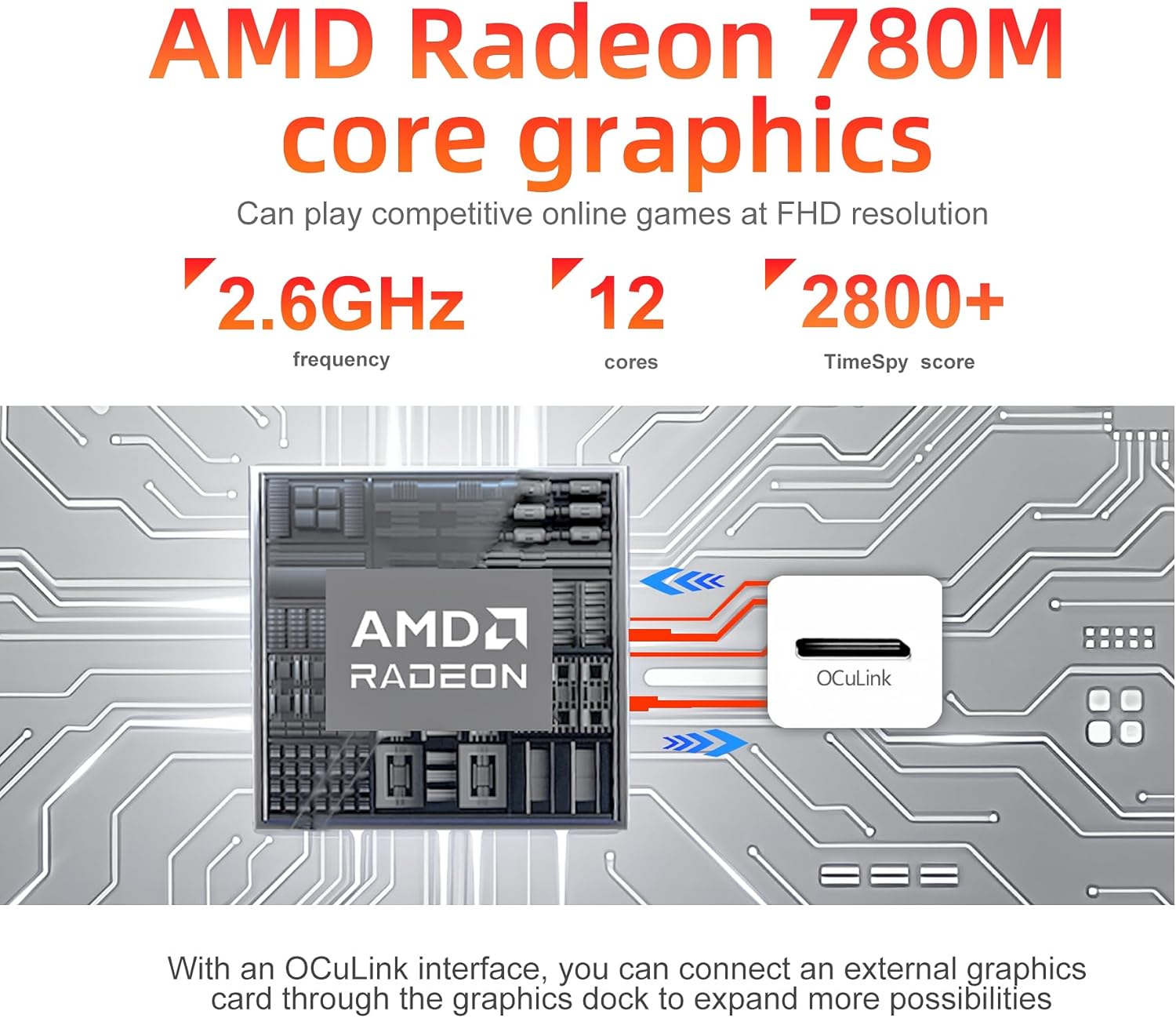
- Графіка: Інтэграваная відэакарта AMD Radeon 780M
- Памяць: 32GB DDR5 5600MHz RAM (expandable up to 64GB)
- захоўванне: 1TB PCIe 4.0 M.2 2280 SSD
- Падключэнне: WiFi 6 (802.11ax), Bluetooth 5.2, Dual 2.5Gbps RJ45 LAN
- Вывад дысплея: Quad-screen support via 2x USB-C 4.0, 1x DP 1.4, 1x HDMI 2.1
- Пашырэнне: OCuLink port for external graphics card support
- Рэжымы прадукцыйнасці: One-click switch for Quiet (45W), Balanced (54W), and Performance (65W) modes
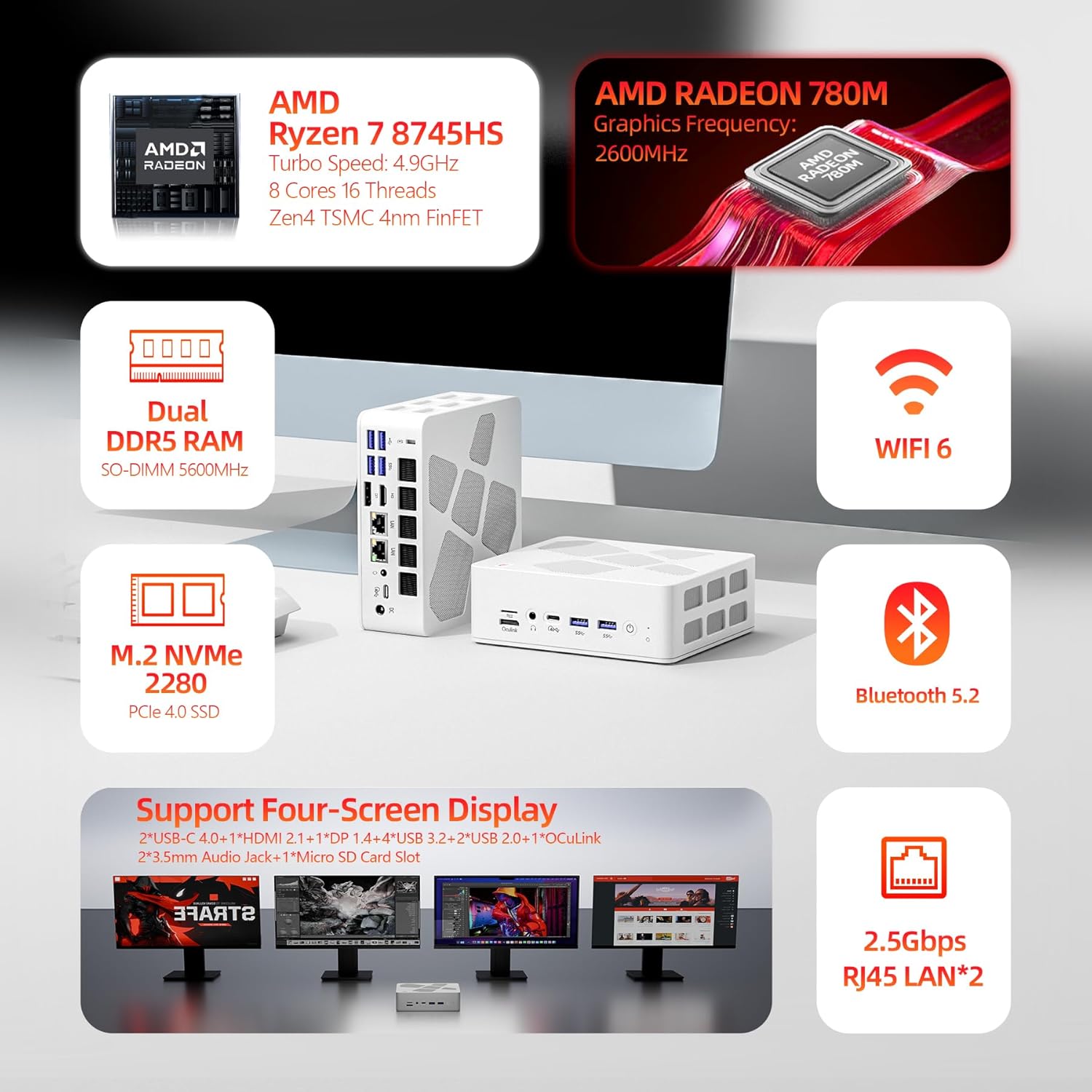
Image 3.1: Diagram highlighting the main components and features of the FIREBAT A8 Mini PC.
3.2 Парты і інтэрфейсы
The FIREBAT A8 Mini PC offers a comprehensive set of ports for various peripherals and displays.
- 1x OCuLink port (for external graphics card)
- 1x слот для карты TF
- 2x USB-C 4.0 (supports Power Delivery, DisplayPort, up to 40Gbps data transfer)
- 4x USB 3.2 Gen2 (up to 10Gbps data transfer)
- 2x USB 2.0 (up to 5Gbps data transfer)
- 1x Kensington Anti-theft Lock Hole
- 1x DisplayPort 1.4
- 1x HDMI 2.1
- 2x 3.5mm Audio Jacks (Headphone & Microphone)
- 2 порты RJ45 LAN 2.5 Гбіт/с
- 1x DC Power Input
- 1x кнопка харчавання
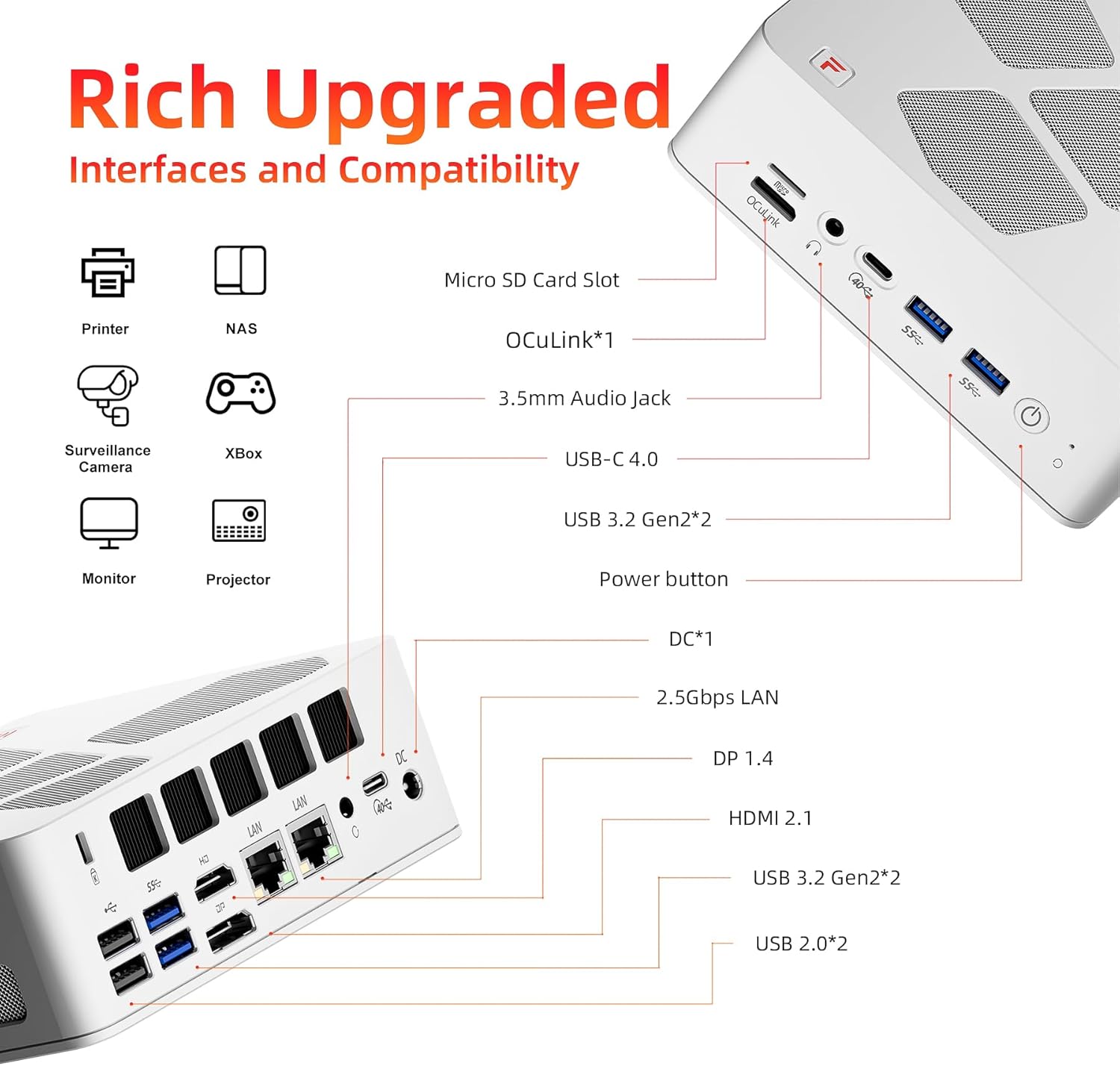
Image 3.2: Detailed diagram illustrating the location and type of all ports and interfaces on the FIREBAT A8 Mini PC.
4. Інструкцыі па ўсталёўцы
4.1 Пачатковае падключэнне
- Падключэнне дысплея: Connect your monitor(s) to the Mini PC using the HDMI, DisplayPort, or USB-C 4.0 ports. The device supports up to four displays simultaneously.
- Падключэнне перыферыйных прылад: Падключыце клавіятуру, мыш і іншыя прылады USB да даступных партаў USB.
- Падключыць сетку: For a wired connection, connect an Ethernet cable to one of the 2.5Gbps RJ45 LAN ports. For wireless, ensure your WiFi network is available.
- Падключыце харчаванне: Connect the provided power adapter to the DC power input port on the Mini PC, then plug the adapter into a power outlet.
- Уключэнне: Press the power button located on the front of the Mini PC to turn on the device.
4.2 Усталёўка мацавання VESA
The included VESA mount allows you to attach the Mini PC to the back of a compatible monitor or to a wall mount, saving desk space.
- Secure the VESA mount bracket to the back of your monitor or desired surface using appropriate screws.
- Устаўце міні-ПК у мантажны кранштэйн, пакуль ён надзейна не зафіксуецца.
5. Інструкцыя па эксплуатацыі
5.1 Рэжымы прадукцыйнасці
The FIREBAT A8 features a one-click performance mode switch, allowing you to adjust power consumption and performance based on your needs. The LED indicator on the device will change color to reflect the current mode.
- Green (Quiet Mode - 45W): Ideal for office tasks, web browsing, and light applications where low noise and power efficiency are prioritized.
- Blue (Balanced Mode - 54W): Suitable for medium workloads, general computing, and moderate applications.
- Red (Performance Mode - 65W): Provides maximum performance for demanding tasks such as gaming, video editing, and other high-load applications.

Image 5.1: The performance mode switch button and its corresponding LED indicators.

Image 5.2: Visual representation of the 65W Performance Mode in action.
5.2 Multi-Screen Display
The FIREBAT A8 supports simultaneous output to up to four screens, enhancing productivity and immersive experiences.
- HDMI 2.1 port supports up to 8K@60Hz resolution.
- USB-C 4.0 ports support up to 4K@144Hz resolution.
- DisplayPort 1.4 also supports high-resolution output.
Connect your displays to the available video output ports and configure your display settings within the operating system.
Малюнак 5.3: Прыкладample setup demonstrating the quad-screen display capability of the Mini PC.
6. Пашырэнне аб'ёму захоўвання і памяці
The FIREBAT A8 allows for easy upgrades of both RAM and SSD storage to meet future demands.
- Памяць: The device comes with 32GB DDR5 5600MHz RAM (2x16GB SO-DIMM). It supports dual-channel memory and can be expanded up to 64GB.
- захоўванне: It includes a 1TB PCIe 4.0 M.2 2280 SSD. There is an additional slot for another M.2 2280 SSD, allowing for further storage expansion.
To access the internal components for upgrade, carefully remove the bottom cover of the Mini PC. Consult a professional if you are unsure about the upgrade process.

Малюнак 6.1: Унутраная частка view of the FIREBAT A8, highlighting the DDR5 SO-DIMM memory slots and the M.2 2280 SSD slot.

Image 6.2: Close-up of the internal layout, showing the M.2 SSD and DDR5 RAM modules for potential upgrades.
7. Cooling and Noise Management
The FIREBAT A8 is designed with an efficient dual-fan cooling system, incorporating thermal grease and three heat pipes to maintain optimal operating temperatures and minimize noise.
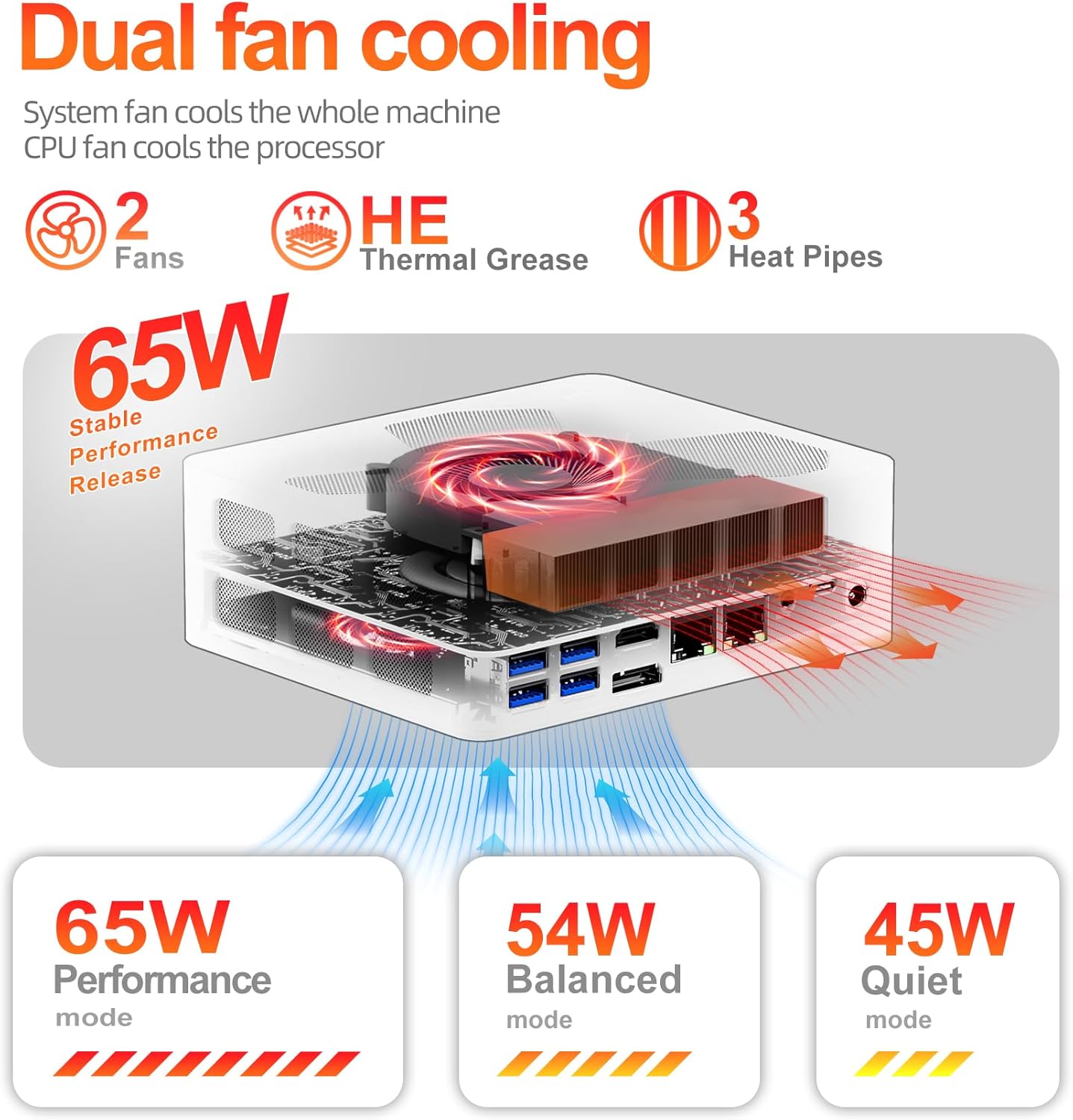
Image 7.1: Diagram illustrating the dual-fan cooling system and heat dissipation within the Mini PC.

Image 7.2: Information on the low noise levels of the FIREBAT A8 during operation.
8. Тэхнічныя характарыстыкі
| Асаблівасць | Спецыфікацыя |
|---|---|
| Працэсар | AMD Ryzen 7 8745HS (3.8 GHz base, up to 4.9 GHz turbo, 8 Cores/16 Threads, 16MB L3 Cache) |
| Графіка | AMD Radeon 780M (інтэграваная) |
| АЗП | 32GB DDR5 5600MHz (SODIMM, expandable to 64GB) |
| Захоўванне | 1TB PCIe 4.0 M.2 2280 SSD (with additional M.2 slot) |
| Аперацыйная сістэма | Default (typically Windows 11 Pro) |
| Бесправоднае падключэнне | Wi-Fi 6 (802.11ax), Bluetooth 5.2 |
| лакальная сетка | 2x 2.5Gbps RJ45 Ethernet |
| Відэавыхад | 2x USB-C 4.0 (4K@144Hz), 1x DisplayPort 1.4, 1x HDMI 2.1 (8K@60Hz) |
| Парты USB | 2x USB-C 4.0, 4x USB 3.2 Gen2, 2x USB 2.0 |
| Іншыя парты | 1x OCuLink, 1x TF Card Slot, 2x 3.5mm Audio Jack (HP&MIC), 1x Kensington Lock |
| Памеры (ДхШхВ) | 5.7 х 5 х 2 цалі (14.6 х 12.6 х 5 см) |
| Вага | 1.5 фунта (0.68 кг) |
| Электразабеспячэнне | 19В 6.32А (120Вт) |

Image 8.1: The compact dimensions of the FIREBAT A8 Mini PC.
9. Выпраўленне непаладак
9.1 Няма харчавання
- Пераканайцеся, што адаптар сілкавання надзейна падключаны як да міні-ПК, так і да спраўнай разеткі.
- Праверце працаздольнасць разеткі, падключыўшы да яе іншую прыладу.
- Check if the power adapter's LED indicator (if any) is lit.
9.2 Няма вываду на дысплей
- Confirm that the display cable (HDMI, DP, USB-C) is firmly connected to both the Mini PC and the monitor.
- Пераканайцеся, што манітор уключаны і настроены на правільную крыніцу ўваходнага сігналу.
- Try a different display cable or port on the Mini PC.
- If using multiple displays, try connecting only one display at a time to isolate the issue.
9.3 Праблемы з падключэннем да сеткі
- Wired: Check the Ethernet cable connection to both the Mini PC and your router/modem. Verify router/modem status.
- Бесправадная сувязь: Ensure WiFi is enabled in the operating system. Check if the correct WiFi network is selected and the password is entered correctly. Restart your router/modem.
9.4 Праблемы з прадукцыйнасцю сістэмы
- Ensure the Mini PC is set to an appropriate performance mode (Balanced or Performance) for demanding tasks.
- Check for background applications consuming excessive resources.
- Ensure adequate ventilation around the Mini PC to prevent overheating.
- Абнавіць драйверы і аперацыйную сістэму.
10. Гарантыя і падтрымка
FIREBAT is committed to providing quality products and customer satisfaction. For warranty information, technical support, or any inquiries regarding your FIREBAT Mini PC A8, please contact us through the following channels:
- Падтрымка па электроннай пошце: support@firebatpc.com
- Афіцыйны Webсайт: www.firebatpc.com
Please have your product model (A8) and purchase details ready when contacting support.