
Уводзіны
This manual provides essential information for setting up, operating, maintaining, and troubleshooting your Razer BlackWidow V4 Low Profile TKL HyperSpeed Wireless Gaming Keyboard. Please read thoroughly to ensure optimal performance and longevity of your device.
Што ў скрынцы
- Razer BlackWidow V4 Low-profile Tenkeyless HyperSpeed Keyboard
- HyperSpeed Wireless Dongle + USB Dongle Adapter
- Кабель USB тыпу A да USB тыпу C
- Кіраўніцтва карыстальніка (гэты дакумент)
Настройка
1. Пачатковая зарадка
Before first use, it is recommended to fully charge your keyboard using the provided USB Type A to USB Type C cable. Connect the USB-C end to the keyboard and the USB-A end to a powered USB port on your computer or a wall adapter.
2. Параметры падключэння
Your Razer BlackWidow V4 Low Profile TKL keyboard offers three connectivity modes:
- HyperSpeed Wireless (2.4GHz): For a lag-free gaming experience with a 1000Hz polling rate. Use the included HyperSpeed Wireless Dongle.
- Bluetooth: Connect up to three Bluetooth-enabled devices simultaneously for multi-tasking efficiency.
- Правадны (USB-C): Connect directly to your PC using the USB Type A to USB Type C cable for a stable, wired connection and simultaneous charging.

Выява: Задняя частка view of the keyboard, highlighting the USB-C port and the wired/wireless switch.
3. Software Installation (Razer Synapse 4 & Chroma App)
For full customization of lighting, macros, and other features, download and install Razer Synapse 4 and the Chroma App from the official Razer website. These applications allow you to:
- Remap keys and create macro layers.
- Customize RGB lighting effects (Chroma effects).
- Спасылка праfiles to specific applications or games.
- Manage onboard memory for settings.
Кіраванне клавіятурай
Асноўныя характарыстыкі і элементы кіравання

Image: Close-up of three keyboards displaying the different low-profile mechanical switch types.
- Нізкі Profile Orange Mechanical Switches: Experience quick, quiet actuation with a tactile bump. These switches have a 1.6 mm actuation point and require 45g of force.
- Ultra-Low 18.5mm Front Height: Designed for ergonomic comfort, reducing wrist strain during extended use. The keyboard features a solid 5052 aluminum alloy top case for durability.

Выява: Side profile of the keyboard demonstrating its ultra-low 18.5mm front height.
- Textured Doubleshot PBT Keycaps: Durable and fade-resistant keycaps with optimized legends for enhanced backlight illumination.
- Optimized Typing Experience: Features lubricated stabilizers and dual sound-dampening foams for clean keystrokes and improved acoustics.
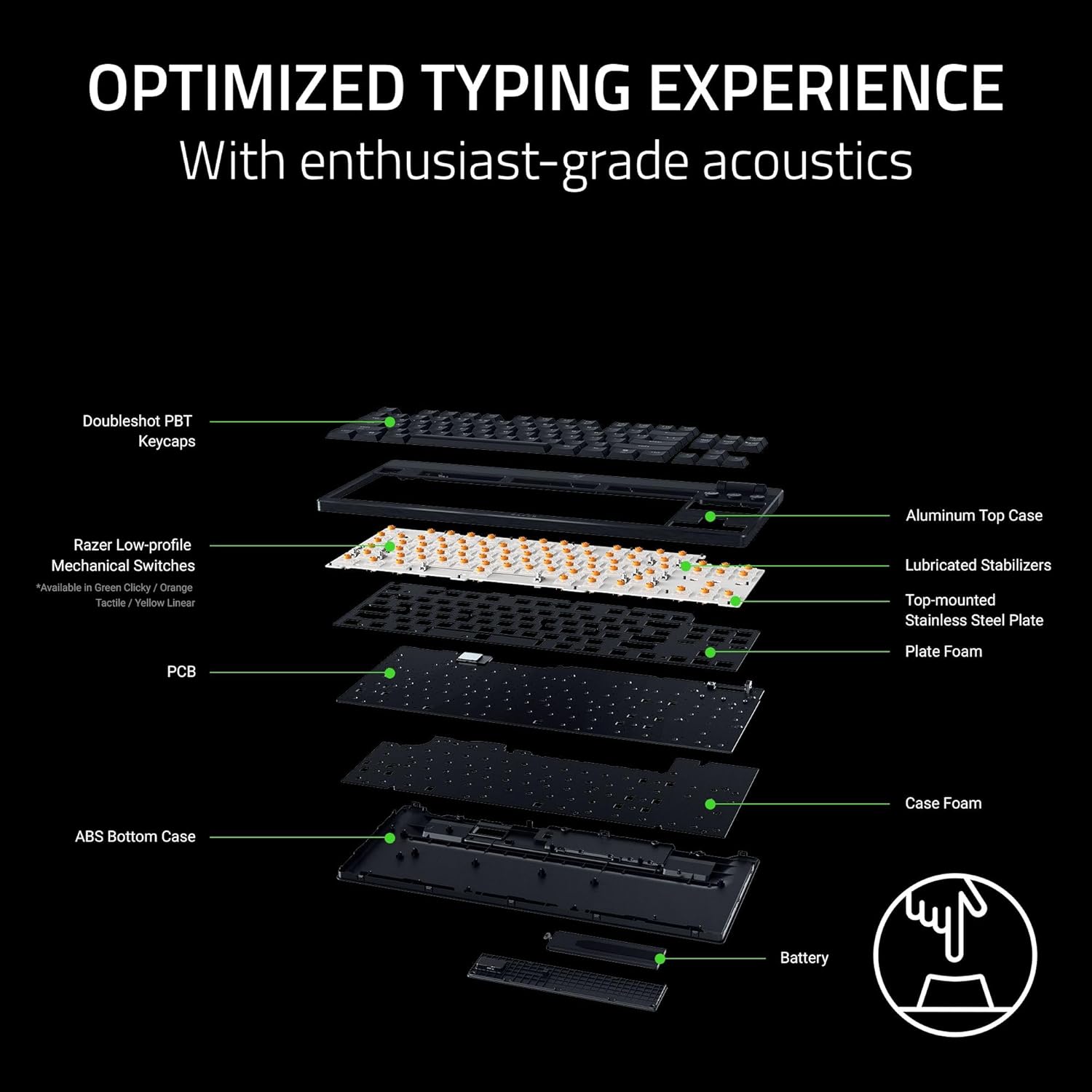
Выява: Разабраная view of the keyboard's internal construction, showing layers for optimized typing.
Dedicated Controls

Image: Detail of the multi-function roller and dedicated control buttons.
- Шматфункцыянальны ролік: Adjust volume or remap to other functions via Razer Synapse.
- Кнопкі кіравання мультымедыя: Dedicated buttons for play/pause, next track, and previous track.
- Connectivity Buttons: Toggle between 2.4GHz HyperSpeed Wireless and Bluetooth modes.
- AI Prompt Button: Launch the AI Prompt Master via Synapse for quick AI interactions.
- Кнопка стану батарэі: Press to display the current battery level on the number row.
Рэжым энергазберажэння
To conserve battery life, press and hold the Battery Status button for 3 seconds to activate Power Saving Mode. In this mode, the keyboard:
- Pauses communication with Synapse.
- Shuts down RGB lighting.
- Reduces the polling rate to 250Hz.
This mode extends battery life significantly, up to 980 hours in idle state when fully charged.

Image: Keyboard highlighting its ultra-long battery life capability.
Тэхнічнае абслугоўванне
Уборка
Рэгулярная чыстка дапамагае падтрымліваць знешні выгляд і функцыянальнасць клавіятуры:
- Выкарыстоўвайце мяккую безворсовую тканіну, злёгку dampened with water to wipe down the keycaps and chassis.
- For stubborn dirt, a small amount of isopropyl alcohol can be used on the cloth.
- Avoid spraying cleaners directly onto the keyboard.
- Use compressed air to remove debris from between keycaps.
Сыход за каўпачкамі клавіш
The Doubleshot PBT keycaps are designed for durability. If removal is necessary for deep cleaning or replacement, use a keycap puller to avoid damage. Apply gentle, even pressure when removing and reattaching keycaps.
Ліквідацыю непаладак
Праблемы з падключэннем
- Wireless (2.4GHz/Bluetooth): Ensure the keyboard is charged and within range of the receiver/device. Check that the correct connectivity mode is selected on the keyboard. Re-pair the device if necessary.
- Wired: Verify the USB-C cable is securely connected to both the keyboard and the PC. Try a different USB port or cable.
Няспраўнасці асвятлення
- Ensure Razer Synapse and Chroma App are running and updated.
- Check lighting settings within the Chroma App for any disabled effects or low brightness.
- If specific keys are not lighting up, check for physical damage or software conflicts.
Праблемы з тэрмінам службы батарэі
- Activate Power Saving Mode when not actively gaming or requiring full RGB lighting.
- Ensure the keyboard is fully charged. Battery life can vary based on usage, lighting intensity, and polling rate.
Праблемы з праграмным забеспячэннем
- Ensure Razer Synapse and Chroma App are updated to the latest version.
- Restart the applications or your computer.
- If issues persist, consider reinstalling the Razer software.
Тэхнічныя характарыстыкі
| Асаблівасць | Дэталь |
|---|---|
| Марка | Razer |
| Назва мадэлі | BlackWidow V4 Low Profile Бесправадная гульнявая клавіятура TKL HyperSpeed |
| Нумар мадэлі | RZ03-05450800-R3U1 |
| Тэхналогія падлучэння | Бесправадная сувязь 2.4 ГГц, Bluetooth, правадны USB-C |
| Апісанне клавіятуры | Нізкі Profile Механічная гульнявая клавіятура |
| Тып перамыкача | Razer Low Profile Orange Mechanical Switches (Tactile & Quiet) |
| Сіла спрацоўвання | 45 г |
| Пункт спрацоўвання | 1.2 мм |
| Total Travel | 2.8 мм |
| Матэрыял клавішы | Textured Doubleshot PBT |
| Вышыня спераду | 18.5 мм |
| Матэрыял верхняга корпуса | Алюмініевы сплаў 5052 |
| Тэрмін службы батарэі | Up to 980 hours (in Power Saving Mode) |
| Стаўка апытання | 1000Hz (Wireless), 250Hz (Power Saving Mode) |
| Колькасць ключоў | 87 (Tenkeyless) |
| Раскладка клавіятуры | QWERTY |
| Падсвятленне клавіятуры | RGB |
| Памеры прадукту (Д х Ш х У) | 5.48" x 14.07" x 1.12" |
| Вага прадмета | 3.1 фунта |
| Сумяшчальныя прылады | PC |
Інфармацыя аб гарантыі
Razer BlackWidow V4 Low Profile TKL HyperSpeed Wireless Gaming Keyboard comes with a 2-гадовая гарантыя вытворцы. Please retain your proof of purchase for warranty claims. For detailed terms and conditions, refer to the official Razer warranty policy on their webсайт.
Падтрымка
For further assistance, technical support, or to access additional resources, please visit the official Razer Support webсайт:
You can also find FAQs, driver downloads, and community forums on the support portal.