
1. Інфармацыя па бяспецы
Please read and understand all safety precautions before assembly and use of the Halitaa Vertical File Кабінет.
- Includes assembly instructions with safety precautions.
- Ensure the cabinet is properly assembled and mounted to prevent tipping. A wall attachment kit is included for this purpose.
- Do not overload drawers to maintain stability.
- Keep fingers away from drawer openings to prevent pinching.
2. Прадукт скончыўсяview
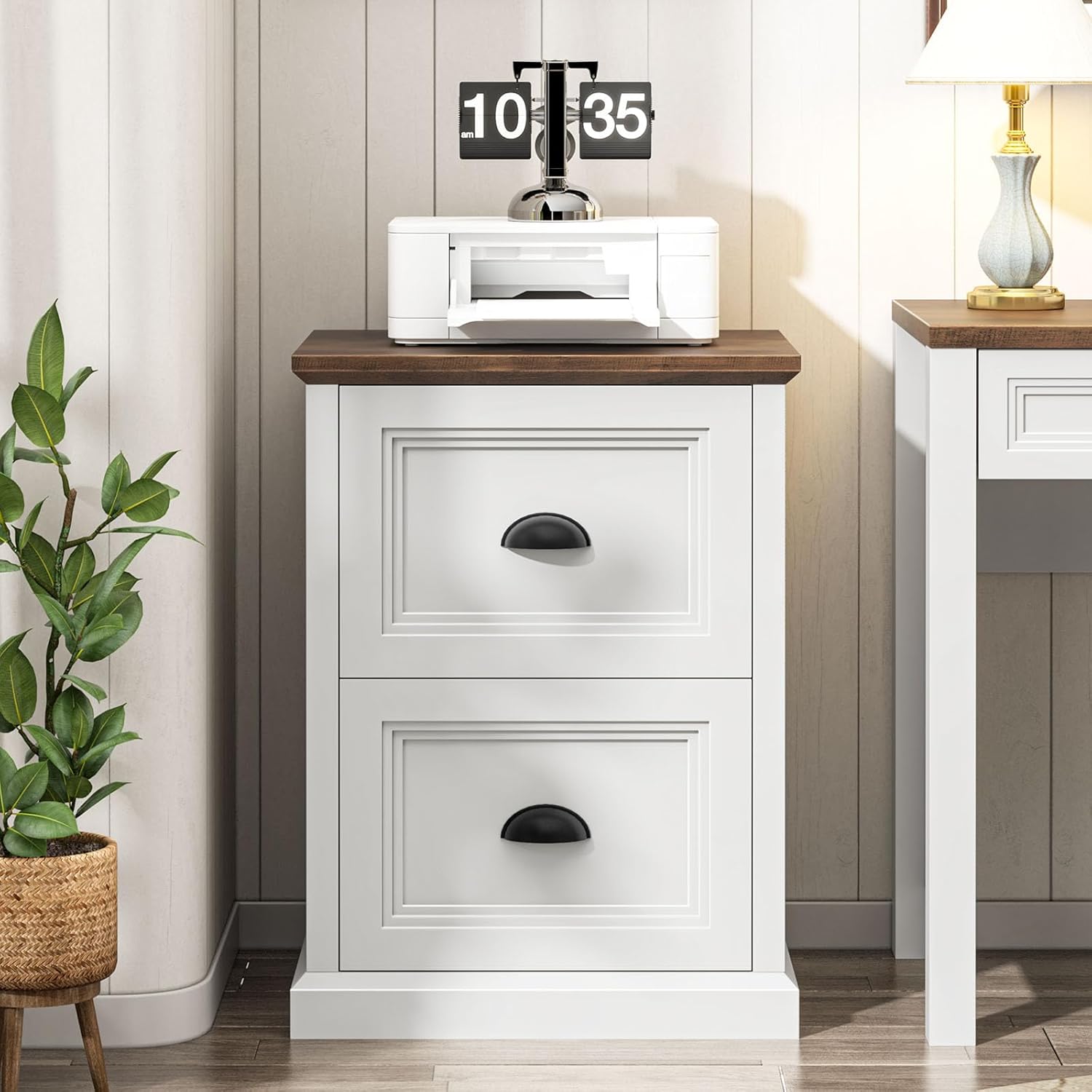
The Halitaa Vertical File Cabinet (Model DA0458) is a farmhouse-style storage solution designed for home offices. It features two file drawers and a spacious top panel, suitable for organizing documents and serving as a printer stand.
Асноўныя характарыстыкі:
- Modern Farmhouse Design: Features a flying eaves top panel and a three-layer drawer front design.
- AmpПрастора для захоўвання: Два file drawers accommodate A4/Letter-sized folders.
- Шматфункцыянальны: Можна выкарыстоўваць як file cabinet, printer stand, or general storage.
- Трывалы і трывалы: Constructed from high-quality engineered wood with a stable base and smooth metal three-section drawer slides.


3. Усталёўка і зборка
The Halitaa Vertical File Cabinet requires assembly. Detailed instructions and all necessary parts are included in the packaging.
Этапы зборкі:
- Распакуйце ўсе кампаненты і звярніцеся да спісу дэталяў, прыведзенага ў інструкцыі па эксплуатацыі.
- Follow the step-by-step instructions carefully. All parts are labeled for easy identification.
- Assemble the frame of the cabinet, ensuring all connections are secure.
- Усталюйце накіроўвалыя для шуфляд і збярыце самі шуфляды.
- Attach the drawer fronts and handles.
- Замацуеце верхнюю панэль.
- Install the anti-tip wall attachment kit as per the safety instructions to prevent accidental tipping.
Note: Assembly typically takes approximately 1.5 to 2 hours for one person.
4. Інструкцыя па эксплуатацыі
Выкарыстоўваючы File высоўныя скрыні:
- The two drawers are designed for hanging files.
- They support both Letter-sized and A4-sized folders.
- Adjust the metal rods inside the drawers to fit your preferred file size (Letter or A4).
- The drawers feature smooth metal three-section slides for full extension and easy access to contents.


Using as a Printer Stand:
- The sturdy top panel can support a printer or other office equipment.
- Ensure the weight of the items placed on top does not exceed the cabinet's capacity to maintain stability.

5. Тэхнічнае абслугоўванне
Уборка:
- Працярыце паверхні мяккай, damp тканіна.
- Пазбягайце выкарыстання агрэсіўных хімікатаў або абразіўных ачышчальнікаў, бо яны могуць пашкодзіць пакрыццё.
- Неадкладна высушыце чыстай тканінай, каб пазбегнуць плям ад вады.
Агульны догляд:
- Periodically check all screws and fasteners to ensure they are tight. Tighten if necessary.
- Avoid exposing the cabinet to direct sunlight or extreme temperature changes, which can cause warping or fading.
- Не кладзіце гарачыя прадметы непасрэдна на паверхню; выкарыстоўвайце падстаўкі або ахоўныя падкладкі.
6. Выпраўленне непаладак
Агульныя праблемы і рашэнні:
- Шуфляды не слізгаюць плаўна:
- Check if the drawer slides are properly aligned and free of obstructions.
- Пераканайцеся, што скрыні не перагружаныя.
- Праверце, ці ўсе шрубы, якія мацуюць слайдары, закручаныя.
- Кабінет міністраў адчувае сябе няўстойлівым:
- Confirm that the cabinet is placed on a level surface.
- Ensure the anti-tip wall attachment kit is correctly installed and secured to a wall stud.
- Праверце герметычнасць усіх мацаванняў зборкі.
- Адсутнічаюць дэталі падчас зборкі:
- Уважліва праверце ўсе ўпаковачныя матэрыялы.
- Contact Halitaa customer support for assistance (see Warranty & Support section).
7. Тэхнічныя характарыстыкі
| Асаблівасць | Дэталь |
|---|---|
| Марка | Halitaa |
| Нумар мадэлі | DA0458 |
| Колер | Белы |
| Матэрыял | Канструяваная драўніна |
| Памеры прадукту (Д х Ш х У) | 15.75" Г x 19.75" Ш x 26.1" У |
| Колькасць скрынь | 2 |
| File Sizes Supported | Ліст, А4 |
| Патрабуецца зборка | так |
| Тып мацавання | Floor Mount (with wall attachment option) |

8. Гарантыя і падтрымка
For any questions regarding assembly, missing parts, or product performance, please contact Halitaa customer support.
While specific warranty details are not provided in this manual, Halitaa is committed to customer satisfaction. Please retain your proof of purchase for any warranty claims.
You can visit the official Halitaa store for more information and support: Halitaa Store on Amazon