
1. Уводзіны
This manual provides essential information for the installation, operation, and maintenance of your Acer Nitro Radeon RX 9060 XT graphics card. Please read this manual thoroughly before installation to ensure proper setup and optimal performance.

Малюнак 1: Спераду view of the Acer Nitro Radeon RX 9060 XT Graphics Card, showcasing its dual fan design.
2. Сістэмныя патрабаванні
- Слот PCIe 5.0 x16 на матчынай плаце.
- Compatible power supply with at least one 8-pin PCIe power connector.
- Operating system: Windows 10/11 64-bit or Linux 64-bit.
- Minimum 8GB system RAM (16GB recommended).
- Інтэрнэт-злучэнне для загрузкі і абнаўлення драйвераў.
3. Настройка і ўстаноўка
3.1. Фізічная ўстаноўка
- Падрыхтуйце сваю сістэму: Выключыце камп'ютар і адлучыце ўсе кабелі. Адкрыйце корпус камп'ютара.
- Знайдзіце слот PCIe: Identify an available PCIe 5.0 x16 slot on your motherboard. Remove any expansion slot covers that may be blocking it.
- Усталюйце відэакарту: Акуратна выраўнуйце відэакарту са слотам PCIe і моцна націсніце, пакуль яна надзейна не зафіксуецца. Пераканайцеся, што фіксатар зашчапіўся.
- Замацуйце карту: Выкарыстоўвайце шрубы, каб замацаваць відэакарту да кранштэйна слота пашырэння корпуса кампутара.
- Падключыць харчаванне: Connect the 8-pin PCIe power connector from your power supply to the corresponding port on the graphics card.

Малюнак 2: бок view of the graphics card, showing the 8-pin power connector.
3.2. Падключэнне дысплея
Connect your monitor(s) to the graphics card using the available ports:
- 1x HDMI 2.1a port
- 2x DisplayPort 2.1b ports
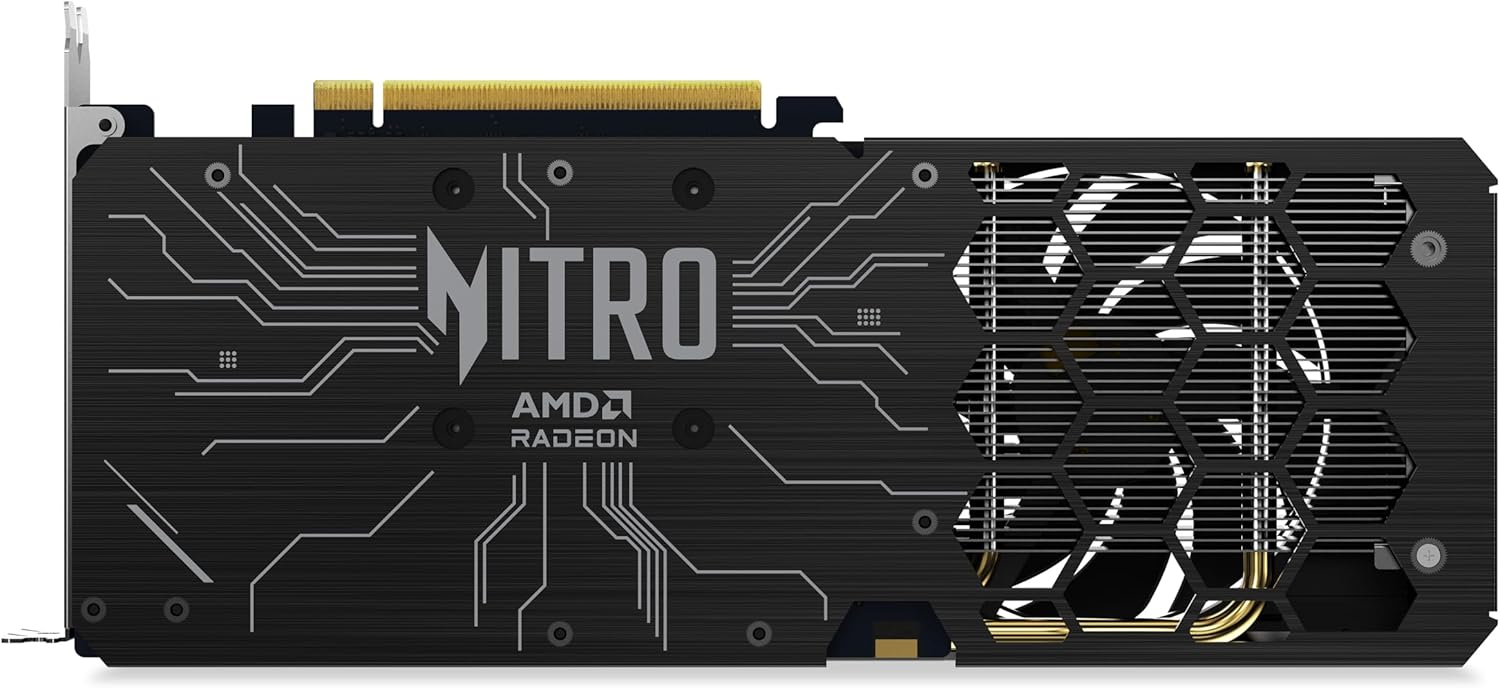
Малюнак 3: Задняя частка view of the graphics card, highlighting the display output ports.
3.3. Ўстаноўка драйвера
- After physical installation, close your computer case and reconnect all cables. Power on your computer.
- Download the latest AMD Software Adrenaline Edition drivers from the official AMD webсайт (www.amd.com/en/support).
- Выконвайце інструкцыі на экране, каб усталяваць драйверы. Можа спатрэбіцца перазагрузка сістэмы.
4. Кіраванне відэакартай
Once installed and drivers are updated, your Acer Nitro Radeon RX 9060 XT graphics card is ready for use. It is designed for high-performance computing, including gaming and demanding graphical applications.
4.1. Асноўныя характарыстыкі і тэхналогіі
- AMD Software Adrenaline Edition: Provides a comprehensive suite of tools for managing your graphics card settings, performance, and features.
- AMD Fluid Motion Frames (AFMF): Enhances frame rates for smoother gameplay.
- AMD Radeon Anti-Lag 2: Reduces input latency for more responsive gaming.
- Тэхналогія AMD FreeSync: Synchronizes display refresh rates with the graphics card for tear-free and stutter-free gaming.
- AMD FidelityFX звышвысокае разрозненне (FSR): Upscales lower resolution images to higher resolutions, improving performance without significant loss in image quality.
- Optimized Ray Tracing: Advanced hardware acceleration for realistic lighting, shadows, and reflections.
4.2. Налады дысплея
The graphics card supports a maximum display resolution of 3840x2160. You can configure display settings through your operating system's display settings or via the AMD Software Adrenaline Edition.
5. Тэхнічнае абслугоўванне
Рэгулярнае тэхнічнае абслугоўванне дапамагае забяспечыць даўгавечнасць і аптымальную прадукцыйнасць вашай відэакарты.
- Выдаленне пылу: Periodically clean dust from the fans and heatsink using compressed air. Ensure the system is powered off before cleaning.
- Сістэма вентылятара: The 2x Nitro FrostBlade fans are designed for high airflow and low volume. Keep the fan blades clear of obstructions.
- Абнаўленні драйвераў: Regularly check for and install the latest graphics drivers from AMD to benefit from performance improvements and bug fixes.

Малюнак 4: Верх view of the graphics card, showing the Nitro FrostBlade fans.
6. Выпраўленне непаладак
Калі ў вас узніклі праблемы з відэакартай, звярніцеся да наступных распаўсюджаных крокаў па ліквідацыі непаладак:
- Няма вываду на дысплей:
- Пераканайцеся, што відэакарта цалкам усталявана ў слот PCIe.
- Verify that the 8-pin PCIe power connector is securely attached.
- Check that the display cable is firmly connected to both the graphics card and the monitor.
- Паспрабуйце іншы кабель дысплея або манітор, калі такі маецца.
- Нестабільнасць або збоі сістэмы:
- Ensure your graphics drivers are up to date. Consider performing a clean installation of the drivers.
- Check your power supply unit (PSU) to ensure it meets the power requirements for your system, including the graphics card.
- Monitor GPU temperatures using AMD Software Adrenaline Edition to check for overheating.
- Нізкая прадукцыйнасць у гульнях/праграмах:
- Verify that your game or application is using the dedicated graphics card and not integrated graphics (if applicable).
- Знізіце налады графікі ў гульні да больш нізкага значэння.
- Ensure background applications are not consuming excessive system resources.
- Check for driver updates.
7. Тэхнічныя характарыстыкі
| Асаблівасць | Дэталь |
|---|---|
| Графічны працэсар | AMD Radeon RX 9060 XT (Navi 44, RDNA 3.5 Architecture) |
| Струменевыя працэсары | 2048 |
| Базавая частата | 1.9 ГГц |
| Павялічыць гадзіннік | 3.3 ГГц |
| Памер памяці | 16 ГБ GDDR6 |
| Шына памяці | 128-бітны |
| Прапускная здольнасць памяці | 3220 Гбіт/с |
| Тактавая частата GPU | 3300 МГц |
| Тактавая частата памяці | 2500 МГц |
| Інтэрфейс | PCIe 5.0 x16 |
| Відэавыхад | 1x HDMI 2.1a, 2x DisplayPort 2.1b |
| Сістэма астуджэння | 2x Nitro FrostBlade Fans |
| Раздымы харчавання | 1x 8-кантактны |
| Максімальная дазвол | 3840x2160 |
| Вага | 929 грам |
8. Інфармацыя аб гарантыі
The Acer Nitro Radeon RX 9060 XT graphics card comes with a 3-гадовая гарантыя вытворцы. Please retain your proof of purchase for warranty claims. For detailed terms and conditions, refer to the official Acer warranty policy or contact Acer support.
9. Падтрымка
For further assistance, technical support, or driver downloads, please visit the official Acer support website or AMD support webсайт: