
FLEXISPOT V9-Max-AR
FLEXISPOT V9-Max-AR Exercise Bike with 2D Desktop User Manual
Model: V9-Max-AR (Exercise Bike with Desk)
1. Уводзіны
This manual provides essential information for the safe and effective use of your FLEXISPOT V9-Max-AR Exercise Bike with 2D Desktop. Please read all instructions carefully before assembly and operation. Retain this manual for future reference.
Важная інфармацыя па бяспецы
- Перад кожным выкарыстаннем пераканайцеся, што ўсе дэталі надзейна замацаваны.
- Не перавышайце максімальную рэкамендаваную вагу ў 300 фунтаў.
- Трымайце дзяцей і хатніх жывёл далей ад велатрэнажора падчас працы.
- Пракансультуйцеся з лекарам, перш чым пачынаць любую новую праграму фізічных практыкаванняў.
- Use the product on a stable, level surface.
2. Прадукт скончыўсяview і кампаненты
The FLEXISPOT V9-Max-AR is a versatile exercise bike designed for indoor use, featuring an integrated 2D adjustable desktop. It combines a stationary bike with a functional workspace, allowing for simultaneous exercise and productivity.

Figure 2.1: User operating the FLEXISPOT V9-Max-AR Exercise Bike with the desktop in use.
Key features include an 8-level quiet magnetic resistance system, an LCD display for tracking workout metrics, and a robust design supporting up to 300 lbs. The adjustable seat and desktop accommodate various user heights and preferences.
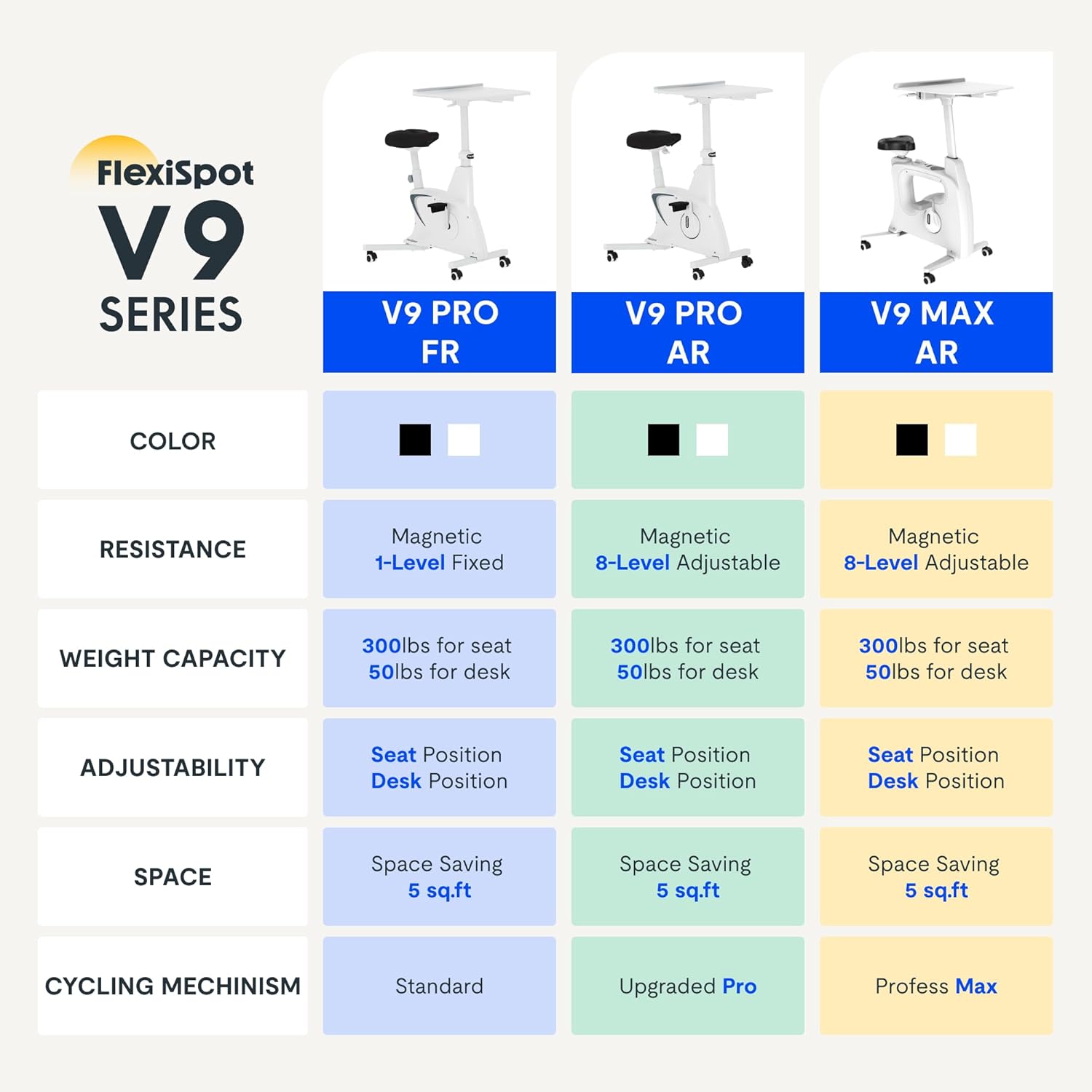
Figure 2.2: Comparison of FlexiSpot V9 series models, highlighting features like resistance and adjustability.
Асноўныя кампаненты:
- Main Frame with Flywheel and Resistance Mechanism
- Рэгуляванае сядзенне
- Adjustable Desktop
- Педалі
- Кансоль ВК-дысплея
- Транспартныя колы
3. Налада і зборка
The FLEXISPOT V9-Max-AR is designed for quick and straightforward assembly, typically requiring about 10 minutes.
Этапы зборкі:
- Распакуйце ўсе кампаненты і звярніцеся да ўпаковачнага ліста.
- Attach the front and rear stabilizers to the main frame using the provided screws.
- Install the pedals, ensuring the left pedal is tightened counter-clockwise and the right pedal clockwise.
- Mount the seat post and seat onto the main frame, securing them firmly.
- Attach the desktop support column to the main frame.
- Secure the desktop to its support column.
- Insert batteries into the LCD display (batteries not included) and connect the sensor wire.
- Перад першым выкарыстаннем пераканайцеся, што ўсе шрубы і злучэнні зацягнуты.

Figure 3.1: Illustration of adjustable components for personalized setup.
4. Інструкцыя па эксплуатацыі
Adjusting Seat and Desktop:
- Вышыня сядзення: Use the quick-release lever located on the seat post to adjust the seat to a comfortable height. Ensure your leg has a slight bend at the knee when the pedal is at its lowest point.
- Desktop Height: The desktop can be adjusted vertically. Locate the adjustment lever beneath the desktop and raise or lower the desktop to your desired working height.
- Глыбіня працоўнага стала: The desktop can also be adjusted horizontally (forward/backward) to optimize your working posture.
Узроўні супраціву:
The V9-Max-AR features 8 levels of quiet magnetic resistance. Rotate the resistance knob, located below the desktop, clockwise to increase resistance and counter-clockwise to decrease it.

Figure 4.1: LCD display and resistance control knob.
Выкарыстанне ВК-дысплея:
The built-in LCD display monitors your workout statistics. It tracks:
- Час
- хуткасць
- Дыстанцыя
- Спаленыя калорыі
- Total Distance Covered (Odometer)
- Хуткасць кручэння
Press the button on the display to cycle through different metrics or hold it to reset values (refer to display specific instructions for exact operation).
Using the 2D Desktop:
The spacious desktop (20" x 22.8") is designed to hold a laptop, notebook, mobile phone, or water cup. It provides a stable surface for working or entertainment while exercising.

Figure 4.2: Desktop in use for studying or working.
Пераноснасць:
Equipped with movable silent wheels, the exercise bike can be easily relocated within your home or office. Simply tilt the bike and roll it to your desired position.
5. Тэхнічнае абслугоўванне
Regular maintenance ensures the longevity and optimal performance of your FLEXISPOT V9-Max-AR Exercise Bike.
- Уборка: Wipe down the bike regularly with a damp тканінай і мяккім мыйным сродкам. Пазбягайце абразіўных ачышчальнікаў або растваральнікаў.
- агляд: Periodically check all bolts, nuts, and moving parts for tightness. Tighten any loose components immediately.
- змазка: No specific lubrication is required for the magnetic resistance system.
- захоўванне: Захоўвайце ровар у сухім, прахалодным месцы, удалечыні ад прамых сонечных прамянёў і экстрэмальных тэмператур.
6. Выпраўленне непаладак
У гэтым раздзеле разглядаюцца распаўсюджаныя праблемы, з якімі вы можаце сутыкнуцца пры выкарыстанні велатрэнажора.
| праблема | Магчымая прычына | Рашэнне |
|---|---|---|
| ВК-дысплей не працуе | Батарэі разраджаны або ўсталяваны няправільна. | Replace batteries (AAA, not included) or ensure correct polarity. |
| Нестабільны або хісткі ровар | Аслабленыя балты або няроўная паверхня. | Check and tighten all assembly bolts. Ensure the bike is on a flat, stable surface. |
| Супраціў не мяняецца | Праблема з механізмам супраціву. | Ensure the resistance knob is properly engaged. If the issue persists, contact customer support. |
| Піск або незвычайныя гукі | Loose components or friction. | Inspect all connections and tighten any loose parts. Ensure no foreign objects are interfering with moving parts. |
7. Тэхнічныя характарыстыкі
Detailed specifications for the FLEXISPOT V9-Max-AR Exercise Bike:
- мадэль: V9-Max-AR (Exercise Bike with Desk)
- Марка: ФЛЕКСІСПОТ
- колер: Чорны
- Механізм супраціву: Магнітныя
- Колькасць узроўняў супраціву: 8
- Максімальны вага Рэкамендацыя: 300 фунта
- Памеры вырабу (Г х Ш х В): 37.6" x 23.2" x 47.2"
- Памеры працоўнага стала: Прыблізна 20" x 22.8"
- Minimum Height (Seat): 29.6 цалі
- Maximum Height (Overall): 47.2 Inches (desktop height can go up to 47.2")
- Крыніца харчавання: З педальным прывадам (не электрычны)
- Сістэма прывада: Рэмень
- асаблівасць: Adjustable Seat, Adjustable Desktop
- Рэкамендуемае выкарыстанне: У памяшканні
- Space Occupied: Прыкладна 5 XNUMX кв

Малюнак 7.1: Памеры вырабу.
8. Гарантыя і падтрымка
FLEXISPOT is committed to providing quality products and customer satisfaction.
- Вяртае: Гэты тавар можна лёгка вярнуць на працягу 30 дзён. Калі ласка, азнаёмцеся з палітыкай вяртання на платформе, дзе вы купляеце.
- Гарантыя: For specific warranty terms and conditions, please refer to the official FLEXISPOT webсайт або звярніцеся непасрэдна ў службу падтрымкі кліентаў.
- Падтрымка кліентаў: For any questions, assistance, or troubleshooting not covered in this manual, please contact FLEXISPOT customer support. Contact information can typically be found on the manufacturer's webсайт або дакументы аб куплі.
9. Дадатковая інфармацыя
While no specific official product videos were provided in the product data, users may find helpful assembly or usage guides on the manufacturer's official website or their authorized channels. Always ensure the source is official for accurate information.