
Genérico 001
Genérico 001 3-Lens Full HD 1080p Dashcam User Manual
Мадэль: 001
1. Уводзіны
Thank you for choosing the Genérico 001 3-Lens Full HD 1080p Dashcam. This device is designed to provide comprehensive video surveillance for your vehicle, recording simultaneously from the front, interior, and rear. It features Full HD 1080p resolution, infrared night vision, G-sensor collision detection, loop recording, and motion detection. Please read this manual carefully before use to ensure proper operation and maintenance.
2. Інфармацыя па бяспецы
- Do not operate the dashcam or attempt to adjust settings while driving. This may distract you and lead to an accident.
- Пераканайцеся, што відэарэгістратар надзейна замацаваны і не перашкаджае вашаму view дарогі або перашкаджаць раскрыццю падушкі бяспекі.
- Use only the provided car charger. Using unauthorized chargers may damage the device or cause fire.
- Do not expose the dashcam to extreme temperatures, direct sunlight for prolonged periods, or moisture.
- Захоўвайце прыладу далей ад дзяцей.
- Regularly check the MicroSD card for errors and format it periodically to ensure optimal recording performance.
3. Змесціва ўпакоўкі
Калі ласка, праверце ўпакоўку на наяўнасць наступных прадметаў:
- Genérico 001 Dashcam Unit
- Мацаванне прысоскі
- Аўтамабільная зарадная прылада (12 В/24 В)
- Задняя камера
- Кіраўніцтва карыстальніка
Note: A MicroSD card (up to 32GB) is required for recording and is NOT included in the package.

Image: Included items with the Genérico 001 Dashcam.
4. Прадукт скончыўсяview
The Genérico 001 Dashcam features a compact design with three integrated cameras and a 4-inch LCD screen for real-time viewі карэкціроўка налад.
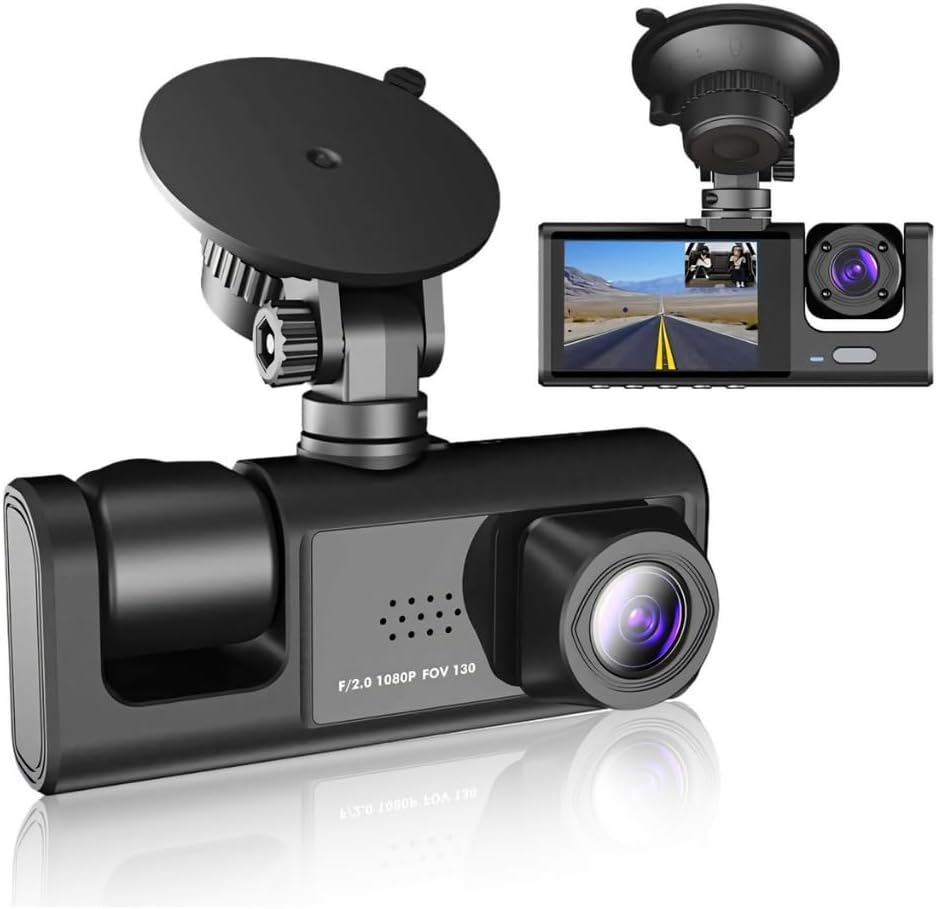
Выява: спераду view of the Genérico 001 Dashcam with its mount.
4.1 Camera Lenses
- Пярэдняя камера: Records the road ahead in Full HD 1080p.
- Internal Camera: Records the vehicle's interior, useful for ride-share drivers. Features infrared night vision.
- Задняя камера: Запісы view за транспартным сродкам.

Image: Depiction of the three camera views (front, internal, rear).
4.2 Памеры прылады

Image: Physical dimensions of the dashcam unit and its suction cup mount.
5. Настройка
5.1 Устаўка карты MicroSD
- Знайдзіце слот для карты MicroSD на відэарэгістратары.
- Insert a Class 10 or higher MicroSD card (up to 32GB) into the slot until it clicks into place.
- It is recommended to format the MicroSD card within the dashcam's settings menu before first use.
5.2 Мантаж відэарэгістратара
- Ачысціце лабавое шкло, дзе вы плануеце ўсталяваць відэарэгістратар.
- Прымацуйце прысоску да відэарэгістратара.
- Моцна прыцісніце прысоску да лабавога шкла і зафіксуйце яе, націснуўшы на рычаг фіксацыі.
- Adjust the dashcam's angle to ensure a clear view of the road ahead. Ensure it does not obstruct your driving view.
5.3 Падключэнне сілкавання
- Connect the car charger to the dashcam's power input port.
- Plug the other end of the car charger into your vehicle's 12V/24V power outlet (cigarette lighter socket).
- The dashcam will typically power on automatically when the vehicle's ignition is turned on.
5.4 Устаноўка задняй камеры
- Connect the rear camera cable to the designated port on the main dashcam unit.
- Route the cable neatly along the vehicle's interior trim to the rear of the vehicle.
- Mount the rear camera in a suitable location, typically above the rear license plate or inside the rear window, ensuring a clear view.
- If the rear camera has a power wire for reverse trigger, connect it to your vehicle's reverse light power supply for automatic display of parking guidelines when reversing.

Image: The rear camera unit with its LED lights and features.
6. Інструкцыя па эксплуатацыі
6.1 Уключэнне/выключэнне сілкавання
- Аўтаматычна: The dashcam will power on and begin recording automatically when connected to the car charger and the vehicle's ignition is turned on. It will power off automatically when the ignition is turned off.
- Кіраўніцтва: Націсніце і ўтрымлівайце кнопку харчавання, каб уручную ўключыць або выключыць прыладу.
6.2 Рэжымы запісу
- цыклічны запіс: The dashcam continuously records video in short segments (e.g., 1, 3, or 5 minutes). When the MicroSD card is full, it automatically overwrites the oldest unlocked footage.
- G-сенсор (выяўленне сутыкненняў): У выпадку раптоўнага ўдару або сутыкнення ўбудаваны G-сенсор аўтаматычна выявіць падзею і заблакуе бягучае відэа. file, што прадухіляе яго перазапіс пры цыклічным запісе.
- Выяўленне руху: When enabled, the dashcam will automatically start recording if it detects movement in front of the vehicle while parked. This feature requires a continuous power supply (e.g., hardwiring kit, not included) to function when the vehicle is off.
- Манітор паркоўкі: Similar to motion detection, this feature can record short video clips if an impact is detected while the vehicle is parked.

Image: Explanation of the automatic loop recording function.

Image: Integrated G-Sensor protecting video fileпадчас сутыкненняў.
6.3 Навігацыя па меню і налады
Use the buttons on the dashcam to navigate through the menu options on the 4-inch LCD screen. Common settings include:
- дазвол: Set video resolution (e.g., 1080p).
- цыклічны запіс: Adjust segment length (e.g., 1/3/5 minutes).
- Адчувальнасць G-сэнсара: Adjust the sensitivity of the collision detection.
- Выяўленне руху: Уключыць або адключыць.
- Дата/час: Set the correct date and time. This is crucial for accurate video timestamps.
- Аўдыёзапіс: Уключыць або выключыць мікрафон.
- Фарматаваць SD-карту: Сцерці ўсе дадзеныя на карце MicroSD.
6.4 Прайграванне
Вы можаце паўторнаview recorded videos directly on the dashcam's LCD screen or by removing the MicroSD card and inserting it into a computer or compatible device.
7. Тэхнічнае абслугоўванне
7.1 Ачыстка прылады
- Выкарыстоўвайце мяккую, сухую тканіну для чысткі корпуса відэарэгістратара.
- For lenses, use a specialized lens cleaning cloth and solution to avoid scratches.
- Не выкарыстоўвайце абразіўныя ачышчальнікі або растваральнікі.
7.2 Сыход за картай MicroSD
- Format the MicroSD card every 2-4 weeks to maintain optimal performance and prevent data corruption.
- Replace the MicroSD card if you notice frequent errors or recording issues.
8. Выпраўленне непаладак
| праблема | Магчымая прычына | Рашэнне |
|---|---|---|
| Відэарэгістратар не ўключаецца. | No power from car charger; faulty charger; loose connection. | Check car charger connection and vehicle's power outlet. Try another charger if available. Ensure vehicle ignition is on. |
| Dashcam does not record. | MicroSD card full or faulty; card not inserted correctly; recording mode off. | Format the MicroSD card. Reinsert the card. Check recording settings. Replace card if issues persist. |
| Дрэнная якасць відэа (размытае, цёмнае). | Protective film on lens; dirty lens; low light conditions; incorrect settings. | Remove any protective films from the lenses. Clean lenses. Ensure night vision is active in low light. Check resolution settings. |
| Date/Time resets after power off. | Internal battery issue; settings not saved. | Ensure date/time settings are saved correctly. If the issue persists, the internal battery (for retaining settings) may be depleted or faulty. Contact support if under warranty. |
| Buttons are unresponsive or difficult to use. | Firmware issue; physical defect. | Try restarting the device. If the problem persists, it may indicate a hardware issue. |
9. Тэхнічныя характарыстыкі
| Асаблівасць | Дэталь |
|---|---|
| Назва мадэлі | 3-Lens Full HD Vehicle Camera (Model 001) |
| Марка | Genérico |
| Дазвол відэа | 1080p Full HD |
| Колькасць лінзаў | 3 (Front, Internal, Rear) |
| Дысплей | 4-цалевы ВК-экран |
| Асаблівасці | Compact Design, Motion Sensor, Night Vision (Infrared) |
| Захоўванне | Supports MicroSD card up to 32GB (not included) |
| Крыніца харчавання | Аўтамабільная зарадная прылада (12 В/24 В) |
| Памеры | 5 x 11 x 11 cm (approximate, main unit) |
| Вага | 320 г (прыблізна) |
| Колер | Чорны |
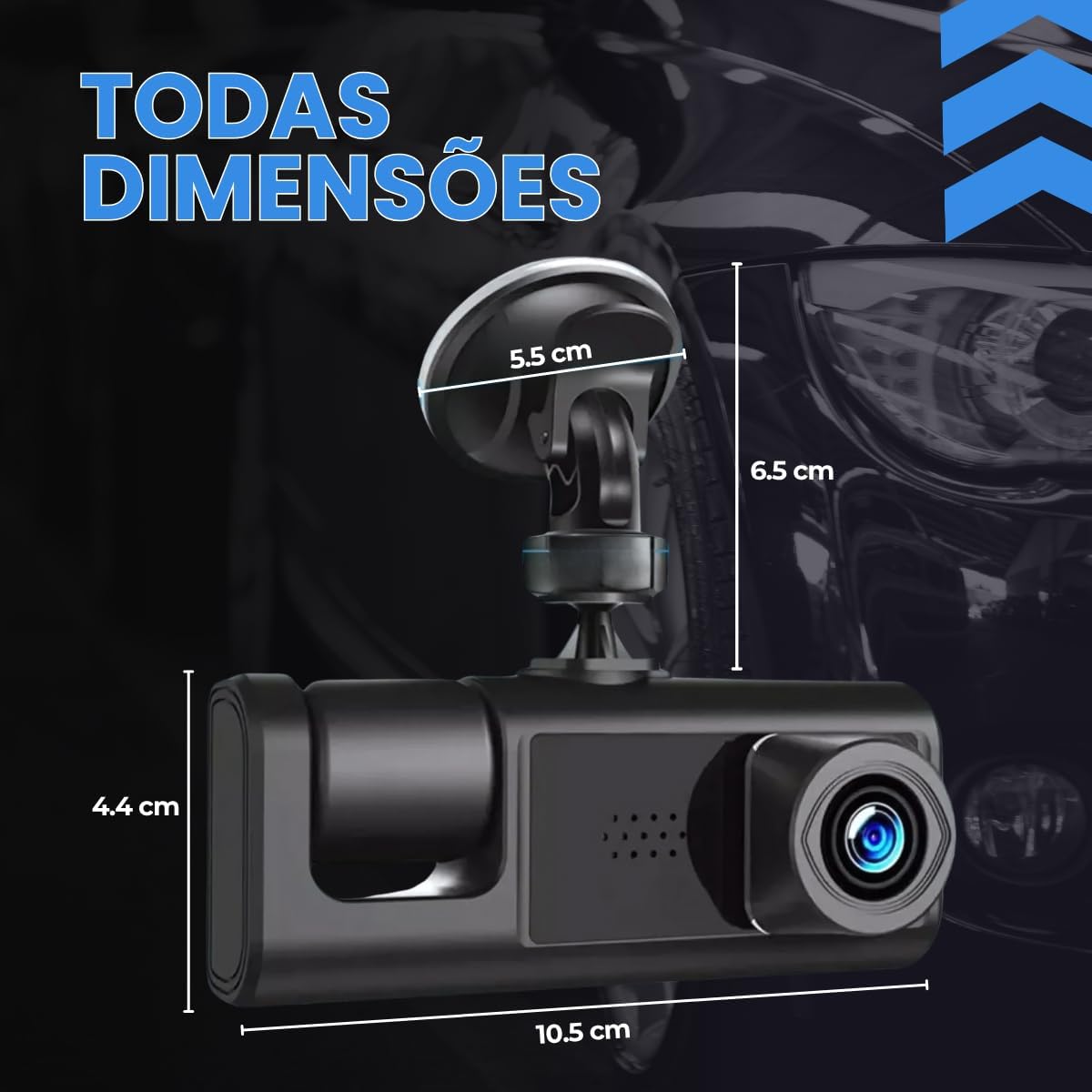
Image: Comparison highlighting the enhanced features of the current dashcam version.
10. Гарантыя і падтрымка
For warranty information and technical support, please refer to the contact details provided by your retailer or the product packaging. Keep your purchase receipt as proof of purchase.
Каб атрымаць дадатковую дапамогу, вы таксама можаце наведаць старонку прадукту на Amazon: Старонка прадукту Amazon