
1. Прадукт скончыўсяview
The Masajoy CM7003 is a wired USB headset designed for clear communication and comfortable use with various computing devices. It features a noise-canceling microphone and a stable USB-A connection, making it suitable for home office, online classes, and teleconferencing environments.

Image 1: Masajoy USB Headset CM7003, showcasing the headset with its USB-A connector.
2. Змесціва ўпакоўкі
- 1 x Masajoy USB Headset (Model CM7003)
3. Інструкцыі па ўсталёўцы
3.1 Падключэнне гарнітуры
- Locate an available USB-A port on your computer, laptop, or compatible device.
- Insert the USB-A connector of the headset into the USB-A port.
- The headset is plug-and-play. Your operating system should automatically detect and install the necessary drivers. The device name will typically appear as "USB Audio Device".

Image 2: Illustration of the headset's plug-and-play functionality, showing a user connecting the USB plug to a laptop.
3.2 Сумяшчальнасць сістэмы
The Masajoy CM7003 headset is compatible with a wide range of operating systems and communication platforms:
- Аперацыйныя сістэмы: macOS, Android, Windows 7/8, Windows 10, Windows 11.
- прылады: PCs, Laptops, Tablets, Macs.
- Камунікацыйныя платформы: Teams, Skype, Zoom, Webex, Facetime, Google Meet.

Image 3: Visual representation of the headset's broad compatibility with various operating systems, devices (desktop PC, laptop, USB plug), and communication applications.
4. Інструкцыя па эксплуатацыі
4.1 Рэгуляванне гучнасці
Volume can be adjusted directly on the headset:
- Павярнуць right ear cup to increase or decrease the audio volume.
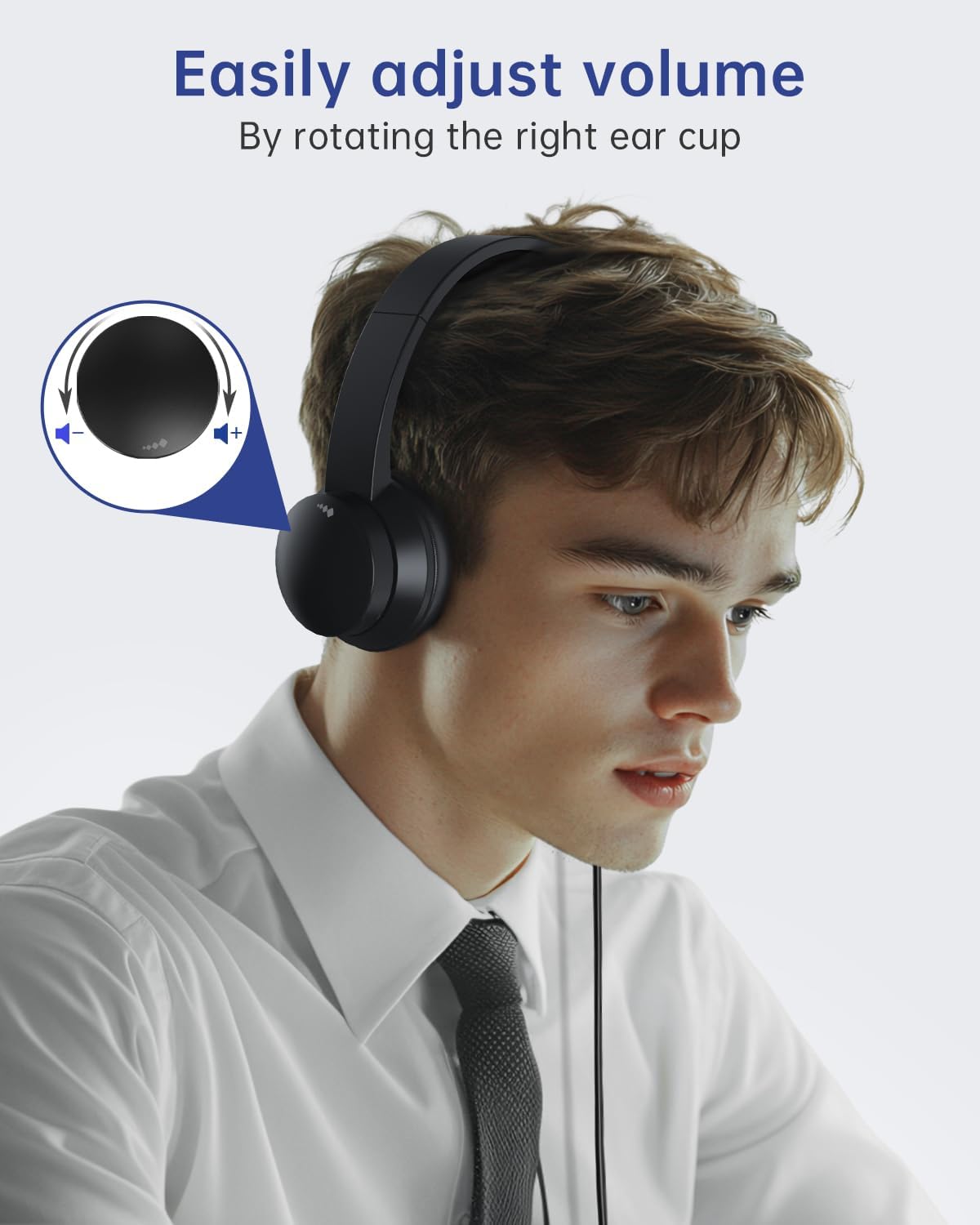
Image 4: A user adjusting the volume by rotating the right ear cup of the headset, with an inset diagram showing the rotation direction for volume control.
4.2 Функцыя адключэння гуку мікрафона
Каб адключыць мікрафон:
- Lift the microphone boom arm to an upright position (approximately 90 degrees). This action will mute the microphone.
- Lower the microphone boom arm to unmute.
Заўвага: The microphone arm only supports 90-degree adjustment. The headset does НЕ support right-ear wearing.

Image 5: A user demonstrating the microphone mute function by rotating the microphone boom arm upwards. An icon indicates the mute status.
4.3 Optimal Microphone Positioning
For the best noise reduction performance and clear voice capture, position the microphone 1 to 2 cm from your mouth.

Image 6: A person using the headset, highlighting the noise-canceling microphone feature for improved communication, with a visual representation of sound wave reduction.
5. Камфорт і дызайн
The Masajoy CM7003 headset is engineered for extended wear comfort:
- Амбушюры: Made with premium soft, breathable protein memory foam to prevent heat and sweat buildup.
- Павязка на галаву: Adjustable and retractable to fit various head sizes.
- Вага: Lightweight design (approximately 5 ounces / 0.23 kg) reduces pressure during prolonged use.

Малюнак 7: Крупны план view illustrating the comfort features of the headset, including soft earpads, a cushioned leather head beam, and an adjustable headband.
6. Тэхнічнае абслугоўванне
Каб забяспечыць даўгавечнасць і аптымальную працу вашай гарнітуры, выконвайце наступныя рэкамендацыі па абслугоўванні:
- Уборка: Use a soft, dry cloth to wipe down the ear cups and headband. Avoid using harsh chemicals or abrasive materials.
- захоўванне: Захоўвайце гарнітуру ў чыстым, сухім месцы, удалечыні ад экстрэмальных тэмператур і прамых сонечных прамянёў.
- Сыход за кабелем: Пазбягайце рэзкіх выгібаў або празмернага нацягвання USB-кабеля, каб пазбегнуць пашкоджанняў.
7. Выпраўленне непаладак
If you encounter issues with your Masajoy CM7003 headset, refer to the following common solutions:
- Няма гуку:
- Ensure the headset is securely plugged into a working USB-A port.
- Check your computer's audio settings to confirm "USB Audio Device" is selected as the output device.
- Verify the volume control on the headset (right ear cup) is not at its minimum setting.
- Test with a different USB port or another computer to rule out port or system issues.
- Мікрафон не працуе:
- Ensure the microphone boom arm is lowered and not in the muted (upright) position.
- Check your computer's audio settings to confirm "USB Audio Device" is selected as the input device.
- Adjust the microphone input level in your system settings.
- Ensure the microphone is positioned 1-2 cm from your mouth.
- Sound Distortion or Static:
- Паспрабуйце падключыць гарнітуру да іншага USB-порта.
- Ensure there are no other devices causing electrical interference nearby.
- Update your computer's audio drivers if available.
8. Тэхнічныя характарыстыкі
| Назва мадэлі | CM7003 |
| Тэхналогія падлучэння | Правадны (USB-A) |
| Гняздо для навушнікаў | USB A |
| Кантроль шуму | Пасіўнае падаўленне шуму |
| Дыяпазон частот | 20 Гц - 20,000 Гц |
| Імпеданс | 32 Ом |
| Тып аўдыё драйвера | Дынамічны драйвер |
| Размяшчэнне вушэй | На вуха |
| Формаў-фактар | На вуха |
| Вага прадмета | 0.23 кілаграма (8.1 унцыі) |
| Уключаныя кампаненты | Гарнітура USB |
| Метад кантролю | Push Button (Volume rotation, Mic lift) |
9. Гарантыя і падтрымка
For warranty information or technical support, please refer to the documentation included with your purchase or contact Masajoy customer service directly. Contact details can typically be found on the manufacturer's official webна сайце або праз вашага прадаўца.
If you experience any product problems during use, please contact our support team for assistance. Our senior engineers are available to help resolve issues as soon as possible.