
MOZOTER SP9i
MOZOTER SP9i Wireless Earbuds User Manual
Model: SP9i
Уводзіны
Thank you for choosing the MOZOTER SP9i Wireless Earbuds. These earbuds are designed to provide a comfortable and stable audio experience with advanced Bluetooth 5.3 technology, deep bass sound, and extended playtime. This manual will guide you through the setup, operation, and maintenance of your new earbuds to ensure optimal performance.
Што ў скрынцы
- MOZOTER SP9i Wireless Earbuds (Left and Right)
- Чахол для зарадкі
- Зарадны кабель USB-C
- Вушныя насадкі (памеры S, M, L)
- Кіраўніцтва карыстальніка
Прадукт скончаныview
The MOZOTER SP9i earbuds feature an over-ear hook design for secure fit and comfort. Each earbud is equipped with intuitive touch controls for easy management of audio and calls. The compact charging case provides additional battery life and convenient storage.

Image: The MOZOTER SP9i Wireless Earbuds resting in their open charging case, showcasing the over-ear hook design and the charging contacts.
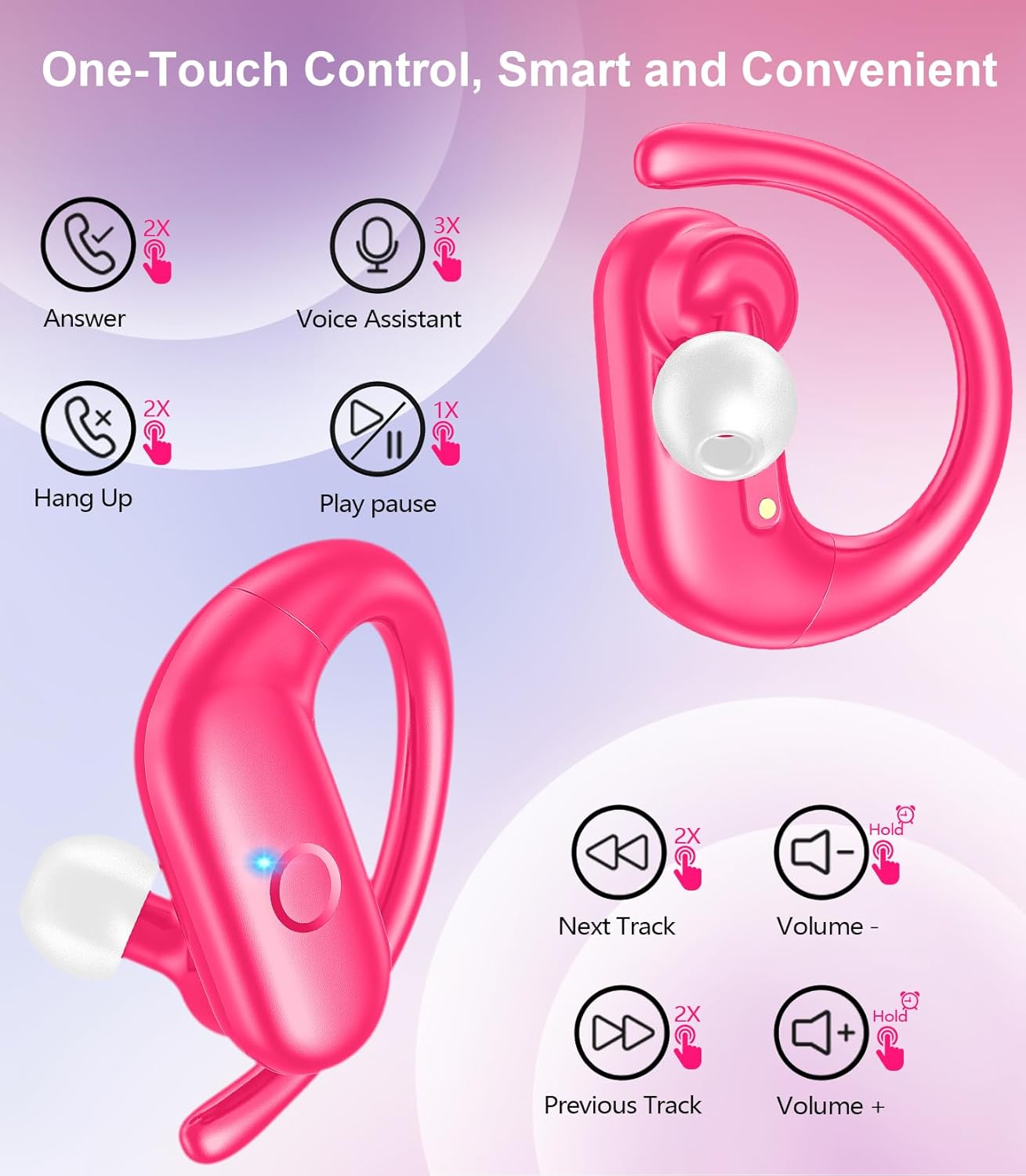
Выява: Падрабязны view of an earbud highlighting the integrated Bluetooth 5.3 technology for stable and efficient wireless connectivity.
Настройка
1. Зарадка навушнікаў і чахла
Before first use, fully charge the earbuds and the charging case. Connect the provided USB-C cable to the charging port on the case and a power source. The indicator lights on the case will show the charging status.
- Час зарадкі: Прыкладна 1.5 гадзіны для поўнай зарадкі.
- Час прайгравання навушнікаў: Да 12 гадзін на адной зарадцы.
- Агульны час прайгравання з кейсам: Да 60 гадзін.

Image: The charging case with earbuds inside, illustrating the 60-hour total playtime, 12-hour single charge, and 48-hour case capacity, along with the USB-C charging port.
2. Спалучэнне з вашай прыладай
- Ensure the charging case has power and the earbuds are inside.
- Адкрыйце зарадны кейс. Навушнікі аўтаматычна ўключацца і пяройдуць у рэжым спалучэння.
- На вашай прыладзе (смартфоне, планшэце, ноўтбуку) уключыце Bluetooth.
- Пошук даступныя прылады Bluetooth і выберыце "SP9i" са спісу.
- Пасля падключэння вы пачуеце гук пацверджання, а індыкатары навушнікаў пагаснуць або пачнуць павольна міргаць.
Навушнікі аўтаматычна падключацца да апошняй спалучанай прылады пасля вымання з кейса, калі на прыладзе ўключаны Bluetooth.

Image: An illustration showing the MOZOTER SP9i earbuds in their open case, with a smartphone screen displaying a successful Bluetooth connection to "SP9i".
Інструкцыі па нашэнні
For optimal sound quality and comfort, it is important to wear the earbuds correctly and choose the appropriate eartip size.
1. Выбар вушных насадак
The earbuds come with small (S), medium (M), and large (L) eartips. Experiment with different sizes to find the pair that provides the best seal and comfort for your ears. A good seal enhances bass response and passive noise cancellation.
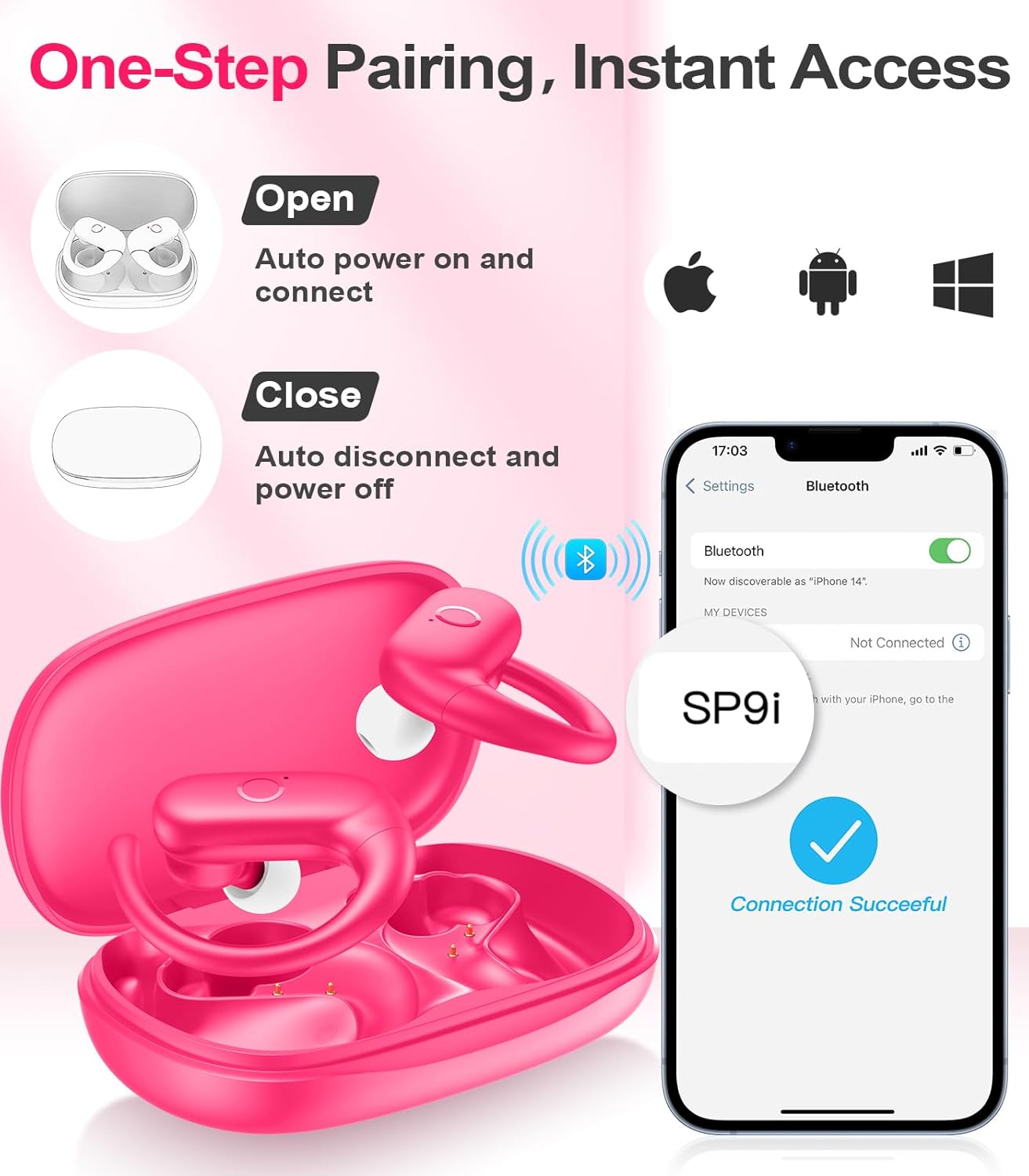
Image: A woman wearing an earbud, with an inset showing the three available eartip sizes (S, M, L) for a customized and comfortable fit.
2. Дасягненне надзейнай фіксацыі
- крок 1: Надзеньце завушніцу на вуха.
- крок 2: Акуратна ўстаўце навушнік у слыхавы праход.
- крок 3: Rotate the earbud slightly to find a comfortable and secure angle. The flexible ear hooks ensure a stable fit, ideal for sports and active use.

Image: A three-step diagram illustrating the correct method to wear the MOZOTER SP9i earbuds, ensuring a secure and comfortable fit with the ear hook.

Image: A woman wearing the MOZOTER SP9i earbuds, demonstrating the ergonomic design that rests comfortably and securely on the ear.
Інструкцыя па эксплуатацыі
The MOZOTER SP9i earbuds feature intuitive touch controls on each earbud. The following table outlines the functions:
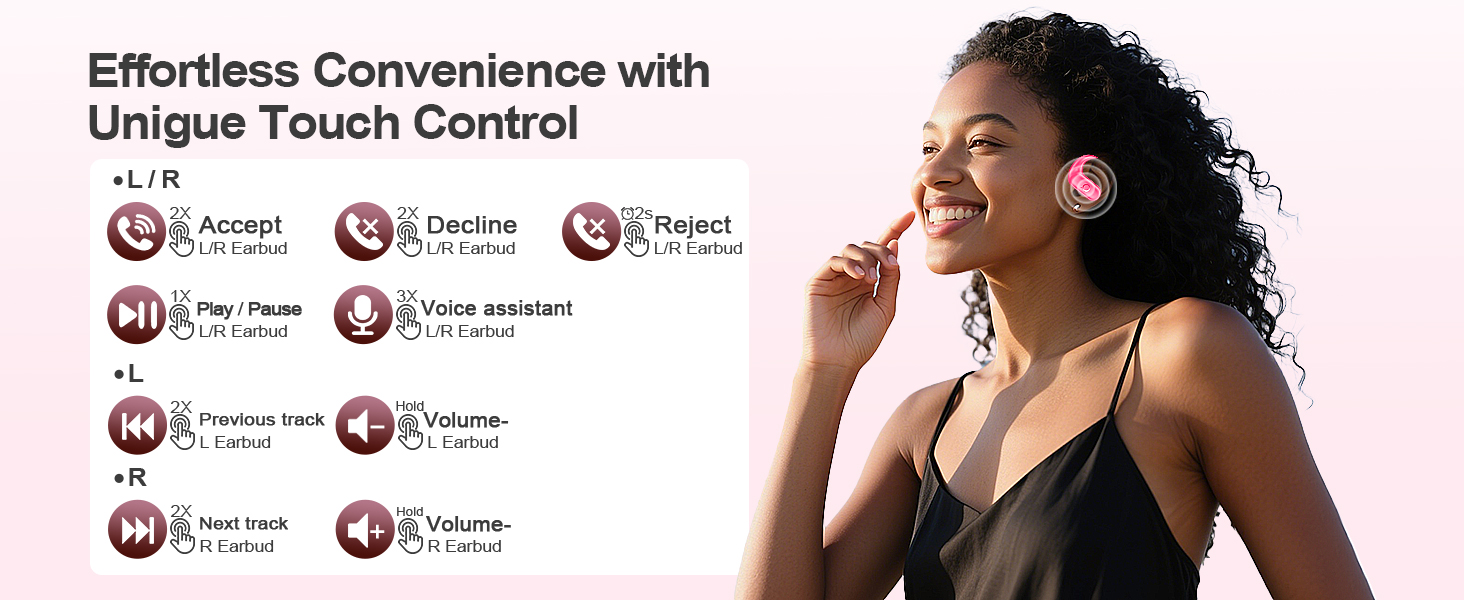
Image: A visual guide detailing the various touch control gestures for the MOZOTER SP9i earbuds, including call management, music playback, and volume adjustments.
| Дзеянне | Жэст (левы/правы навушнік-ўкладыш) |
|---|---|
| Адказаць на званок | Double-tap (2X) |
| Пакласці трубку | Double-tap (2X) |
| Адхіліць выклік | Triple-tap (3X) |
| Прайграванне/прыпыненне музыкі | Single-tap (1X) |
| Актывуйце галасавой памочнік | Triple-tap (3X) |
| Наступны трэк | Double-tap (2X) on правільна навушнік |
| Папярэдні трэк | Double-tap (2X) on налева навушнік |
| Павялічыць гучнасць | Трымайся правільна навушнік |
| Памяншэнне гучнасці | Трымайся налева навушнік |
Тэхнічнае абслугоўванне
Правільны догляд гарантуе даўгавечнасць і прадукцыйнасць вашых навушнікаў-ўкладышаў.
- Уборка: Regularly clean the eartips and the charging contacts on both the earbuds and the case with a soft, dry, lint-free cloth. Avoid using harsh chemicals or abrasive materials.
- захоўванне: Калі навушнікі не выкарыстоўваюцца, захоўвайце іх у зарадным футляры, каб абараніць ад пылу і пашкоджанняў.
- Ўздзеянне вады: Нягледзячы на тое, што навушнікі прызначаны для заняткаў спортам, не апускайце іх у ваду. Адразу пасля выкарыстання выцірайце пот або вільгаць.
Ліквідацыю непаладак
If you encounter any issues with your MOZOTER SP9i earbuds, please refer to the following common solutions:
- Навушнікі не спалучаюцца: Пераканайцеся, што абодва навушнікі зараджаныя і вынятыя з кейса. Выключыце і ўключыце Bluetooth на прыладзе. Калі праблемы не знікнуць, паспрабуйце скінуць налады навушнікаў (звярніцеся да інструкцыі вытворцы). webсайт для атрымання канкрэтных інструкцый па скідзе, калі іх няма ў кіраўніцтве).
- Працуе толькі адзін навушнік: Place both earbuds back into the charging case, close the lid, wait a few seconds, then open the lid and remove them. This often resynchronizes them.
- Дрэнная якасць гуку: Ensure the eartips provide a good seal in your ear. Clean any debris from the earbud speakers. Check your device's volume and audio settings.
- Праблемы з зарадкай: Пераканайцеся, што зарадны кабель надзейна падключаны як да чахла, так і да крыніцы харчавання. Ачысціце зарадныя кантакты на навушніках і ўнутры чахла.
- Выпадаюць навушнікі: Experiment with different eartip sizes and adjust the ear hooks for a more secure fit as described in the Wearing Instructions section.
Тэхнічныя характарыстыкі
| Асаблівасць | Дэталь |
|---|---|
| Назва мадэлі | SP9i |
| Тэхналогія падлучэння | Бесправадная сувязь (Bluetooth 5.3) |
| Кантроль шуму | Пасіўнае падаўленне шуму |
| Імпеданс | 4 Ом |
| Вага навушніка | Прыблізна 8 г на навушнік |
| Час прайгравання навушнікаў | Да 12 гадзін |
| Агульны час прайгравання (з кейсам) | Да 60 гадзін |
| Порт для зарадкі | USB-C |
| Уключаныя кампаненты | Earbuds, Charging Case, Eartips, User Manual |
Гарантыя і падтрымка
MOZOTER products are designed and manufactured to the highest quality standards. For warranty information and customer support, please refer to the documentation included with your purchase or visit the official MOZOTER website. If you require further assistance, please contact our customer service team.