
1. Уводзіны
This manual provides essential information for the safe and efficient operation of your Anern FGI-DU4200 Dual Voltage Hybrid Solar Inverter. Please read this manual thoroughly before installation and use, and retain it for future reference. This inverter is designed to provide reliable power for various applications, integrating solar charging, AC utility charging, and inverter output functions.
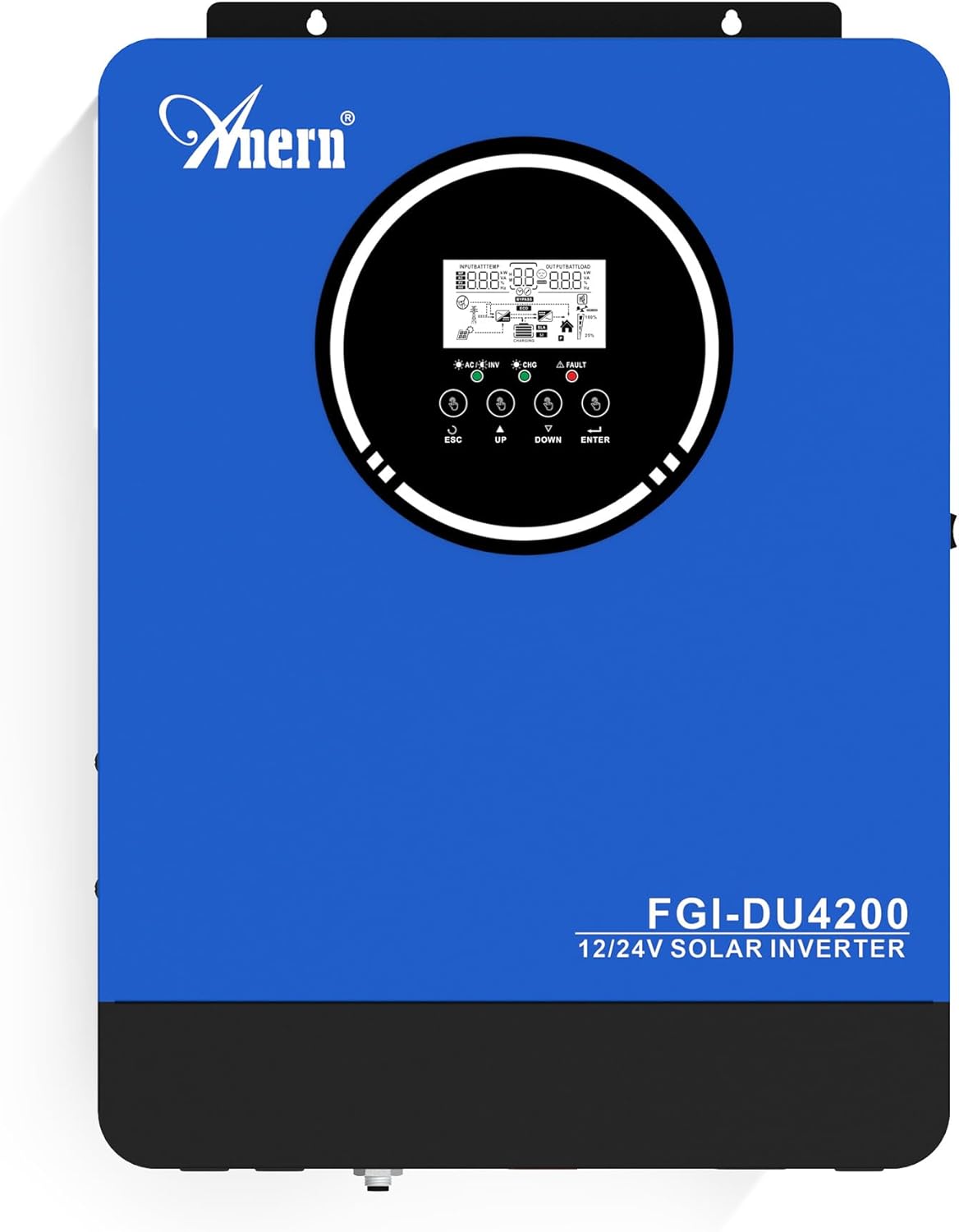
Малюнак 1: Anern FGI-DU4200 Dual Voltage Hybrid Solar Inverter. This image shows the front panel of the inverter, featuring the display screen and control buttons.
2. Інструкцыі па тэхніцы бяспекі
Please observe the following safety precautions to prevent injury and damage to the inverter or connected equipment:
- Усталёўка павінна выконвацца кваліфікаваным персаналам у адпаведнасці з мясцовымі электрычнымі нормамі.
- Пераканайцеся, што ўсе правады правільна памераныя і падключаныя.
- Не разбірайце інвертар. Унутры няма дэталяў, якія можа абслугоўваць карыстальнік.
- Трымайце інвертар далей ад лёгкаўзгаральных матэрыялаў, вільгаці і прамых сонечных прамянёў.
- Забяспечце дастатковую вентыляцыю вакол інвертара, каб прадухіліць перагрэў.
- Заўсёды адключайце ўсе крыніцы харчавання (сонечную батарэю, акумулятар, электрасетку) перад выкананнем любога тэхнічнага абслугоўвання або падключэннем электраправодкі.
- Карыстайцеся адпаведнымі сродкамі індывідуальнай абароны (СІА) падчас усталёўкі і тэхнічнага абслугоўвання.
3. Прадукт скончыўсяview і Асаблівасці
The Anern FGI-DU4200 is a versatile hybrid solar inverter designed for both on-grid and off-grid applications. It features automatic dual-voltage operation and a 120A MPPT solar charge controller.
Асноўныя характарыстыкі:
- Automatic Dual-Voltage Аперацыя: Automatically recognizes 12VDC (2300W output) or 24VDC (4200W output) battery systems.
- High-Efficiency Pure Sine Wave Output: Provides stable 220-230VAC ±5% output (50Hz) with 90% efficiency.
- Integrated 120A MPPT Solar Charge Controller: Maximizes solar power harvesting.
- Некалькі рэжымаў зарадкі: Solar, Solar and Utility, Solar Priority.
- Некалькі рэжымаў вываду: Solar Priority, Utility Priority, SBU (Solar-Battery-Utility) Mode.
- Seamless Transfer: Grid/generator transfer time less than 20ms for critical loads.
- Комплексная абарона: Абарона ад перагрузкі, перагрэву і кароткага замыкання.
- Сумяшчальнасць з батарэяй: Supports 12V/24V Lithium, Lead-Acid, and Gel batteries.
- Cold Start Capability: Ensures operation in extreme conditions.
- Маніторынг Wi-Fi: Allows system operation control via mobile phone (requires optional Wi-Fi module).

Малюнак 2: Скончанаview of key features including frequency range, waveform, charging currents, battery voltage, and protection mechanisms.

Малюнак 3: Illustration of the inverter's dual voltage capability, supporting 4.2KW at 24V and 2.3KW at 12V battery systems.
4. Настройка і ўстаноўка
4.1 Распакаванне і праверка
Upon receiving the inverter, carefully unpack it and inspect for any shipping damage. Ensure all components listed in the packing list are present. If any damage or missing parts are found, contact your dealer immediately.
4.2 Мантаж інвертара
Mount the inverter vertically on a sturdy wall or surface. Ensure there is sufficient clearance around the unit for proper ventilation (at least 20 cm on all sides). Avoid mounting in direct sunlight, near heat sources, or in areas with excessive dust or moisture.
4.3 Правадныя злучэнні
All wiring must comply with local electrical codes. Use appropriate wire gauges for all connections to prevent overheating and ensure efficient power transfer.
4.3.1 Падключэнне батарэі
The inverter supports both 12VDC and 24VDC battery systems. The inverter automatically detects the battery voltage. Ensure correct polarity when connecting batteries. For 12V systems, batteries are typically connected in parallel. For 24V systems, batteries are typically connected in series.

Малюнак 4: Wiring diagram illustrating parallel connection for 12V battery systems (2300W output) and series connection for 24V battery systems (4200W output).

Малюнак 5: The inverter is compatible with various battery types, including Gel, AGM, Flooded (FLD), Lithium (LI), and Sealed Lead-Acid (SLD) batteries.
4.3.2 Падключэнне сонечнай панэлі
Connect your solar panels to the designated PV input terminals. Ensure the open circuit voltage (Voc) of your solar array does not exceed the inverter's maximum PV input voltage (500Vdc). Observe correct polarity.
4.3.3 AC Input Connection (Utility/Generator)
Connect the AC utility grid or a compatible generator to the AC input terminals. The inverter supports 220-230VAC input. Ensure proper grounding.
4.3.4 AC Output Connection (Loads)
Connect your household or office loads to the AC output terminals. The inverter provides a pure sine wave output suitable for sensitive electronics. Do not exceed the rated output power of the inverter (2300W for 12VDC systems, 4200W for 24VDC systems).
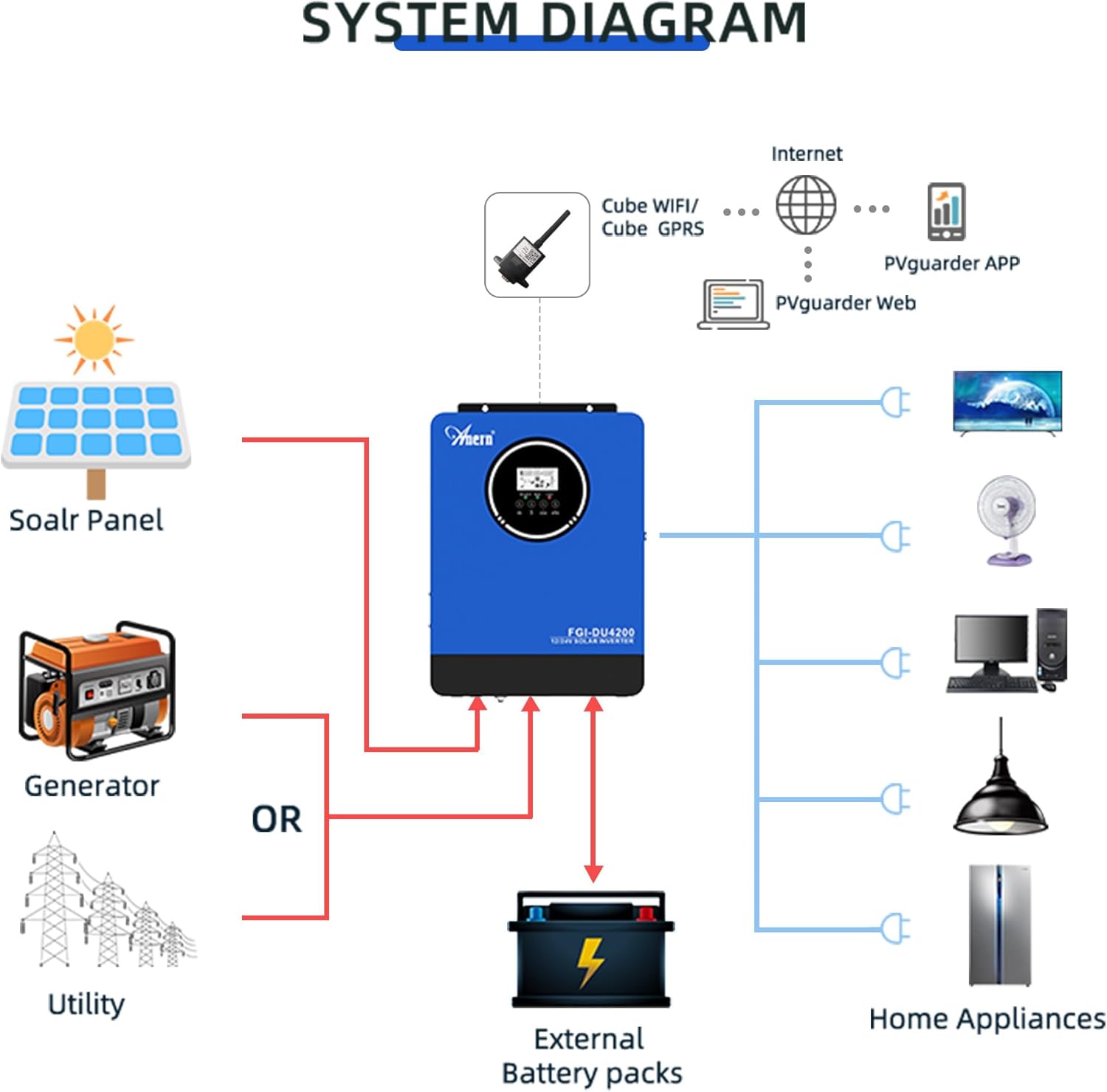
Малюнак 6: Comprehensive system diagram showing connections for solar panels, generator/utility, external battery packs, and various home appliances.

Малюнак 7: Example of an outdoor installation of the Anern FGI-DU4200 inverter, demonstrating its integration into a home solar power system.
5. Інструкцыя па эксплуатацыі
5.1 Уключэнне/выключэнне
After all connections are securely made, switch on the battery breaker first, then the solar array breaker, and finally the AC input breaker (if connected). Press the power button on the inverter to turn it on. To power off, reverse the sequence: turn off AC input, then solar, then battery, and finally the inverter power button.
5.2 ВК-дысплей і кнопкі кіравання
The inverter features an LCD display that shows real-time operating status, input/output voltages, battery status, and error codes. Use the control buttons (ESC, UP, DOWN, ENTER) to navigate through menus and adjust settings.
5.3 рэжыму зарадкі
The inverter offers four selectable charging modes:
- Прыярытэт сонечнай энергіі: Solar power charges the battery first. If solar is insufficient, utility power supplements.
- Прыярытэт камунальных паслуг: Utility power charges the battery first. Solar power supplements if utility is unavailable.
- Толькі сонечная: Толькі сонечная энергія зараджае акумулятар.
- Сонечная энергія і камунальныя паслугі: Both solar and utility power charge the battery simultaneously.
5.4 Рэжымы вываду
The inverter offers three selectable output modes:
- Прыярытэт камунальных паслуг: Loads are primarily powered by utility. If utility fails, the inverter switches to battery power.
- Прыярытэт сонечнай энергіі: Loads are primarily powered by solar. If solar is insufficient, battery power is used. If both are insufficient, utility power is used (if connected).
- SBU (Solar-Battery-Utility) Mode: Loads are powered by solar first, then battery, and finally utility if both solar and battery are depleted or unavailable.
5.5 Маніторынг Wi-Fi (неабавязкова)
If equipped with the optional Wi-Fi module, the inverter can be monitored and controlled via a mobile application. Connect the Wi-Fi module to the designated port on the inverter and follow the instructions provided with the module for setup.

Малюнак 8: Diagram illustrating the connection of an optional Wi-Fi module for remote monitoring and control of the inverter system via a mobile application or web інтэрфейс.
6. Тэхнічнае абслугоўванне
Рэгулярнае тэхнічнае абслугоўванне забяспечвае даўгавечнасць і аптымальную прадукцыйнасць вашага інвертара.
- Уборка: Перыядычна працірайце знешнія паверхні інвертара сухой анучай. Пераканайцеся, што вентыляцыйныя адтуліны чыстыя ад пылу і смецця.
- Сувязі: Annually check all electrical connections for tightness and corrosion. Re-tighten if necessary.
- Праверка батарэі: Для свінцова-кіслотных акумулятараў праверце ўзровень электраліта і стан клем у адпаведнасці з рэкамендацыямі вытворцы акумулятара.
- Асяроддзе: Забяспечце, каб тэмпература і вільготнасць у рабочым асяроддзі знаходзіліся ў межах зададзеных дыяпазонаў.
7. Выпраўленне непаладак
У гэтым раздзеле прыведзены рашэнні распаўсюджаных праблем. Па праблемах, якія тут не пералічаны, звярніцеся ў службу тэхнічнай падтрымкі.
| праблема | Магчымая прычына | Рашэнне |
|---|---|---|
| Інвертар не ўключаецца | Няма падключэння да акумулятара; зарад акумулятараtage too low; Power button not pressed. | Праверце злучэнне батарэі і абtage; Charge battery; Press and hold power button. |
| Няма выхаду пераменнага току | Overload; Short circuit; Battery low; Inverter fault. | Reduce load; Check for short circuits; Charge battery; Restart inverter. |
| Сонечная зарадка не працуе | Solar panels disconnected; Insufficient sunlight; PV voltage too low/high; MPPT fault. | Check PV connections; Ensure adequate sunlight; Verify PV voltagе ў межах дасяжнасці. |
| Адлюстроўваецца код памылкі | Specific fault detected by the inverter. | Refer to the inverter's LCD display for the specific error code and consult the full manual (if available) or contact support for detailed interpretation and resolution. |
8. Тэхнічныя характарыстыкі
| Параметр | Каштоўнасць |
|---|---|
| мадэль | FGI-DU4200 |
| Rated Power (12VDC) | 2300 Вт |
| Rated Power (24VDC) | 4200 Вт |
| Акумулятар Voltage | 12VDC / 24VDC (Auto-sensing) |
| Выхад Voltage | 220-230VAC ±5% (50Hz) |
| Форма сігналу | Чыстая сінусоід |
| MPPT Solar Charge Controller Current | 120А |
| Max PV Array Open Circuit Voltage | 500 В пастаяннага току |
| Ток зарадкі пераменнага току | 60А |
| Эфектыўнасць | 90% |
| Час перадачы | <20 мс |
| Памеры прадукту | 16.9 х 8.27 х 21.6 цалі |
| Вага прадмета | 19.14 фунта |
| Вытворца | Анерн |
9. Гарантыя і падтрымка
Anern products are designed for reliability and performance. For warranty information, please refer to the warranty card included with your product or visit the official Anern website. For technical support, troubleshooting assistance, or spare parts, please contact Anern customer service through their official channels. Please have your model number (FGI-DU4200) and purchase date ready when contacting support.
Кантактная інфармацыя: Refer to your product packaging or the official Anern webсайт для атрымання найбольш актуальнай кантактнай інфармацыі.