
1. Уводзіны
Гэта кіраўніцтва змяшчае падрабязныя інструкцыі па выкарыстанні чорнагаview Wave9C SIM-free smartphone. The Wave9C combines a sleek design with powerful performance, running on the latest Android 15 with Doke AI integration. It features a 6.56-inch high-definition display, a long-lasting 5000mAh battery, and IP54 dust and water resistance, making it suitable for various environments. This guide will help you understand its features, set up your device, and troubleshoot common issues.
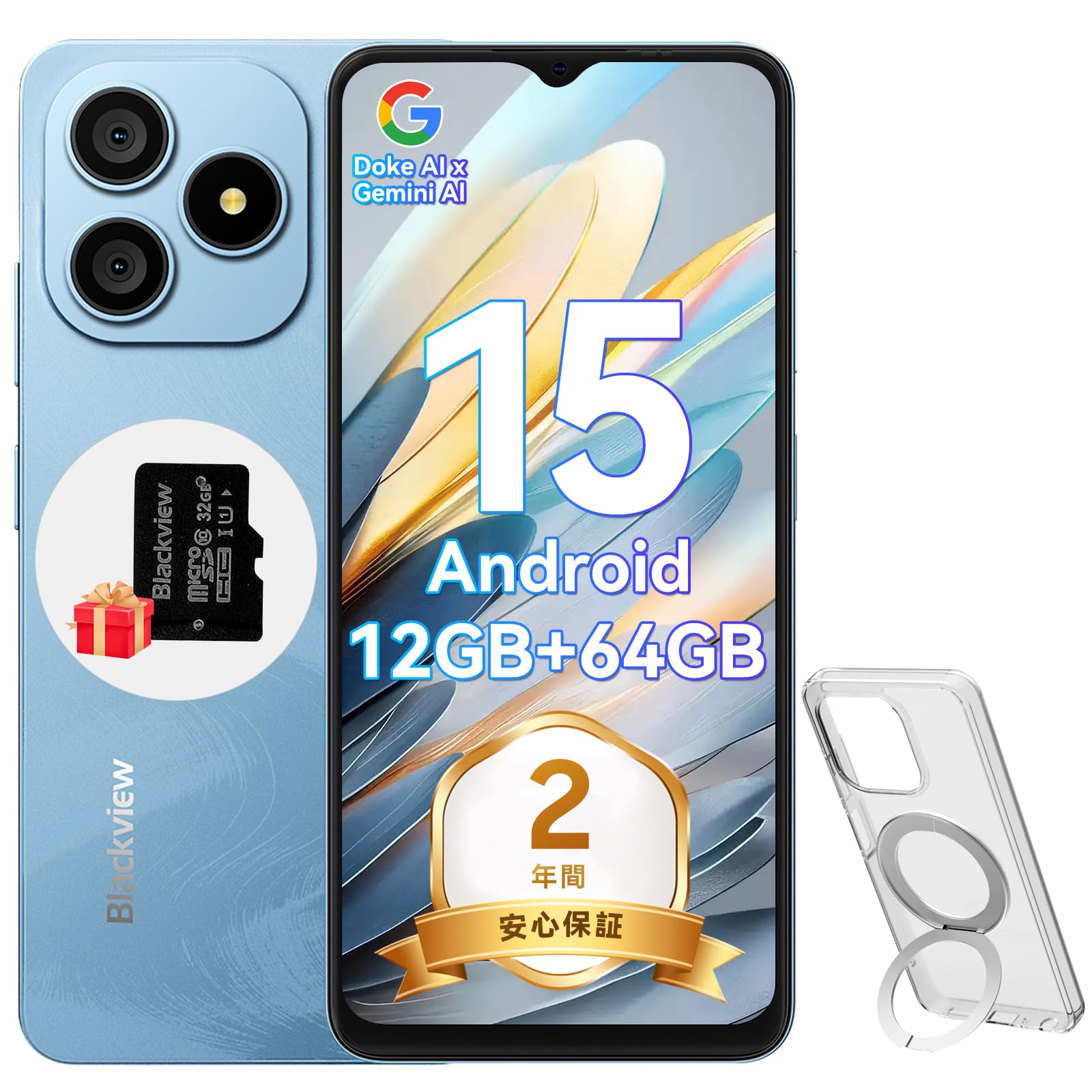
Малюнак 1.1: Чорныview Wave9C Smartphone
2. Змесціва ўпакоўкі
Калі ласка, пастаўце галачку для наступных пунктаў:
- Чорныview Wave9C Smartphone Body
- Ахоўная плёнка для экрана (папярэдне нанесеная або ўключаная ў камплект)
- Protective Phone Case (with stand)
- Карта памяці (32 ГБ)
- Адаптар сілкавання
- Кабель USB
- Кіраўніцтва па эксплуатацыі
- Штыфт для выталки SIM-карты

Малюнак 2.1: Камплектуючыя прыналежнасці
3. Настройка
3.1. Усталёўка SIM-карты і TF-карты
Чорныview Wave9C supports dual SIM cards and a TF card for expandable storage. Before inserting, ensure your SIM card's frequency bands are compatible with the device (2G: B2/B3/B5/B8; 3G: B1/B2/B; 4G: B1/B3/B7/B8/B19/B20/B40/B41). After insertion, you may need to configure APN settings for mobile data.
- Знайдзіце латок для SIM-карты на бакавой панэлі прылады.
- Устаўце штыфт для выкіду SIM-карты ў невялікую адтуліну побач з латком, каб адкрыць яго.
- Place your Nano-SIM cards and the TF card into the designated slots on the tray. Ensure they are correctly oriented.
- Асцярожна ўстаўце латок назад у прыладу, пакуль ён не ўстане на роўную паверхню.

Figure 3.1: SIM and TF Card Tray
3.2. Пачатковае ўключэнне
Press and hold the Power button located on the side of the device until the Blackview logo appears. Follow the on-screen prompts to complete the initial setup, including language selection, Wi-Fi connection, and Google account setup.
4. Інструкцыя па эксплуатацыі
4.1. Прылада скончанаview і асноўныя характарыстыкі
Відэа 4.1: Чорныview Wave9C Product Overview. This video demonstrates key features such as face unlock, AI applications, the integrated kickstand case, AI live photo functionality, and the smile shutter camera feature.
4.2. Асаблівасці дысплея
The Wave9C features a 6.56-inch HD+ display with a high screen-to-body ratio of 94.94% and 600 nits brightness for clear visibility even in bright conditions. The 720x1612 resolution ensures a smooth visual experience for games and videos.

Малюнак 4.2: Тэхнічныя характарыстыкі дысплея
To reduce eye strain during prolonged use, the device offers three eye-friendly modes:
- Начны рэжым: Adjusts the display to warmer colors for comfortable viewпры слабым асвятленні.
- Цёмны рэжым: Changes the system interface to a dark theme, reducing glare.
- Рэжым чытання: Optimizes the screen for reading, similar to an e-reader.

Figure 4.3: Eye Protection Modes
4.3. Прадукцыйнасць і захоўванне
Чорныview Wave9C is powered by an Unisoc T603 Octa-core CPU, ensuring smooth multitasking and gaming. It comes with 12GB RAM (4GB physical + 8GB expandable virtual RAM) and 64GB of internal storage, which can be expanded up to 2TB using a TF card. This ample storage allows for saving numerous photos, videos, and applications.

Figure 4.4: Processor and Memory

Figure 4.5: Storage and RAM Expansion
4.4. Кіраванне батарэяй
Equipped with a 5000mAh large-capacity battery, the Wave9C provides extended usage, supporting up to 21 hours of talk time or 5 hours of video playback/gaming. It features 10W fast charging via a convenient Type-C port, allowing for quick recharges. Advanced battery features include AI night charge protection and AI power-saving modes to optimize battery life. The device also supports OTG reverse charging, allowing it to charge other devices.

Малюнак 4.6: Тэрмін службы батарэі і зарадка
4.5. AI Features and DokeOS 4.2
Чорныview Wave9C runs on DokeOS 4.2, based on Android 15, offering a seamless and personalized user experience with enhanced privacy and convenience. It integrates Doke AI, featuring ChatGPT for various smart functions:
- Voice Activation & Recognition: Enhanced privacy and hands-free operation.
- Smart QA: Quick answers to your questions.
- Global Smart Control: Control various device functions with voice commands.
- Screen Content Support: Get instant solutions and information based on what's displayed on your screen.

Figure 4.7: Doke AI Capabilities
DokeOS 4.2 also includes several system-level optimizations:
- Атамізаваная памяць 2.0: Improves memory utilization for smoother performance.
- EasyShare: Facilitates quick and easy file сумеснае выкарыстанне.
- Smart Preload: Anticipates app usage for faster launching.
- Clipboard Auto-Clear: Enhances privacy by automatically clearing clipboard content.
- Прыватная прастора і блакіроўка праграмы: Secure your personal data and applications.

Figure 4.8: DokeOS 4.2 System Features
4.6. Integrated AI Applications
The Wave9C comes with several pre-installed AI-powered applications to enhance your daily experience:
- Прывітанне, праграма Doki: Integrates top AI models for AI chat, image generation, and online search.
- Праграма ImageX: Offers AI photo editing features like AI photo animation, background replacement, and skin correction.
- Праграма VidGen: Enables AI video editing, allowing you to create videos from text or images.
- Праграма Soundle: Assists with AI music creation, offering playlist management and supporting 11 music styles, including text-to-music conversion.

Figure 4.9: Hi Doki App

Figure 4.10: ImageX App

Figure 4.11: VidGen App

Figure 4.12: Soundle App
4.7. Асаблівасці камеры
Capture every moment with the Wave9C's camera system. It features a 13MP rear camera and an 8MP front camera, capable of recording 1080P Full HD videos.
- Партрэтны рэжым: Creates a depth effect, blurring the background to highlight the subject.
- Запаўняйце святло: Enhances lighting for selfies and portraits.
- Smile Shutter: Automatically captures photos when a smile is detected.
- Smart Camera Control: Use the volume keys as a shutter button or to zoom.

Малюнак 4.13: Камера зверхуview

Figure 4.14: Camera Modes

Figure 4.15: Smart Camera Controls
4.8. Функцыі бяспекі
Чорныview Wave9C offers convenient and secure access with its face recognition feature. Simply look at your device to unlock it quickly, eliminating the need for passwords and adding speed to your daily life.

Figure 4.16: Face Recognition
4.9. Сувязь
The Wave9C supports multiple global positioning systems, including GPS, GLONASS, Galileo, and BeiDou, ensuring accurate and stable navigation. It also features Bluetooth, USB, and Wi-Fi connectivity for seamless communication and data transfer.

Figure 4.17: Multi-System GPS Support
4.10. Асаблівасці
- Дзіцячы рэжым: Set usage time limits to manage screen time for children.
- Senior Mode: Features large icons and text for easier readability and simplified operation, ideal for elderly users.
- IP54 Пыла- і воданепранікальнасць: Enjoy reliable performance without worrying about dust or splashes.
- Тэхналогія вільготнага дотыку: Operate the screen comfortably even with wet hands.
- Integrated Stand Case: The included protective case features a built-in stand for hands-free viewінж.
- Google Lens: Utilize Google Lens for instant information retrieval, text translation, product identification, and exploring nearby places by simply pointing your camera.
- Smart-K Speaker: Delivers crystal-clear audio and rich sound for streaming podcasts, games, and music.

Figure 4.18: Kids Mode and Senior Mode

Figure 4.19: IP54 Water Resistance and Wet Touch

Figure 4.20: Google Lens Integration

Figure 4.21: Smart-K Speaker
5. Тэхнічнае абслугоўванне
Каб забяспечыць даўгавечнасць і аптымальную прадукцыйнасць вашага Blackview Wave9C, follow these maintenance guidelines:
- Уборка: Regularly wipe the screen and body with a soft, lint-free cloth. Avoid using harsh chemicals or abrasive materials.
- тэмпература: Avoid exposing the device to extreme temperatures (hot or cold) or direct sunlight for extended periods.
- захоўванне: Калі прылада доўга не выкарыстоўваецца, захоўвайце яе ў прахалодным, сухім месцы.
- Абнаўленні праграмнага забеспячэння: Keep your device's software updated to benefit from the latest features, security patches, and performance improvements.
6. Выпраўленне непаладак
Калі ў вас узнікнуць якія-небудзь праблемы з вашым Blackview Wave9C, try the following basic troubleshooting steps:
- Прылада не адказвае: Націсніце і ўтрымлівайце кнопку харчавання каля 10-15 секунд, каб прымусова перазагрузіць кампутар.
- Збой праграмы: Ачысціце кэш і даныя праблемнай праграмы ў раздзеле "Налады" > "Праграмы". Калі праблема не знікне, выдаліце і пераўсталюйце праграму.
- Хуткая разрадка батарэі: Check battery usage in Settings > Battery to identify power-hungry apps. Adjust screen brightness and use power-saving modes.
- Праблемы з падключэннем (Wi-Fi/Bluetooth): Toggle Wi-Fi or Bluetooth off and on. Restart your device or the router/paired device.
- Network Issues (SIM): Ensure the SIM card is correctly inserted. Check your APN settings. Contact your mobile carrier if necessary.
- Скід да заводскіх налад: У крайнім выпадку можна выканаць скід да заводскіх налад (Налады > Сістэма > Параметры скіду > Сцерці ўсе дадзеныя). Папярэджанне: Гэта сатрэ ўсе дадзеныя на вашай прыладзе. Перад тым, як працягнуць, зрабіце рэзервовую копію важных дадзеных.
Калі гэтыя дзеянні не вырашаць праблему, звярніцеся да раздзела «Гарантыя і падтрымка» для атрымання дадатковай дапамогі.
7. Тэхнічныя характарыстыкі
| Асаблівасць | Спецыфікацыя |
|---|---|
| Нумар мадэлі | WAVE9C |
| Памер дысплея | 6.56 цаляў |
| дазвол | 720 х 1612 |
| Яркасць | 600 ніт |
| Аперацыйная сістэма | Android 15 (DokeOS 4.2) |
| Працэсар | Unisoc T603 Octa-core CPU |
| АЗП | 12GB (4GB physical + 8GB expandable) |
| Унутраная памяць | 64 ГБ |
| Сховішча з магчымасцю пашырэння | Да 2 ТБ праз TF-карту |
| Ёмістасць батарэі | 5000 мАг |
| Зарадка | Хуткая зарадка 10 Вт (Type-C) |
| Задняя камера | 13 МП |
| Пярэдняя камера | 8 МП |
| Устойлівасць да вады і пылу | IP54 |
| Сувязь | Bluetooth, USB, Wi-Fi |
| Навігацыя | GPS, ГЛОНАСС, Galileo, BeiDou |
| Памеры | 17.8 х 9 х 5.7 см |
| Вага | 440 г |
8. Гарантыя і падтрымка
Чорныview забяспечвае а Гарантыя 2 год for the Wave9C smartphone. In case of any product issues, our customer service team is available online 24 hours a day and aims to provide support within 12 hours, including return and exchange services.
Спосабы сувязі:
- On the product page, click the store name "PTablet" below the "Add to Cart" button, then click "Ask a question" in the upper right corner to send an email.
- Alternatively, go to your Amazon account > Order History > Problem with order > Contact Seller.

Малюнак 8.1: Чорныview Падтрымка кліентаў