1. Важная інфармацыя па бяспецы
Please read this manual thoroughly before assembly and operation. Keep this manual for future reference. Incorrect assembly or operation may cause damage to the product or personal injury.
- Перад зборкай пераканайцеся, што ўсе кампаненты ёсць у наяўнасці і не пашкоджаны.
- Не перавышайце максімальную грузападымальнасць 60 кг (132 фунтаў).
- Трымайце дзяцей і хатніх жывёл далей ад стала падчас працы.
- Ensure there are no obstructions in the desk's path during height adjustment.
- Only use the provided power adapter and cables.
- Do not disassemble or modify the desk's motor or control system.
2. Прадукт скончыўсяview
The SANODESK QS1 is an electric height-adjustable standing desk designed for home and office use. It features a sturdy frame, a one-piece desktop, and a smart control panel with memory presets and an anti-collision system.

Figure 2.1: The SANODESK QS1 Electric Standing Desk in a home office environment, showcasing its modern design and versatility.
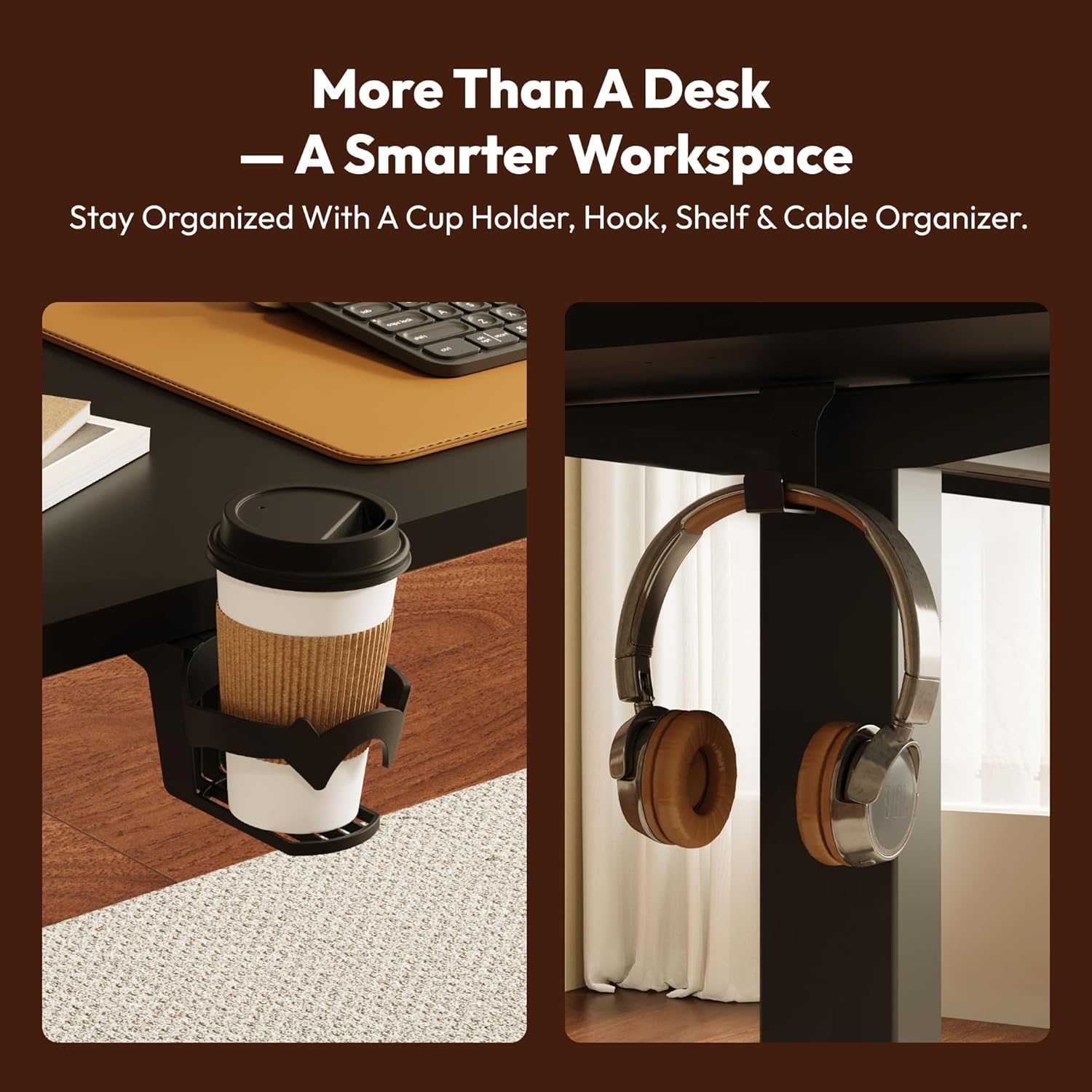
Figure 2.2: Integrated cup holder and headphone hook for organized workspace management.
3. Інструкцыя па зборцы
Assembly typically requires one person. Follow the steps below carefully.
- Распакуйце кампаненты: Carefully remove all parts from the packaging. Verify that all components listed in the parts list (usually included in the box) are present and undamaged.
- Збярыце каркас: Attach the lifting columns to the foot supports. Secure them using the provided screws and tools. Ensure all connections are tight and stable.
- Attach Crossbar/Support Beams: Connect the crossbar or support beams between the lifting columns. This provides structural integrity to the desk frame.
- Усталюйце працоўны стол: Carefully place the desktop upside down on a soft, clean surface. Position the assembled frame onto the desktop, aligning the pre-drilled holes. Secure the desktop to the frame using the appropriate screws.
- Install Control Panel and Motor: Attach the control panel to the underside of the desktop in the designated location. Connect the motor cables and control panel cable to the control box, ensuring all connections are secure.
- Усталяваць аксэсуары: Attach the cup holder and headphone hooks to the desired locations on the desk frame or desktop edge.
- Кабельнае кіраванне: Use the included cable ties or management clips to organize and secure all cables, preventing them from interfering with the desk's movement.
- Initial Power-On and Calibration: Plug the power adapter into the control box and then into a wall outlet. The desk may require an initial calibration. Refer to the 'Operating Instructions' section for details on first-time use and calibration.
4. Інструкцыя па эксплуатацыі
The SANODESK QS1 features an intuitive smart control panel for easy height adjustment and memory functions.

Figure 4.1: The Smart LED Control Panel for effortless height adjustment and memory presets.
4.1 Базавая рэгуляванне вышыні
- Кнопкі ўверх/уніз (▲ / ▼): Press and hold the 'Up' (▲) button to raise the desk, or the 'Down' (▼) button to lower the desk. Release the button when the desired height is reached. The LED display will show the current height.

Figure 4.2: The desk offers a height range from 73.5 cm (Min) to 118 cm (Max) for versatile use.
4.2 Папярэднія налады памяці
Панэль кіравання дазваляе захаваць да чатырох пераважных налад вышыні.
- Setting a Memory Preset:
- Адрэгулюйце вышыню стала на патрэбную вышыню з дапамогай кнопак «Уверх»/«Уніз».
- Press the 'M' button (or similar memory set button, if present, otherwise proceed to step c).
- Immediately press one of the numbered preset buttons (1, 2, 3, or 4). The LED display will flash or beep to confirm the setting is saved.
- Recalling a Memory Preset:
- Simply press the desired numbered preset button (1, 2, 3, or 4). The desk will automatically move to the saved height.
4.3 Сістэма прадухілення сутыкненняў
The desk is equipped with an anti-collision system to prevent damage or injury. If the desk encounters an obstruction during height adjustment, it will stop and reverse slightly.

Figure 4.3: The Smart Safety System stops and gently moves back upon contact with an obstruction.
5. Тэхнічнае абслугоўванне
Regular maintenance ensures the longevity and optimal performance of your SANODESK QS1.
- Уборка: Працярыце працоўны стол і рамку мяккай губкайamp тканінай. Пазбягайце абразіўных ачышчальнікаў або агрэсіўных хімічных рэчываў.
- Кабельнае кіраванне: Periodically check that all cables are securely routed and not pinched or tangled.
- Абмежаванне вагі: Do not place items exceeding 60 kg (132 lbs) on the desk. Distribute weight evenly across the desktop.
- Інспекцыі: Перыядычна правярайце ўсе шрубы і балты, каб пераканацца, што яны зацягнуты. Пры неабходнасці падцягвайце.
6. Выпраўленне непаладак
If you encounter issues with your SANODESK QS1, refer to the following common solutions.
- Стол не рухаецца:
- Праверце, ці надзейна падключаны кабель харчавання да разеткі і блока кіравання.
- Пераканайцеся, што ўсе кабелі рухавіка правільна падключаны да блока кіравання.
- Perform a reset (see below).
- Uneven Movement or Desk Stops Mid-Adjustment:
- Check for obstructions under or around the desk that might be triggering the anti-collision system.
- Пераканайцеся, што стол не перагружаны больш чым на 60 кг.
- Выканайце скід.
- Працэдура скіду:
- Press and hold the 'Down' (▼) button until the desk reaches its lowest position and slightly rebounds. Continue holding for approximately 5-10 seconds until the LED display shows 'RST' or '000' and the desk performs a small movement to confirm reset.
- If the issue persists after a reset, unplug the desk from the power outlet for 10 minutes, then plug it back in and attempt the reset procedure again.
- Коды памылак: If the LED display shows an error code (e.g., E01, E02), consult the specific error code section in the full manual (if available) or contact customer support.
7. Тэхнічныя характарыстыкі
| Асаблівасць | Спецыфікацыя |
|---|---|
| Нумар мадэлі | QS1 |
| Марка | САНОДЭСК |
| Дызайн працоўнага стала | Пастаянны стол |
| Desktop Dimensions (W x D) | 110 см х 60 см (43.31" х 23.62") |
| Дыяпазон вышыні | 73.5 см - 118 см (28.9" - 46.5") |
| Максімальная грузападымальнасць | 60 кг (132 фунтаў) |
| Пад'ёмны механізм | Электрычны |
| Панэль кіравання | Smart LED with 4 Memory Presets |
| Асаблівасці | Adjustable Height, Anti-Collision System, Cup Holder, Hooks |
| Узровень шуму | Ніжэй за 50 дБ |
| Матэрыял для працоўнага стала | Канструяваная драўніна |
| Матэрыял каркаса | Легаваная сталь |
| Колер | Black Frame + Black Desktop |
| Патрабуецца зборка | так |
| Recommended for Assembly | 1 асоба |

Figure 7.1: The desk operates quietly, with noise levels below 50 dB.

Figure 7.2: The solid frame supports up to 60 kg (132 lbs), ensuring stability.

Figure 7.3: The sturdy structure provides wobble-free stability during use.
8. Гарантыя і падтрымка
SANODESK products are manufactured to high-quality standards. For warranty information, please refer to the documentation included with your purchase or visit the official SANODESK website. For technical support, troubleshooting assistance, or to inquire about replacement parts, please contact SANODESK customer service through their official channels or the retailer from whom you purchased the product.