
1. Уводзіны
Thank you for choosing the THOMSON WS902DUO Cosy Bookshelf Speakers. These active stereo speakers deliver a powerful 150W audio experience with deep bass from two 10 cm woofers. They offer versatile connectivity options including Bluetooth 5.3, Optical, HDMI (ARC), RCA, and USB playback. The included remote control and side panel adjustments provide precise control over your audio. Please read this manual carefully before use to ensure proper operation and to maximize your listening experience.

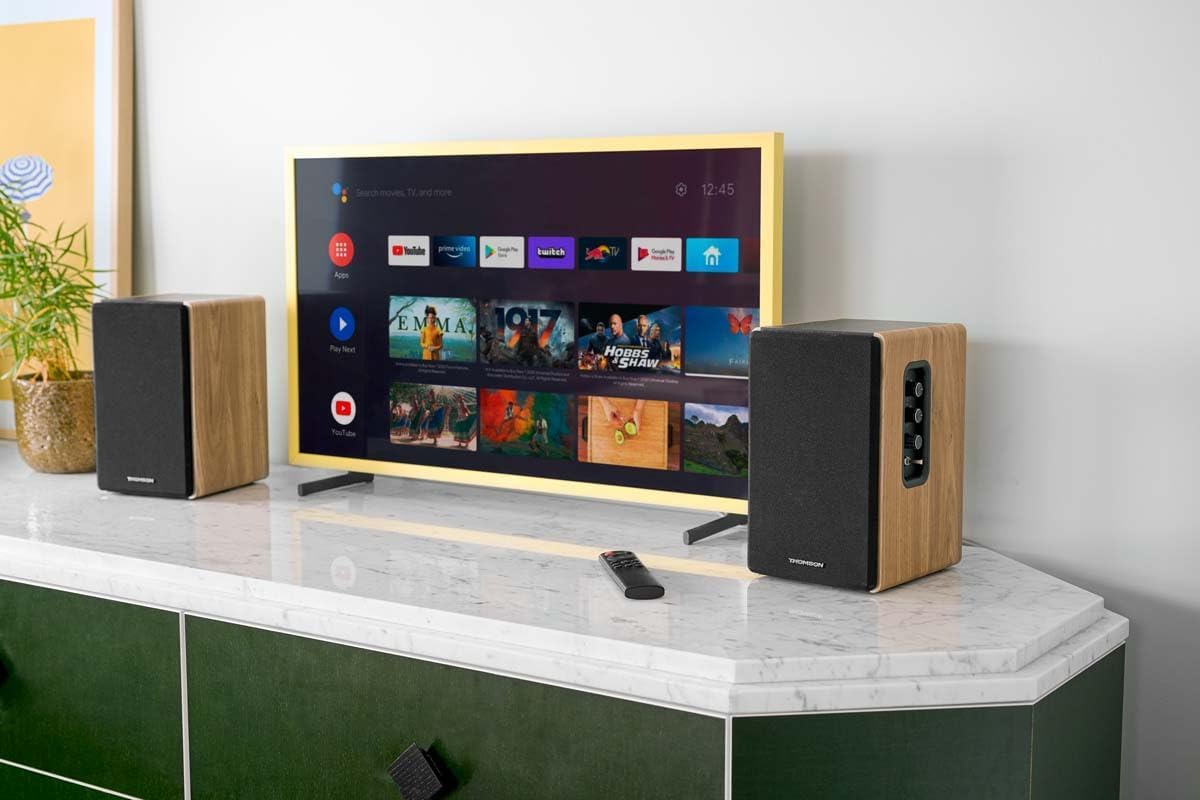
Image 1.1: THOMSON WS902DUO Bookshelf Speakers in a living space, showcasing their elegant wood finish.
2. Важныя інструкцыі па бяспецы
- Уважліва прачытайце гэтыя інструкцыі перад эксплуатацыяй вырабу.
- Захоўвайце гэтыя інструкцыі для выкарыстання ў будучыні.
- Улічвайце ўсе папярэджанні на прадукце і ў інструкцыі па эксплуатацыі.
- Выконвайце ўсе інструкцыі.
- Не выкарыстоўвайце гэты прыбор паблізу вады.
- Чысціце толькі сухой анучай.
- Не блакуйце вентыляцыйныя адтуліны. Усталюйце ў адпаведнасці з інструкцыямі вытворцы.
- Не ўстанаўлівайце побач з крыніцамі цяпла, такімі як радыятары, абагравальнікі, пліты або іншыя прылады (у тым ліку ampLifiers), якія вырабляюць цяпло.
- Не пагаршайце мэты бяспекі палярызаванай або зазямляльнай вілкі. Палярызаваная відэлец мае два леза, адзін шырэйшы за другі. Вілка з зазямленнем мае два ножы і трэці зазямляльны штырь. Шырокае лязо або трэці зубец прызначаны для вашай бяспекі. Калі вілка з камплекта не падыходзіць да вашай разеткі, звярніцеся да электрыка для замены састарэлай разеткі.
- Абараняйце сеткавы шнур ад наступання або заціскання, асабліва ў месцах вілкі, разеткі і месца выхаду з прылады.
- Выкарыстоўвайце толькі насадкі/аксэсуары, указаныя вытворцам.
- Выкарыстоўвайце толькі каляскі, падстаўкі, штатывы, кранштэйны або сталы, указаныя вытворцам або якія прадаюцца разам з прыладай. Калі выкарыстоўваецца каляска, будзьце асцярожныя пры перамяшчэнні каляскі/прыбора, каб пазбегнуць траўмаў у выніку перакульвання.
- Адключайце гэты прыбор ад сеткі падчас навальніцы або калі ён не выкарыстоўваецца на працягу доўгага часу.
- Звяртайцеся да кваліфікаванага абслугоўваючага персаналу. Тэхнічнае абслугоўванне патрабуецца, калі прылада была пашкоджана якім-небудзь чынам, напрыклад, пашкоджаны шнур сілкавання або вілка, была праліта вадкасць або ў прыладу ўпалі прадметы, прылада падвяргалася ўздзеянню дажджу або вільгаці, не працуе належным чынам , або быў адкінуты.
3. Змесціва ўпакоўкі
Калі ласка, праверце, ці ўсе пералічаныя ніжэй прадметы ўваходзяць у ваш пакет:
- THOMSON WS902DUO Bookshelf Speakers (2 units)
- Пульт дыстанцыйнага кіравання
- Сілавы кабель
- Кабель для падлучэння дынаміка
- 3.5mm Jack to RCA Adapter Cable
- Кіраўніцтва карыстальніка (гэты дакумент)

Image 3.1: Packaging of the THOMSON WS902DUO Bookshelf Speakers.
4. Прадукт скончыўсяview
4.1. Side Control Panel (Active Speaker)
The active speaker features a side control panel for easy access to essential functions.

Image 4.1: Side control panel.
- Кантроль баса: Рэгулюе нізкачастотны выхадны сігнал.
- Кантроль высокіх частот: Рэгулюе высокачастотны выхад.
- Рэгулятар гучнасці: Рэгулюе агульную гучнасць гуку.
- Выключальнік сілкавання: Turns the speakers on or off.
- Святлодыёдны індыкатар: Shows the current status or selected input.
4.2. Задняя панэль (актыўны дынамік)
The rear panel of the active speaker provides all necessary input and output connections.
Малюнак 4.2: Падключэнні на задняй панэлі.
- Аптычны ўваход: For connecting digital audio sources like TVs, game consoles, or Blu-ray players.
- Дапаможны ўваход (RCA): For connecting analog audio sources such as turntables, CD players, or PCs. A 3.5mm jack adapter is provided.
- TV Audio (HDMI ARC): For connecting to a TV's HDMI ARC port, allowing TV remote control of the speaker volume.
- USB прайграванне: Для прайгравання MP3 files непасрэдна з флэшкі USB.
- Сабвуфер: For connecting an external active subwoofer for enhanced bass.
- Выхад на дынамік: Падключаецца да пасіўнага дынаміка.
- Спажываная магутнасць: Падключаецца да асноўнай крыніцы харчавання.
4.3. Пульт дыстанцыйнага кіравання
Пульт дыстанцыйнага кіравання забяспечвае зручны доступ да ўсіх функцый дынаміка на адлегласці.

Image 4.3: Remote control.
- Кнопка харчавання: Turns the speakers on/off.
- Кнопка адключэння: Выключае/уключае гук.
- Гучнасць +/-: Рэгулюе ўзровень гучнасці.
- Playback Controls (Play/Pause, Skip): For USB playback.
- Source Selection Buttons (OPT, BT, ARC, USB, LINE): Выбірае крыніцу ўваходнага гуку.
- EQ Mode Buttons (MOVIE, MUSIC, DIALOG): Selects preset equalization modes.
5. Настройка
5.1. Размяшчэнне дынамікаў
Place the speakers on a stable, flat surface such as a bookshelf, desk, or speaker stands. For optimal stereo imaging, position the speakers equidistant from your listening position and at ear level. Ensure there is adequate space around the speakers for ventilation.
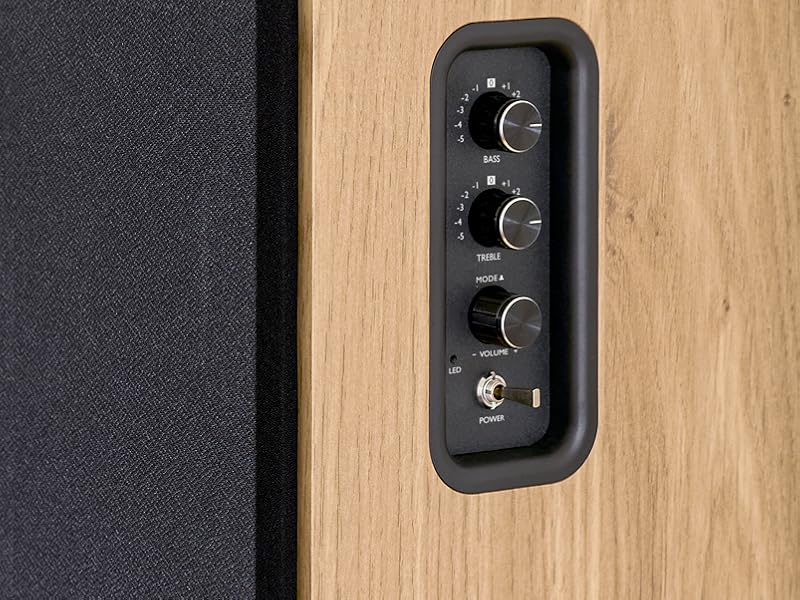
Image 5.1: Recommended speaker placement on a desk.
5.2. Падключэнне дынамікаў
- Identify the active speaker (with controls and inputs) and the passive speaker.
- Connect the included speaker cable from the speaker output terminals on the active speaker to the input terminals on the passive speaker. Ensure correct polarity (+ to + and - to -).
5.3. Падключэнне крыніц гуку
Connect your desired audio sources to the active speaker using the appropriate cables.
- Аптычны ўваход: Use an optical cable to connect your TV, game console, or Blu-ray player to the OPTICAL IN port.
- HDMI (ARC) Input: Use an HDMI cable to connect your TV's HDMI ARC port to the TV AUDIO (HDMI) port on the speaker. This allows your TV remote to control the speaker volume.
- RCA (AUX) Input: Use an RCA cable (or the provided 3.5mm jack to RCA adapter) to connect devices like a turntable, CD player, or PC to the AUX IN (RCA) ports.
- USB ўвод: Устаўце USB-назапашвальнік з MP3 files into the USB PLAY port.

Image 5.2: Speakers connected to a television via HDMI ARC.
5.4. Спарванне Bluetooth
- Пераканайцеся, што дынамікі ўключаны.
- Press the 'BT' button on the remote control or the side panel to select Bluetooth input. The LED indicator will flash, indicating pairing mode.
- На смартфоне, планшэце або камп'ютары ўключыце Bluetooth і знайдзіце даступныя прылады.
- Select "THOMSON WS902DUO" from the list of devices.
- Пасля спалучэння святлодыёдны індыкатар перастане міргаць і будзе гарэць пастаянна. Цяпер вы можаце перадаваць аўдыё па бесправадной сувязі.
5.5. Падключэнне сабвуфера (дадаткова)
If you wish to enhance bass further, connect an active subwoofer to the 'Sub Out' port on the rear panel of the active speaker using an RCA cable.
6. Інструкцыя па эксплуатацыі
6.1. Уключэнне/выключэнне харчавання
Use the power switch on the side control panel or the power button on the remote control to turn the speakers on or off.
6.2. Выбар крыніцы
Press the corresponding source button on the remote control (OPT, BT, ARC, USB, LINE) to switch between connected audio inputs. The LED indicator will change to reflect the selected source.
6.3. Рэгулятар гучнасці
Adjust the volume using the 'Volume' knob on the side control panel or the 'VOL+/-' buttons on the remote control.
6.4. Налады гуку
Fine-tune the sound to your preference:
- НЧ/ВЧ: Use the 'Bass' and 'Treble' knobs on the side control panel to adjust the low and high frequencies.
- Рэжымы эквалайзера: Press the 'MOVIE', 'MUSIC', or 'DIALOG' buttons on the remote control to select preset equalization settings optimized for different content types.
6.5. Прайграванне з USB
When a USB flash drive with MP3 files is inserted and USB source is selected, the speakers will automatically begin playing. Use the playback control buttons on the remote control (Play/Pause, Skip) to manage your music.
6.6. Аперацыя Bluetooth
After successful pairing (see Section 5.4), you can stream audio from your Bluetooth device. Use your device's controls or the speaker's remote control for playback and volume adjustments.
7. Тэхнічнае абслугоўванне
Правільнае абслугоўванне забяспечвае даўгавечнасць і прадукцыйнасць вашых дынамікаў.
- Уборка: Працірайце паверхні дынамікаў мяккай сухой тканінай. Не выкарыстоўвайце вадкія ачышчальнікі або абразіўныя матэрыялы.
- Вентыляцыя: Пераканайцеся, што вентыляцыйныя адтуліны не заблакіраваны, каб прадухіліць перагрэў.
- захоўванне: If storing the speakers for an extended period, unplug them from the power outlet and store them in a cool, dry place.
- Пазбягайце вільгаці: Keep the speakers away from water and high humidity.
8. Выпраўленне непаладак
Калі вы сутыкнуліся з якімі-небудзь праблемамі, звярніцеся да наступнага кіраўніцтва па ліквідацыі непаладак:
| праблема | Магчымая прычына | Рашэнне |
|---|---|---|
| Няма ўлады | Power cable not connected; Power switch off; Wall outlet not working. | Ensure power cable is securely connected. Turn on the power switch. Test the wall outlet with another device. |
| Няма гуку | Incorrect input source selected; Volume too low; Mute function active; Audio cable not connected properly. | Select the correct input source. Increase volume. Press Mute button on remote. Check all audio cable connections. |
| Збой спалучэння Bluetooth | Speakers not in pairing mode; Device too far; Bluetooth disabled on source device. | Ensure speakers are in Bluetooth pairing mode (flashing LED). Move device closer to speakers. Enable Bluetooth on your source device. |
| Прайграванне з USB не працуе | USB drive not formatted correctly; Files not MP3; USB drive not inserted properly. | Ensure USB drive is FAT32 formatted. Verify files are in MP3 format. Re-insert USB drive firmly. |
| Скажэнне гуку | Volume too high; Source audio quality poor; Bass/Treble settings too extreme. | Lower the volume. Test with a different audio source. Adjust Bass and Treble controls. |
9. Тэхнічныя характарыстыкі
| Асаблівасць | Спецыфікацыя |
|---|---|
| Марка | ТОМСАН |
| Нумар мадэлі | WS902DUO |
| Максімальная выходная магутнасць дынаміка | 150 ват |
| АЧХ | 60 Гц |
| Тэхналогія падлучэння | Bluetooth, HDMI (ARC), Optical, RCA, USB |
| Версія Bluetooth | 5.3 |
| Рэжым выхаду гуку | Стэрэа (2.0 каналы) |
| Уваходны кнtage | 230 вольт (пераменны ток) |
| Тып мацавання | Мантаж паліцы |
| Тып дынаміка | Multimedia Bookshelf |
| Асаблівасці | Stereo Pairing, USB Port, Sub-Out, Remote Control, EQ Modes |
| Рэкамендуемае выкарыстанне | Smartphone, Tablet, PC, TV, Game Console, DVD Player, Turntable |
| Колер | Аздабленне з натуральнага дрэва |
| Метад кантролю | Remote Control, Side Panel Knobs |
| Памер НЧ-дынаміка | 10 сантыметраў |
| Памеры (В х Ш х Г) | 28 cm x 24 cm x 47 cm (approximate, per speaker) |
| Вага | 5048 Grams (total for pair) |
| Колькасць элементаў | 2 |
| Краіна паходжання | Кітай |
10. Інфармацыя аб гарантыі
This THOMSON WS902DUO product comes with a 1-гадовая абмежаваная гарантыя з даты пакупкі. Гэтая гарантыя распаўсюджваецца на вытворчыя дэфекты і дэфекты вырабу пры нармальным выкарыстанні. Яна не распаўсюджваецца на пашкоджанні, выкліканыя няправільным выкарыстаннем, аварыямі, несанкцыянаванымі мадыфікацыямі або нармальным зносам. Калі ласка, захавайце пацвярджэнне пакупкі для прэтэнзій па гарантыі.
11. Падтрымка кліентаў
For technical assistance, warranty claims, or any questions regarding your THOMSON WS902DUO speakers, please contact your retailer or visit the official THOMSON support website. Please have your model number (WS902DUO) and proof of purchase ready when contacting support.
Інтэрнэт-падтрымка: www.thomsonconsumer.com (Калі ласка, праверце кантакты рэгіянальнай падтрымкі)