
Уводзіны
Thank you for choosing the SABLUTE MA31 Ergonomic Wireless Keyboard and Mouse Combo. This manual provides essential information for setting up, operating, and maintaining your new peripheral set. Designed for comfort and efficiency, this combo features a full-size wave-key keyboard with a cushioned palm rest and a 3-DPI adjustable ergonomic mouse, offering seamless 2.4G wireless connectivity for various devices.
Што ў скрынцы
- 1 x Ergonomic Wireless Keyboard (MA31)
- 1 x Ergonomic Wireless Mouse (MS801)
- 1 x 2.4GHz USB Receiver (shared for both keyboard and mouse, stored in mouse battery compartment)
- 1 х адаптар USB-A да USB-C
- 1 х Кіраўніцтва карыстальніка

Image: The contents of the product box, showing the ergonomic keyboard, ergonomic mouse, a small USB receiver, a USB-A to Type-C adapter, and the user manual.
Інструкцыя па наладзе
- Усталюйце батарэі:
- Клавіятура: Insert two (2) AA batteries (not included) into the battery compartment on the underside of the keyboard.
- Мыш: Insert one (1) AA battery (not included) into the battery compartment on the underside of the mouse. The 2.4GHz USB receiver is stored in this compartment.
- Атрымаць USB-прыёмнік: Carefully remove the 2.4GHz USB receiver from the mouse's battery compartment.
- Падключэнне прыёмніка:
- Plug the USB receiver directly into an available USB-A port on your computer, laptop, tablet, or Mac.
- If your device only has USB-C ports, use the provided USB-A to USB-C adapter to connect the receiver.
- Уключэнне:
- Клавіятура: Turn on the keyboard using the ON/OFF switch located on the side.
- Мыш: Уключыце мыш з дапамогай перамыкача ON/OFF, размешчанага на ніжняй панэлі.
- Аўтаматычнае падключэнне: The keyboard and mouse will automatically connect to your computer. No additional drivers are needed.

Image: A close-up of the USB-A receiver and the USB-A to Type-C adapter, illustrating how to connect the wireless peripherals to different types of ports on a computer.
Інструкцыя па эксплуатацыі
Асаблівасці клавіятуры
- Эрганамічны дызайн: The keyboard features a wave-shaped key layout and a cushioned faux lambskin palm rest for natural typing posture and reduced wrist strain.
- Рэгуляваныя па нахіле ножкі: Dual-angle tilt legs on the underside allow you to adjust the keyboard's elevation for comfortable typing while sitting or standing.
- Ціхі ўвод: The keys are designed for soft, quiet presses, minimizing noise during use.
- Клавішы хуткага доступу: 9 dedicated multimedia shortcut keys are located at the top of the keyboard for quick access to functions like:
- Emoji (FN+Q for Windows, FN+W for Mac)
- Калькулятар
- Print Screen
- Папярэдняя песня
- Прайграванне/Паўза
- Наступная песня
- Павялічыць гучнасць
- Памяншэнне гучнасці
- Адключыць гук
- Функцыянальныя клавішы (F1-F12): These keys can be used in combination with the 'Fn' key for additional system-specific functions (e.g., screen brightness, search, window switch, sleep, lock screen). Refer to the included quick guide for a full layout.
- Compatibility Switch: Use FN+Q for Windows/ChromeOS and FN+W for macOS to optimize keyboard functions for your operating system.
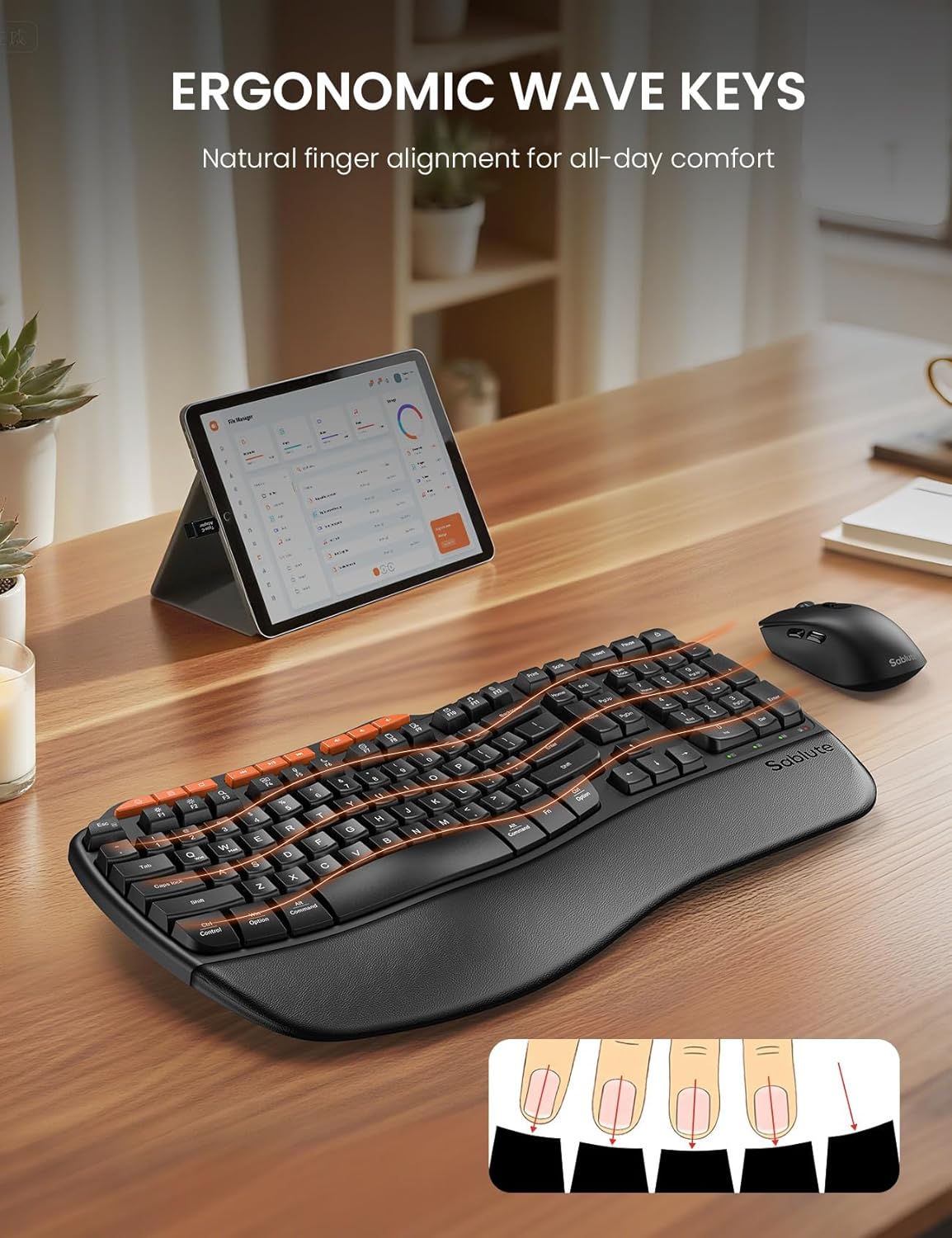
Image: The ergonomic keyboard with its distinctive wave-shaped keys and integrated wrist rest, designed for natural finger alignment and comfort.

Image: The underside of the keyboard with its dual-angle tilt legs extended, demonstrating how to adjust the keyboard for comfortable use in both sitting and standing postures.

Выява: Падрабязны view of the nine orange-colored multimedia shortcut keys located at the top of the keyboard, highlighting their accessibility.
Асаблівасці мышы
- Ergonomic Sculpted Design: The mouse is shaped to fit comfortably in the right hand, promoting a natural hand position.
- Рэгуляваны DPI: Cycle through 3 DPI settings (800/1200/1600) using the dedicated DPI switch button to adjust cursor sensitivity for different tasks.
- Бакавыя кнопкі: Features forward and backward buttons on the side for enhanced navigation.
- Ціхія клікі: The mouse buttons and scroll wheel are designed for silent operation.
- Выключальнік сілкавання: An ON/OFF switch on the underside helps conserve battery life when not in use.

Image: The ergonomic mouse, showcasing its sculpted shape designed to provide a comfortable and natural grip for the right hand.
Бесправоднае падключэнне
- Бесправадная сувязь 2.4 ГГц: Both the keyboard and mouse connect wirelessly via a single 2.4GHz USB receiver.
- Эфектыўны дыяпазон: Enjoy a stable connection up to 33 feet (10 meters) with minimal lag or drops.
- Універсальная сумяшчальнасць: Compatible with 99% of devices including PCs, laptops, tablets, and Macs. Supports Windows, macOS, Chrome OS, Android, and Linux operating systems.
- Заўвага: This combo connects to one device at a time; multi-device switching is not supported.

Image: The wireless keyboard and mouse in a professional setting, illustrating the 33-foot stable 2.4GHz wireless connection range.
Тэхнічнае абслугоўванне
- Уборка: Выкарыстоўвайце мяккі, damp cloth to clean the surfaces of the keyboard and mouse. Avoid harsh chemicals or abrasive materials. The faux lambskin palm rest is sweat-proof and easy to maintain.
- Замена батарэі: Replace batteries when performance degrades. The keyboard requires 2 AA batteries, and the mouse requires 1 AA battery.
- захоўванне: When not in use, turn off both the keyboard and mouse to conserve battery life. Store the USB receiver in the mouse's battery compartment to prevent loss.
Ліквідацыю непаладак
Keyboard/Mouse Loses Connection with USB
- Для клавіятуры: Long-press the "ESC" + "=" keys for three seconds until the red light flashes. Then, immediately plug the USB receiver into your computer.
- Для мышкі: Press and hold the left, middle (scroll wheel click), and right buttons of the mouse for 3-5 seconds. Then, plug the USB receiver into your computer.
- Праверце батарэі: Ensure fresh batteries are installed in both devices.
- Праверце USB-порт: Паспрабуйце падключыць USB-прыёмнік да іншага USB-порта на прыладзе.
- Перашкоды: Move the devices closer to the USB receiver and away from other wireless devices that might cause interference.
Тэхнічныя характарыстыкі
| Асаблівасць | Дэталь |
|---|---|
| Марка | САБЛЮТ |
| Нумар мадэлі | MA31 |
| Колер | Чорны |
| Тэхналогія падлучэння | 2.4G USB Wireless |
| Эфектыўная дыстанцыя | 33 футы (10 м) |
| Раскладка клавіятуры | QWERTY, Full Size (104 keys) |
| Keyboard Special Features | Ergonomic Wave Keys, Cushioned Wrist Rest, Dual-Angle Tilt Legs, 9 Multimedia Shortcut Keys, FN Function Keys, Non-Fading Keycaps |
| Налады DPI мышы | 800/1200/1600 (рэгуляваны) |
| Кнопкі мышкі | Left, Right, Scroll Wheel, Forward, Backward, DPI Switch |
| Крыніца харчавання | Battery Powered (Keyboard: 2xAA, Mouse: 1xAA) |
| Сумяшчальныя прылады | PCs, Laptops, Tablets, Mac, Gaming Consoles, Television |
| Сумяшчальныя аперацыйныя сістэмы | Windows (10+), macOS, Chrome OS (134+), Linux, Android |
| Вага прадмета | 2.7 фунта |

Image: A diagram illustrating the dimensions of the full-size ergonomic keyboard (44.2cm x 24.13cm) and the ergonomic mouse (12.45cm x 6.35cm x 4.32cm).
Гарантыя і падтрымка
- Гарантыя: На гэты прадукт даецца 1-гадовая гарантыя.
- Вяртае: Enjoy a 30-day money-back guarantee.
- Замена: A 1-year free replacement policy is offered for manufacturing defects.
- Абслугоўванне кліентаў: For any inquiries or support, please contact SABLUTE Inc.
- электронная пошта: sabluteservices@outlook.com
- Phone: 1-888-858-1618 (US)
- Operating Hours: Mon-Fri, 9am-6pm (Worktime), 1pm-2pm (Rest)
Відэа аб прадуктах
SABLUTE Ergonomic Wireless Keyboard and Mouse Combo Overview
Відэа: Чыноўнік скончыўview of the SABLUTE Ergonomic Wireless Keyboard and Mouse Combo, highlighting its key features and ergonomic design. This video is provided by a seller.
SABLUTE Wireless Keyboard with Cushioned Palm Rest
Video: A detailed look at the wireless keyboard, focusing on its cushioned palm rest and ergonomic benefits for comfortable typing. This video is provided by a seller.