
Уводзіны
This manual provides detailed instructions for the installation, operation, and maintenance of your Ossuret 7-inch Android 14 Car Stereo. Please read this manual thoroughly before using the product to ensure proper functionality and to prevent damage.
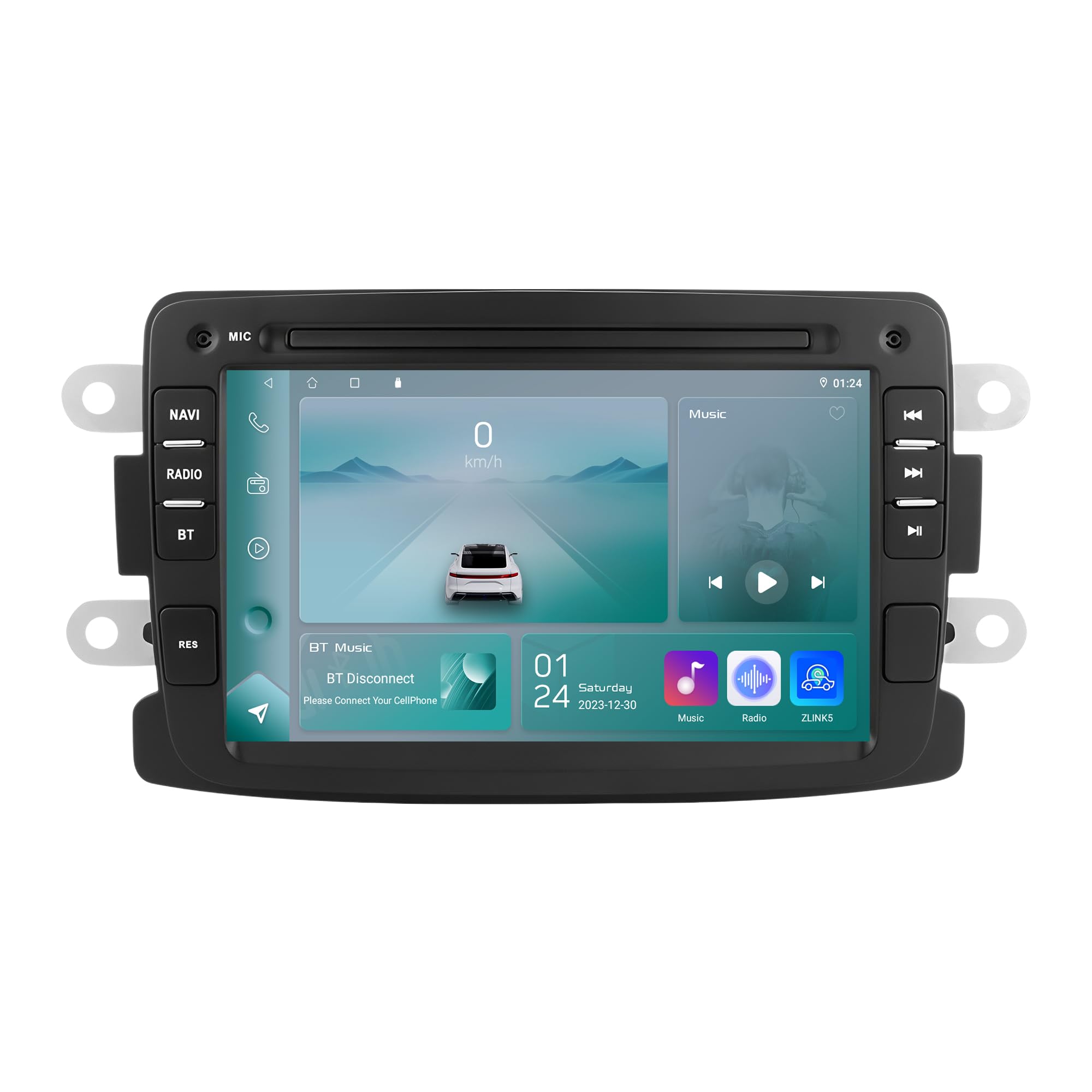
Figure 1: Ossuret 7-Inch Android 14 Car Stereo. This image shows the main unit with its display.
Сумяшчальнасць з аўтамабілем
This car stereo is designed for specific vehicle models. Please verify your vehicle's compatibility before installation.
- For Dacia: Logan (2012-2017), DOKKER (2012-2017), Duster (2011-2017), Sandero (2012-2017), Lodgy (2012-2017)
- Для Renault: Captur (2013-2017), Symbol (2013-2017)
- For LADA: Xray 2 (Note: Some steering wheel control buttons may not function with LADA Xray 2)
Што ў скрынцы
Ensure all components listed below are present in the package before proceeding with installation.

Малюнак 2: Камплектацыя. This image displays all items included with your Ossuret car stereo, such as various cables, adapters, and the main unit.
- Кабель USB
- RCA Harness
- GPS антэна
- Rear Camera Input RCA Cable
- Знешні мікрафон
- 4 Pin USB Cable
- 6 Pin USB Cable
- Сілавы кабель
- Дэкодэр CANbus
- Radio Antenna Adapter Cable
- Адаптар радыёантэны
Кіраўніцтва па ўстаноўцы
Professional installation is recommended. Disconnect the vehicle's battery before starting the installation process. Refer to your vehicle's specific wiring diagrams for accurate connections.

Figure 3: Before and After Installation. This image illustrates the visual transformation of the dashboard after the Ossuret car stereo is installed, replacing the original unit.
Агульныя этапы ўстаноўкі:
- Падрыхтоўка: Пераканайцеся, што транспартны сродак выключаны, а акумулятар адключаны.
- Выдаліць стары блок: Carefully remove the existing car stereo and trim panels.
- Падключэнне правадоў: Connect the power cable, RCA harness, GPS antenna, and other necessary cables to the new Ossuret unit. Ensure all connections are secure.
- Дэкодэр CANbus: If your vehicle requires a Canbus decoder (included), connect it as per the wiring diagram to ensure proper communication with vehicle systems.
- Праверка функцыянальнасці: Before fully reassembling the dashboard, reconnect the battery and test the basic functions of the stereo (power, audio, touch screen).
- Бяспечны блок: Mount the new stereo securely into the dashboard opening.
- Зборка: Reinstall all trim panels and ensure a neat finish.
Operating Your Car Stereo
Асноўныя аперацыі
- Уключэнне/выключэнне харчавання: Націсніце і ўтрымлівайце кнопку харчавання (звычайна размешчаную на пярэдняй панэлі), каб уключыць або выключыць прыладу.
- Рэгулятар гучнасці: Adjust the volume using the physical knob or the on-screen controls.
- Сэнсарны экран: Navigate through menus and applications using the capacitive touch screen.
- Галоўны экран: Access the main Android interface by pressing the Home button or icon.
Wireless Carplay / Android Auto
The unit supports wireless Apple Carplay and Android Auto via the pre-installed Zlink application. This allows seamless integration of your smartphone's features onto the car stereo display.

Figure 4: Carplay and Android Auto System. This image demonstrates how your smartphone's interface can be mirrored and controlled directly from the car stereo screen.
- Пераканайцеся, што на вашым смартфоне ўключаны Wi-Fi і Bluetooth.
- On the car stereo, open the "Zlink" application.
- Follow the on-screen prompts to connect your phone via Bluetooth or Wi-Fi.
- Once connected, your phone's compatible apps will appear on the stereo screen.
Функцыя Bluetooth
Падключыце мабільны тэлефон праз Bluetooth для званкоў у рэжыме hands-free і перадачы аўдыё.

Figure 5: Bluetooth Functionality. This image highlights the hands-free calling feature and the built-in microphone for clear communication.
- Спалучэнне: Перайдзіце ў налады Bluetooth на стэрэасістэме і тэлефоне. Пошук available devices and select "Ossuret" (or similar name). Enter the PIN if prompted (usually 0000).
- Гучная сувязь: Once paired, you can make and receive calls directly from the stereo. The built-in microphone captures your voice.
- Музыка праз Bluetooth (A2DP): Stream audio from your phone to the car stereo. Control playback (play/pause, skip) from the stereo screen.
- Phonebook Download: The unit supports downloading your phone's contact list for easy access.
GPS-навігацыя
The car stereo features integrated GPS navigation with preloaded European maps and supports online navigation apps.

Figure 6: GPS Navigation. This image shows the detailed map interface with navigation guidance and support for various navigation applications.
- Аўтаномная навігацыя: Use the preloaded maps without an internet connection.
- Інтэрнэт-навігацыя: Connect to Wi-Fi and use popular navigation apps like Google Maps, Waze, etc.
- Галасавыя падказкі: Receive turn-by-turn voice directions.
- Функцыя падвойнай зоны: Navigate while listening to music or other audio.
USB-злучэнне
Connect external USB devices for media playback or data transfer. The unit supports up to 2TB external memory.

Figure 7: USB Connection. Гэты малюнак ілюструе file browsing capability when a USB device is connected, allowing access to various media and data files.
- Insert your USB drive into the designated USB port.
- Доступ да file manager or media player application to browse and play content.
Прайграванне мультымедыя
The unit supports a wide range of audio and video formats for an enhanced entertainment experience.

Figure 8: Multimedia Playback. This image shows the car stereo playing a video, indicating its support for various multimedia formats.
- Music Formats: MP3, WMA, AAC, RM, FLAC, etc.
- Фарматы відэа: MPEG-1/2/4, H264, H263, VC1, RV, RMVB, DivX, Sorenson Spark, Spark, VP8, AVS Stream, etc.
- Фарматы малюнкаў: JPG/BMP/JEPG/GIF/PNG
Кіраванне рулявым колам
The car stereo is compatible with your vehicle's factory steering wheel controls, allowing you to manage volume, tracks, and channels without taking your hands off the wheel. This feature helps minimize distractions while driving.
Тыл View Увод з камеры
Прылада падтрымлівае заднюю view camera (not included). When the vehicle is shifted into reverse gear, the display will automatically switch to the rear camera feed, providing a clear view of obstacles behind the vehicle and assisting with safe parking.
Догляд і абслугоўванне
- Ачыстка экрана: Use a soft, lint-free cloth to gently wipe the touch screen. Avoid abrasive cleaners or solvents that may damage the screen.
- Генеральная ўборка: Трымайце прыладу чыстай ад пылу і смецця. Выкарыстоўвайце мяккую сухую тканіну для чысткі вонкавых паверхняў.
- тэмпература: Пазбягайце працяглага ўздзеяння экстрэмальных тэмператур, прамых сонечных прамянёў або высокай вільготнасці на прыладу.
- Абнаўленні праграмнага забеспячэння: Перыядычна правярайце інфармацыю вытворцы website for any available software updates to ensure optimal performance and new features.
Ліквідацыю непаладак
If you encounter issues, refer to the table below for common problems and their solutions. If the problem persists, contact customer support.
| праблема | Магчымая прычына | Рашэнне |
|---|---|---|
| Прылада не ўключаецца. | Няспраўнае падключэнне да электрасеткі, перагарэлы засцерагальнік, праблема з акумулятарам аўтамабіля. | Check power cables and connections. Inspect vehicle fuses. Ensure vehicle battery is charged. |
| Няма гуку. | Занадта нізкі гук, уключаны гук без гуку, няправільная крыніца гуку, праблема з праводкай дынамікаў. | Павялічце гучнасць. Праверце, ці ўключаны рэжым адключэння гуку. Выберыце правільную крыніцу гуку. Праверце падключэнне дынамікаў. |
| Сэнсарны экран не рэагуе. | Праграмны збой, праблема з каліброўкай экрана. | Restart the unit. If available, perform screen calibration in settings. |
| Праблемы з падключэннем Bluetooth. | Phone not discoverable, incorrect pairing, interference. | Ensure phone Bluetooth is on and discoverable. Delete previous pairings and re-pair. Move phone closer to the unit. |
| Сігнал GPS страчаны або недакладны. | GPS antenna obstruction, poor satellite reception, outdated maps. | Пераканайцеся, што антэна GPS мае чысты view неба. Пры неабходнасці абнавіце карты. |
Тэхнічныя характарыстыкі
| Асаблівасць | Спецыфікацыя |
|---|---|
| Марка | Ossuret |
| Аперацыйная сістэма | Android 14 |
| АЗП | 2 ГБ |
| ПЗУ | 32 ГБ |
| працэсар | 4Core*A53 1.5Ghz |
| Памер экрана | 7 цалі |
| Тып сэнсарнага экрана | Ёмістны сэнсарны экран |
| Дазвол экрана | 1024 х 600 |
| Тэхналогія падлучэння | Bluetooth, USB, Wi-Fi |
| Асаблівасці | Android Auto, Apple CarPlay, GPS Navigation, Steering Wheel Control, Rear Camera Input |
| Сумяшчальныя прылады | Смартфон |
| Рэжым выхаду гуку | Стэрэа |
| Колькасць каналаў | 2.0 |
| Метад кантролю | Тактыльны |
| USB Port Compatibility | Up to 2TB external memory |
| Гарантыя | 1 год |
| Краіна паходжання | Кітай |
Гарантыя і падтрымка
Інфармацыя аб гарантыі
This Ossuret car stereo comes with a Гарантыя 1 год з даты пакупкі. Гэтая гарантыя распаўсюджваецца на вытворчыя дэфекты і няспраўнасці пры нармальным выкарыстанні. Калі ласка, захавайце пацвярджэнне пакупкі для прэтэнзій па гарантыі.
Падтрымка кліентаў
For technical assistance, troubleshooting beyond this manual, or warranty inquiries, please contact Ossuret customer support through the retailer where the product was purchased or visit the official Ossuret webсайт для кантактнай інфармацыі.