1. Уводзіны
This manual provides essential information for the assembly, operation, maintenance, and troubleshooting of your Jocoevol Farmhouse L Shaped Executive Desk, Model B11861. Please read these instructions carefully before assembly and use to ensure proper function and longevity of your product. Keep this manual for future reference.
2. Прадукт скончыўсяview
The Jocoevol Farmhouse L Shaped Executive Desk is designed to provide a spacious and organized workspace. It features a robust construction with a farmhouse aesthetic, multiple storage options, and an integrated charging station for convenience.

Асноўныя характарыстыкі:
- L-вобразны дызайн: Offers an expansive work surface for multi-monitor setups and various tasks.
- Інтэграваная зарадная станцыя: Equipped with USB ports, Type-C ports, and AC outlets for convenient device charging.
- AmpЗахоўванне: Includes multiple drawers, a file cabinet for letter/legal documents, and a hidden under-desk storage shelf.
- Трывалая канструкцыя: Features a thickened solid wood base and desktop for stability and longevity.
- Farmhouse Aesthetic: Classic beadboard detailing and vintage-style pulls contribute to a warm and inviting appearance.
3. Тэхнічныя характарыстыкі
| Асаблівасць | Дэталь |
|---|---|
| Марка | Джакоэволь |
| Нумар мадэлі | B11861 |
| Памеры прадукту (Д х Ш х У) | 21" Г x 59" Ш x 30" У |
| Колер | Антычны белы |
| стыль | Сялянскі дом |
| Базавы матэрыял | Канструяваная драўніна |
| Верхні тып матэрыялу | Канструяваная драўніна |
| Тып аздаблення | Нескончаны |
| Вага прадмета | 137 фунта |
| Неабходная зборка | так |
| Асаблівасці | 4 drawers, Built-In USB Outlet, Executive L Shaped Desk with Drawers, File Storage Drawer, Large Desktop |

4. Інфармацыя па бяспецы
Please adhere to the following safety guidelines during assembly and use:
- Перад пачаткам зборкі прачытайце ўсе інструкцыі.
- Перад зборкай пераканайцеся, што ўсе дэталі ў наяўнасці і не пашкоджаны. Не выкарыстоўвайце, калі якія-небудзь дэталі адсутнічаюць або зламаныя.
- Assemble the desk on a soft, clean surface (e.g., carpet) to prevent scratches.
- Не перацягвайце шрубы, бо гэта можа пашкодзіць матэрыял.
- Трымайце дробныя дэталі далей ад дзяцей падчас зборкі.
- Не сядзіце і не стойце на стале.
- Distribute weight evenly on the desktop and shelves to prevent tipping.
- Ensure the charging station is properly connected to a grounded outlet and avoid liquid spills near electrical components.
5. Змесціва ўпакоўкі
Verify that all components are included in your package. While specific part lists vary, a typical package for this desk includes:
- Desktop panels (L-shaped sections)
- Side cabinets with drawers and doors
- Support panels and legs
- Накіроўвалкі для скрынь і фурнітура
- Зарадная станцыя
- Мантажныя элементы (шрубы, дзюбелі, замкі-эксцэнтрыкі і г.д.)
- Кручок для навушнікаў
- Інструкцыя па зборцы
6. Інструкцыя па зборцы
Assembly of the Jocoevol Farmhouse L Shaped Executive Desk requires careful attention to detail. It is recommended to have two people for assembly. Please refer to the separate, detailed assembly guide included in your package for step-by-step visual instructions. The general process involves:
- Распакаваць і вызначыць: Carefully unpack all components and hardware. Lay them out and identify each part using the provided parts list.
- Збярыце асноўныя блокі: Construct the two main cabinet base units, including drawer frames and cabinet structures.
- Усталюйце скрыні і дзверы: Attach drawer slides, assemble drawers, and install them into the cabinet units. Mount cabinet doors.
- Connect Desktop Sections: Secure the L-shaped desktop panels to the assembled base units and central support.
- Усталяваць зарадную станцыю: Integrate the charging station into the designated desktop cutout and connect necessary wiring.
- Апошнія штрыхі: Attach any remaining accessories like the headphone hook and ensure all connections are secure.


7. Інструкцыя па эксплуатацыі
7.1 Выкарыстанне зараднай станцыі
The integrated charging station provides convenient power access for your electronic devices. To use:
- Ensure the desk's power cord is securely plugged into a functional, grounded wall outlet.
- Connect your devices to the available USB ports, Type-C ports, or AC outlets.
- Use the cable organizer to manage cords and reduce clutter.

7.2 Utilizing Storage Drawers and Cabinets
The desk offers various storage solutions to keep your workspace organized:
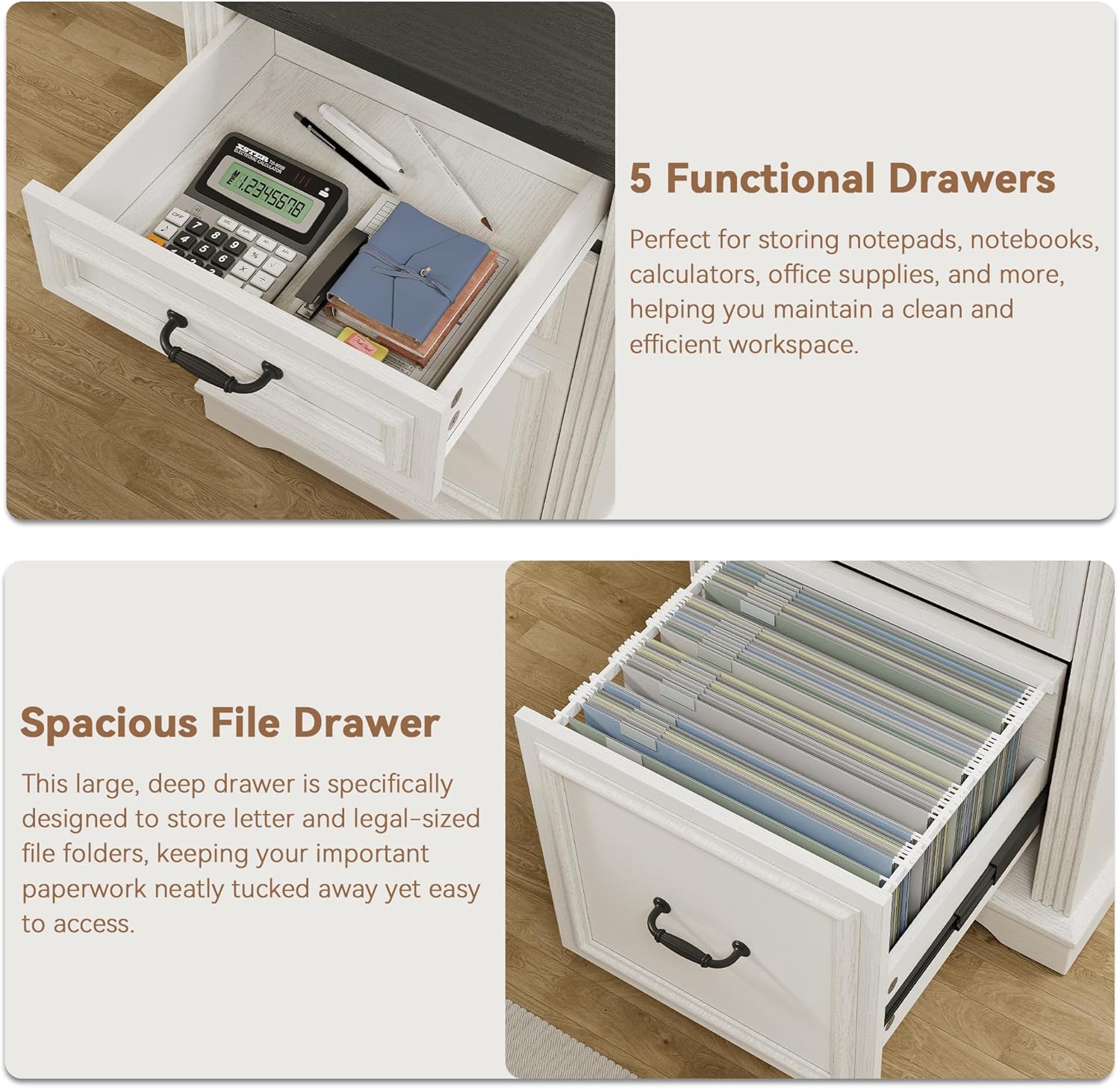
- Functional Drawers: Use the smaller drawers for office supplies such as pens, notebooks, and calculators.
- Прасторны File шуфляда: The bottom drawer is designed to accommodate letter and legal-sized hanging file folders for important documents.
- Hidden Under-Desk Storage Shelf: This shelf provides discreet storage for items you want to keep within reach but out of sight.
- Large Storage Cabinet: The cabinet offers adjustable shelving for bulkier items or binders.

8. Тэхнічнае абслугоўванне
Proper care will help maintain the appearance and functionality of your desk:
- Уборка: Працярыце паверхні стала рэкламайamp тканінай. Пазбягайце агрэсіўных хімічных рэчываў або абразіўных ачышчальнікаў, якія могуць пашкодзіць пакрыццё.
- Разлівы: Неадкладна прыбірайце разлівы, каб прадухіліць афарбоўванне або пашкоджанне драўніны.
- Цяпло і вільгаць: Не кладзіце гарачыя прадметы непасрэдна на стол. Выкарыстоўвайце падстаўкі пад напоі, каб пазбегнуць застойвання вады.
- Праверка абсталявання: Перыядычна правярайце і падцягвайце ўсе шрубы і крапежныя элементы, каб забяспечыць стабільнасць.
- Ўздзеянне сонечнага святла: Пазбягайце працяглага знаходжання прамых сонечных прамянёў, каб пазбегнуць выцвітання або змены колеру пакрыцця.
9. Выпраўленне непаладак
If you encounter issues with your desk, refer to the following common problems and solutions:
| праблема | Магчымая прычына | Рашэнне |
|---|---|---|
| Стол хістаецца | Аслабленыя крапежныя элементы; няроўная падлога | Зацягніце ўсе шрубы зборкі. Пераканайцеся, што стол стаіць на роўнай паверхні; пры неабходнасці выкарыстоўвайце пракладкі. |
| Шуфляды не слізгаюць плаўна | Improperly installed slides; obstruction | Check that drawer slides are correctly aligned and installed. Remove any obstructions. |
| Зарадная станцыя не працуе | Power cord not plugged in; faulty outlet; device issue | Ensure the desk's power cord is fully plugged into a working wall outlet. Test the outlet with another device. Check device's charging cable. |
| Parts missing or damaged upon arrival | Shipping damage; packaging error | Do not proceed with assembly. Contact Jocoevol customer support immediately for replacement parts. |
10. Гарантыя і падтрымка
For information regarding product warranty, please refer to the warranty card included with your purchase or visit the official Jocoevol website. If you require assistance with assembly, have questions about product functionality, or need to report missing/damaged parts, please contact Jocoevol customer support. Contact details can typically be found on the product packaging or the brand's official webсайт.