
1. Прадукт скончыўсяview
The bmani T16 Wireless Earbuds are designed for active lifestyles, offering an ultra-long 80-hour playtime with their dual LED display charging case. They feature immersive stereo sound with 10mm dynamic drivers, clear calls with dual microphones, and seamless Bluetooth connectivity. The adjustable over-ear hooks ensure a secure and comfortable fit for various activities. Easy button controls provide intuitive management of music and calls.
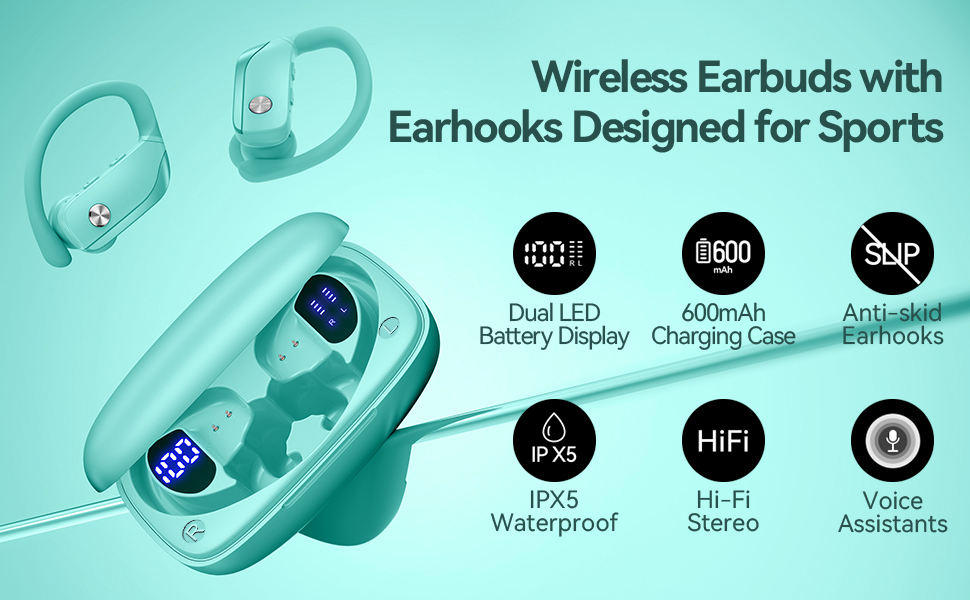
Image: bmani T16 Wireless Earbuds in their charging case, highlighting 80 hours of total playtime and the dual LED battery display.
2. Што ў скрынцы
- bmani T16 Wireless Earbuds (Left and Right)
- Зарадны чахол са святлодыёдным дысплеем
- Вушныя насадкі (малыя, сярэднія, вялікія памеры)
- Зарадны кабель Type-C
- Кіраўніцтва карыстальніка (гэты дакумент)

Image: The bmani T16 Wireless Earbuds, charging case, and various eartip sizes.
3. Налада і спалучэнне
The bmani T16 earbuds feature one-step pairing for quick and easy connection to your devices.
- Першапачатковае спалучэнне: Адкрыйце зарадны кейс. Навушнікі аўтаматычна ўключацца і пяройдуць у рэжым спалучэння.
- На смартфоне, планшэце або іншай прыладзе з падтрымкай Bluetooth перайдзіце ў налады Bluetooth.
- Пошук даступныя прылады і абярыце «T16» са спісу.
- Пасля падлучэння вы пачуеце галасавое паведамленне, якое пацвярджае паспяховае спалучэнне.
- Аўтаматычнае паўторнае падключэнне: After the initial pairing, the earbuds will automatically reconnect to the last paired device when removed from the charging case.

Image: Illustration of the one-step pairing process for the bmani T16 earbuds with a smartphone and other compatible devices.
Video: An official seller video demonstrating the features and pairing process of the bmani T16 Wireless Earbuds.
4. Інструкцыя па нашэнні
For optimal sound quality and a secure fit, follow these steps to wear your bmani T16 earbuds:
- Choose the correct eartip size (S, M, L) that best fits your ear canal.
- Place the flexible ear hook over the back of your ear.
- Акуратна ўстаўце навушнік у слыхавы праход.
- Adjust the earbud and hook by twisting until you achieve a comfortable and secure fit. The ear hooks are designed to adapt to different ear shapes, minimizing slippage during movement.

Image: Visual guide demonstrating how to correctly position the bmani T16 earbuds with their flexible ear hooks for a secure fit.
5. Аперацыйныя элементы кіравання
The bmani T16 earbuds feature intuitive physical buttons for easy control of your audio and calls.
- Прайграванне/Паўза: Націсніце адзін раз на любым з навушнікаў.
- Наступны трэк: Quick double-click on the Right (R) earbud.
- Папярэдні трэк: Quick double-click on the Left (L) earbud.
- Павялічыць гучнасць: Press the "+" button on the earbud.
- Паменшыць гучнасць: Press the "-" button on the earbud.
- Адказ/завяршэнне выкліку: Націсніце адзін раз на любым з навушнікаў.
- Адхіліць выклік: Hold either earbud button.
- Актывацыя галасавога памочніка (Siri/Google Assistant): Quick triple-click on either earbud.
- Уключэнне/выключэнне харчавання: Hold the button on either earbud.
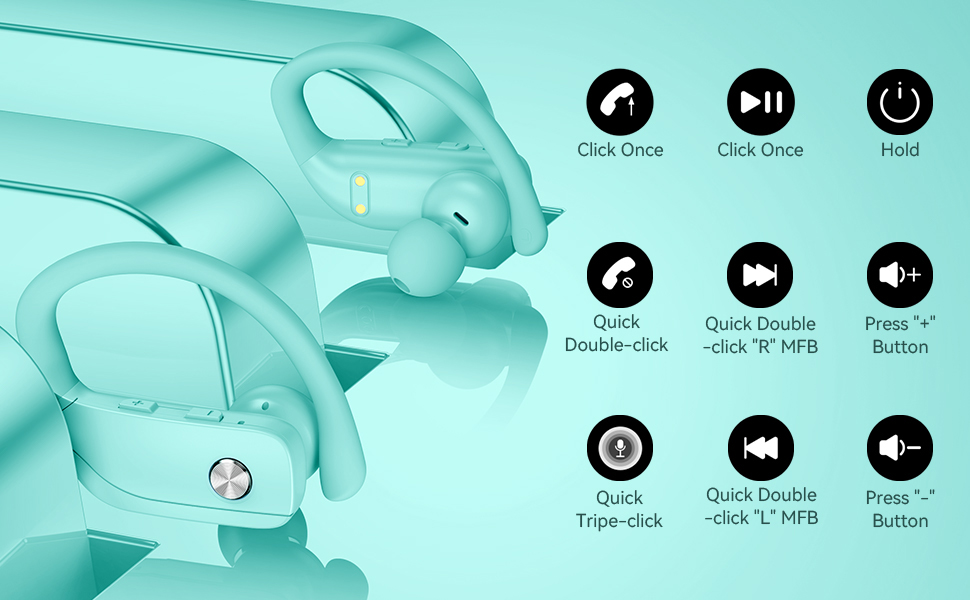
Image: Detailed diagram showing the various button controls on the bmani T16 earbuds for managing audio playback, calls, and voice assistant.
6. Зарадка
The bmani T16 earbuds and charging case provide an impressive 80 hours of total playtime.
- Зарадка навушнікаў: Place the earbuds back into the charging case. The LED indicators on the case will show the charging status of each earbud. Each earbud offers up to 8 hours of playtime per charge.
- Справа зарадкі: Connect the provided Type-C charging cable to the charging port on the case and to a USB power source. The digital display on the left side of the case will show the remaining power percentagе зарадкі.
- The charging case can recharge the earbuds multiple times, extending total usage to 80 hours.
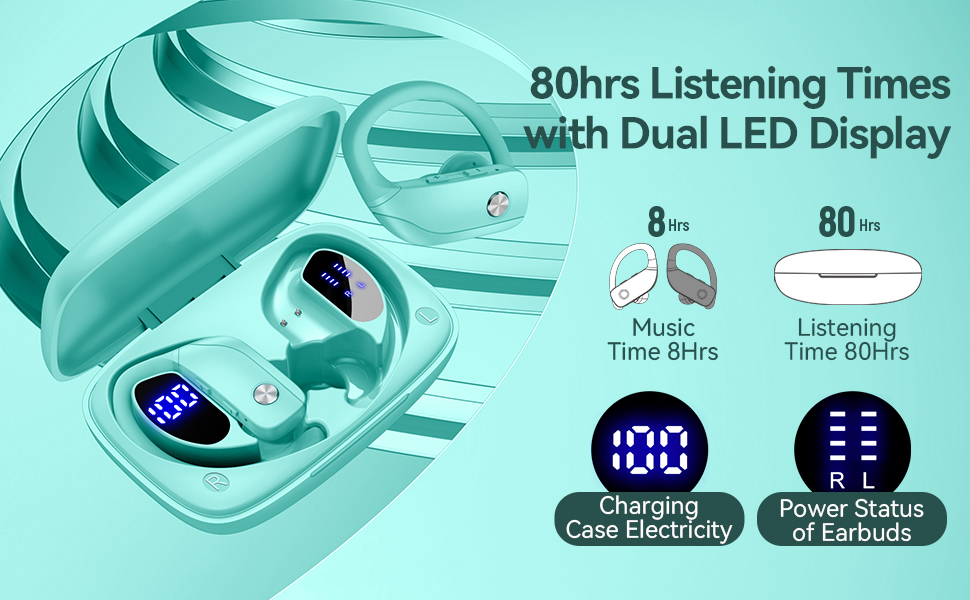
Image: The bmani T16 charging case with its dual LED digital display, indicating the battery percentagкорпуса і стан зарадкі кожнага навушніка.
Відэа: Афіцыйнае відэа прадаўцаasing the 48-hour playback (note: product features state 80H) and LED display of the bmani T16 Sport Earphones.
7. Тэхнічнае абслугоўванне
- Рэгулярна працірайце навушнікі і зарадныя кантакты мяккай сухой тканінай, каб прадухіліць назапашванне пылу і смецця.
- Пазбягайце працяглага ўздзеяння экстрэмальных тэмператур або прамых сонечных прамянёў на навушнікі.
- Захоўвайце навушнікі ў зарадным чахле, калі яны не выкарыстоўваюцца, каб абараніць іх і забяспечыць іх зарадку.
- The earbuds are sweat-resistant and dust-resistant, but avoid submerging them in water.
8. Выпраўленне непаладак
- Навушнікі не спалучаюцца: Ensure both earbuds are removed from the case and are powered on. Turn off Bluetooth on your device and turn it back on. If issues persist, try resetting the earbuds (refer to the full user manual for specific reset instructions).
- Няма гуку: Праверце ўзровень гучнасці як на прыладзе, так і ў навушніках. Пераканайцеся, што навушнікі правільна падключаны да прылады праз Bluetooth.
- Праблемы з зарадкай: Verify that the charging cable is securely connected to both the case and the power source. Ensure the charging contacts on the earbuds and inside the case are clean and free of debris.
- Нестабільнае злучэнне: Ensure your device is within the Bluetooth range (approximately 33 feet/10 meters) and there are no significant obstacles between the earbuds and your device.
9. Тэхнічныя характарыстыкі
| Назва мадэлі | Т16 |
| Тэхналогія падлучэння | Бесправадная сувязь (Bluetooth 5.0) |
| Час прайгравання (навушнікі) | Да 8 гадзін зарадкі |
| Агульны час прайгравання (з кейсам) | Да 80 гадзін |
| Тып аўдыё драйвера | Дынамічны драйвер 10 мм |
| Функцыі кантролю шуму | Noise Cancellation (Dual Mics) |
| Узровень воданепранікальнасці | Sweat-resistant and Dust-resistant |
| Метад кантролю | Кнопкі кіравання |
| Размяшчэнне вушэй | Над вухам |
| Вага прадмета | 2 унцыі |
10. Гарантыя і падтрымка
bmani offers a lifetime warranty for permanent replacement of damaged, defective, upgraded, or lost products. Please refer to the warranty card included in your package for activation details and terms. For further assistance, please contact bmani customer support.